
Microsoft has marked Roadmap ID 502524 as launched for SlimCore-based Microsoft Teams optimization on macOS endpoints connecting to Citrix Virtual Apps and Desktops, Azure Virtual Desktop, and Windows 365. The practical change is that Mac users can now use Microsoft’s newer Teams VDI media architecture rather than being confined to the older WebRTC-based path when their client, plugin, Teams build, and endpoint configuration meet the requirements.
The roadmap lists general availability as February 2026 across commercial tenants, GCC, GCC High, and DoD. Microsoft’s current Teams VDI documentation goes further: it says Mac support has reached 100% general availability for both AVD/Windows 365 and Citrix. This is a rollout-completion update, rather than a newly invented Mac client or a broad change to Teams itself.
For VDI administrators, the important part is where the media runs. A Teams meeting launched inside a virtual desktop normally risks sending camera, microphone, speaker, and video workloads through the session host. SlimCore moves much of that real-time media processing onto the physical endpoint, while Teams running in the VM uses Microsoft’s virtual-channel components to coordinate the session. The goal is lower latency, less session-host CPU pressure, and a feature set closer to the locally installed Teams client.
SlimCore is Microsoft’s media engine for the new Teams client. In the VDI implementation, Teams in the virtual desktop communicates with a client-side plugin, which establishes the virtual channel and manages downloading the macOS-specific SlimCore framework. The media engine is therefore tied to the endpoint rather than solely to the Windows VM.
Microsoft describes the new architecture as its replacement path for the legacy VDI optimization model. Citrix characterizes the distinction more bluntly in its documentation: legacy HDX/WebRTC optimization used Citrix’s
That shift matters operationally. With SlimCore, feature delivery and compatibility are increasingly controlled by Microsoft’s Teams VDI code rather than the older Citrix HDX optimization stack. It also means a Mac fleet can no longer be treated as an incidental endpoint type in a primarily Windows VDI deployment. The endpoint client, locally installed plugin, permissions, storage locations, and network policy all participate in whether Teams is actually optimized.
Microsoft’s end-user support documentation gives admins a useful validation point: Teams displays Optimized when media optimization is working, and hovering over that status identifies the media mode. A user can still sign into Teams and join a call without the new architecture, but that is not evidence that SlimCore is active. A missing endpoint plugin produces error code 2000, according to Microsoft.
That is the least visible deployment trap in this rollout. An organization can have a current Teams image, a supported macOS device, and an otherwise healthy Windows 365 or AVD session, yet remain on the older optimization route if employees installed Windows App from the Mac App Store. The distinction is not cosmetic; it determines whether the endpoint contains the plugin needed to launch SlimCore.
Microsoft’s primary Teams VDI documentation names Windows App for macOS 11.3.4 or later as the baseline and says Mac endpoints need Teams build 26072.521.4595.7966 or later. Its Azure Virtual Desktop Teams guidance names Windows App for macOS 11.13.2 or later. Those version statements are not mutually exclusive—11.13.2 is newer than 11.3.4—but they show why administrators should use Microsoft’s current deployment documentation rather than freeze a one-time minimum in an image-management runbook.
The session host still needs to be prepared. Microsoft requires the
For Macs, the local package and log paths are also relevant to support cases. Windows App stores Teams VDI packages under the user’s Windows App container data, and Teams VDI logs remain on the local Mac. This is endpoint state, not data inside the virtual desktop profile, so help desks investigating microphone or media-engine failures need to collect evidence from the Mac as well as the session host.
Citrix Workspace app can prompt a user to install the plugin beginning with version 2508.10, but that approach requires user action. Microsoft says Citrix Workspace app 2603 supports deployment through Citrix Global App Configuration Service or the Virtual Channel Plugin Download Manager policy, while Workspace app 2607 is expected to automatically install the plugin. Enterprises that block local installs or run tightly managed Macs should not depend on a first-run prompt; they should deploy the plugin through Jamf or their existing endpoint-management tooling.
Citrix administrators also need to examine their virtual-channel allow list. Microsoft says the allow list is enabled by default in Citrix Virtual Apps and Desktops 2203 and later, and the default configuration can deny the Teams custom channels required by SlimCore. The three channels—
There is a documentation lag worth calling out. Citrix’s “Optimization for Microsoft Teams (New)” transition page still describes SlimCore as available on Windows endpoints only, despite Microsoft’s current Teams VDI page stating that Mac support is fully rolled out for Citrix and AVD/Windows 365. The Citrix page identifies itself as a September 2025 document, which explains the contradiction, but it creates a real risk that teams following Citrix’s older transition guidance will incorrectly conclude that macOS remains unsupported.
Microsoft’s published Mac limitations include no system-audio sharing, no optimized Town Hall attendance, no RemoteApp or published-app support, and no outgoing screen sharing in end-to-end encrypted meetings. HID support remains in public preview. For AVD and Windows 365 specifically, authenticated macOS network proxies and LLDP-based emergency-location support are also unavailable.
The most consequential technical limitation is screen sharing. On Mac endpoints using Citrix or AVD/Windows 365, Microsoft says outgoing screen and app sharing are handled from the virtual machine to the other participant or conference service. In other words, the user’s camera and meeting media benefit from endpoint optimization, but a Mac presenter’s shared screen can still place work on the VM and require the VM network to reach Teams media endpoints.
Admins should account for that in capacity and firewall planning. Microsoft advises allowing the relevant Teams network traffic from the VM for Mac screen sharing, and it notes that screen sharing consumes CPU, GPU, RAM, and network resources. A virtual desktop host sized only around optimized audio/video calls may still struggle during high-frame-rate application or video presentation.
The operational takeaway is straightforward: Mac support is now generally available, but it is not an automatic upgrade for every Mac-based VDI user. AVD and Windows 365 deployments need the non-Store Windows App; Citrix deployments need a supported Workspace app, the Mac plugin, and—on older VDAs—a corrected virtual-channel allow list. Teams must also be current enough to request the matching SlimCore framework.
Organizations that validate only whether Teams launches will miss the point of the rollout. The deployment is complete when a supported Mac endpoint shows SlimCore optimization in Teams, can use its local camera and audio devices reliably, and has been tested against the organization’s actual screen-sharing, proxy, locked-down endpoint, and cross-cloud requirements.
For VDI administrators, the important part is where the media runs. A Teams meeting launched inside a virtual desktop normally risks sending camera, microphone, speaker, and video workloads through the session host. SlimCore moves much of that real-time media processing onto the physical endpoint, while Teams running in the VM uses Microsoft’s virtual-channel components to coordinate the session. The goal is lower latency, less session-host CPU pressure, and a feature set closer to the locally installed Teams client.
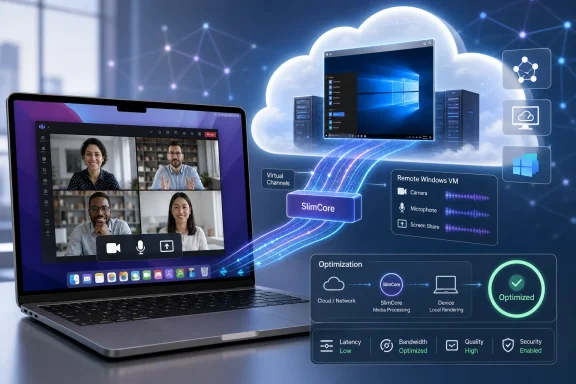 Mac endpoints move to Microsoft’s newer VDI media stack
SlimCore is Microsoft’s media engine for the new Teams client. In the VDI implementation, Teams in the virtual desktop communicates with a client-side plugin, which establishes the virtual channel and manages downloading the macOS-specific SlimCore framework. The media engine is therefore tied to the endpoint rather than solely to the Windows VM.Microsoft describes the new architecture as its replacement path for the legacy VDI optimization model. Citrix characterizes the distinction more bluntly in its documentation: legacy HDX/WebRTC optimization used Citrix’s
HdxRtcEngine, while SlimCore media offload is handled by Microsoft’s own engine and Microsoft-owned virtual channels.That shift matters operationally. With SlimCore, feature delivery and compatibility are increasingly controlled by Microsoft’s Teams VDI code rather than the older Citrix HDX optimization stack. It also means a Mac fleet can no longer be treated as an incidental endpoint type in a primarily Windows VDI deployment. The endpoint client, locally installed plugin, permissions, storage locations, and network policy all participate in whether Teams is actually optimized.
Microsoft’s end-user support documentation gives admins a useful validation point: Teams displays Optimized when media optimization is working, and hovering over that status identifies the media mode. A user can still sign into Teams and join a call without the new architecture, but that is not evidence that SlimCore is active. A missing endpoint plugin produces error code 2000, according to Microsoft.
The client source determines whether AVD and Windows 365 users get SlimCore
For Azure Virtual Desktop and Windows 365, Mac users must use the non-App Store edition of Windows App, distributed through Microsoft AutoUpdate as a standalone package. Microsoft explicitly says the App Store version does not include the required VDI plugin and will leave users on WebRTC-based optimization.That is the least visible deployment trap in this rollout. An organization can have a current Teams image, a supported macOS device, and an otherwise healthy Windows 365 or AVD session, yet remain on the older optimization route if employees installed Windows App from the Mac App Store. The distinction is not cosmetic; it determines whether the endpoint contains the plugin needed to launch SlimCore.
Microsoft’s primary Teams VDI documentation names Windows App for macOS 11.3.4 or later as the baseline and says Mac endpoints need Teams build 26072.521.4595.7966 or later. Its Azure Virtual Desktop Teams guidance names Windows App for macOS 11.13.2 or later. Those version statements are not mutually exclusive—11.13.2 is newer than 11.3.4—but they show why administrators should use Microsoft’s current deployment documentation rather than freeze a one-time minimum in an image-management runbook.
The session host still needs to be prepared. Microsoft requires the
IsWVDEnvironment registry setting on AVD hosts to enable Teams media optimization, and it recommends keeping the WebRTC Redirector Service installed even when deploying SlimCore. The reason is fallback: a user who roams to a device that lacks the new optimization components may need WebRTC to avoid landing in server-side media rendering.For Macs, the local package and log paths are also relevant to support cases. Windows App stores Teams VDI packages under the user’s Windows App container data, and Teams VDI logs remain on the local Mac. This is endpoint state, not data inside the virtual desktop profile, so help desks investigating microphone or media-engine failures need to collect evidence from the Mac as well as the session host.
Citrix requires a separate plugin and policy review
Citrix deployments have a more explicit administrative dependency. Microsoft lists Citrix Workspace app for Mac 2508.10 and the MacMsTeamsPluginCitrix 2025.49.x.x plugin among the published prerequisites. The same Microsoft requirements table also lists macOS 14, macOS 15, and macOS 26, while noting that macOS support requires Citrix Workspace app 2511. That mismatch means the higher Workspace app requirement is the safer planning baseline until Citrix and Microsoft align the prerequisite table.Citrix Workspace app can prompt a user to install the plugin beginning with version 2508.10, but that approach requires user action. Microsoft says Citrix Workspace app 2603 supports deployment through Citrix Global App Configuration Service or the Virtual Channel Plugin Download Manager policy, while Workspace app 2607 is expected to automatically install the plugin. Enterprises that block local installs or run tightly managed Macs should not depend on a first-run prompt; they should deploy the plugin through Jamf or their existing endpoint-management tooling.
Citrix administrators also need to examine their virtual-channel allow list. Microsoft says the allow list is enabled by default in Citrix Virtual Apps and Desktops 2203 and later, and the default configuration can deny the Teams custom channels required by SlimCore. The three channels—
MSTEAMS, MSTEAM1, and MSTEAM2—must be permitted for the Teams executable on affected VDA versions. Citrix VDA 2603 and later allows those channels by default, but older production environments will need the policy change and a VDA reboot.There is a documentation lag worth calling out. Citrix’s “Optimization for Microsoft Teams (New)” transition page still describes SlimCore as available on Windows endpoints only, despite Microsoft’s current Teams VDI page stating that Mac support is fully rolled out for Citrix and AVD/Windows 365. The Citrix page identifies itself as a September 2025 document, which explains the contradiction, but it creates a real risk that teams following Citrix’s older transition guidance will incorrectly conclude that macOS remains unsupported.
“Optimized” does not erase Mac-specific feature gaps
Microsoft’s roadmap wording promises an expanded feature set and improvements to quality, reliability, and performance. Those are reasonable expected outcomes of endpoint media offload, but they should not be read as feature parity with a native Mac Teams client.Microsoft’s published Mac limitations include no system-audio sharing, no optimized Town Hall attendance, no RemoteApp or published-app support, and no outgoing screen sharing in end-to-end encrypted meetings. HID support remains in public preview. For AVD and Windows 365 specifically, authenticated macOS network proxies and LLDP-based emergency-location support are also unavailable.
The most consequential technical limitation is screen sharing. On Mac endpoints using Citrix or AVD/Windows 365, Microsoft says outgoing screen and app sharing are handled from the virtual machine to the other participant or conference service. In other words, the user’s camera and meeting media benefit from endpoint optimization, but a Mac presenter’s shared screen can still place work on the VM and require the VM network to reach Teams media endpoints.
Admins should account for that in capacity and firewall planning. Microsoft advises allowing the relevant Teams network traffic from the VM for Mac screen sharing, and it notes that screen sharing consumes CPU, GPU, RAM, and network resources. A virtual desktop host sized only around optimized audio/video calls may still struggle during high-frame-rate application or video presentation.
The operational takeaway is straightforward: Mac support is now generally available, but it is not an automatic upgrade for every Mac-based VDI user. AVD and Windows 365 deployments need the non-Store Windows App; Citrix deployments need a supported Workspace app, the Mac plugin, and—on older VDAs—a corrected virtual-channel allow list. Teams must also be current enough to request the matching SlimCore framework.
Organizations that validate only whether Teams launches will miss the point of the rollout. The deployment is complete when a supported Mac endpoint shows SlimCore optimization in Teams, can use its local camera and audio devices reliably, and has been tested against the organization’s actual screen-sharing, proxy, locked-down endpoint, and cross-cloud requirements.
References
- Primary source: Microsoft 365 Roadmap
Published: 2026-08-05T22:47:32.7900752Z
Loading…
www.microsoft.com - Related coverage: docs.citrix.com
Loading…
docs.citrix.com - Related coverage: learn.microsoft.com
New VDI solution for Teams - Microsoft Teams | Microsoft Learn
Learn about Teams for Virtualized Desktop Infrastructure (VDI) 2.0.learn.microsoft.com - Related coverage: docs.citrix.com
Loading…
docs.citrix.com - Related coverage: learn.microsoft.com
Loading…
learn.microsoft.com - Related coverage: support.microsoft.com
Loading…
support.microsoft.com - Related coverage: citrix.com
Loading…
www.citrix.com - Related coverage: citrix.com
Loading…
www.citrix.com - Related coverage: support.citrix.com
Loading…
support.citrix.com - Related coverage: support.citrix.com
Loading…
support.citrix.com - Related coverage: techcommunity.microsoft.com
Loading…
techcommunity.microsoft.com - Related coverage: cdn-dynmedia-1.microsoft.com
- Related coverage: techcommunity.microsoft.com
Loading…
techcommunity.microsoft.com