
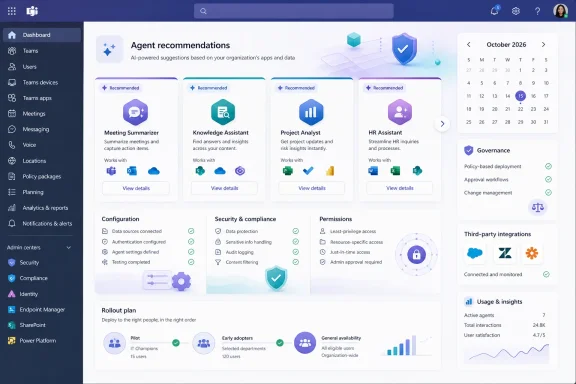
For Teams administrators, the useful change is not that Teams gains another agent catalog. The Teams Admin Center already lets admins find, allow, block, assign, and review agents and apps. The planned feature is intended to connect those controls to software the tenant has already adopted, turning discovery from a search task into a recommendation based on an organization’s current application footprint.
Microsoft lists the item as In development, with general availability targeted for Worldwide standard multi-tenant tenants and GCC. That is a release target, not a feature administrators can configure today, and the roadmap entry does not identify the initial application partners, explain what makes an agent “high value,” or say how Teams will determine that an organization is already using a particular third-party service.
 What Microsoft is adding beyond the existing Teams app catalog
Microsoft’s current Teams administration documentation describes a broad Manage apps experience that includes third-party agents and apps. Administrators can search the catalog, inspect an app’s details, set its organization-wide status, and assign availability to everyone, selected groups, or no one. Microsoft also has a “Popular apps in your org” widget that highlights heavily used third-party applications that are not broadly available to employees.
Roadmap item 569608 appears to move that model one step further for agents. Instead of merely identifying popular applications, Teams will recommend agent versions or companion agents for applications already present in the tenant and lead an administrator through enablement.
The distinction is important. An application being in use does not mean its agent is available, approved, correctly configured, or appropriate for every department. Many SaaS applications now offer Teams integrations, bots, Copilot agents, or automation components with separate permissions, data access scopes, licensing terms, and setup requirements. A recommendation can expose that gap, but it cannot resolve the governance decision for the administrator.
Microsoft says the enablement workflow will display required configuration changes. That wording suggests the feature will do more than flip a Teams availability setting; some recommended agents may require tenant-specific setup with the third-party publisher before they can work. The roadmap does not say whether Teams will validate those configurations, simply link to publisher instructions, or identify prerequisites such as OAuth consent, API permissions, application subscriptions, or user licensing.
The roadmap also makes no promise that a recommended agent will be free. Teams can make an agent available in the collaboration client, but the underlying provider may charge separately for the service, advanced AI usage, or the application tier needed to use it.
The recommendation is not a security approval
Microsoft’s planned workflow may make agent discovery easier, but it does not change the responsibility model for third-party software. Microsoft’s Teams Admin Center documentation says app publishers provide support, publish fixes, disclose their data-handling practices, and supply their own service and compliance information. Microsoft offers validation and compliance signals for certain apps, including Microsoft 365 certification and publisher attestation, but those signals are not a blanket approval for an organization’s particular data, retention, regulatory, or identity requirements.
This matters especially for agents, which may do more than render an existing service inside a Teams tab. Depending on the product, an agent may receive conversational prompts, read or write records through connected APIs, retrieve information from an external service, or send data beyond Microsoft 365. An application already cleared for use in a company does not automatically mean an AI-enabled extension of that application has the same permissions or data path.
The planned Teams recommendations therefore should be treated as candidates for review, not an auto-deployment queue. Before enabling any suggested agent broadly, IT and security teams should establish:
- The exact data the agent can read, create, modify, transmit, or retain under the organization’s intended configuration.
- Whether the agent requires Microsoft Graph permissions, separate administrator consent, a vendor-side administrator role, or a paid entitlement.
- Which employees need access, rather than using an organization-wide assignment by default.
- Whether the publisher’s privacy terms, retention behavior, regional processing commitments, and support model meet the organization’s requirements.
- How the agent will be removed or access revoked if the vendor relationship, subscription, or risk assessment changes.
Microsoft’s existing documentation gives administrators useful places to begin that work. The Teams Admin Center can show an agent or app’s security and compliance details, certification or attestation status, and, where a developer permits it, evidence submitted during certification review. Those details can improve due diligence, but they do not replace a review of the agent’s own permissions and the vendor’s contractual commitments.
Existing Teams controls will still determine who actually gets an agent
Even after Microsoft adds recommendations, an agent’s availability will remain governed through Teams app and agent administration. Microsoft documents separate organization-level controls, per-app allow or block status, and user or group assignment. In the app-centric management model, an administrator can make an app or Copilot agent available to everyone, only to selected users or groups, or to no one.
That makes a limited rollout the sensible first response to any October recommendation. A security group for the business team that already owns the application is a more defensible starting point than enabling an agent for the entire tenant. It lets administrators test the required setup, confirm that the agent delivers the expected function, observe usage, and validate that users receive the correct access boundaries.
There are practical deployment limits to remember. Microsoft says availability changes can take up to 24 hours to reach users and, in rare cases, up to six days. Teams also distinguishes between an agent being allowed at the organization level and being assigned to a particular user or group. An agent can be technically enabled but still unavailable to a user who is outside its assignment.
Guest access creates another boundary. Microsoft’s Teams documentation says guests cannot access an app or agent when it is assigned only to selected users or groups, even if the guest is included in that assignment. Organizations relying on external collaboration should test the guest experience rather than assuming an internal rollout works identically in shared channels and meetings.
For organizations still moving through Microsoft’s management transitions, the administrative path can also vary. Microsoft says tenants that have not moved to unified agent and app management may need corresponding allow or block settings in both the Teams Admin Center and the Integrated apps page in the Microsoft 365 admin center. Its documentation specifically warns administrators to keep settings synchronized until the migration is complete to avoid unexpected agent or app disruptions.
GCC availability does not mean third-party agents start enabled
Microsoft lists GCC among the cloud instances targeted for the October 2026 release. That is meaningful because government tenants are often excluded from early Teams integrations, but it should not be read as an automatic opening of third-party agents.
Microsoft’s Teams guidance states that, in GCC, GCC High, and DoD deployments, third-party agents and apps are blocked by default. The new recommendation surface may be available in GCC if Microsoft meets its roadmap target, yet an administrator will still need to intentionally permit the relevant agent and configure access. A GCC tenant with a policy of blocking all third-party apps will not become broadly permissive merely because Teams can recommend an agent.
The same caution applies to companies that use a restrictive default for third-party Teams apps. Microsoft’s current app-centric management documentation says a single organization-wide setting can govern bulk availability for both new and existing third-party apps that administrators have not individually managed. Individual app-level settings remain intact, but toggling the broad default is the wrong way to respond to a single recommendation unless the organization truly intends to change its tenant-wide posture.
Microsoft’s roadmap language emphasizes that recommended agents will help organizations obtain more value from existing software investments. That is a vendor claim, not a measured outcome supplied with the announcement. The practical value will depend on whether the recommended agents expose useful workflows inside Teams without duplicating current automations, increasing help-desk load, or widening data access beyond what the original app deployment required.
What to prepare before October 2026
Teams administrators do not need to take action for Roadmap ID 569608 yet, but October is close enough to prepare the administrative baseline. Inventorying current third-party Teams apps, documenting which business owners are responsible for them, and confirming the status of unified app management will make the future recommendations easier to assess.
It is also worth deciding now who can approve an agent that maps to an already approved application. In many organizations, the Teams administrator can expose the agent, while the application owner, identity team, security group, procurement function, or records-management staff controls a prerequisite the agent needs. Microsoft’s promise to expose configuration changes could make those dependencies more visible, but visibility is only useful if there is an established owner for each approval.
The October rollout will be worth watching because it shifts Teams from a catalog administrators must actively search toward a system that proposes agent adoption based on existing software use. Microsoft has not yet disclosed which agents will be recommended, how the recommendations will be ranked, or whether the feature will offer any bulk controls. Until those details arrive, the sound operational posture is clear: use the recommendations to find candidates, then enable each agent through the same least-privilege, group-scoped review process used for any other third-party integration.