

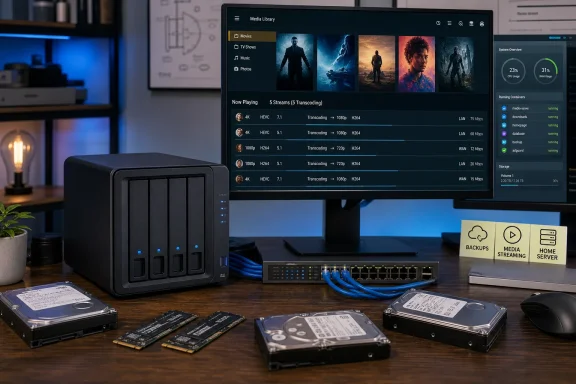
The important qualification is that the F4-425 Pro is not a wholesale platform reset. TerraMaster has retained much of the F4-425 Plus formula: four SATA bays, three PCIe 3.0 x1 M.2 slots, dual 5GbE Ethernet, four 10Gbps USB ports and a single memory slot. The Pro’s major hardware change is the return of an eight-core Intel chip, either the N305 with 8GB of DDR5 or the newer Core 3 N350 with 16GB, after the F4-425 Plus used a four-core Intel N150.
That makes the N305 model a sensible correction to the Plus rather than an automatic bargain against every competing NAS. It offers real advantages for people who want Intel Quick Sync video support and an accessible, compact appliance. But prospective buyers should treat headline bandwidth, AI functionality and maximum-capacity figures as areas that need closer reading before they decide this is a $700 diskless box worth buying.
The N305 model has the more familiar server CPU
The Core i3-N305 is an Alder Lake-N processor with eight efficiency cores, eight threads, a 3.8GHz maximum turbo clock and Intel’s 32-execution-unit integrated graphics. Intel’s product material confirms the platform includes Quick Sync Video, which is the practical reason this older-looking CPU still carries weight in the NAS market: Plex, Jellyfin and related media-server stacks can hand supported video decode and encode work to the iGPU instead of grinding through it on CPU cores.
ROOT-NATION’s five-stream Plex test and AppleInsider’s matching result are useful evidence that the appliance can do more than claim 4K transcoding on a spec sheet. The test does not establish that every source codec, subtitle format, audio conversion or remote-streaming scenario will scale to five simultaneous users. Burned-in image subtitles, tone mapping and unsupported codecs can shift work back onto the CPU. Still, two independent reviews reaching the same five-stream result gives the N305 a stronger media-server case than a generic “4K capable” label.
The N350 model is not necessarily a straightforward performance upgrade. TechRadar notes that both processors use eight Gracemont cores, the same 6MB cache and one DDR5 memory channel, while the N350 has a lower 7W base-power rating compared with the N305’s 15W. The newer chip can favor lower power draw and thermals, but a buyer choosing between the two should not assume the model number alone means substantially faster containers or transcoding.
For a household running a media library, PC backups, Time Machine targets and a few Docker services, the N305’s 8GB starting point is defensible if the price gap is meaningful. For heavier homelab use—several databases, Home Assistant, Immich, a game server, virtual machines, or memory-hungry indexing—the one-SODIMM design matters more. Upgrading means replacing rather than adding memory, and TerraMaster specifies non-ECC DDR5 support up to 32GB.
The strongest upgrade is CPU capacity, not the enclosure
TerraMaster presents the F4-425 Pro as a premium hybrid NAS, and the physical design supports that description. Four tool-less front bays handle bulk SATA storage, while three M.2 2280 slots can hold NVMe SSDs for a separate fast pool, cache, applications or virtual-machine storage. The bottom panel gives direct access to the memory slot and all three M.2 positions after removing four screws—a modest detail with an outsized effect on ownership, because storage and memory upgrades do not require dismantling the drive cage.
But buyers moving from an F4-425 Plus should recognize how much is unchanged. TerraMaster’s own F4-425 Plus documentation lists the same three PCIe 3.0 x1 M.2 slots, dual 5GbE ports, four 10Gbps USB ports, HDMI output, 120mm fan and 90W external power supply. The Pro’s M.2 slots remain one PCIe 3.0 lane each, which is enough for application volumes, caching and many NAS tasks but does not give each SSD the multi-gigabyte-per-second link associated with a desktop NVMe slot.
That is not a defect; it is an architectural limit buyers should price correctly. A home NAS backed by hard drives rarely needs full desktop NVMe speed. The three slots are valuable chiefly because they separate frequently accessed data and applications from slower disks. Running Docker data, thumbnail databases and Plex metadata on SSD storage can make the interface feel much more responsive even if a large media archive stays on RAID-protected HDDs.
The Pro is therefore most compelling for new buyers coming from USB drives, a low-end two-bay NAS, or an older Atom- and Celeron-based box. Owners of the recent F4-425 Plus already have much of the chassis and I/O value; upgrading solely for OpenClaw or the word “Pro” would be difficult to justify. The eight-core CPU is the material reason to move.
Dual 5GbE is fast, but 1010MB/s is an aggregate claim
TerraMaster advertises up to 1010MB/s throughput from the F4-425 Pro’s two 5GbE Ethernet ports. ROOT-NATION recorded closer to 800MB/s when linked to another machine through aggregation, which is still impressive for a compact four-bay NAS. The vendor’s figure, however, should be read as an aggregate best case—not as a promise that one ordinary laptop or desktop will always copy files at roughly 10GbE speed.
A single 5GbE connection has a practical ceiling nearer to the neighborhood of 500MB/s after protocol overhead, and a four-disk RAID array can become the limiting factor depending on drive choice and RAID mode. To exploit both network ports, the client, switch and NAS configuration must support the required pathing. Link aggregation can distribute multiple connections while leaving a single transfer tied to one link; SMB Multichannel can use more than one path, but it requires compatible client networking and proper configuration.
This is where the F4-425 Pro occupies an awkward but understandable middle ground. Dual 5GbE can serve several PCs at high speed, provide redundancy, and offer more usable bandwidth than a 2.5GbE NAS. Yet a NAS with native 10GbE can be simpler for a workstation that needs a single fast connection, provided the buyer already owns—or is willing to buy—the necessary NIC and switching hardware.
TechRadar and Notebookcheck both flagged the product’s competitive pressure. Ugreen’s DXP4800 GT offers 10GbE networking, while Minisforum’s N5 Air adds a faster Ryzen platform, USB4 and a PCIe x16 slot. Those alternatives are not interchangeable: a more expandable mini-server can demand more setup work, and Intel Quick Sync remains attractive for video-heavy deployments. Still, TerraMaster’s dual-5GbE design is a choice to evaluate against the rest of the network, not a number that automatically makes it twice as useful as a single-5GbE NAS.
TOS 7 deserves more attention than OpenClaw
ROOT-NATION’s review correctly places TerraMaster Operating System 7 ahead of OpenClaw in the practical hierarchy. TOS 7 introduces a newer Linux 6.12 base, more polished Docker and virtual-machine support, one-click deployments for applications including Plex and Nextcloud, and macOS Time Machine compatibility. For a Windows household, the key test is more mundane: reliable SMB sharing, predictable permissions, backup behavior and an application catalog that does not turn routine maintenance into a shell-session project.
Those core improvements matter because TerraMaster has historically had to prove its software maturity against Synology and QNAP, whose ecosystems remain a selling point even when their hardware looks conservative. A cleaner deployment path for containers and self-hosted services lowers the barrier for enthusiasts who want the NAS to do more than expose folders on a network.
OpenClaw, by contrast, should be considered an administrative convenience until it proves it can reduce real setup work safely and consistently. TerraMaster calls TOS 7 “AI-native” and says the assistant can provision storage through natural-language requests. That may be useful for explaining settings or carrying out well-bounded tasks, but storage administration involves destructive operations, permissions, snapshots, RAID layout and backup destinations. A chat layer does not remove the need to understand those decisions, and it should never be the only confirmation before a volume change or a data-retention action.
The broader security point is simple. Any assistant granted authority to inspect system state or execute administrative changes increases the number of components that must be updated, authenticated and monitored. Home users should keep TOS current, use unique credentials and multi-factor authentication where available, avoid exposing management services directly to the internet, and maintain a tested backup that is separate from the NAS. RAID protects availability after a disk failure; it does not replace an offline or off-site backup.
Capacity and price require a final check before checkout
There is a small but revealing discrepancy in the published capacity figures. ROOT-NATION’s review cites 30TB per SATA bay and an overall 144TB maximum across the four hard-drive bays and three 8TB M.2 slots. B&H Photo’s current N305 listing instead says four 32TB SATA drives plus three 8TB SSDs, for 152TB raw capacity. TerraMaster’s recent F4-425 Plus specification also listed 30TB per drive and 144TB raw capacity, while the retailer’s newer Pro listing reflects the arrival of 32TB drives.
Neither number tells a buyer how much usable space remains after RAID redundancy, filesystem overhead and the selected disk layout. A four-drive RAID 5 array sacrifices one drive’s capacity; RAID 6 sacrifices two. The sensible move is to size the NAS around the specific drives TerraMaster lists as supported at purchase time, then calculate usable capacity using the intended RAID level—not buy on the largest raw number printed in a review.
Pricing is similarly more fluid than a single MSRP suggests. B&H Photo lists the N305, 8GB model at $699.99, matching the price cited by ROOT-NATION and Notebookcheck. TerraMaster’s store has also shown lower direct-sale pricing during promotions, while the N350 model is commonly listed at $799.99. Since the appliance ships diskless, the actual project cost can rapidly exceed the chassis price once four NAS-rated drives, one or more NVMe SSDs, a UPS and potentially 5GbE networking are included.
The F4-425 Pro N305 succeeds when it is treated as a quiet, serviceable Intel media and backup server with unusually flexible SSD expansion—not as an AI appliance. Its best feature is the combination of Quick Sync, four SATA bays, three accessible M.2 slots and software that appears to have improved where TerraMaster needed it to improve. Buyers should make the purchase decision on those concrete capabilities, verify the current street price and drive-support list, and regard OpenClaw as optional software rather than the reason to trust a box with irreplaceable data.