
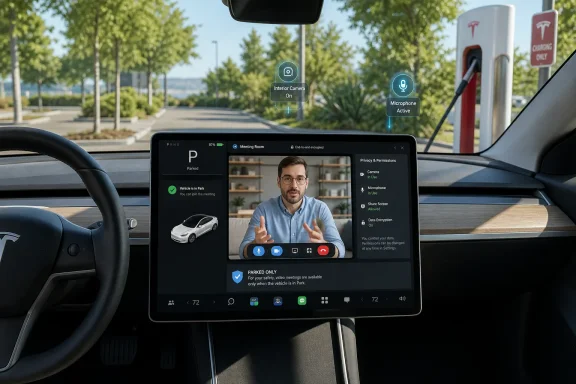
Tesla’s Summer 2026 software update turns the in-car web browser into a far more capable communications tool by allowing compatible vehicles to expose their interior camera and cabin microphone to websites. In practical terms, that means a parked Tesla can now join browser-based video calls through services such as Google Meet, Microsoft Teams, Discord, X Spaces, and Zoom—without Tesla having to build and maintain a separate native app for every platform. The important qualification is safety-critical: Tesla’s release notes say the camera is available only while parked, placing this feature firmly in the “mobile meeting room” category rather than a new way to video chat while driving. Tesla’s 2026.26 update coverage and the corresponding 2026.26 release notes describe the capability as part of the company’s Summer Update rollout.
At first glance, browser camera access may sound like a minor technical permission. In a Tesla, however, it changes a long-standing limitation of the infotainment environment: the car already had a large display, speakers, a microphone, a cabin-facing camera, and internet connectivity, yet the browser could not combine those components into a general-purpose web conferencing setup.
Tesla is addressing that gap not by launching a fresh collection of branded conferencing apps, but by letting websites request access to the relevant hardware. That is a strategically sensible route. Browser-based platforms already handle identity, meeting links, invitations, moderation, captions, chat, screen-sharing controls, and organization-specific security policies. Tesla only needs to provide the device access layer.
The result is more flexible than a single-purpose Zoom tile. If a service works in Tesla’s browser and can negotiate camera and microphone access, the vehicle can potentially serve as a temporary communications hub while parked. That covers more than work meetings: owners could join a family call while charging, take part in a Discord community conversation before an event, or listen and speak in a live social-audio space.
Tesla’s published update notes identify the Web Browser feature as available on vehicles with AMD infotainment hardware across the Model S, Model 3, Model X, Model Y, and Cybertruck family. The same notes are explicit that the interior camera can be used through the browser only while the car is parked. The 2026.26 feature listing also separates the browser update from other Summer Update additions, including navigation refinements, Caraoke scoring, camera preview, Grok commands, custom wraps, and Apple Music queue controls.
The new approach is more open-ended. The browser is no longer just displaying a meeting page; it can now pass along video from the cabin-facing camera and audio from the car’s interior microphone when a site requests those devices and the owner approves access. Reporting on the rollout indicates that Tesla presents an on-screen permission prompt analogous to the one users encounter in conventional desktop browsers.
That matters because video-conferencing services are increasingly browser-first. Google Meet expects users to grant browser-level camera and microphone access before entering a meeting. Google’s Meet documentation also lists current mainstream browsers as supported options and notes that camera and microphone permission is required for full participation.
Microsoft Teams follows the same broad model. Teams on the web depends on browser permission to access a camera and microphone, and Microsoft identifies Chrome, Safari, Edge, and Firefox as supported browser families for its web experience. Microsoft’s Teams web guidance makes clear that browser permissions and organizational settings can determine whether those hardware features work.
This creates several advantages:
That design is the right baseline. Camera and microphone access should never become invisible, automatic, or difficult to revoke. The browser’s ability to access vehicle hardware is powerful precisely because it can support numerous services, but that flexibility raises the stakes for permission hygiene.
That approach has a clear goal: make the user more visible in a camera view originally designed for in-cabin monitoring rather than polished video calling. A tight crop can also reduce the amount of private cabin detail shown to meeting participants. But the trade-off is flexibility. A front passenger may not fit naturally in the shot, and even the driver could drift out of frame while adjusting seating position or posture.
Tesla should be careful, however, not to let a useful video-conferencing convenience become a confusing new surveillance feature. Any framing intelligence should be clearly described, locally processed where possible, and accompanied by obvious controls. The company’s existing owner documentation says the cabin camera is used for driver attentiveness functions and that, by default, cabin images and video do not leave the vehicle unless the owner enables data sharing or certain diagnostic and safety circumstances apply. Tesla’s Model 3 owner manual also says the cabin camera does not perform facial recognition or identity verification.
That privacy explanation remains relevant, but it does not eliminate the need for care. A browser video call is a separate data path: when an owner grants a meeting site access to the camera and microphone, the video and audio are handled according to the policies, account settings, encryption options, and recording rules of that third-party service. Tesla’s vehicle-side cabin-camera data policy and a workplace’s Teams retention policy are not interchangeable.
That means older Intel-equipped vehicles are excluded from using the cabin camera as a browser webcam, even if they retain browser functionality for ordinary web use. This is consistent with Tesla’s previous Zoom availability, which also focused on newer, more capable infotainment hardware. The original feature coverage describes the AMD requirement as matching the earlier Zoom limitation.
Google itself recommends relatively modern processor and graphics capabilities for high-quality Meet use, especially where HD video, visual effects, and multitasking are involved. Google’s current Meet requirements specifically discuss processor performance, GPU acceleration, a 1080p camera, and network quality as factors in the experience.
Tesla owners should therefore approach the feature with reasonable expectations:
That safeguard matters because video conferencing combines visual, cognitive, and conversational demands. Even hands-free communication can pull attention away from driving; a screen-based meeting adds an obvious visual component and can invite the driver to look at faces, shared documents, chat messages, or presentation slides.
The National Highway Traffic Safety Administration defines distracted driving broadly as any activity that diverts attention from the driving task, including phone use, entertainment systems, navigation interactions, and other non-driving activities. NHTSA’s distracted-driving overview reports that 3,208 people were killed in crashes involving distracted drivers in 2024. Its advice is direct: driving safely requires full attention.
This is not merely an issue of vehicle software policy. State laws differ, but restrictions on handheld phone use and texting are widespread. The Governors Highway Safety Association says that 33 states, Washington, D.C., and several U.S. territories prohibit handheld cellphone use for all drivers, while texting bans cover 49 states, D.C., and multiple territories. GHSA’s state-law overview also notes that local rules can add further restrictions.
Tesla’s parked-only approach therefore does more than simplify a user-interface decision. It protects against an obvious misuse case and helps align the experience with road-safety expectations. Owners should still avoid the temptation to set up a call at a light, in a drive-through queue, or in any situation where the vehicle could begin moving before the session is fully ended.
Tesla’s own manual also says that users can review cabin-camera-related enabled functions from the vehicle’s controls and alter cabin-camera analytics preferences. Tesla’s cabin camera documentation provides useful reassurance about Tesla’s standard data-sharing posture, including its statement that cabin camera data is not associated with the vehicle identification number.
A sensible privacy routine includes:
Its strengths are clear: broader compatibility, familiar browser permissions, parked-only camera operation, and a substantially more flexible infotainment experience. The AMD restriction is disappointing for Intel-era owners, and first-generation framing appears limited, but those are understandable constraints rather than reasons to dismiss the feature.
More importantly, Tesla has put the crucial safety boundary in the right place. A parked Tesla can now become a useful private space for a call during charging, before an appointment, or while waiting for passengers. Once the car is moving, it should return to being what it is meant to be first: a vehicle that demands the driver’s full attention.
 Overview: A Browser Permission Change With Outsized Implications
At first glance, browser camera access may sound like a minor technical permission. In a Tesla, however, it changes a long-standing limitation of the infotainment environment: the car already had a large display, speakers, a microphone, a cabin-facing camera, and internet connectivity, yet the browser could not combine those components into a general-purpose web conferencing setup.Tesla is addressing that gap not by launching a fresh collection of branded conferencing apps, but by letting websites request access to the relevant hardware. That is a strategically sensible route. Browser-based platforms already handle identity, meeting links, invitations, moderation, captions, chat, screen-sharing controls, and organization-specific security policies. Tesla only needs to provide the device access layer.
The result is more flexible than a single-purpose Zoom tile. If a service works in Tesla’s browser and can negotiate camera and microphone access, the vehicle can potentially serve as a temporary communications hub while parked. That covers more than work meetings: owners could join a family call while charging, take part in a Discord community conversation before an event, or listen and speak in a live social-audio space.
Tesla’s published update notes identify the Web Browser feature as available on vehicles with AMD infotainment hardware across the Model S, Model 3, Model X, Model Y, and Cybertruck family. The same notes are explicit that the interior camera can be used through the browser only while the car is parked. The 2026.26 feature listing also separates the browser update from other Summer Update additions, including navigation refinements, Caraoke scoring, camera preview, Grok commands, custom wraps, and Apple Music queue controls.
From Zoom Shortcut to a Genuine In-Car Web Meeting Setup
Tesla’s previous video-conferencing approach
Tesla has offered Zoom access for several years, but the prior implementation was effectively a focused route into Zoom’s web experience rather than a broad browser permission framework. That solution proved that the hardware could support video calling, but it limited owners to one major platform and one set of account, workplace, and guest-access rules.The new approach is more open-ended. The browser is no longer just displaying a meeting page; it can now pass along video from the cabin-facing camera and audio from the car’s interior microphone when a site requests those devices and the owner approves access. Reporting on the rollout indicates that Tesla presents an on-screen permission prompt analogous to the one users encounter in conventional desktop browsers.
That matters because video-conferencing services are increasingly browser-first. Google Meet expects users to grant browser-level camera and microphone access before entering a meeting. Google’s Meet documentation also lists current mainstream browsers as supported options and notes that camera and microphone permission is required for full participation.
Microsoft Teams follows the same broad model. Teams on the web depends on browser permission to access a camera and microphone, and Microsoft identifies Chrome, Safari, Edge, and Firefox as supported browser families for its web experience. Microsoft’s Teams web guidance makes clear that browser permissions and organizational settings can determine whether those hardware features work.
Why browser access is better than an app-by-app strategy
The most obvious benefit is platform neutrality. A Tesla owner does not have to wait for the company to negotiate an integration with every employer, conferencing vendor, gaming community, or creator platform. In principle, the browser becomes the app catalog.This creates several advantages:
- Broader service choice: Google Meet, Teams, Zoom, Discord, and other browser-supported calling services can be accessed from one location.
- Faster compatibility: Web services can update their own interfaces and features without requiring a vehicle software release for every change.
- Less app fragmentation: Tesla avoids filling the App Launcher with separate communications clients.
- Better guest access: A meeting link can be more useful than installing and authenticating into a native app.
- Support for niche workflows: Enterprise web portals, virtual-event tools, telehealth waiting rooms, and community platforms may become viable if their browser requirements are met.
How the New Tesla Browser Permission Model Works
The permission flow described in early coverage should feel familiar to anyone who has granted webcam access in Chrome, Edge, or another modern browser. A website requests use of the camera, microphone, or both, and Tesla displays an on-screen decision prompt. Owners can deny the request, permit it for a session, or allow access on a more persistent basis. Not a Tesla App’s hands-on report says that the choices resemble conventional browser permission behavior.That design is the right baseline. Camera and microphone access should never become invisible, automatic, or difficult to revoke. The browser’s ability to access vehicle hardware is powerful precisely because it can support numerous services, but that flexibility raises the stakes for permission hygiene.
A practical setup sequence
For a compatible vehicle, the process should generally look like this:- Park the vehicle safely. Tesla’s 2026.26 notes state that interior-camera access in the browser is limited to when the car is parked. The release notes are unambiguous on this point.
- Open the Tesla Web Browser. Navigate directly to the meeting link or to the service’s web portal.
- Sign in if necessary. Corporate Teams environments, Google Workspace accounts, Discord communities, and other platforms may require authentication or administrator approval.
- Respond to the browser permission prompt. Grant camera and/or microphone access only when the website and meeting context are legitimate.
- Use the service’s preview screen. Google Meet provides a pre-join device check, including controls for camera, microphone, and speakers. Google’s audio and video connection guide explains the normal preview and selection process.
- Review audio before joining. Cabin acoustics can vary dramatically based on road noise, HVAC settings, nearby charging equipment, open windows, or passengers.
- Mute when needed. Tesla’s reported implementation provides a convenient audio control during active calls, but meeting-platform controls should still remain the primary place to manage microphone and camera state. The early feature report notes a mute/unmute control in the vehicle’s audio player.
The Camera Framing Question: Useful Today, Limited Tomorrow
Tesla’s first implementation reportedly does more than simply expose the raw interior-camera feed. When activated, the video is automatically cropped and zoomed to focus on the driver. Early testing described in the feature report suggests that the crop can be aggressive enough to cut off portions of the person in frame.That approach has a clear goal: make the user more visible in a camera view originally designed for in-cabin monitoring rather than polished video calling. A tight crop can also reduce the amount of private cabin detail shown to meeting participants. But the trade-off is flexibility. A front passenger may not fit naturally in the shot, and even the driver could drift out of frame while adjusting seating position or posture.
What a more mature implementation could offer
The next logical refinement would be dynamic person framing or face-aware auto-framing. That could keep a subject centered as they move, widen the view when a passenger joins, and provide a choice between a privacy-focused driver crop and a wider cabin composition.Tesla should be careful, however, not to let a useful video-conferencing convenience become a confusing new surveillance feature. Any framing intelligence should be clearly described, locally processed where possible, and accompanied by obvious controls. The company’s existing owner documentation says the cabin camera is used for driver attentiveness functions and that, by default, cabin images and video do not leave the vehicle unless the owner enables data sharing or certain diagnostic and safety circumstances apply. Tesla’s Model 3 owner manual also says the cabin camera does not perform facial recognition or identity verification.
That privacy explanation remains relevant, but it does not eliminate the need for care. A browser video call is a separate data path: when an owner grants a meeting site access to the camera and microphone, the video and audio are handled according to the policies, account settings, encryption options, and recording rules of that third-party service. Tesla’s vehicle-side cabin-camera data policy and a workplace’s Teams retention policy are not interchangeable.
Compatibility: AMD Tesla Infotainment Is the Dividing Line
The headline feature is not available to every Tesla still on the road. According to the 2026.26 release notes, browser access to the interior camera and cabin microphone requires the AMD infotainment platform. Tesla update tracking for version 2026.26 lists AMD support for the Web Browser feature and does not list Intel support.That means older Intel-equipped vehicles are excluded from using the cabin camera as a browser webcam, even if they retain browser functionality for ordinary web use. This is consistent with Tesla’s previous Zoom availability, which also focused on newer, more capable infotainment hardware. The original feature coverage describes the AMD requirement as matching the earlier Zoom limitation.
Why the processor difference matters
Video calling is more demanding than loading a static webpage. The system must decode and render remote video, encode the local cabin camera feed, process audio, manage encryption, keep the user interface responsive, and sustain the connection over Wi‑Fi or cellular connectivity. Those tasks place meaningful demands on CPU, graphics, memory, browser capabilities, and network stability.Google itself recommends relatively modern processor and graphics capabilities for high-quality Meet use, especially where HD video, visual effects, and multitasking are involved. Google’s current Meet requirements specifically discuss processor performance, GPU acceleration, a 1080p camera, and network quality as factors in the experience.
Tesla owners should therefore approach the feature with reasonable expectations:
- A meeting may work well on a stable Wi‑Fi connection yet struggle on a congested cellular link.
- Enterprise meeting policies can block browser participation, guest entry, or device access.
- Some web apps may load but still lack full feature support in Tesla’s browser.
- High-resolution video, virtual backgrounds, extensive screen sharing, and large participant galleries may be less practical than on a modern Windows laptop.
- Compatibility may evolve with Tesla browser updates and with changes made by the conferencing services themselves.
Safety Comes First: Parked Means Parked
The most encouraging design decision in Tesla’s implementation is also the one that deserves the most emphasis: the cabin camera is only available through the browser while parked. The 2026.26 release notes make this limitation clear, and it prevents the new feature from becoming a rolling dashboard video-call system.That safeguard matters because video conferencing combines visual, cognitive, and conversational demands. Even hands-free communication can pull attention away from driving; a screen-based meeting adds an obvious visual component and can invite the driver to look at faces, shared documents, chat messages, or presentation slides.
The National Highway Traffic Safety Administration defines distracted driving broadly as any activity that diverts attention from the driving task, including phone use, entertainment systems, navigation interactions, and other non-driving activities. NHTSA’s distracted-driving overview reports that 3,208 people were killed in crashes involving distracted drivers in 2024. Its advice is direct: driving safely requires full attention.
This is not merely an issue of vehicle software policy. State laws differ, but restrictions on handheld phone use and texting are widespread. The Governors Highway Safety Association says that 33 states, Washington, D.C., and several U.S. territories prohibit handheld cellphone use for all drivers, while texting bans cover 49 states, D.C., and multiple territories. GHSA’s state-law overview also notes that local rules can add further restrictions.
Tesla’s parked-only approach therefore does more than simplify a user-interface decision. It protects against an obvious misuse case and helps align the experience with road-safety expectations. Owners should still avoid the temptation to set up a call at a light, in a drive-through queue, or in any situation where the vehicle could begin moving before the session is fully ended.
Privacy, Consent, and the Risks of Turning a Car Into a Call Room
The Summer Update’s browser webcam access is a convenience feature, but it is also a privacy feature in the literal sense: it brings a camera and microphone into the web-permission model. That makes consent, visibility, and account discipline central to a good implementation.The good news: user-controlled permissions
Tesla’s reported dialog offers an affirmative choice when a website requests camera or microphone access. The feature report says an owner can deny access, grant it for the current session, or allow it persistently. That is much better than a blanket setting that silently exposes the devices to any page.Tesla’s own manual also says that users can review cabin-camera-related enabled functions from the vehicle’s controls and alter cabin-camera analytics preferences. Tesla’s cabin camera documentation provides useful reassurance about Tesla’s standard data-sharing posture, including its statement that cabin camera data is not associated with the vehicle identification number.
The risks: persistent permissions and shared vehicles
Still, users should think carefully before selecting a permanent “allow” option for a communication site. A Tesla can be shared among family members, used by valets, borrowed by friends, or accessed by passengers who happen to be in the cabin while an account remains signed in.A sensible privacy routine includes:
- Granting camera and microphone access only to recognized domains.
- Favoring session-only permission for services not used frequently.
- Logging out of work, school, and personal accounts after use on shared vehicles.
- Verifying that the correct camera and microphone are selected in the conference platform.
- Checking whether a meeting is being recorded before discussing sensitive information.
- Being mindful of passengers, who may not expect to be visible or audible on a call.
- Avoiding sensitive meetings in public charging locations where surrounding conversation and activity may be captured.
A Strong Summer Update Feature, With Sensible Boundaries
Tesla’s 2026.26 browser camera and microphone support is one of the most practical elements of the Summer Update because it unlocks value from hardware that is already in the vehicle. It avoids the bloat and delay of a separate native app strategy while opening the door to familiar services such as Google Meet, Teams, Zoom, Discord, and other browser-driven platforms.Its strengths are clear: broader compatibility, familiar browser permissions, parked-only camera operation, and a substantially more flexible infotainment experience. The AMD restriction is disappointing for Intel-era owners, and first-generation framing appears limited, but those are understandable constraints rather than reasons to dismiss the feature.
More importantly, Tesla has put the crucial safety boundary in the right place. A parked Tesla can now become a useful private space for a call during charging, before an appointment, or while waiting for passengers. Once the car is moving, it should return to being what it is meant to be first: a vehicle that demands the driver’s full attention.
References
- Primary source: Not a Tesla App
Published: 2026-07-28T14:23:00+00:00
Tesla's 2026.26 Summer Update Lets You Video Conference on Google Meet, Teams & Discord - Not a Tesla App
Tesla's Summer Update allows web apps to access the interior cabin camera and mic, delivering on Musk's longstanding promise of in-vehicle video conferencingwww.notateslaapp.com - Related coverage: support.google.com

Learn what requirements you need to use Google Meet - Google Meet Help
Google Meet access requirements You'll need a Google account to use Google Meet. For work or school Google Workspace users: A Google Workspace administrator needs to turn on Meet for
support.google.com
- Related coverage: support.microsoft.com
Use video in Microsoft Teams | Microsoft Support
There are a lot of ways to customize your video experience when you join a Teams meeting or call. You can add a custom background, change the video layout you see on your screen, and much more. Here's how.support.microsoft.com
