

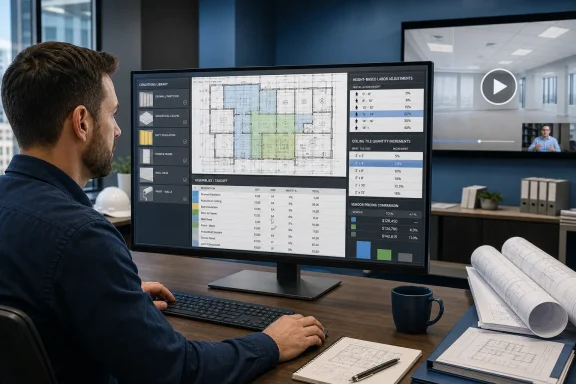
The August 4 announcement, distributed through ACCESS Newswire and republished by Guard Online, says Regional Sales Manager Lu Irene demonstrates ways to reduce manual entry when estimating assemblies that combine framing, insulation, bracing, trim, and finishes. Estimating Edge frames the session as free and on-demand, but the company has not published a public price for The EDGE, identified which subscription tier is required to use the demonstrated functions, or explained whether all viewers can access the recording without an active maintenance agreement.
That last point is more than fine print. Estimating Edge’s own webinar page says its on-demand Estimator webinars are no charge to customers current on maintenance. The company’s release calls this new session “free,” but does not say whether free means open public access, free registration for prospects, or no additional charge for existing customers. As of August 5, the new interior-estimating webinar also was not visible among the exposed entries on the company’s webinar catalog, which still prominently lists older training recordings. Contractors should confirm access conditions before treating the announcement as a free training resource for a whole estimating team.
The webinar packages existing v12 functions around interior assemblies
The announced agenda is built around five workflow areas: reusable “conditions” for assemblies, production-rate adjustments above a specified height, a trade-specific library of wall types and products, mathematical increment calculations for ceiling tiles, and simultaneous vendor pricing comparisons.
Those are meaningful estimating controls, but they are not newly introduced tools. Estimating Edge’s existing product documentation describes Common Conditions as a way to reproduce calculation logic across similarly configured rooms or areas. Its training material for acoustical work also documents increment settings that round material quantities according to specified dimensions, as well as height-dependent settings that can add scaffold-related labor or costs when ceiling heights trigger the condition.
The company has separately marketed the same general ideas for other specialties. Its commercial painting materials, for example, describe reusable conditions, labor adjustments based on wall height and preparation, and a Vendor Quote feature that requests and compares supplier quotes inside the platform. In March, Estimating Edge also told attendees at AWCI’s BUILD26 convention that The EDGE used trade-specific databases, real-time material and labor data, and Smart Labor technology for interior contractors.
The distinction matters for firms evaluating the webinar. The session may be useful training for setting up an interior-estimating workflow, especially for people who currently calculate wall, ceiling, and trim items in disconnected takeoff and spreadsheet steps. But there is no evidence in the August 4 release that Estimating Edge has shipped a new module, added a new vendor network, changed its supported operating systems, or revised the underlying estimating engine.
“Free” applies to the webinar, not the estimating platform
The press release’s headline makes the webinar sound like a no-cost entry point to better estimating. It is not an announcement of free estimating software.
Estimating Edge sells The EDGE as a commercial takeoff-and-estimating product, with trade-specific configurations and optional links into Foundation Software’s construction accounting products. Foundation Software’s partner page says The EDGE can pass estimate information, including assigned cost codes and classes, to FOUNDATION after the systems are synchronized. That connection can reduce duplicate entry, but it also means the accuracy of the initial condition setup travels downstream into job-costing and budget data.
No price, trial length, licensing model, maintenance rate, or webinar registration requirement appears in the August 4 announcement. No independent outlet has reported those terms. For a small subcontractor, that omission is material: a free one-hour recording has little bearing on the total cost of a desktop estimating deployment, implementation assistance, template conversion, vendor-quote setup, or recurring maintenance.
The vendor’s statement that the webinar can improve workflows should therefore be read as a demonstration claim. A better workflow depends on whether the company’s existing assemblies match the estimator’s actual wall types, manufacturer preferences, labor practices, regional suppliers, and change-order process. Software can update linked calculations instantly; it cannot determine that a user selected the wrong acoustic system, missed a revision, or applied a standard production rate to a crew that works differently.
Ceiling-tile increments are a more consequential feature than the release makes clear
The most concrete detail in the announcement is the “mathematical increment” function for ceiling tiles, presented as an alternative to applying a blanket waste percentage. In an interior estimate, that approach can be more defensible than adding an arbitrary percentage to every measured ceiling area.
The logic is familiar to anyone managing ordered material rather than merely measuring a plan: tiles, grid components, wall molding, and other products may need to be bought in full units, standard lengths, or manufacturer-defined packaging. A room that measures slightly beyond a selected increment can require another full piece or package, even if the measured area suggests only a marginal overage. Estimating Edge’s existing acoustical-condition documentation describes several increment methods and explains how its settings can round quantities to the next configured increment.
That does not automatically make the resulting estimate more accurate. The output is only as reliable as the rule set. An estimator still has to decide whether the geometry is regular enough for the chosen approximation method, whether field cuts can be reused, whether specified products have changed, and whether the crew’s installation sequence creates additional losses. Replacing a global waste percentage with automated rounding is an improvement only if the templates are governed and reviewed.
For firms that share assemblies among several estimators, this is where a webinar can add operational value. A reusable condition prevents each estimator from inventing a different labor factor, material allowance, or trimming rule for equivalent work. It also creates a shared point of failure: a bad condition copied across a hotel, school, or office project can consistently produce the wrong quantity faster than a manual method would.
Height-driven labor needs verification against field production
The session also promises tools for setting custom production rates above a specified height. Estimating Edge has long promoted Smart Labor as a way to use contractor-defined labor assumptions instead of a single standardized set of labor hours, and its interior-oriented materials describe height-sensitive settings for tasks that require added access equipment or effort.
That is a sensible category of automation. High walls and ceilings can change handling time, scaffolding needs, lift usage, crew movement, safety preparation, and the practical pace of framing, board installation, finishing, or grid work. The danger is treating a height threshold as a universal truth rather than a company-specific rule.
An estimator should validate any height-based condition against completed-job data before it becomes a default. A 12-foot ceiling in an open, unobstructed space may behave very differently from the same elevation in a tenant retrofit packed with mechanical conflicts, restricted staging, occupied areas, or sequencing constraints. The vendor’s release does not say what height values the webinar uses, whether rates are based on customer data, or how estimates account for equipment availability and local labor conditions.
The best use of this feature is as a controlled assumption: document the rate, record why it changes, compare estimate-versus-actual production after the job, and adjust the template where the field record disagrees. That is a more durable process than simply accepting a software default because it appears in an assembly library.
Windows users should treat this as training, not deployment guidance
For Windows-focused estimating teams, The EDGE remains a desktop-oriented product with explicit hardware requirements. Estimating Edge lists Windows 11 Pro 64-bit as both the minimum and recommended operating system for The EDGE Estimator v12, along with local administrator privileges. Its minimum specification calls for a quad-core Intel Core i7 processor, 16GB of memory, 256GB of storage, a 1080p display, and 512MB of video memory; its recommended configuration is substantially higher.
Those requirements matter because the new webinar does not address deployment, compatibility, performance, or version migration. A contractor still running an older Windows release, a locked-down endpoint without local administrative access, or a thin client environment should not infer support from an interior-estimating demonstration. The company’s site says current subscribers receive the latest version 12 updates, but the webinar announcement contains no build number, feature-release note, or change log.
The vendor also describes The EDGE as cloud-based in some sales material, while its published system requirements show that the estimator application itself has meaningful local Windows hardware and administration needs. IT teams should ask separately about data storage, multiuser access, backups, remote desktop support, vendor-quote connectivity, and how updates are distributed. None of those operational questions are answered by the August 4 release.
What an interior estimating team should check before copying the workflow
The webinar’s useful promise is not speed alone; it is consistency in how the company turns plan measurements into purchasable materials, labor allowances, and bids. Before importing its approach into live work, firms should verify four items:
- Confirm that reusable wall and ceiling conditions reflect the contractor’s current specified products, assemblies, cut rules, fastening requirements, and exclusions.
- Test height-based production changes against actual completed projects, including equipment, access, sequencing, and crew-composition differences.
- Validate mathematical increments against supplier packaging and field-cut practices rather than assuming they eliminate waste.
- Confirm which supplier feeds or quote requests are available in the company’s market, how long quotes remain valid, and who approves a selected vendor price before a bid goes out.
Estimating Edge’s webinar could help new users understand how The EDGE combines takeoff, conditions, pricing, and labor into one estimate. The company has not, however, announced a new capability that changes what current v12 customers can deploy. The concrete consequence is straightforward: treat the recording as a chance to audit existing templates and estimating discipline, not as proof that a free webinar delivers free software, validated production rates, or automatically reliable vendor pricing.