
The 3.69-inch display is a magnetic frame intended to sit over a conventional 120 mm fan, using the fan’s corner screw heads as its attachment points. Thermalright’s own product catalog lists both black and white versions with a 640 × 172 resolution and 500-nit peak brightness. Tom’s Hardware first reported the wider launch details on August 22, including an AliExpress price of $37.14 and use of Thermalright’s TRCC display-control software.
For PC modders, the appeal is obvious: instead of buying a proprietary LCD fan or replacing an entire cooling setup, the Vision-1 is meant to add hardware-monitoring readouts, animations, images, and themed graphics to fans already installed in a case. For system builders, though, the most important detail is not the screen size. It is that this is an accessory built around a specific mechanical assumption: four accessible, normally positioned metal screw heads on a 120 mm fan.
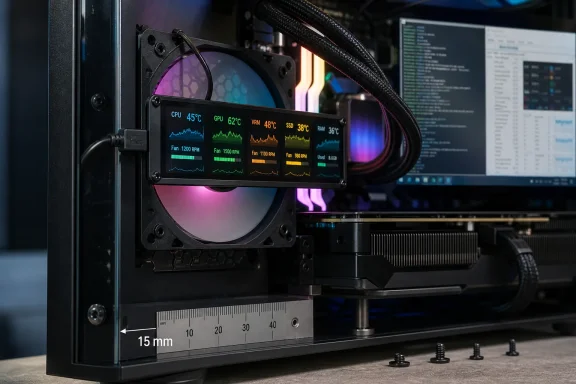 A 640 × 172 LCD built around the fan frame
The Fan Frame Vision-1 is not a fan controller and does not replace a fan’s PWM or ARGB wiring. It is an independently powered display module that mounts in front of the fan, then connects to the PC through an internal USB 2.0 header or hub. Thermalright also includes a USB-A adapter, according to Tom’s Hardware, for systems where the internal-header route is unavailable.
The unusually wide 640 × 172 panel has the proportions of a narrow banner rather than a square display. That changes its practical use. It should suit a temperature readout, fan-speed telemetry, short text, a logo, or a horizontally framed animation better than the dashboard-style layouts commonly used on a 3.5-inch AIO pump display.
Thermalright’s 500-nit brightness rating also suggests the company expects the screen to remain visible through a tempered-glass side panel and alongside bright RGB lighting. But the company has not published a detailed product page setting out panel type, refresh behavior, viewing angle, power draw, USB bandwidth requirements, supported image formats, or a full TRCC compatibility list. Its catalog confirms the basic resolution and size; it does not yet answer the questions that matter when several of these displays are attached to the same system.
Cowcotland, which reported on the product separately, says the frame adds 15 mm to the fan’s depth. That is a material constraint in compact cases. A normal 25 mm-thick fan becomes a roughly 40 mm assembly once the Vision-1 is fitted, before accounting for the cable bend and clearance required between the screen and a case panel, radiator, GPU backplate, or front-mounted drive cage.
That makes the accessory far more practical in roomy mid-towers and full-towers than in small-form-factor builds. Front intake fans can be especially problematic: the display needs to face into the chassis to be visible through the side panel, which places it between the fan and interior components.
“Most 120 mm fans” is not the same as every 120 mm fan
The mounting mechanism is clever because it avoids a separate bracket or proprietary fan ecosystem. Magnetic posts on the Vision-1 latch onto the fan screws, so a conventional square-frame 120 mm fan with four corner fasteners should be the intended target.
But the compatibility claim has limits that are easy to miss when looking at product photographs. Fans installed with rubber pull-through mounts, concealed screw covers, nonmetallic fasteners, unusually recessed screws, or heavily sculpted frames may not present enough exposed metal for the magnets to grip securely. The same concern applies to fans squeezed against a radiator, where the screw heads may not be accessible after installation.
The design also excludes the growing set of fans that depart from the familiar standalone 120 mm square. Tom’s Hardware specifically highlighted Thermalright’s TL-UC24 and TL-UC36 multi-fan arrangements, whose offset mounting points do not offer the expected four-corner pattern. Cowcotland independently reached the same conclusion: the Vision-1 works around the standard 120 mm format, not every product marketed as a 120 mm-class cooling solution.
A buyer should therefore check more than nominal fan diameter before ordering:
- The installed fan needs four accessible corner mounting points with exposed metal screw heads for the magnetic mounts.
- The case needs approximately 15 mm of extra room in front of the fan, plus enough clearance for the USB cable.
- The fan position must leave the display visible; an LCD mounted against a solid front panel or hidden behind a radiator offers little value.
- Builds using daisy-chained, linked, reverse-blade, thick-frame, or multi-fan assemblies should be treated as unverified until Thermalright publishes a compatibility guide.
There is another practical issue: an intake fan’s exposed face is also its airflow path. Thermalright says the frame’s open design preserves airflow, and Cowcotland likewise describes an open construction intended to let the fan breathe. Neither outlet, however, has published independent airflow, noise, static-pressure, or temperature testing with the accessory installed. Until that testing exists, “no interference” should be read as a manufacturer design claim, not a measured performance result.
TRCC is the real product dependency
The Vision-1 is only useful as a display if its software can detect it and send content to it. Thermalright places it in the same wider product family as its TRCC LCD control software, which is used across the company’s screen-equipped coolers and displays. That centralizes customization, but it also means the Vision-1 inherits the usual problems of USB LCD hardware: background services, device detection, sensor permissions, software updates, and potential conflicts with other monitoring suites.
For Windows users, the immediate question is whether TRCC recognizes multiple Vision-1 frames reliably at once, preserves each device’s layout after restart, and coexists with tools such as HWiNFO, Libre Hardware Monitor, MSI Center, Corsair iCUE, NZXT CAM, or motherboard vendor RGB software. Thermalright has not yet provided public guidance on any of those points.
The broader reporting around Linux requires a sharper distinction. Tom’s Hardware correctly notes that a TRCC-compatible Linux option exists, but it is not an official Thermalright port or vendor-supported Linux release. The project is an independent, open-source implementation maintained on GitHub by developer Lexonight1, who reverse-engineered support for Thermalright LCD and lighting hardware.
That project is substantial: its repository documents packages for several Linux distributions, including SteamOS-related environments, and it has recently published updates. But the public technical reference lists supported USB identifiers and named devices from Thermalright’s existing LCD cooler range. It does not yet list the newly announced Fan Frame Vision-1 by name.
That omission matters. A Linux utility supporting earlier Thermalright displays does not establish that an unreleased or newly shipping USB device will be detected by the same software. The Vision-1 may use an already supported controller and work immediately; it may need its USB vendor/product identifiers and protocol added; or it may require an entirely different implementation. At publication time, no independent tester has documented the new frame running on Linux, SteamOS, Bazzite, or another distribution.
Linux builders should not purchase the Vision-1 on the assumption that it is plug-and-play outside Windows. The responsible expectation is narrower: community support may arrive quickly, particularly if the hardware resembles existing Thermalright LCD devices, but compatibility has not been confirmed.
The price changes the value proposition
At the $37.14 AliExpress price cited by Tom’s Hardware, one Vision-1 costs as much as, or more than, many competent 120 mm PWM fans. A three-fan front intake setup could therefore require more than $110 in displays before USB hubs, wiring, and shipping are counted.
That does not make the product irrational. It makes it a visual-modification part rather than a cooling upgrade. The Vision-1 provides no additional airflow, lower temperature, or quieter operation on its own. It consumes internal USB capacity, adds cable management, and creates another software dependency in exchange for appearance and at-a-glance information.
The stronger use case is a system that already has a display-oriented design: an AIO with an LCD pump head, a wide internal sensor panel, or a themed showcase build with room behind the side glass. There, the Vision-1 can make fan positions part of the design rather than leaving them as blank space around a single pump display.
Thermalright’s official catalog now confirms that the Fan Frame Vision-1 exists in both color variants and specifies its display resolution, but it has not established retail availability through its usual distribution channels or published a detailed compatibility matrix. Until those arrive, the safe purchase decision is simple: measure the clearance, verify the fan’s exposed corner screws, reserve a USB 2.0 connection, and treat Linux compatibility as unconfirmed rather than advertised.