

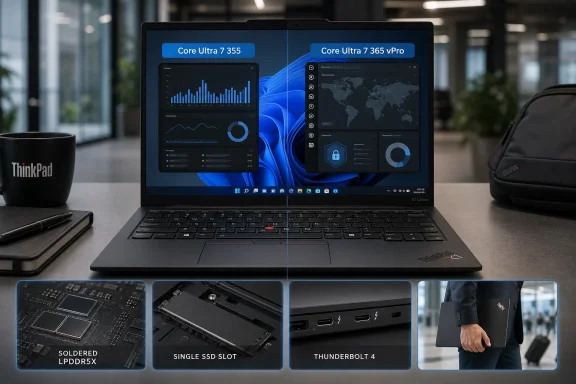
ServeTheHome does state that Lenovo offers the Core Ultra 7 365 vPro as the top non-H processor option for the Gen 14, and Lenovo’s own specifications confirm it. But the separate ServeTheHome page titled “Lenovo ThinkPad X1 Carbon Gen 14 Intel Core Ultra 7 365 VPro Processor 1” contains no benchmark data, system configuration, or accompanying analysis. It is an asset page with an ambiguous title, not a test report of the 365 SKU.
For Windows administrators, the correction changes the practical reading of the review. ServeTheHome’s results describe the entry-adjacent eight-core Core Ultra 7 355 model, not the remotely manageable corporate configuration that an IT department is more likely to standardize on.
The Core Ultra 7 365 is a manageability upgrade first
Intel’s Core Ultra 7 355 and Core Ultra 7 365 are both Panther Lake, or Core Ultra Series 3, low-power chips with four Performance cores and four low-power Efficient cores. Each presents eight threads to Windows, carries 12MB of Intel Smart Cache, uses Intel Graphics rather than the more capable Arc B390 graphics fitted to certain X7 systems, and lists a 49 TOPS NPU. Both qualify the X1 Carbon Gen 14 as a Copilot+ PC under Microsoft’s NPU threshold.
The 365’s CPU clock advantage is modest: Lenovo and Intel list maximum boosts of 4.8GHz for P-cores and 3.6GHz for low-power E-cores, versus 4.7GHz and 3.5GHz on the 355. That may produce a small uplift in short burst workloads, but it does not turn the X1 Carbon into the 16-core H-series machine that Lenovo sells in other regions.
The material difference is vPro. Intel lists the Core Ultra 7 365 as supporting the Intel vPro platform, including Intel Active Management Technology, Standard Manageability, Remote Platform Erase, and Threat Detection Technology. Lenovo’s product documentation separately lists both vPro Enterprise and non-vPro configurations for the X1 Carbon Gen 14.
Those features matter only when the whole platform is purchased and provisioned accordingly. A vPro-capable processor by itself does not create an out-of-band management deployment; IT still needs compatible firmware settings, network configuration, certificates and a management process. But it gives an organization options the Core Ultra 7 355 review unit simply does not have. A help desk that needs remote recovery and inventory controls should treat the 365 as a procurement requirement, rather than infer those capabilities from a review of the 355.
Tom’s Hardware reached a similar configuration conclusion in its separate Gen 14 review. Its tested system also used the Core Ultra 7 355, and it described the vPro-enabled 365 as the highest standard U-series processor offered by Lenovo at the time. Two independent reviews therefore assess the same lower-tier processor class; neither independently benchmarks the 365.
The 355 benchmark is useful, but only in its proper lane
ServeTheHome’s review still supplies a useful answer for prospective X1 Carbon buyers: Lenovo has built a very light Windows 11 Pro machine with better connectivity than many premium 14-inch competitors. The test unit weighed below 1kg, included three Thunderbolt 4 ports, HDMI 2.1, USB-A, a 3.5mm headset jack, Wi-Fi 7, and a 58Wh battery.
That port selection is more consequential than it sounds in a corporate rollout. The built-in USB-A port accommodates existing security keys, presentation clickers, serial adapters, and peripheral receivers without a dock. HDMI avoids an adapter at a conference-room display. Three Thunderbolt 4 ports leave more flexibility for charging and docking than systems that reserve one side for power.
The performance result needs the same qualification. ServeTheHome recorded a Geekbench 7 multi-core score of 11,363 for the Core Ultra 7 355 system. Its two larger Dell Pro comparison systems scored 15,486 and 17,709, leaving the X1 Carbon 26.6% to 35.8% behind in that specific test. The publication’s conclusion was straightforward: the X1 Carbon trades sustained multi-core throughput for low weight and travel convenience.
That is a reasonable trade for executives, sales staff, consultants, and administrators whose work is centered on browser-based enterprise applications, remote sessions, documents, presentations, communications tools, and moderate local scripting. It is a poor fit for developers compiling large codebases, engineers running multiple local VMs, analysts processing large data sets, or anyone planning sustained local AI inference beyond small, optimized workloads.
The 365 vPro option does not erase that basic chassis limitation. It has the same eight-thread core layout as the 355 and is identified by Intel as a thin-and-light, 15W-class design. Organizations choosing it are buying fleet controls and a small clock-speed step, not workstation-class multi-core performance.
Configuration choices are permanent in the places that matter
The Gen 14’s central purchasing risk is not its processor. It is memory.
ServeTheHome found no SODIMM slots in the X1 Carbon Gen 14. Lenovo’s Product Specifications Reference confirms that the 16GB, 24GB, 32GB, and 64GB LPDDR5X options are soldered to the system board. There is no later RAM upgrade path. An employee issued a 16GB machine will remain on 16GB for the life of the notebook, regardless of whether future Windows releases, endpoint tools, browser tabs, Teams meetings, or local AI features make that capacity uncomfortable.
For a premium business notebook expected to stay in service for three to five years, 32GB should be the practical floor for most professional deployments. The exception is a tightly controlled task-worker role where the entire workload is known and support policy does not permit broad software variation. Lenovo offers 64GB in the product family, but buyers should verify the precise machine type and region before assuming it can be paired with the exact CPU, display, WWAN, and touchpad combination they want.
There is a second specification wrinkle around memory speed. Lenovo’s Gen 14 family documentation lists LPDDR5X-7467, -8533, and -9600 options, then explicitly warns that installed memory may run at a lower speed because of platform limitations. Intel’s specification page for the Core Ultra 7 365 lists support up to LPDDR5X-7467. The documents are not necessarily contradictory—Lenovo’s family sheet includes faster H-series and X7 systems—but they are enough to show why a generic “up to LPDDR5X-9600” line should not be read as a promise for a Core Ultra 7 365 configuration.
The storage situation is better, though still constrained. Lenovo specifies one M.2 2280 PCIe 5.0 x4 slot and supports up to a 2TB SSD. The slot is serviceable and the drive can be replaced, but there is only one internal slot. ServeTheHome’s 21V7006EUS carried a 512GB Samsung PM9C1b PCIe 4.0 SSD, illustrating the difference between a Gen 5-capable slot and a Gen 5 drive actually included in the purchased system.
For administrators, that means capacity planning still belongs in the initial order. A drive can be swapped during refresh or repair, but it cannot be supplemented with a second internal SSD, and any replacement operation introduces encryption-key, BitLocker, imaging, and asset-management work.
North American buyers should not plan around the H-series models
Lenovo’s July 27 Product Specifications Reference carries a restriction that can easily disappear in a broad product-page comparison: processors with an H suffix are not available in North America. The worldwide X1 Carbon Gen 14 family includes the 16-core Core Ultra 7 356H, Core Ultra 7 366H, Core Ultra X7 358H, and Core Ultra X7 368H, with the X7 models also receiving the Arc B390 integrated GPU.
Those parts would substantially alter the machine’s compute and graphics profile. They are not the configurations U.S. buyers should expect to quote against the Core Ultra 7 365 vPro.
That limitation explains why the 365 matters in the American business catalog. It is the upper-end standard processor option for buyers who need vPro but do not have access to the higher-core H-family builds. It also reinforces the procurement rule for this model: compare exact machine types, not the maximum features shown on a global product-family sheet.
The X1 Carbon Gen 14 remains a well-equipped Windows ultraportable, and ServeTheHome’s review supports its core case for mobile professionals. But the evidence currently available supports a more precise conclusion: the published benchmarks are for the Core Ultra 7 355, while the Core Ultra 7 365 vPro is the configuration to evaluate for enterprise manageability. Treat them as related SKUs, not interchangeable test results, and lock the required memory capacity into the purchase order before deployment.