
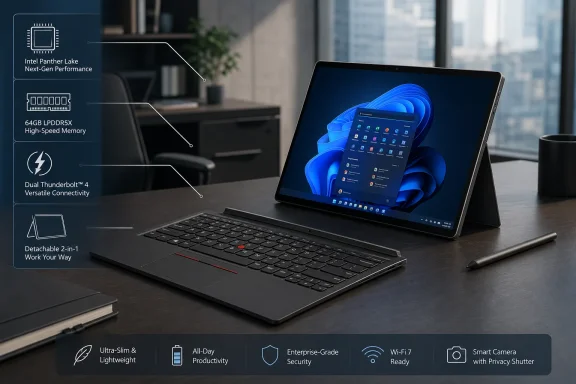
 A detachable ThinkPad returns with a more serious specification sheet
The Windows detachable market has often been defined by compromise. Buyers generally choose between an ultra-light tablet with a thin keyboard cover, or a traditional convertible laptop with a fixed hinge and more robust cooling. Lenovo is attempting to occupy the increasingly narrow middle ground: a detachable Windows 11 PC that retains a ThinkPad identity while using current Intel silicon and business-class configuration options.
The ThinkPad X13 Detachable Gen 1 was initially revealed in March 2026, when Lenovo outlined a 13-inch device designed around a 3:2 touchscreen, a folio keyboard, Panther Lake processors, and up to 64 GB of RAM. At that stage, Lenovo indicated a July release window across parts of Africa, Europe, and the Middle East, with Eurozone pricing beginning at €1,949. The earlier announcement coverage also identified dual Thunderbolt 4 connectivity, 2.8K display resolution, and a chassis measuring 290 x 210 x 9.3 mm.
The global listing now fills in important gaps. Lenovo plans variants with the Core Ultra 5 332, Core Ultra 5 335, and Core Ultra 7 365, all from Intel’s Core Ultra Series 3 family. The entry Core Ultra 5 332 has six cores and a maximum turbo frequency of 4.4 GHz, while the Core Ultra 5 335 and Core Ultra 7 365 move to eight cores and reach up to 4.6 GHz and 4.8 GHz respectively. Intel’s Series 3 processor catalogue lists all three chips as 2026 parts.
That configuration range matters. Detachables are too often sold with a small handful of tightly constrained configurations: modest memory, limited storage, and no meaningful route for buyers who need to run heavier professional Windows workloads. Lenovo’s model instead spans 16 GB, 32 GB, and 64 GB memory choices, alongside 256 GB, 512 GB, and 1 TB PCIe 4.0 SSD options. Notebookcheck reports that storage connects through a single M.2 2242 slot.
For IT departments, that is the story behind the headline. A 64 GB Windows tablet is not a mass-market specification, but it makes the ThinkPad X13 Detachable a more realistic option for professionals who keep demanding applications open for an entire day.
Panther Lake gives Lenovo an Intel-native answer to the Surface Pro challenge
Lenovo’s processor selection is strategically significant because the ThinkPad X13 Detachable does not ask Windows users to choose an ARM platform merely to obtain a thin and tablet-like form factor. The device uses Intel’s latest mobile architecture, with the familiar advantages that brings for legacy Windows software, specialized drivers, enterprise peripheral compatibility, and virtualized workloads.
Three CPU tiers, one platform strategy
The available processor lineup is:
- Intel Core Ultra 5 332
- Six cores and six threads
- Two-core Xe3 integrated graphics
- Up to 4.4 GHz turbo frequency
- Intel Core Ultra 5 335
- Eight cores and eight threads
- Four-core Xe3 integrated graphics
- Up to 4.6 GHz turbo frequency
- Intel Core Ultra 7 365
- Eight cores and eight threads
- Four-core Xe3 integrated graphics
- Up to 4.8 GHz turbo frequency
The Core Ultra 5 332 is likely to be the practical choice for managed fleets, browser-heavy office work, remote access, document management, and Teams-style communications. It retains modern platform features while giving Lenovo a lower-cost configuration from which to build out the lineup.
The Core Ultra 5 335 and Core Ultra 7 365 should be more appealing to users who will treat the detachable as a primary PC rather than a secondary travel companion. The extra CPU and graphics resources can matter in large spreadsheets, local data analysis, light creative work, code compilation, complex PowerPoint decks, and multitasking across high-resolution external monitors.
Intel’s own specifications make clear that the Core Ultra 5 332 supports LPDDR5X-7467 memory, matching Lenovo’s listed memory speed. Intel’s Core Ultra 5 332 product page also places the processor in the Core Ultra Series 3 family. The Core Ultra 5 335 and Core Ultra 7 365 likewise list support for LPDDR5X-7467, providing a useful technical cross-check on Lenovo’s planned configurations. Intel’s Core Ultra 5 335 page Intel’s Core Ultra 7 365 page
Intel compatibility remains a practical selling point
Windows on Arm has made substantial progress, and Snapdragon-powered Surface hardware has demonstrated that excellent battery life and quiet operation are possible in a detachable form factor. But business buyers do not purchase platforms in isolation. They purchase the total operating environment: line-of-business software, security tools, device-management agents, printers, smart-card readers, VPN clients, dock firmware, virtualization utilities, and often older internal applications that remain essential.
That is where Lenovo’s Intel choice can be compelling. It reduces the degree of compatibility assessment required before deployment, especially in organizations with a long-tail collection of Windows applications. It is not an argument that ARM Windows cannot work; it is an acknowledgement that many businesses still prefer the lower-friction path of an x86 Windows machine.
The ThinkPad X13 Detachable Gen 1’s potential advantage, then, is not simply raw benchmark performance. It is the ability to bring a familiar enterprise Windows platform into a form factor that usually forces compromises on memory and connectivity.
64 GB of RAM is the differentiator, not a vanity specification
The standout figure is undoubtedly 64 GB of LPDDR5X-7467 RAM. In an era when many premium thin-and-light tablets still top out at 16 GB or 32 GB, Lenovo’s specification is a clear attempt to redefine what a detachable can be.
Who actually needs 64 GB in a 13-inch detachable?
Not every buyer does. For email, web applications, Office, note-taking, streaming, and ordinary video calls, even 16 GB remains sufficient. The more important point is that Lenovo is not limiting the entire product category to that baseline.
A 32 GB or 64 GB ThinkPad X13 Detachable makes more sense for:
- Developers running local containers, emulators, virtual machines, or large IDE projects.
- Data analysts working with demanding Power BI models, large Excel files, or local databases.
- Consultants and field engineers who must keep multiple corporate tools, browser sessions, remote desktops, and communications apps open.
- Creative users handling large layered images, complex PDFs, or moderate video projects.
- IT professionals who routinely use management consoles, device imaging utilities, scripts, log-analysis tools, and virtualized test environments.
- Executives and power users who expect a mobile Windows PC to remain viable through a long replacement cycle.
The benefit is not merely the ability to run one extreme application. Memory capacity reduces the frequency with which Windows must rely on SSD paging under pressure. That can make a device feel substantially more responsive in real mixed workloads, particularly when a user has developed the modern habit of leaving everything open.
The non-upgradeable-memory caveat
There is also an important limitation. LPDDR5X system memory is normally soldered to the motherboard, which means the memory choice is effectively permanent. Buyers should treat 16 GB, 32 GB, and 64 GB as a purchasing decision for the life of the device, not an upgrade path.
That makes Lenovo’s broader RAM ladder more valuable. Rather than settling for the minimum specification because it is available today, business buyers can align the configuration with the role the device will play over several years. A 16 GB model may be ideal for a standard fleet assignment; a 32 GB system is arguably the sensible long-term middle tier; and 64 GB becomes the specialist configuration for power users.
Lenovo’s decision is especially notable compared with the compact Surface Pro 12 reviewed by Notebookcheck in 2025. That device was limited to 16 GB of onboard memory, and the review identified the inability to upgrade either RAM or storage as a key drawback. Notebookcheck’s Surface Pro 12 review also noted that Microsoft’s smaller detachable uses UFS storage rather than an M.2 SSD.
Display and portability: Lenovo targets the productivity sweet spot
A 13-inch, 3:2 display is an appropriate choice for a ThinkPad detachable. The taller aspect ratio provides more usable vertical workspace than a 16:9 panel, which is useful in Word documents, web pages, spreadsheets, source code, PDF reviews, and management dashboards.
Lenovo rates the IPS panel at 500 nits in SDR mode, with 120 Hz variable refresh rate support and 100% sRGB coverage. The earlier specification report described it as a 2.8K panel. The March launch coverage framed those figures as part of Lenovo’s original announcement, while the newer global rollout report reiterated the brightness, refresh-rate, and color-coverage claims. Notebookcheck’s July update provides the most current published configuration details.
Why 120 Hz matters beyond smooth scrolling
The obvious value of a 120 Hz panel is smoother motion: scrolling through webpages, navigating Windows 11, moving a stylus cursor, and dragging windows all look more fluid. But there is a more practical benefit in a pen-capable detachable. Ink input can feel more direct when a display refreshes more frequently, even though pen responsiveness also depends on digitizer and software tuning.
Variable refresh rate is equally important. A premium mobile PC should not run the panel at its maximum refresh rate unnecessarily when displaying static content. Adaptive behavior can balance responsiveness with power consumption, at least in principle.
The key warning is that display specifications do not answer every quality question. A 500-nit rating and full sRGB coverage are promising, but they do not reveal real-world brightness consistency, calibration quality, contrast, glare behavior, response times, or the degree to which refresh rate affects battery life. Independent testing will matter before the ThinkPad X13 Detachable can be considered a display leader rather than simply a well-specified entrant.
Tablet weight versus complete working weight
Lenovo reportedly places the ThinkPad X13 Detachable Gen 1 at 890 grams for the tablet itself and 1.25 kg with the keyboard folio attached. The global listing report highlights both figures.
The 890-gram tablet weight is reasonable for handheld use, especially given the 13-inch screen and workstation-oriented memory ceiling. However, the 1.25 kg full configuration is the number prospective buyers should use when comparing it with conventional ultraportable laptops. A detachable is rarely used in productive work without its keyboard, and the keyboard cover is not a peripheral in the usual sense; it is fundamental to the experience.
This does not diminish the appeal of the form factor. The ability to separate screen and keyboard remains useful for presentations, digital note-taking, touch-centric applications, bedside or travel reading, and desk setups where the tablet is connected to external displays. It simply means that the ThinkPad X13 Detachable should be evaluated as both a tablet and a complete portable Windows workstation.
Battery capacity is the clearest compromise
The ThinkPad X13 Detachable Gen 1 includes a 45 Wh battery, and Lenovo rates it for just under 11 hours in MobileMark 30 at 250 nits. Notebookcheck’s global launch coverage provides that qualification, which is important because battery-life claims are only meaningful in the context of the test and display brightness used.
On paper, 45 Wh is not a large battery for a 13-inch, 120 Hz, high-resolution Windows detachable. Lenovo is clearly relying on the efficiency of the Panther Lake platform, adaptive display refresh, and the productivity-oriented nature of the device rather than brute-force battery capacity.
A respectable claim, but not a guarantee
MobileMark is a standardized benchmark designed around office-style usage, making it more useful than an unqualified “up to” number. Still, buyers should not interpret the under-11-hour result as a guarantee of a full day in every workflow.
Actual runtime will depend heavily on:
- Screen brightness, particularly when used outdoors.
- Whether 120 Hz mode is active.
- Video conferencing duration and camera use.
- External displays and Thunderbolt dock usage.
- Wi-Fi conditions and background synchronization.
- The selected processor configuration.
- Local development, rendering, or AI workloads.
- Corporate security and management software.
The battery also becomes more consequential in the context of the higher-end configurations. A Core Ultra 7 model with 64 GB of memory is likely to attract users who expect the device to handle demanding work. Those workloads tend to be exactly the ones that expose the limitations of a smaller battery.
Lenovo’s own March-era positioning acknowledged the constraint indirectly by comparing the device with Microsoft’s larger Surface Pro designs, which had been offered with 47 Wh and 53 Wh batteries in IPS and OLED forms respectively. Notebookcheck’s initial report described the 45 Wh capacity as a potential weakness at the time.
Storage options offer flexibility, but only one slot
Lenovo is offering 256 GB, 512 GB, and 1 TB PCIe 4.0 SSD configurations through a single M.2 2242 slot. This is a better direction than sealed UFS storage for a professional Windows detachable, because it suggests a conventional SSD architecture rather than permanently fixed flash storage.
The word single matters, however. There is no second SSD bay for expansion, no RAID option, and no practical way to separate operating-system storage from a large local working dataset. Users with substantial files should choose capacity carefully at purchase.
The M.2 2242 form factor deserves attention
M.2 2242 drives are shorter than the more familiar M.2 2280 format used in many laptops and desktops. The compact size is understandable in a thin detachable, but it can reduce the breadth of aftermarket choices compared with 2280 hardware.
That does not make the decision poor. It is the kind of engineering trade-off that allows Lenovo to build a 9.3 mm tablet chassis. But it reinforces a familiar point: a detachable’s upgrade story is usually more limited than that of a standard ThinkPad laptop, even if it is better than a fully sealed tablet.
Pricing will decide whether the X13 Detachable is a niche showcase or a credible Surface alternative
Lenovo previously said that the ThinkPad X13 Detachable Gen 1 would begin at €1,949 in the Eurozone, which was roughly $2,217 at the exchange rate cited in the latest report. The current global listings confirm the hardware plan, but the exact regional pricing and availability of every configuration remain the more important unanswered questions. Notebookcheck’s July report cautions that the earlier Eurozone figure may not remain unchanged amid memory-cost pressure.
At that level, Lenovo is not aiming for the consumer tablet market. This is a premium device intended to be evaluated against high-end Surface Pro configurations, ultraportable ThinkPads, enterprise 2-in-1s, and possibly compact mobile workstations.
The value proposition must be judged as a complete package
The right comparison is not simply tablet price against tablet price. Buyers should look at:
- Keyboard inclusion or cost
A detachable keyboard is essential for serious Windows use. A low tablet price loses meaning if the keyboard is a costly optional addition. - Pen availability and functionality
A pen is central to the detachable proposition for note-taking, markup, engineering sketches, and whiteboarding. - RAM and SSD configuration
The ThinkPad’s real distinction appears in its 32 GB and 64 GB options, not necessarily in entry-level models. - Docking and external-display capability
Dual Thunderbolt 4 ports, as previously reported for the device, could be a substantial advantage for desk-based users. Notebookcheck’s March coverage - Warranty, support, and fleet management
ThinkPad buyers often pay a premium for reasons that do not appear in a retail specification table. - Real battery life and thermals
The promised performance range will need to be weighed against the modest 45 Wh battery.
The early verdict: a compelling business detachable with familiar risks
The ThinkPad X13 Detachable Gen 1 is one of the most interesting Windows 2-in-1 launches because Lenovo is taking the category seriously rather than treating it as a low-powered companion device. The 13-inch 3:2 display, 120 Hz variable refresh rate, 500-nit SDR brightness target, PCIe 4.0 storage, Thunderbolt connectivity, and Panther Lake processor choices give it a credible modern foundation. Lenovo’s product reference listing is now the central reference point for the expanding regional configuration plan.
More importantly, 64 GB of RAM changes the conversation. It does not make the ThinkPad X13 Detachable a replacement for every full-size workstation or a high-end mobile GPU laptop. It does make it plausible as a primary PC for a subset of professionals who have traditionally avoided detachables because of memory ceilings and platform compromises.
The risks are equally clear. The 45 Wh battery is modest, the single short M.2 2242 slot narrows storage flexibility, and the premium pricing implied by the original €1,949 starting point could make the device difficult to justify for buyers who do not need its high-memory configurations. Battery claims and display specifications also require independent testing before they can be treated as real-world guarantees.
Yet Lenovo has created a more differentiated Surface Pro rival than the category usually receives. The ThinkPad X13 Detachable Gen 1 is not merely a Windows tablet with a keyboard attached. It is an attempt to merge the tablet flexibility of a detachable with the configuration depth, processor compatibility, and professional intent that Windows power users still expect from a ThinkPad.
Update: Lenovo listings add 5G option and reveal substantially higher regional pricing (July 31, 2026)
A newer Notebookcheck report says Lenovo’s international ThinkPad X13 Detachable Gen 1 listings include an optional Qualcomm Snapdragon X61 modem with Sub-6 GHz 5G support. Wi‑Fi 7 is also listed across the range. That gives travelling professionals and managed fleets a cellular-connectivity option that was not confirmed in the earlier rollout details.
The report also adds concrete regional pricing: Lenovo configurations start at AUD 3,249 in Australia, €3,599–€3,680 in the Eurozone, and £3,150 in the UK. Those figures are materially above the previously cited €1,949 starting price, suggesting that currently listed retail configurations may be higher-spec models, or that regional pricing has shifted since Lenovo’s initial announcement.
There is also an important caveat for buyers targeting the headline 64 GB configuration. Although Lenovo has specified 16 GB, 32 GB, and 64 GB LPDDR5X-7467 memory options, Notebookcheck could not find a 64 GB model available for sale at publication time. Storage options from 256 GB through 1 TB were available in multiple markets.
