
Thunderbird’s own 154 beta release notes documented the same Graph enablement, tray behavior, attachment workflow changes, and most of the fixes now listed for the release. The project’s July roadmap still categorized Exchange work covering Graph API, calendar, and address-book support as active, while Thunderbird’s release notes for version 153 said full Graph support and calendar/address-book integration were planned later in 2026. In practical terms, Thunderbird 154 turns on a foundation that had been present but disabled; it does not eliminate every Exchange or Microsoft 365 limitation overnight.
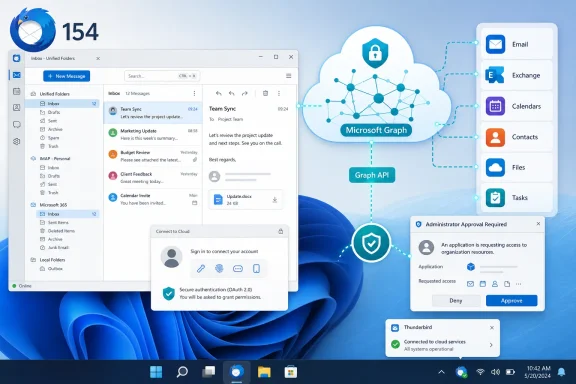 Microsoft Graph is enabled, but administrators still control access
Microsoft Graph is Microsoft’s modern API layer for Microsoft 365 services. It is the strategic route for third-party clients that need to work with Exchange Online as older approaches become less attractive or less complete over time. Thunderbird had already added native Exchange Web Services support, and version 154 now enables Graph for Microsoft 365 rather than leaving it behind a preference.
That matters to Windows users who want a desktop client outside Outlook but still rely on a work or school mailbox hosted in Microsoft 365. It also matters to organizations that have standardized on Microsoft Entra ID authentication and OAuth rather than allowing legacy credential flows. The change brings Thunderbird closer to the identity and API model Microsoft expects modern cloud-connected applications to use.
The important qualification is that Graph enablement is not the same as a complete Microsoft 365 client stack. Thunderbird’s public roadmap continues to list Graph calendar and address-book support as work in progress. The release note itself only says that Microsoft Graph is enabled for Microsoft 365; it does not promise a finished implementation of every Outlook, Exchange Online, Calendar, or People feature a company may use.
This is particularly relevant for IT teams evaluating Thunderbird as an Outlook alternative. Mail access may now be the immediate focus, but administrators should test shared mailboxes, delegated access, calendar workflows, global address list behavior, retention rules, and any compliance tooling that depends on the Microsoft client. A successful sign-in is only the beginning of a deployment assessment.
Thunderbird’s development team said in its June 2026 engineering update that Microsoft had confirmed approved mail clients such as Thunderbird could continue to obtain user consent for permissions that had previously been unavailable to third-party applications. That removes a major uncertainty for ordinary users, but it does not override a tenant’s own Entra policies.
Microsoft’s Entra documentation is clear that administrators can restrict or disable user consent, require users to request approval, or limit consent to trusted verified publishers and specific low-impact permissions. Thunderbird’s own knowledge-base work also acknowledges that Microsoft 365 administrators may need a formal way to allow-list the Thunderbird application in their tenant. A user whose organization displays a “Need admin approval” message after upgrading has not necessarily encountered a Thunderbird defect; the block may be an intentional tenant control.
For managed environments, the right approach is to treat Thunderbird 154 as a new enterprise application access decision. Review the consent screen and the requested delegated permissions, determine whether user consent is permitted under the tenant’s policy, and grant organization-wide approval only after the organization has decided the client fits its mail-data and endpoint-management rules.
Closing the window can now leave Thunderbird running
The other visible change is an optional system tray mode. When enabled, Thunderbird hides to the tray after its last application window is closed instead of quitting. That sounds minor, but it changes the day-to-day behavior of the application for anyone who expects an email client to keep polling for new messages, maintain background connections, and remain ready for notifications.
For Windows users accustomed to Outlook, Teams, Slack, or other persistent desktop applications, the prior behavior could be confusing: closing the final Thunderbird window meant the application was no longer running. The new option gives Thunderbird a more conventional desktop presence without forcing that choice on everyone.
There is an operational consequence: users must distinguish between closing a window and exiting the application. On a system with several background tools, leaving Thunderbird resident means it can continue consuming memory, retaining network sessions, and showing notifications until the user explicitly quits it. That is expected behavior for a tray-based client, but it is worth explaining in managed-device documentation and support guides.
The tray feature also does not change an organization’s Windows notification policies, endpoint battery policies, or network access controls. It controls whether Thunderbird remains running after its windows disappear; it is not a replacement for a centrally managed mail-notification strategy.
The IMAP folder-copy fix deserves more attention than the interface additions
Among version 154’s fixes, the most operationally significant is the correction for an IMAP folder move to Local Folders that could delete messages when the copy operation failed. This is the kind of bug that can be obscured by a release full of user-facing additions: a failed local archival or migration action should not result in the source messages disappearing.
For users who move older mail from a server-backed IMAP account into local archives, this is a tangible data-protection fix. The safe assumption remains that important mail should be backed up independently and that large mailbox moves should be checked before server-side retention actions occur. But correcting the failure path reduces the risk that a routine archival operation creates an unexpected recovery job.
Thunderbird 154 also fixes IMAP attachments that could appear empty after filters moved messages. That issue lands in a different but equally familiar support category: a mail rule appears to work, but the result is misleading or incomplete when a user opens the moved message. Organizations with server-heavy mail filtering habits should validate critical rules after the upgrade, especially where attachments feed accounts payable, case-management, or support workflows.
The release addresses repeated notifications for messages that had already been marked read on another device as well. That is less severe, but it is a meaningful quality-of-life correction for users who read mail across a Windows PC, phone, and web client. Synchronization defects often look like user error until they create enough duplicate alerts to make people distrust their notification settings.
Exchange and OAuth fixes arrive alongside the Graph switch
Thunderbird 154 includes two fixes directly relevant to organizations that had already deployed Exchange accounts through Thunderbird’s existing support. Exchange accounts could falsely report repeated login failures during authentication, and custom OAuth settings for one Exchange Web Services account could overwrite the original account’s settings.
Neither fix is glamorous, but both address conditions that help-desk teams recognize immediately. False login-failure messages generate password resets, reauthentication loops, and unnecessary account-lockout investigations. OAuth settings leaking from one account configuration to another can produce inconsistent behavior that is hard to reproduce, especially on machines used with multiple work, school, or test accounts.
The timing is notable. Thunderbird is enabling Graph while repairing problems in the EWS and OAuth paths it already supports. That is an appropriate order for an open-source client moving into more complicated enterprise territory: add the new protocol route, but do not leave existing Exchange users carrying old authentication failures and account-isolation bugs.
Administrators should therefore avoid treating 154 as an upgrade aimed only at users who intend to configure a new Microsoft 365 account. Existing Thunderbird users with Exchange or IMAP mailboxes stand to benefit from the reliability work even if Graph is not yet approved in their tenant.
Search, attached messages, and encrypted mail get practical fixes
Thunderbird 154 adds a setting that opens global search results in list view by default. It also lets users copy attached email messages—the message/rfc822 attachments commonly created when mail is forwarded as an item—to a chosen folder, and drag those attached messages into the folder tree.
Those additions improve workflows that are common in investigation, support, legal, and administrative work. An attached email is often evidence, a ticket history, or a handoff artifact rather than an ordinary file. Being able to file it directly into a local or account folder reduces the need to open, re-forward, or manually reconstruct it.
The release also corrects decryption for CMS messages using AuthEnvelopedData, a newer encrypted-message format, and adds attachment preview support on macOS. The encryption compatibility work is more consequential than the platform-specific preview feature: when a client receives an encrypted message, failure to process a valid format turns into a communications problem rather than a cosmetic defect.
Several crash fixes round out the release, including failures when opening drafts or templates containing invalid quoted-printable data, saving Exchange mail, going offline with an active IMAP IDLE connection, running online mail search, and moving EWS search folders to Trash. These are narrow cases, but they reinforce the broader message of version 154: the release is not merely a Graph switch. It is also a stabilization pass across the older protocols and message formats that remain part of real-world enterprise mail.
For Microsoft 365 users, Thunderbird 154 is worth evaluating now because Graph is no longer presented as an experimental hidden option. For administrators, the next action is more specific: approve or deny the Thunderbird application deliberately, test the Microsoft 365 functions their users actually depend on, and avoid promising Outlook-equivalent calendar and directory behavior until Thunderbird ships the remaining Graph work it still lists as active.
