
MakeUseOf’s account of the project correctly identifies the appeal: former Microsoft engineer Dave Plummer’s TinyRetroPad brings back the familiar File, Edit, Format, View, and Help menu layout while retaining Open, Save, Find, Replace, printing, word wrap, font selection, and a line-and-column indicator. But the important detail is in the repository itself. TinyRetroPad delegates much of the work to Windows components already installed on the machine, including the RICHEDIT50W control and common file, print, font, and search dialogs.
That makes TinyRetroPad an interesting demonstration of what a native Win32 front end can still achieve with very little application code. It does not prove that a modern editor’s installed size, memory footprint, feature set, security support, and update model can be reduced to a few kilobytes without trade-offs.
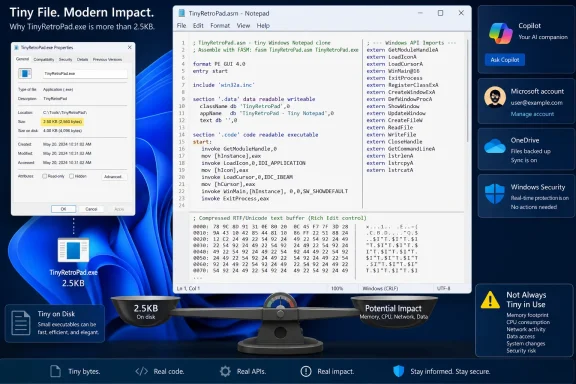 The 2.5KB claim leaves out the Windows code it depends on
Plummer’s GitHub repository describes TinyRetroPad as a Notepad-style editor in “roughly 2.5 KB,” with the feature-filled build landing near 2,476 bytes. The project reaches that number using assembly language and Crinkler, an executable compressor designed for extremely small Windows programs.
The repository is unusually candid about the underlying method. TinyRetroPad is “basically a wrapper” around the Windows Rich Edit control. Its menus call into existing WinAPI capabilities for tasks such as choosing a font, opening a file picker, locating text, printing, and formatting dates and times. Those APIs and libraries are not bundled in the 2.5KB executable; Windows provides them.
The Register independently compiled the program and reported a resulting binary of 2,794 bytes, which occupied 4,096 bytes on disk because of filesystem cluster allocation. It also noted that the program’s runtime requirements are substantially larger than its file size, precisely because the application calls on Windows facilities already present on the PC.
That distinction is not a criticism of the project. Reusing platform libraries is conventional Windows development, and it is one reason native software can remain compact. But it means the TinyRetroPad executable is best understood as a tiny launcher and interface layer atop Windows, not as a 2.5KB self-contained text-editing stack.
The MakeUseOf report that observed roughly 500MB of memory use on one Windows 11 laptop should therefore not be treated as a settled benchmark for TinyRetroPad. No reproducible measurement methodology, workload, Task Manager metric, or comparison build was provided. Memory figures can differ sharply between private working set, committed memory, virtual address reservations, and DLL-backed pages shared across processes. What the report does establish is that a minuscule executable file does not guarantee minuscule runtime memory use.
Microsoft’s Notepad AI features are real, but their scope is narrower than the complaint suggests
Microsoft has added Rewrite, Summarize, and Write features to Notepad, and its own support documentation says the cloud-backed tools require a Microsoft account and AI credits. Microsoft 365 Personal and Family subscribers receive 60 credits per month, while Copilot Pro subscribers receive higher usage limits; credits can be consumed by features across Microsoft’s Windows and Microsoft 365 applications.
Microsoft also says those Notepad AI features can be disabled in the app’s settings. For managed Windows 11 environments, the company provides an administrative template and a policy named DisableAIFeaturesInNotepad. Administrators can block access through Intune, Group Policy, or by setting the DisableAIFeatures value under HKLM\SOFTWARE\Policies\WindowsNotepad.
There is a material qualification missing from broad claims that “Notepad now has AI.” Microsoft’s current consumer support page says Write, Rewrite, and Summarize are available to Windows Insiders in the Canary and Dev channels on Windows 11. Microsoft also distinguishes subscription-based cloud processing from local-model features, which process text on-device. Availability varies by build, hardware, account status, region, and channel.
For an IT department, that means TinyRetroPad is not the only way to keep generative AI out of a plain-text workflow. Microsoft already offers a supported method to remove Notepad’s AI entry points on managed Windows 11 devices. For a home user, disabling the features is less drastic than replacing the editor, and avoids introducing a separate unsigned executable into the workflow.
TinyRetroPad restores the older model, not every Notepad capability
The attraction is straightforward. TinyRetroPad removes the account-dependent AI layer and returns to an older Windows interface where a text editor opens quickly, displays a file, and stays out of the way. Its feature set is more substantial than a proof-of-concept: it includes save prompts, Find and Replace, Go To, printing, page setup, word wrap, a status bar, and drag-and-drop startup-file handling.
It is still a hobbyist project with a deliberately constrained design. The repository says there are no warranties or guarantees. It has no formal release channel listed on GitHub, no published support lifecycle, no Microsoft Store packaging, and no evidence of the testing, accessibility validation, localization work, servicing process, or enterprise deployment support that comes with Windows Notepad.
There are also functional implications to its design choices. TinyRetroPad uses the Rich Edit control and a default Courier font, whereas current Notepad has accumulated capabilities such as tabs, session restoration, spellchecking, autocorrect, dark-mode integration, encoding controls, and Markdown-oriented formatting work in recent Windows 11 releases. Some users regard those additions as clutter; others use them daily. Replacing Notepad means choosing which set of compromises is preferable, rather than simply removing unwanted AI.
The broader Windows context matters as well. TechRadar and The Register both connected TinyRetroPad’s appeal to Microsoft’s 2024 removal of WordPad. The old division was easy to describe: Notepad handled plain text and WordPad handled more formatted documents. Microsoft has increasingly put lightweight writing features into Notepad after retiring the middle-ground application, which helps explain why the editor now serves more audiences than its original minimal role.
Windows Defender warnings are a deployment problem, not a cosmetic nuisance
The strongest reason to be cautious is not that TinyRetroPad is open source. Open source permits inspection and independent compilation, and the project is distributed under the Apache 2.0 license. The concern is that the prebuilt executable is compressed with Crinkler, and TinyRetroPad’s own README explicitly warns that programs using Crinkler can trigger antivirus false positives, including Windows Defender.
That warning should not be waved away as harmless. A detection or SmartScreen-style warning does not establish malicious behavior, but users should not train themselves to bypass Windows security prompts merely because a small utility has an appealing anti-bloat story. The repository tells users they may need to create an antivirus exception folder to build certain versions, while also declining to provide the command needed to do so. That is a sensible boundary from the maintainer, but it is also a clear sign that this is not a frictionless consumer download.
For personal experimentation, the sensible route is to inspect the project, build it from source in an isolated development environment if practical, and keep the software away from sensitive production workflows unless it has been vetted under local policy. For business deployments, an un-signed, compressed, independently maintained executable that can attract endpoint protection alerts is a poor substitute for configuring the Microsoft application already included with Windows 11.
Do not use TinyRetroPad as a replacement for Notepad when you need a supported tool to inspect incident evidence, edit production configuration files, work on regulated endpoints, or operate under software allowlisting rules. Its tiny binary is an engineering exercise first and a managed-software product second.
The real lesson is that Microsoft has made a simple preference harder to express
TinyRetroPad succeeds as a compact critique of the direction of Windows’ inbox apps. Its source code shows that a familiar text editor can be assembled from native Windows primitives without sign-in prompts, cloud calls, subscription credits, or a toolbar dedicated to generated prose. That will resonate with users who open Notepad to inspect a log, alter a .ini file, copy a command, or park a temporary note.
But the practical answer is different for different users. Windows 11 users who otherwise like Notepad can turn off its AI features. Administrators can disable them centrally with Microsoft’s supported policy. Users who specifically want an old-school editor can try TinyRetroPad, provided they understand that its 2.5KB headline reflects an aggressively compressed wrapper over Windows components and that its security warnings are part of the project’s real operational cost.
TinyRetroPad is a sharp technical statement about restraint in Windows software. It is not evidence that modern Notepad has become unusable, and it should not be deployed as though a tiny executable automatically carries a tiny risk.
