
For Windows administrators, the important point is not that SharePoint or Teams themselves have been breached. The reported operation abuses their normal, trusted functions after a user has already been convinced to run a PowerShell command. This is a trust-boundary problem: controls that treat microsoft.com, Microsoft Graph, SharePoint, or Teams destinations as inherently benign can miss the activity because the destinations really are Microsoft-operated services.
The implant’s reported initial-access path is also familiar: an attacker impersonates IT staff in Microsoft Teams and persuades a target to execute a command that retrieves an archive. That archive reportedly includes a Python 3.12.9 runtime, a loader named bootstrap-fat.pyc, and an encrypted package protected with PyArmor. Ontinue told SC Media it recovered 115 of roughly 120 modules for analysis, but neither Ontinue nor SC Media had published a hash list, victim sector, victim count, or a named threat actor as of publication. That means defenders have useful behavioral leads, but no public indicator set that can establish whether a particular detection is TWINLOOT rather than another Python-based intrusion.
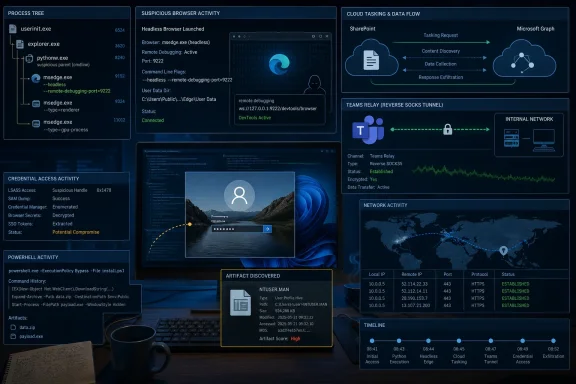 SharePoint tasking changes where defenders need to look
According to Ontinue’s account to SC Media, TWINLOOT polls an attacker-controlled SharePoint drive every 15 seconds for commands. The traffic reportedly involves Microsoft identity and Graph endpoints, followed by access to a SharePoint tenant controlled by the operator. This is a classic dead-drop resolver arrangement: SharePoint stores instructions and data, reducing the need for a conspicuous callback server.
The unusual part is the reported use of Microsoft Edge to perform Graph requests. Rather than having python.exe call the Graph API directly, TWINLOOT allegedly launches a headless Edge instance, attaches to it over the Chrome DevTools Protocol on a local WebSocket, and executes same-origin browser requests to Graph through the page context. Endpoint telemetry may therefore show msedge.exe making the cloud requests that matter, while the Python process becomes visible mainly as Edge’s parent or as a process using remote-debugging switches.
That is a meaningful evasion layer, but it is not invisibility. Microsoft documents an Edge policy, RemoteDebuggingAllowed, that can prohibit the --remote-debug-port and --remote-debugging-pipe command-line options. Organizations that do not use browser automation, testing tools, or developer workflows requiring remote debugging should evaluate disabling it through the Microsoft Edge administrative templates. The policy requires a browser restart and should be tested against approved automation before a broad deployment.
The more immediate detection opportunity is correlation. A workstation user who has never used a SharePoint site should not suddenly produce a high-frequency pattern of Graph activity, access a new external SharePoint tenant, and launch Edge with headless or debugging arguments shortly after PowerShell downloads an archive. Any one event may be legitimate; the sequence is considerably harder to explain.
Microsoft Defender XDR can join process, network, file, image-load, logon, and cloud-connected telemetry in Advanced Hunting. A practical hunt should begin with PowerShell-launched archives or Python runtimes in user-writable locations, then pivot to child Edge processes and command lines containing --headless, --remote-debugging-port, or --remote-debugging-pipe. Investigators should also preserve the browser’s parent-process chain. Treating all Edge traffic as user browsing will miss the distinction TWINLOOT is built around.
Teams TURN relays create an interactive tunnel, not a Teams chat
SC Media reports that TWINLOOT has a second communications path: a reverse SOCKS5 tunnel intended for hands-on access and lateral movement. It can reportedly connect directly to attacker infrastructure, but it also supports tunneling through the relay servers that Microsoft Teams uses for real-time media when endpoints cannot communicate directly.
The technique is not a new Teams flaw. Praetorian publicly described the underlying method, called TURNt or “Ghost Calls,” in 2025. Its research showed how valid Teams TURN credentials can be obtained and used to establish WebRTC data channels that relay interactive proxy traffic through Teams infrastructure. Praetorian’s public TURNt documentation also explicitly lists Microsoft Teams as supported.
That history matters because it confirms the mechanism is technically credible while putting TWINLOOT’s claimed use in perspective. A Teams TURN connection is not automatically malicious, and blocking all *.relay.teams.microsoft.com traffic would break legitimate calling behavior. The useful question is whether the connection is being made by a sanctioned Teams client during a call, or by an unexpected process on a workstation that also shows signs of Python execution, browser automation, credential theft, or rapid connections to internal administrative services.
Ontinue’s reported design uses the SharePoint channel to exchange WebRTC session-description data, while the Teams TURN relay carries the interactive data path. The combination removes the obvious attacker-host connection from routine proxy logs: SharePoint transfers the setup material, while Teams relays the tunnel. It also leaves defenders with two separate Microsoft 365 activity streams that may look ordinary when examined in isolation.
Teams relay abuse is no longer only a proof-of-concept concern. Independent reporting in June described DragonForce’s Backdoor.Turn malware using Teams relay infrastructure in a real intrusion. TWINLOOT, if the Ontinue findings hold, would represent another malware family applying the same broad idea with a different architecture: SharePoint for persistent tasking and signaling, Teams TURN for interactive access, and Edge to make Graph traffic originate from a familiar browser executable.
The fake lock screen is aimed at passwords defenders may never see fail
The most operationally dangerous component described by Ontinue is a credential harvester that presents a fake Windows 10 or Windows 11 lock screen. The implant reportedly builds the display with Tkinter and populates it using the victim’s actual name, profile image, and wallpaper. A command identified as credz_waiting triggers the prompt.
SC Media reports that the fake screen captures two password entries, deliberately displays a failure after the first one, and does not validate either entry. The victim can then continue to the real Windows authentication flow. The attacker receives the typed password, while the organization may have no corresponding failed Entra ID, Active Directory, or Windows logon event because the first password prompt was entirely local and fraudulent.
This is why failed-sign-in analytics alone are insufficient. A successful valid-password login later in the session may look normal, especially if the attacker uses the password for SMB, RDP, WinRM, SQL Server, SSH, LDAP, or other services reachable from the compromised machine. The reported TWINLOOT module then uses its SOCKS tunnel to make those internal connections.
The high-value endpoint signal is therefore the originating process. A user workstation’s python.exe, bundled Python binary, or suspicious child process should not fan out to multiple internal addresses on ports such as 445, 3389, 5985, 22, 1433, 135, or 389. Network sensors, Defender for Endpoint, and firewall logs should retain both the local process attribution and the destination ports. A connection to TCP 445 becomes much more urgent when it follows a user-launched Python runtime and precedes a new remote service session.
Organizations should also revisit their Teams external-access settings. Restricting external Teams communication where the business does not need it will not remove every social-engineering route, but it reduces the attacker’s ability to impersonate internal IT staff through a channel employees tend to trust.
NTUSER.MAN persistence carries a visible operational cost
TWINLOOT reportedly includes ordinary persistence options such as TypeLib COM scriptlet hijacking and TaskCache manipulation. Its more unusual method is the creation of %USERPROFILE%\NTUSER.MAN, exploiting Windows mandatory user profiles. Ontinue described it as an in-the-wild use of Praetorian’s January 2026 “Corrupting the Hive Mind” research.
Praetorian’s original research established the central behavior: Windows can load NTUSER.MAN in preference to the normal per-user NTUSER.DAT registry hive when the user signs in. An attacker can construct the mandatory hive offline with RegLoadAppKeyW and the Offline Registry API through offreg.dll, then place it in the profile directory without making the standard live registry modifications that many endpoint products watch.
But the research also documents a limitation that should shape both incident response and detection. Once NTUSER.MAN exists, the affected profile becomes mandatory: changes made by the user during a session generally do not persist after sign-out. The persistence only takes effect at the next logon, and the technique is limited to the current user hive rather than system-wide HKLM persistence. In other words, it trades some conventional registry telemetry for a file artifact and a potentially disruptive user-profile condition.
That makes hunting more concrete than “look for stealthy registry changes.” Alert on creation, renaming, or unexpected modification of NTUSER.MAN anywhere under user profile directories, particularly when the initiating process is Python, PowerShell, a temporary executable, or an unsigned binary. Investigate unexpected loading of offreg.dll, profile-reset complaints that appear after a suspicious sign-out, and startup entries that emerge only after the user returns to the device.
A NTUSER.MAN file may be legitimate in environments with managed mandatory profiles, so the alert needs asset context. On a standard knowledge-worker laptop, however, it is unusual enough to warrant immediate review.
Treat Microsoft 365 activity as telemetry, not an allow-list
TWINLOOT’s reported design is a warning against a common operational shortcut: allowing Microsoft 365 destinations and assuming the resulting traffic has been vetted by its destination. Microsoft services authenticate, transport, and host content for enormous volumes of valid activity. They do not establish that a particular tenant, SharePoint drive, Graph request, Teams relay session, or browser process is authorized in your environment.
The response should be targeted rather than destructive:
- Restrict external Teams contact and unaudited app access where they are not required, while preserving documented business exceptions.
- Review OAuth consent grants, newly registered enterprise applications, unfamiliar SharePoint tenants, and Graph activity associated with accounts that do not normally automate Microsoft 365 work.
- Hunt for PowerShell downloading archives followed by Python execution from Downloads, Temp, AppData, or other user-writable paths.
- Investigate Edge processes launched with headless or remote-debugging arguments when their parent is not an approved developer or test tool.
- Correlate cloud events with endpoint behavior, especially unexpected Python-to-internal-admin-port traffic and creation of
NTUSER.MAN.
The immediate consequence is that domain reputation and destination allow-lists are no longer enough for this class of intrusion. TWINLOOT’s reported components still have to execute on Windows, create files, spawn processes, request credentials, and reach internal services. Those seams—especially the PowerShell-to-Python-to-Edge chain and the creation of a mandatory user hive—are where defenders can act before trusted Microsoft infrastructure turns an initial Teams lure into a broader network compromise.
