
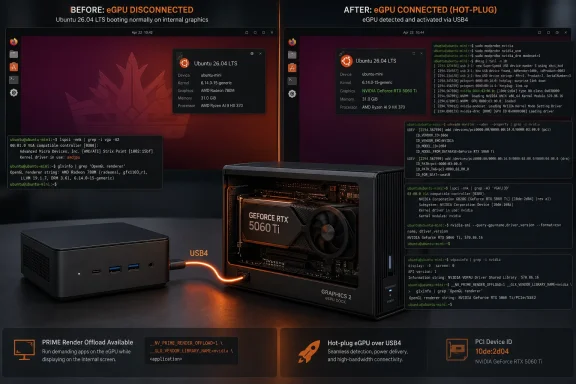
The practical fix is a two-part configuration: install NVIDIA’s open kernel-module package for the RTX 5060 Ti, then prevent NVIDIA modules from loading during ordinary boot and load them only when the PCIe device appears. The second half is the important finding here. It turns a setup that works only when the dock is permanently connected into one that can operate as a removable eGPU.
CNX Software is the only outlet to publish this exact Khadas-and-Ubuntu boot sequence so far, so the failure mode should be treated as a tested configuration-specific report rather than a confirmed Ubuntu-wide bug. Still, NVIDIA’s own Linux documentation and open kernel-module device list support the components of the workaround: the RTX 5060 Ti is device ID 10de:2d04, is supported by the open modules, and NVIDIA documents removable-GPU and PRIME render-offload configurations as distinct deployment cases.
 Nouveau successfully enumerated the eGPU, but did not provide usable performance
The first result is encouraging at a hardware level. CNX Software’s Ubuntu 26.04 installation saw both the Intel Meteor Lake integrated GPU and the external NVIDIA GB206 GPU after the Khadas Mind Graphics 2 was connected over USB4. The system reported the RTX 5060 Ti through Nouveau, Mesa’s NVK Vulkan driver, and the Zink OpenGL translation layer.
That stack is sufficient for discovery and basic rendering, which can create the misleading impression that the eGPU is ready for use. CNX ran Unigine Heaven 4.0 and recorded a score of 592.199 at roughly 23.5 frames per second. In its test, that result was below the performance of the host’s integrated Intel graphics.
This is a reminder that enumeration is not acceleration. A PCIe device appearing in lspci, inxi, Vulkan, or a desktop settings panel only confirms that the operating system can see it. It says little about whether the graphics stack is using the driver path intended for a current-generation GPU, whether an application is being offloaded to that GPU, or whether the eGPU’s display and PCIe links are functioning as expected.
NVIDIA’s current documentation makes the driver choice less ambiguous than it may look in Ubuntu’s package list. Its open GPU kernel modules support Turing-and-later hardware, including the RTX 5060 Ti, and the device-ID table explicitly lists 2D04 for that card. “Open” in Ubuntu package names such as nvidia-driver-610-open refers to the kernel modules; it does not mean an entirely open graphics driver stack. The accompanying user-space OpenGL, Vulkan, CUDA, and firmware components remain NVIDIA-provided proprietary software.
Ubuntu’s nvidia-driver-610-open package changed the rendering path
CNX Software installed Ubuntu’s nvidia-driver-610-open package, which supplied NVIDIA driver version 610.43.02 in the test. After rebooting, the card reported the nvidia driver rather than Nouveau, and the renderer changed from Zink-over-NVK to NVIDIA’s native OpenGL path.
The publication reports that Heaven’s score and average frame rate rose by approximately 5.75 times after the switch. That is strong evidence that the initial problem was the driver stack rather than USB4 detection or a failed dock connection. But the report does not provide the complete post-install benchmark result, the Heaven preset, resolution, display attachment, power mode, or a PCIe-link measurement in its written results. Readers should therefore avoid treating the multiplier as a general RTX 5060 Ti USB4 benchmark.
There is another reason not to blindly choose the numerically highest package offered by ubuntu-drivers list. NVIDIA identifies the 610 series as a new-feature branch, while its production branch can be on a different version line. Ubuntu may package several branches simultaneously, and the right selection is the one supported for the installed Ubuntu release, kernel, GPU generation, and workload—not automatically the highest-looking number.
For this Blackwell card, however, an open kernel-module build is the relevant distinction. NVIDIA’s project documentation lists the RTX 5060 Ti among supported devices, and recent Blackwell reports in NVIDIA’s own issue tracker show why this matters: some Blackwell hardware is explicitly rejected by the older proprietary-kernel-module path. Administrators replacing Nouveau on an RTX 5060 Ti should verify that they installed nvidia-driver-<version>-open, rather than assuming that a similarly versioned non-open package is interchangeable.
Applications also need to select the eGPU. CNX used NVIDIA PRIME render offload variables to launch Heaven on the external card while retaining Intel graphics as the primary display GPU. That is the correct model for many mini PCs and laptops: the external NVIDIA GPU accelerates selected applications, while the integrated GPU can continue to own the desktop session.
The unplugged-dock boot failure is the real operational issue
The configuration became less straightforward after NVIDIA’s driver was installed. CNX Software reports that removing the Mind Graphics 2 caused the GEEKOM IT13 Max to reach a black screen during startup. Switching to a text console showed the NVIDIA driver repeatedly looking for the graphics device.
A desktop or mini PC eGPU setup cannot assume the dock will always be present. The user may move the system, power the dock independently, change cables, disconnect it to reduce idle power use, or simply boot before the dock comes online. A machine that cannot reliably boot without an optional eGPU is not configured for a removable peripheral; it has effectively made that peripheral part of its baseline boot hardware.
NVIDIA’s Linux documentation contains a dedicated section for external and removable GPUs, which is an indication that these installations carry requirements beyond a normal internal PCIe card. Its runtime power-management documentation also notes that an NVIDIA GPU may expose more than the VGA function alone, including audio, USB, and USB-C controller functions. That architecture helps explain why eGPU behavior can be sensitive to module-loading order, hot-plug timing, firmware, dock design, and the host system’s PCIe and ACPI implementation.
The CNX result should not be read as proof that every RTX 5060 Ti eGPU on Ubuntu 26.04 will fail to boot when absent. No second outlet has independently reported the exact Khadas Mind Graphics 2 and GEEKOM IT13 Max behavior. It does establish a credible configuration hazard: installing an NVIDIA driver on a host with an intermittently attached Blackwell eGPU can change startup behavior even when the eGPU itself is no longer connected.
Blacklisting at boot and loading on hot-plug makes the eGPU removable again
CNX’s solution has two layers. First, it blacklists the NVIDIA modules—nvidia, nvidia_modeset, nvidia_drm, and nvidia_uvm—through a file under /etc/modprobe.d/, then rebuilds the initramfs. This prevents the host from attempting to initialize the missing eGPU early in boot.
Second, it adds a udev rule that listens for the appearance of the RTX 5060 Ti’s PCI device and invokes modprobe for the four NVIDIA modules. The rule is tied to NVIDIA’s vendor ID, 0x10de; the RTX 5060 Ti’s GPU function device ID, 0x2d04; and PCI class 0x030000 for a VGA controller. Once Ubuntu sees that device being added, the driver stack loads and PRIME offload can use the card.
The distinction is operationally useful:
- The blacklist makes the host boot independently of the dock.
- The udev rule restores automatic driver loading when the intended eGPU is connected.
- The device ID must be changed for a different NVIDIA GPU; copying the Khadas rule unchanged would not match another card.
- The audio function associated with the GPU uses a different PCI device ID and is not the matching target for the graphics-driver rule.
CNX also sets NVreg_DynamicPowerManagement=0x00, disabling NVIDIA runtime D3 power management. NVIDIA documents that value as disabling runtime D3 behavior, which is a reasonable conservative choice during troubleshooting because it avoids an additional layer of GPU power-state transitions. It may, however, increase idle power use while the eGPU is connected, so it should be viewed as part of this stability-focused workaround rather than a universal power-management recommendation.
Treat the configuration as a host-specific deployment, not a one-command install
The Khadas Mind Graphics 2 test supplies a useful working pattern for Ubuntu 26.04 users with Blackwell eGPUs: install the NVIDIA open driver, use explicit PRIME offload for workloads, make boot independent of the dock, and trigger driver loading only after the card is present. It also shows why an eGPU setup must be tested in both states—connected and disconnected—before it is considered stable.
Before adopting the udev rule on another system, administrators should confirm the GPU’s vendor and device IDs with lspci -nn, retain a path to a local console or recovery boot, and test a cold boot with the dock physically disconnected. They should also test a connected boot, a powered-but-disconnected dock, and application offload after reconnecting the eGPU.
The immediate consequence is clear: an RTX 5060 Ti eGPU can be made practical on Ubuntu 26.04, but the proprietary NVIDIA driver is only the first half of the deployment. For systems that treat the dock as removable hardware, automatic module loading must be designed around hot-plug rather than assumed at boot.
