
UniGetUI 2026.2.6 is now available with a refreshed WinUI-inspired interface, CSV exports for installed software and available updates, and fixes aimed at stubborn WinGet update failures. For Windows users who use UniGetUI as a front end for Winget, Chocolatey, Scoop, Pip, npm, and .NET Tool, the release is less about adding another package source than making routine maintenance more dependable.
As reported by Neowin, the update also expands Operation History, giving completed installs, upgrades, and removals a more structured visual record. That matters for power users and administrators using the app to coordinate bulk package actions, where a terse console log is not always the quickest way to identify what changed.
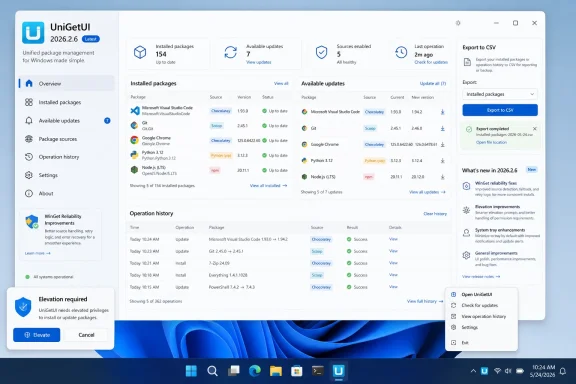
UniGetUI 2026.2.6 can export both installed packages and currently available updates to CSV. The feature gives users a straightforward way to inventory a workstation, compare package states between machines, or keep a record before a migration or rebuild.
The release also adds a clear button to the title-bar search field and improves context menus and immersive overlays. Borders now follow the Windows accent color, with fallback styling for systems where Mica is unavailable.
The update further addresses duplicate UniGetUI instances opened from toast notifications and ensures User Account Control prompts appear in the foreground. Those are small-sounding defects with outsized consequences: an invisible elevation prompt or an update loop can make unattended-looking maintenance turn into a confusing manual recovery job.
PowerShell modules should also now update in the intended CurrentUser scope rather than being forced into an incorrect target.
Custom install arguments and installation paths can now use expanded environment variables, which should be particularly useful for repeatable setups that rely on per-user folders, redirected locations, or deployment variables.
UniGetUI is maintained by Devolutions and remains open source. Version 2026.2.6 is a practical maintenance release: its visible polish is welcome, but the WinGet reliability fixes and export capability are likely to be the changes Windows package-management regulars notice most.
As reported by Neowin, the update also expands Operation History, giving completed installs, upgrades, and removals a more structured visual record. That matters for power users and administrators using the app to coordinate bulk package actions, where a terse console log is not always the quickest way to identify what changed.
CSV exports make package state easier to audit
UniGetUI 2026.2.6 can export both installed packages and currently available updates to CSV. The feature gives users a straightforward way to inventory a workstation, compare package states between machines, or keep a record before a migration or rebuild.The release also adds a clear button to the title-bar search field and improves context menus and immersive overlays. Borders now follow the Windows accent color, with fallback styling for systems where Mica is unavailable.
WinGet and elevation fixes target real maintenance friction
The most important changes are under the surface. UniGetUI 2026.2.6 fixes WinGet update loops in cases where an upgrade did not successfully complete, and it corrects cases where explicitly configured installation locations were ignored during WinGet updates.The update further addresses duplicate UniGetUI instances opened from toast notifications and ensures User Account Control prompts appear in the foreground. Those are small-sounding defects with outsized consequences: an invisible elevation prompt or an update loop can make unattended-looking maintenance turn into a confusing manual recovery job.
PowerShell modules should also now update in the intended CurrentUser scope rather than being forced into an incorrect target.
More predictable behavior when UniGetUI stays in the tray
UniGetUI now limits notifications to times when the app is hidden, reducing interruptions while it is already on screen. Search terms are cleared when the application is closed to the system tray, tray icons refresh after a Windows theme change, and partially entered process names are retained when configuring Close Apps behavior.Custom install arguments and installation paths can now use expanded environment variables, which should be particularly useful for repeatable setups that rely on per-user folders, redirected locations, or deployment variables.
UniGetUI is maintained by Devolutions and remains open source. Version 2026.2.6 is a practical maintenance release: its visible polish is welcome, but the WinGet reliability fixes and export capability are likely to be the changes Windows package-management regulars notice most.
References
- Primary source: Neowin
Published: 2026-07-30T11:49:11+00:00
Loading…
www.neowin.net - Related coverage: github.com
Releases · Devolutions/UniGetUI · GitHub
UniGetUI: The Graphical Interface for your package managers. Could be terribly described as a package manager manager to manage your package managers - Releases · Devolutions/UniGetUI
github.com
- Related coverage: sourceforge.net
Loading…
sourceforge.net - Related coverage: devolutions.net
Release notes | UniGetUI
Learn about all the new features, fixes and improvements made in Devolutions UniGetUI across the versions.devolutions.net - Related coverage: unigetui.org
UniGetUI — Free Download for Windows PC
Download UniGetUI free for Windows 10/11. One GUI to manage WinGet, Scoop, Chocolatey, and more package managers.unigetui.org