
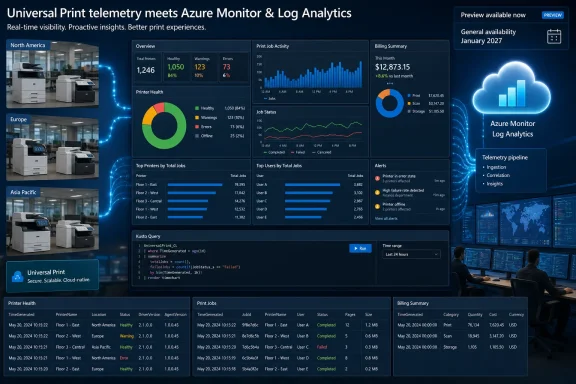
The important qualification is that this is not a January 2027 feature in the practical sense for every tenant. Microsoft Learn documentation published in June shows that Logs and Alerting is already in preview for allow-listed tenants in the commercial Azure public cloud. Administrators who can see the option in the Universal Print portal can begin deploying it now; January is the current target for broader general availability, not the beginning of all access.
For organizations that have been treating Universal Print troubleshooting as a portal-by-portal exercise, the integration changes the operating model. It turns print telemetry into data that can be queried with Kusto Query Language, sent into Azure Monitor alert rules, visualized in workbooks, and retained under an organization’s existing Azure governance controls.
 A preview exists, but availability remains uneven
Microsoft’s roadmap describes the feature simply: Universal Print customers will be able to send detailed diagnostic logs to a Log Analytics workspace for troubleshooting and custom alerts. The entry lists General Availability and Preview release phases, and names Worldwide standard multi-tenant, GCC, and GCC High cloud instances.
Microsoft’s own implementation documentation is more restrictive than that roadmap shorthand. It says the preview is rolling out through an allow-list in the commercial Azure public cloud, and that government and sovereign clouds are not supported yet. If the Logs and alerts page does not appear in the Universal Print admin portal, the documentation directs customers to contact their Microsoft representative.
That leaves a meaningful gap between the roadmap’s eventual cloud-instance listing and what a tenant can deploy in late August 2026. GCC and GCC High administrators should not assume that the roadmap entry means the preview is immediately enabled for their environment. The documentation establishes that availability is controlled at the tenant level during preview, while the roadmap provides the broader release intent.
Microsoft also has not published a tenant-by-tenant rollout sequence, a date for government-cloud preview access, or a commitment that all listed clouds will reach general availability simultaneously in January 2027. Admins planning an observability project around the capability should therefore treat January as a target date, not a contractual deployment deadline.
Universal Print data lands in Azure, not in a new Microsoft console
Microsoft Learn calls the feature Logs and Alerting, while the Universal Print admin portal labels its corresponding page Logs and alerts. The branding difference is minor; the deployment model is not.
Universal Print streams data into a Log Analytics workspace owned by the customer. Microsoft’s documentation says the service uses Azure Monitor’s direct-ingestion pipeline and a Data Collection Rule, or DCR, rather than retaining a separate copy of the operational data in Universal Print. The deployment creates three custom Log Analytics tables:
UniversalPrintPrinterHealth_CLreceives printer status and health events.UniversalPrintJob_CLreceives print-job lifecycle events and job metadata.UniversalPrintBillingSummary_CLreceives aggregated usage and billing records.
This is more useful than a fixed reporting page because the organization can correlate print failures with its own infrastructure telemetry. A site experiencing job failures after a network, identity, driver, connector, or printer change can query the relevant events in the same Azure Monitor environment already used for servers, applications, and services. A help-desk escalation can become an alerting rule with a specific threshold, time window, and action group instead of depending on a staff member noticing a cluster of complaints.
The trade-off is that Microsoft is providing raw operational data and the plumbing to collect it, not a finished monitoring service. Administrators must decide which events merit alerts, write or adapt KQL queries, choose notification paths, and tune thresholds to avoid creating another source of noisy tickets.
The data starts when administrators enable it
The documentation makes clear that this integration is not a historical reporting backfill. Telemetry begins flowing from the time the feature is enabled. A tenant that switches it on after a recurring printing incident will have data for the next occurrence, but not a retroactive account of the previous one.
Microsoft says printer-health and print-job updates should normally appear within a few minutes of the underlying event. Billing data is different: it is aggregated and delivered on a periodic roll-up, with extra delay possible immediately after initial setup. That distinction matters for alert design. A rule intended to identify a printer that has gone offline can be near-operational; a rule intended to track billing or page-volume trends needs to accommodate the aggregation interval rather than treating a delayed record as a failed ingestion event.
The print-job table also changes the information that may be visible to Azure administrators. Microsoft documents that it can contain the identity of the user who submitted a job, while printer-health telemetry includes location information such as country, city, and organizational hierarchy. The billing data records aggregated job and page counts.
In a small deployment, these fields may simply answer “who printed where, and what happened?” At enterprise scale, they can constitute personnel, location, and usage data that needs access controls and retention decisions. The new diagnostic capability should therefore be reviewed with the same RBAC and data-handling discipline applied to endpoint, identity, and application logs.
Setup requires Azure rights and an Entra tenant match
The feature is not a toggle available to every print operator. Microsoft’s documented setup uses a one-time deployment package, available as PowerShell, Bicep, or an ARM template. That deployment provisions or configures the Log Analytics destination, the three custom tables, and the DCR. It also grants Universal Print’s service principal the Azure role it needs to ingest data.
The Azure subscription used for the workspace and DCR must be in the same Microsoft Entra tenant as Universal Print. Microsoft explicitly says a workspace in another tenant will not receive the telemetry. That requirement will matter to organizations that centralize monitoring in a separate tenant, use a managed-services tenant, or have inherited Azure subscriptions after an acquisition.
The required permissions are also split across Azure and Microsoft 365 administration. The deployment requires sufficient rights to create resources and assign access in the target Azure resource group; enabling the service from Universal Print requires the Printer Administrator or Global Administrator directory role. The feature can use an existing Log Analytics workspace, according to Microsoft’s FAQ, but the deployment still adds the Universal Print tables and DCR to that workspace.
That is a sensible way to keep print data alongside other operational logs, but it should be deliberate. An existing workspace may carry broader access than the printing team expects, while a dedicated workspace can isolate print telemetry but adds another resource to manage. The safest initial design for many enterprises will be a dedicated or tightly controlled workspace during preview, followed by integration into the main monitoring design after data volumes, access needs, and alert quality are understood.
Azure Monitor billing is the operational catch
Universal Print itself does not require an additional license for this logging feature beyond the organization’s standard Universal Print subscription, according to Microsoft’s documentation. But the monitoring pipeline is not free: the customer pays Azure Monitor ingestion and retention charges for data stored in its workspace.
That cost model deserves attention before enabling every log category across a large print fleet. A busy environment can generate significant print-job telemetry, and data that looks modest per event can become expensive when multiplied by high job counts and long retention periods. Microsoft says billing begins when the feature is enabled and saved, while stopping the feature halts new ingestion but does not erase data already stored in the workspace.
The default retention posture is also uneven. Microsoft says the printer-health and billing tables inherit the workspace default, which is 30 days unless the customer has changed it. The print-job table’s retention can be tuned through parameters in the deployment package, and all three tables can later be adjusted in Azure. That flexibility is useful, but it puts the compliance and cost decision squarely on the customer.
A practical preview rollout should begin with a representative set of printers and a limited retention period. Measure daily ingestion, verify that a selected set of queries can identify real conditions worth acting on, and only then expand coverage. Alerting on repeated failures, sustained unhealthy status, or unusual volume patterns is likely to be more actionable than trying to page staff for every individual print-job state change.
A monitoring feature, not a replacement for audit records
Logs and alerts also should not be confused with Universal Print audit logging. Microsoft has separately outlined Universal Print audit records for Microsoft Purview’s Unified Audit Log, including administrator and user actions such as print-job submissions, configuration changes, and printer registrations.
The two capabilities serve different purposes. Purview audit logging is aimed at compliance and long-term records of actions. Azure Monitor integration is aimed at operational telemetry, troubleshooting, dashboards, and custom alerting. Organizations that need both accountability and fast fault detection will likely need both systems, with different retention, access, and review practices.
The immediate action for Universal Print administrators is simple: check whether Logs and alerts is visible in the portal, confirm that the Azure subscription is in the same Entra tenant, and decide where the three custom tables should live before activating the preview. Microsoft’s January 2027 general-availability target expands the planning window, but for tenants already on the allow-list, the governance, cost, and alert-design decisions begin now.