
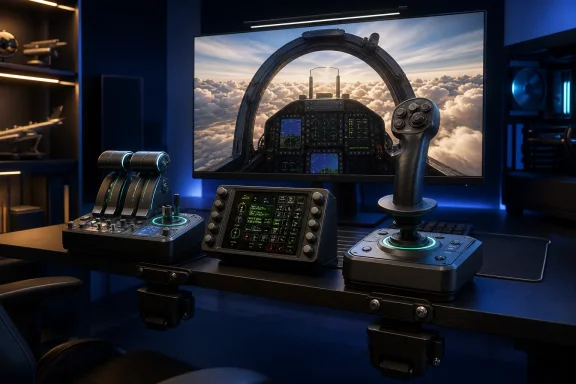
For Windows gamers, the important story is not simply that Turtle Beach has announced another joystick. It is that the company is trying to solve a persistent problem in the flight-simulation hardware market: the jump from a single all-in-one stick to a full cockpit is usually expensive, awkward, and often platform-specific. The new VelocityOne range gives PC sim pilots a way to start with a stick or throttle independently, then combine them later—while Xbox users can move to a fuller H.O.T.A.S. setup without leaving the officially licensed console ecosystem. G Style Magazine’s launch coverage
 A More Ambitious VelocityOne Flight Sim Strategy
The original VelocityOne Flightstick was already positioned as a practical Xbox and PC controller, pairing an ambidextrous stick with a small display, throttle levers, programmable buttons, and a twist-rudder option. It offered 27 programmable buttons and support for Microsoft Flight Simulator, space combat titles, and other flight-oriented games on both platforms. Turtle Beach’s original VelocityOne Flightstick page
The VelocityOne Flightstick II changes the equation by substantially increasing control density. Turtle Beach lists 38 programmable inputs—an increase of 11 compared with the previous Flightstick—alongside eight axes of control. Turtle Beach’s Flightstick II specifications
That matters because modern flight simulators are not limited to pitch, roll, yaw, and throttle. A single flight can require quick access to trim, flaps, landing gear, spoilers, radios, camera movement, autopilot functions, weapon systems, targeting controls, countermeasures, engine management, and sensor modes. Moving those functions away from a keyboard or menu interface and onto dedicated hardware is the practical appeal of a H.O.T.A.S.—short for hands on throttle and stick.
Turtle Beach’s new approach is also deliberately expandable:
- Flightstick II for pilots who want a self-contained stick.
- Dual Throttle for Windows users who need a dedicated power-management module.
- VelocityOne H.O.T.A.S. for buyers who want both devices together.
- VelocityOne Universal Sim Mount for positioning the hardware on a desk or simulation rig.
- Existing compatibility with the company’s VelocityOne Rudder Pedals for a more complete cockpit configuration. Turtle Beach’s H.O.T.A.S. product details
This modular model is particularly relevant for Windows PC flight simulation, where users frequently mix peripherals, add controls over time, and build setups around specific aircraft types or genres.
VelocityOne Flightstick II: The Key Upgrade Is Precision
The most substantial technical specification attached to the Flightstick II is its use of 16-bit Hall-effect sensors on the primary stick axes. Turtle Beach says these sensors provide more than 65,000 input counts per axis, enabling finer reported movement than a typical lower-resolution joystick sensor. Turtle Beach’s Flightstick II overview
Why Hall-effect sensors matter
Hall-effect sensors measure movement magnetically rather than depending on the physical contact surfaces used in many potentiometer-based controllers. In practical flight-sim terms, that design aims to deliver smoother movement and reduce wear-related issues that can emerge after long-term use.
The 16-bit rating means the controller can report a much larger number of positions across an axis than a 10-bit or 8-bit control. More reported positions do not automatically make someone a better virtual pilot—simulation settings, dead zones, calibration, aircraft modeling, and game support still matter—but higher sensing resolution can make fine corrections more consistent.
This is most relevant during situations where small inputs matter:
- Holding a stable approach during a crosswind landing.
- Fine-tuning pitch in helicopters or spacecraft.
- Keeping a formation position in a military sim.
- Making incremental aiming corrections in a combat or space-flight title.
- Managing smooth banking motions while using virtual reality.
The Flightstick II is not only about the central stick, either. Turtle Beach has equipped it with dual 10-bit Hall-effect levers, a thumbstick, and a multi-function wheel, delivering eight axes in total. The levers can serve as throttle or flap controls, while the thumbstick can be assigned to tasks such as camera movement, thrusters, or view control. Turtle Beach’s Flightstick II feature breakdown
An ambidextrous flight stick with adjustable tension
One of the more distinctive features remains the stick’s ambidextrous design. Adjustable wrist and thumb rests with swappable inserts are intended to support left- and right-handed configurations, a useful feature for pilots who prefer a side-stick arrangement on a specific side of their cockpit. Turtle Beach’s Flightstick II product page
Turtle Beach also includes three selectable tension settings. Users can choose a looser setting for quicker reactions, a firmer setting for more deliberate movement, or a middle ground. That flexibility is welcome because the appropriate resistance differs greatly between genres. A combat pilot may prefer faster, lighter control inputs, while an airliner enthusiast may want a heavier feel for slower, more precise movements.
The integrated twist rudder adds another layer of convenience. It gives users yaw control without dedicated pedals, but can be locked when rudder pedals are added later. Turtle Beach’s Flightstick II technical specifications
Flight Management Display and control dial
Turtle Beach is retaining and expanding the on-device display concept. The full-color Flight Management Display is designed to show telemetry and settings, with support for sim-assigned information in supported PC flight titles. Turtle Beach’s Flightstick II listing
Its integrated cockpit control dial combines dual encoders with a tri-position mode switch, creating as many as nine programmable inputs. Turtle Beach positions this as a useful way to handle autopilot, navigation, and onboard-system adjustments without adding a separate button box. Turtle Beach’s Flightstick II feature page
That is an intelligent design choice. A display is only valuable if it meaningfully reduces the need to pause, tab out, or search for configuration options. For PC users with a keyboard nearby, this feature is a convenience. For Xbox pilots flying from a couch or compact desk, it may be considerably more important.
VelocityOne Dual Throttle: A Dedicated Module for Engine Control
The VelocityOne Dual Throttle is the second half of Turtle Beach’s new flight-sim proposition. It is a dedicated throttle quadrant with dual levers, seven axes, and 35 programmable inputs and switches. Turtle Beach’s Dual Throttle product page
At first glance, the 10-bit Hall-effect resolution may appear less impressive than the Flightstick II’s 16-bit stick sensors. That is the wrong comparison. A throttle module does not need the same extreme movement granularity as a primary flight-control stick, and Turtle Beach’s quoted more than 1,000 input counts per axis should still offer a fine level of throttle adjustment. Turtle Beach’s Dual Throttle specifications
Twin-engine and single-engine configurations
The two main throttle levers can be operated independently for twin-engine aircraft or locked together for single-engine flying. That is a practical hardware decision rather than a cosmetic one. Independent throttles are useful for aircraft that need asymmetric power management, while a locking mechanism avoids unnecessary complexity when flying a basic propeller aircraft or a single-engine fighter. Turtle Beach’s Dual Throttle features
The throttle’s more compelling feature may be its swappable detent cartridges. Turtle Beach says four cartridges are included, creating tactile reference points suited to different use cases, including afterburner, idle, and reverse-thrust positions. Turtle Beach’s Dual Throttle product page
That should appeal to a wide mix of sim pilots:
- Airliner enthusiasts can use a recognizable idle or reverse-thrust reference.
- Combat pilots can configure a tactile afterburner boundary.
- Space-sim players can use the controls more flexibly for thrust, speed-limiter, or power-distribution assignments.
- General aviation pilots can keep the levers locked and use ancillary controls for trim, mixture, propeller pitch, or other functions.
The module also includes adjustable throttle tension, an additional base lever, thumbstick, textured wheel, rear scroll wheel, LED bars, and RGB lighting. Turtle Beach’s Dual Throttle listing
A crucial Xbox limitation
The Dual Throttle is particularly flexible on Windows PC because it can connect as an independent USB device and work alongside any flightstick. On Xbox, however, it does not operate as an independent console peripheral. It must connect through the Xbox-compatible VelocityOne Flightstick II. Turtle Beach’s Dual Throttle compatibility details
That distinction is essential for prospective buyers. A Windows pilot can reasonably add the Dual Throttle to an existing joystick, HOSAS arrangement, or more specialized flight rig. An Xbox pilot needs the compatible Flightstick II model to use it.
Turtle Beach also lists Xbox support for Microsoft Flight Simulator 2024, Microsoft Flight Simulator 2020, and compatibility-mode support for Star Wars Squadrons, Elite Dangerous, and War Thunder. It specifically says the Dual Throttle is not compatible with Xbox Cloud streaming. Turtle Beach’s Dual Throttle technical specifications
VelocityOne H.O.T.A.S.: The Better Value on Paper
The $279.99 VelocityOne H.O.T.A.S. package combines the Flightstick II and Dual Throttle into a single bundle. It is the headline product because it brings the whole control scheme together: 73 programmable inputs and 15 axes across the two components. Turtle Beach’s H.O.T.A.S. product listing
The pricing is significant. Individually, the Flightstick II and Dual Throttle are each priced at $149.99. Purchasing them separately totals $299.98, making the $279.99 H.O.T.A.S. bundle a modest $19.99 saving before any retailer promotions or regional pricing differences.
That does not make the bundle an automatic purchase. The standalone Flightstick II will make more sense for casual pilots, travelers, and gamers with limited desk space. The Dual Throttle is a logical upgrade for PC sim users who already own a preferred stick. But for someone starting from scratch and intending to fly Microsoft Flight Simulator, DCS World, X-Plane, Elite Dangerous, or Star Citizen with regularity, the complete system offers a much stronger functional foundation.
A complete control map without immediate cockpit clutter
Seventy-three inputs sound excessive until they are mapped to a complex aircraft. The advantage is not simply that there are more buttons; it is that users can put essential commands on physical controls rather than repeatedly navigating cockpit panels or keyboard shortcuts.
The H.O.T.A.S. also retains the Flightstick II’s ergonomic and practical features:
- Ambidextrous stick configuration.
- Adjustable stick tension.
- Twist-rudder control that can be locked when pedals are used.
- Full-color Flight Management Display.
- Customizable RGB lighting.
- On-device and app-based customization.
- Mounting support for more permanent rigs. Turtle Beach’s H.O.T.A.S. specifications
For Windows users, the system supports the VelocityOne Flight Hangar app, which Turtle Beach says can adjust dead zones, response curves, lighting, and aircraft-specific profiles, while also providing firmware updates. Turtle Beach’s H.O.T.A.S. support information
That software layer should not be treated as an optional afterthought. With a controller offering 73 programmable inputs, setup quality is central to the experience. A robust profile system can make the difference between a powerful flight-sim controller and an overwhelming collection of buttons.
Compatibility Is a Strength, but Setup Still Matters
Turtle Beach officially lists the Flightstick II and H.O.T.A.S. as compatible with Xbox Series X|S, Xbox One, and Windows 10/11 PCs. The Flightstick II’s PC compatibility list includes Microsoft Flight Simulator, Elite Dangerous, Star Citizen, Ace Combat, DCS World, X-Plane 11 and 12, War Thunder, Everspace 2, Star Wars: Squadrons, Rise of Flight, and Prepar3D. Turtle Beach’s Flightstick II compatibility list
That range makes the new hardware more than a Microsoft Flight Simulator accessory. It is designed to bridge civilian aviation, military simulation, space combat, and arcade-oriented air combat.
Still, compatibility lists should be read as a starting point rather than a promise of perfectly tuned control schemes in every title. Button mappings, telemetry support, LED behavior, and display integration can differ from game to game. Even the earlier VelocityOne Flightstick was praised for its Xbox and PC support, but a recent Windows Central overview cautioned that users may need firmware updates for the best results outside Microsoft Flight Simulator. Windows Central’s VelocityOne Flightstick assessment
The practical takeaway is straightforward: Windows users should expect to spend time calibrating axes, assigning controls, testing dead zones, and saving profiles. That is normal for advanced simulation equipment, not necessarily a flaw—but it is part of the ownership experience.
The Universal Sim Mount Broadens the Ecosystem
Turtle Beach is also launching the VelocityOne Universal Sim Mount, a clamp-based mounting system priced at $59.99. It is designed to mount Flightstick II, Dual Throttle, H.O.T.A.S. components, the older VelocityOne Flightstick, the Flightdeck, and certain racing accessories. Turtle Beach’s launch announcement
The company describes the mount as offering more than 230mm of vertical or horizontal adjustment, plus support for desk and simulation-rig configurations. It also includes a mousepad mount, which is a small but thoughtful addition for PC sim pilots who still need a mouse within reach. Turtle Beach’s Universal Sim Mount product page
Turtle Beach also names compatibility with products from Thrustmaster, Logitech/Saitek, Winwing, VKB, Virpil, Virtual Fly, and Moza, while warning that third-party mounting-hole patterns can change and are not guaranteed. Turtle Beach’s published compatibility list
That cross-brand support is strategically important. Flight sim users often combine a favorite stick, throttle, rudder, button box, shifter, wheel, or handbrake over time. A mounting accessory that works only with a single company’s ecosystem has limited long-term value.
There is one release-date inconsistency worth noting. Turtle Beach’s announcement puts the mount’s launch on September 23, 2026, while early coverage listed September 21, 2026 alongside the new controllers. Turtle Beach’s announcement G Style Magazine’s report Buyers planning a complete mounted setup should check the retailer’s current availability date before placing an order.
Strengths, Risks, and the Buying Decision
The new VelocityOne controls have several clear strengths. The Flightstick II focuses on high-resolution primary controls, comfort, and flexible assignments. The Dual Throttle adds the engine-management realism that a compact standalone flight stick cannot fully reproduce. The H.O.T.A.S. bundle packages both at a slightly lower price than buying each component individually.
The strongest reasons to consider the new range
- High-resolution Hall-effect stick controls with 16-bit sensing and more than 65,000 counts per primary axis.
- A modular upgrade route that supports buying a stick, throttle, pedals, and mounting hardware over time.
- Strong Xbox and PC positioning, particularly for players who want one peripheral family across both platforms.
- A large input count for complex aircraft and simulation genres.
- Ambidextrous ergonomics, including adjustable rests and configurable stick tension.
- Useful physical throttle features, including lockable twin-engine levers, adjustable resistance, and interchangeable detents.
- Mounting provisions for desk use today and a more serious cockpit later. Turtle Beach’s official product specifications
The caveats buyers should weigh
The first concern is that the experience will be software-dependent. Turtle Beach’s Flight Hangar app, firmware updates, game profiles, and calibration options will play a major role in whether the hardware feels effortless or demanding. A controller with dozens of inputs needs clear profile management and reliable game support to realize its potential.
Second, the hardware is not a substitute for dedicated rudder pedals. The twist-rudder feature is convenient and should suit many players, but pilots seeking a more authentic experience—particularly for taxiing, helicopter flying, or precise crosswind landings—will still benefit from pedals.
Third, the Xbox ecosystem has an important structural constraint: the Dual Throttle connects to Xbox only through the Xbox-compatible Flightstick II. That is an understandable consequence of console peripheral certification, but it makes the throttle less flexible for console users than for PC users. Turtle Beach’s Dual Throttle compatibility information
Finally, prospective buyers should not confuse a high number of inputs with immediate simplicity. The VelocityOne H.O.T.A.S. has the potential to reduce keyboard dependence dramatically, but only after a user takes the time to create sensible mappings for the aircraft and games they fly most often.
A Promising Upgrade for PC and Xbox Sim Pilots
Turtle Beach’s VelocityOne Flightstick II, VelocityOne Dual Throttle, and VelocityOne H.O.T.A.S. form a more coherent and expandable simulation platform than the company’s earlier standalone flight-stick approach. The standout technical feature is the Flightstick II’s 16-bit Hall-effect sensing, but the more meaningful upgrade may be the combination of 73 programmable inputs, dedicated dual throttles, tactile detents, profile customization, and support for a larger physical cockpit over time.
For casual Windows pilots, the Flightstick II offers a capable entry point with room to grow. For players already committed to flight simulation, the $279.99 H.O.T.A.S. bundle is the more compelling proposition, pairing precision stick control with the engine-management tools that make airliners, fighters, twin-engine aircraft, and space sims feel substantially more hands-on.
The true test will come once the hardware reaches users and its profiles, firmware behavior, mounting flexibility, and support across the broader PC simulation catalog can be evaluated in real cockpits. On paper, however, Turtle Beach has delivered a notably competitive new option for anyone seeking a modern Xbox and PC flight sim controller that can begin on a desk and grow into a dedicated simulation rig.
