
For an app that began as a modular polyphonic synthesizer, Tera Pro’s new update is significant because it further changes the product’s identity. It is no longer simply a flexible synth with a long module list. It is becoming a broad multi-engine sound-design workstation that can move among virtual analog, wavetable, FM, additive, physical modeling, resonator processing, and now granular audio effects without leaving a single AUv3-compatible environment.
The 3.1.0 release itself is free for existing Tera Pro owners, while CLOUDZ is sold separately through the app’s in-app purchase system. That distinction matters: the update enhances the host platform, but the most consequential new DSP capability is part of the app’s continuing expansion model.
For musicians working on iPad, iPhone, or Apple Silicon Macs, the appeal is straightforward. Tera Pro can now cover even more sound-design territory in a compact desktop and mobile workflow, with internal modulation and modular-style routing providing a level of movement that many traditional granular effects do not offer.
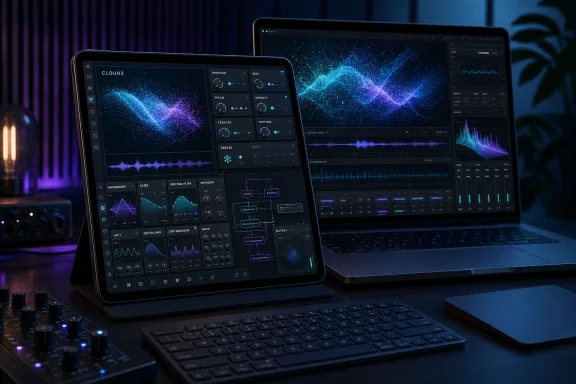 Overview: Tera Pro’s Evolution Into a Modular Sound Laboratory
Tera Pro is built around an intentionally broad premise: instead of asking users to choose one synthesis method, it provides an expandable instrument whose modules can be combined into complex patches. Its “wireless modular” design avoids the visual cable clutter common in virtual Eurorack environments, but still allows users to assemble sophisticated signal paths and modulation structures.
That design has helped the app remain relevant through years of updates. Rather than replacing the core application with a succession of separate instruments, Virsyn has repeatedly extended Tera Pro from within. The result is a product with a long history of engine additions, new synthesis techniques, and increasing support for modern Apple music-production workflows.
Tera Pro’s architecture now includes or has incorporated capabilities such as:
- Virtual analog synthesis for conventional subtractive sounds, basses, leads, pads, and animated polyphonic patches.
- Wavetable synthesis through the optional Waves modules, including user wavetable import.
- Six-operator FM synthesis via the FM 7 expansion.
- Mutable Instruments Plaits-inspired oscillator algorithms through BrainZ.
- Mutable Instruments Rings-inspired resonator and physical-modeling functions through RingZ.
- Audio-input processing, enabling external audio to pass through filters, engines, modulators, effects, dynamics tools, and other parts of the Tera Pro environment.
- Granular processing through the newly introduced CLOUDZ module.
This expanding approach has major advantages. A producer can use one app for radically different jobs: designing an evolving polyphonic pad, generating a metallic FM sequence, making a physical-modeling pluck, processing a vocal fragment into an ambient wash, or placing a synth voice into a granular effect chain.
That breadth is increasingly important on iOS, where a streamlined plugin collection can be more practical than installing a different specialist app for every sound-design task. Tera Pro’s AUv3 support is central to that practicality. It allows the instrument and its capabilities to work as a plug-in inside compatible iOS hosts, where multiple instances can be loaded in a larger project.
On Apple Silicon Macs, the app’s availability also creates a bridge between mobile and desktop production. Users who move between an iPad sketching setup and a Mac-based DAW workflow can keep the same core instrument available across both environments.
CLOUDZ Brings a Familiar Granular Character to Tera Pro
The new CLOUDZ engine takes its conceptual and technical inspiration from Mutable Instruments Clouds, a well-known open-source granular processor from the Eurorack world. Clouds earned its reputation by treating incoming sound not as a static sample file but as a constantly changing recording buffer that could be broken into tiny overlapping audio fragments called grains.
Granular synthesis is often described in abstract terms, but its musical effect is easy to recognize. Instead of playing an audio signal back as a continuous recording, a granular processor slices it into very short pieces. Those pieces can then be repeated, shifted in pitch, layered, scattered, stretched, randomized, reversed in feel, or spread across the stereo field.
The result can be subtle or extreme.
At restrained settings, granular processing may turn a dry synth chord into a moving halo of shimmer and air. With more aggressive parameter choices, the same source can become a rhythmic stutter, unstable pitch cloud, smeared reverb-like texture, or dense digital drone. Freeze the captured audio, and a momentary sound can be transformed into a playable, evolving sound source.
CLOUDZ is especially noteworthy because it brings that approach into Tera Pro’s modular environment rather than presenting it as a standalone granular plug-in. This could make it particularly compelling for users who already rely on Tera Pro’s envelopes, LFOs, sequencer functions, modulation sources, and synthesis engines.
The Core Controls
The new CLOUDZ engine provides the central controls associated with the original Clouds-style granular workflow:
- Position determines where grains are extracted from the captured audio buffer.
- Size controls the duration of individual grains.
- Pitch adjusts the transposition or playback pitch of the grain material.
- Density governs how often grains are produced and how densely they overlap.
- Texture changes the character of the grains, affecting envelope behavior and the perceived smoothness or roughness of the result.
- Freeze stops fresh audio from replacing the current buffer, allowing a captured sound to be explored repeatedly.
These parameters are deceptively simple. Their interaction is where the depth lies.
A short grain size and high density can yield a smooth, cloud-like effect that feels closer to reverb or diffusion than obvious sampling. Larger grains can reveal more recognizable slices of the source material, producing loop-like fragments and granular delays. Moving position creates scanning effects through the captured buffer, while pitch changes can take a sound from subtle chorus-like doubling to octave-shifted spectral abstraction.
Texture is particularly important in a Clouds-derived design because it affects whether the result feels sharp and rhythmic, soft and blended, or washed into a diffuse atmospheric layer. This is the parameter that can help turn a harsh grain stream into something more musical—or, conversely, expose the glitchy, granular edges that experimental producers may actively seek.
Four Modes Extend CLOUDZ Beyond Basic Grain Effects
CLOUDZ includes four operating modes, reflecting the broader function set associated with the Clouds platform. That gives the module a wider role than a one-dimensional ambient processor.
The four-mode approach matters because granular processing can easily become a niche effect if it only excels at creating drones and blurred pads. With different operating modes, a processor in this family can also act as a pitch-shifter, time-based effect, experimental delay, or spectral transformation tool.
The exact musical output will depend on how Virsyn has implemented the engine’s controls and mapped them to Tera Pro’s interface. Still, the practical value is clear: one module can potentially cover several categories of audio manipulation.
Granular Processing
The standard granular mode is likely to be the main attraction for many users. This is where sound is continuously written into a short recording buffer and reconstructed as overlapping grains. It is well suited to turning brief melodic phrases, percussion, field recordings, synth patches, and vocal fragments into evolving textures.
Within Tera Pro, this can be especially powerful when the source material is already animated before it reaches CLOUDZ. A wavetable patch modulated by multiple envelopes will create a very different granular cloud than a stable sawtooth wave. A physical-modeling sound generated with RingZ may yield organic resonances, while an FM voice can produce bright, metallic grain clusters.
Pitch and Time Manipulation
Granular techniques have long been used for pitch shifting and time stretching because short sections of audio can be played back at different rates and positions. The results rarely behave as transparently as a surgical studio-grade pitch editor, but that is often the point.
In a creative context, pitch manipulation with a Clouds-style engine can add a fragile, unstable, digital quality that works beautifully for electronic music. The artifacts are not merely defects. They are part of the sound design.
Diffused Delay and Looping Effects
Clouds-inspired processors are also valued for their ability to blur delay into something less predictable than a conventional echo. Instead of clearly repeated copies, a signal can dissolve into overlapping fragments, feedback-driven haze, and shifting pitch relationships.
That makes CLOUDZ potentially useful for more than ambient music. Producers working with techno, IDM, cinematic scoring, experimental pop, game audio, and sound installations can use this type of processing to make transitions, fills, breakdowns, and sustained effects feel more alive.
Spectral and Experimental Processing
A more experimental mode is likely to appeal to users interested in abstract processing rather than conventional effects. Spectral-style transformations can pull a sound apart into a more synthetic, unstable, and sometimes alien texture.
This is not necessarily a replacement for a dedicated spectral resynthesis tool. It is better understood as another color in a modular sound palette. In the right patch, it can turn ordinary audio into a source of unpredictable movement and digital atmosphere.
Modulation Is the Feature That Could Make CLOUDZ Stand Out
The individual CLOUDZ controls are familiar to experienced granular users. The more important question is how they interact with Tera Pro’s existing modular design.
Virsyn’s platform already emphasizes modulation. LFOs, envelopes, multi-segment envelopes, sequencing tools, and other modulation resources can animate an engine over time. With CLOUDZ, that means granular parameters do not need to remain static.
This is critical because granular processing becomes far more expressive when its controls move in coordinated ways.
A slow LFO assigned to Position can sweep through an audio buffer to reveal different moments of a phrase. An envelope controlling Density can turn a regular synth note into a burst of grains that fades into a smooth wash. A velocity-dependent modulation assignment can make harder-played notes produce more pitch scatter or texture. A sequencer can create rhythmic changes in grain size, turning sustained audio into percussive pulses.
The potential combinations are substantial:
- Modulate Position with a slow random source for constantly shifting textures.
- Use note velocity to influence Density for more expressive performance dynamics.
- Apply an envelope to Pitch for rising or falling grain swarms.
- Automate Texture to morph from articulated fragments into diffuse ambience.
- Connect the freeze function to performance controls for instant sound capture.
- Combine granular processing with filters, compressors, and effects for a complete end-to-end sound-design chain.
The inclusion of two oscilloscopes also adds a practical visual feedback element. Oscilloscopes will not tell a producer whether a granular patch is artistically successful, but they can help reveal changes in signal behavior and output shape while parameters are being modulated.
For users who enjoy deep patch construction, this feedback can make experimentation more manageable. Granular engines are often at their most rewarding when they are explored through motion rather than static knob positions, and visual confirmation can help when a patch is becoming complex.
A Strong Addition for Tera Pro FX Workflows
One of the most important details surrounding CLOUDZ is that it appears to be focused on the Tera Pro FX side of the product. The currently available demonstrations emphasize effects processing rather than using CLOUDZ as a standalone oscillator or embedded synth voice.
That framing makes sense. Mutable Instruments Clouds was fundamentally designed around live audio processing, capturing incoming sound in a buffer and transforming it in real time. Tera Pro’s version naturally fits a signal-processing environment where external sources, internal instruments, filters, dynamics processors, and modulation modules can be combined.
Tera Pro 3.0 had already made this direction more obvious by adding an audio-input option. The app can process mono and stereo input while offering pitch and level processing, while the output module adds gain control, a noise gate, and a compressor. Those additions helped position Tera Pro as a flexible FX processor as well as a synth.
CLOUDZ reinforces that shift.
A user can now imagine routes such as:
- Feed an external instrument, microphone, or host track into Tera Pro.
- Capture and granularize the source through CLOUDZ.
- Modulate grain behavior with internal envelopes and LFOs.
- Filter or distort the resulting texture.
- Add compression, gating, delay, or other effects.
- Return the processed audio to the host project.
That kind of signal path can replace several separate effects plug-ins in a creative project. It may not be faster than loading a dedicated granular plug-in for a single simple task, but it offers more room for integration and experimentation.
For iPad musicians, where touch control and compact setups encourage hands-on performance, a granular effect inside a modular environment can also become a live instrument in its own right. Freeze a moment, scan it, pitch it, densify it, feed it back, then move into a new captured sound. The process can turn a passive effect chain into a performance tool.
The Continuing Mutable Instruments Connection
CLOUDZ is not Tera Pro’s first encounter with Mutable Instruments-inspired DSP. Virsyn has already added other engines that bring elements of the beloved Eurorack developer’s design language into its ecosystem.
The BrainZ expansion introduced a collection of oscillator algorithms based on Mutable Instruments Plaits. It expanded Tera Pro’s tonal range with virtual analog, FM, additive, waveshaping, wavetable, and other macro-oscillator-style sounds. A later BrainZ update added further engines, including classic waveforms, phase distortion, FM variations, wave terrain synthesis, string-machine-style sounds, and square-wave voices.
The RingZ expansion followed with algorithms based on Mutable Instruments Rings. That addition gave Tera Pro a physical-modeling and resonator dimension, enabling modal resonances, sympathetic behavior, and string-like processing.
CLOUDZ completes a highly recognizable trio:
- BrainZ supplies flexible oscillator concepts.
- RingZ adds resonator and physical-modeling character.
- CLOUDZ introduces live granular audio processing.
This combination is creatively compelling because the modules can complement one another. A bright BrainZ-generated sound can become more organic through RingZ-like resonances, then be captured and transformed through CLOUDZ. Alternatively, a conventional virtual analog patch can be fed into granular processing to create a complex layer without requiring a second synth.
The approach also reflects a broader trend in software synthesis: respected Eurorack concepts are increasingly appearing inside flexible desktop and mobile environments. The difference with Tera Pro is that these ideas are not being isolated into a rack simulation. They are being incorporated into a broader polyphonic, modular, AUv3-capable instrument.
What the Update Does Well
The strengths of Tera Pro 3.1.0 go beyond simply adding another feature to a lengthy specification list.
It Increases Creative Range Without Replacing the Workflow
Tera Pro users do not need to learn a separate app, purchase a hardware module, or move projects into another host just to access this style of granular processing. CLOUDZ fits into the existing Tera Pro ecosystem.
That continuity is valuable. Experienced users already understand the app’s modular mindset, while newer users can start with presets and slowly progress toward more ambitious modulation-heavy patches.
It Makes Granular Processing More Accessible on Apple Devices
Granular tools are available on iOS and macOS, but their interfaces range from simple effects to highly technical sample-based instruments. CLOUDZ occupies a useful middle ground: it is based on a known granular design with a direct control set, yet sits inside a system that supports substantial modulation and audio processing.
The use of a freeze control is particularly accessible. It offers an immediate, tactile way to capture a moment and transform it, even before the user explores deeper parameter automation.
It Supports Audio Processing and Internal Sound Design
CLOUDZ can be relevant whether the source is external audio or an internal Tera Pro patch. This matters because the best granular effects often begin with interesting source material, and Tera Pro can generate a vast variety of source material by itself.
A producer can create a sound, process it, and automate it all in one place. That reduces friction and can lead to happy accidents that are difficult to recreate in a more segmented workflow.
It Extends a Mature Platform
The update also demonstrates that Tera Pro remains actively developed. The app has progressed from an already capable modular synth into an increasingly broad collection of synthesis and processing engines.
Continued development is important for long-lived creative software. It gives users confidence that a tool can grow with their workflow instead of becoming static shortly after purchase.
The Risks: In-App Purchases, Complexity, and Expectations
Tera Pro’s growth strategy has real benefits, but it also creates some potential downsides.
The Cost Can Become Less Transparent
The base app may be attractively priced during promotional periods, but Tera Pro’s full potential is distributed across optional engine purchases. Waves, BrainZ, FM 7, RingZ, and now CLOUDZ all contribute to the broader instrument.
That model can be reasonable when each expansion is clearly defined and useful on its own. However, prospective buyers should understand that the low initial app price does not necessarily represent the cost of owning every major synthesis engine.
CLOUDZ’s in-app purchase price was not clearly visible in the supplied reporting, so users should check the current store listing directly before treating any price expectation as final. Storefront pricing, promotional discounts, and regional conversion can change.
Deep Modular Flexibility Has a Learning Curve
Tera Pro’s modular design is a major strength, but it is not automatically simple. Users who want immediate, preset-driven results may find the app more involved than a focused virtual analog synth or a dedicated single-purpose granular effect.
The lack of virtual patch cables reduces visual clutter, yet it can also mean that routing and modulation relationships require attention to menus and interface states. This is a common trade-off in dense mobile music software: compactness can come at the expense of instant visibility.
Clouds-Style Granular Processing Is Not a Sample Library
CLOUDZ should not be mistaken for a full granular sampler built around long-form sample import, multisampling, detailed key mapping, and extensive sample management. The original Clouds concept focuses on real-time treatment of captured audio rather than functioning as a traditional sample-playback instrument.
That limitation is not a flaw if users understand the design goal. CLOUDZ is about turning incoming material into an evolving audio texture. It is not necessarily intended to replace a dedicated granular sampler for composers who need to build instruments from large, carefully organized sample collections.
FX-Only Availability May Limit Some Sound-Design Ambitions
If CLOUDZ remains exclusive to the Tera Pro FX environment, some users may wish it could be inserted more directly into standard synth patches. A granular engine available as a fully integrated patch module could open additional possibilities, especially for per-voice transformations or self-contained generative instruments.
Even so, using Tera Pro FX as a companion processor may be the more faithful interpretation of the Clouds concept. The value depends on whether users see granular synthesis primarily as an effect or as a core voice-generation method.
Why CLOUDZ Matters for iOS and macOS Music Production
The most compelling aspect of this update is not merely that a Clouds-inspired processor has arrived on another platform. Granular processors are widespread. What matters is the context around CLOUDZ.
Tera Pro offers AUv3 plug-in support, Apple Silicon Mac compatibility, a modular routing philosophy, broad synthesis coverage, MPE support, MIDI functionality, and an increasingly capable audio-processing side. CLOUDZ arrives inside all of that.
For iOS music production, this is meaningful because iPad workflows often favor compact but powerful tools that can take on several roles. A producer may work on a train with headphones, start a track in a host app, use Tera Pro for synthesis, then repurpose it for an audio-processing task later in the same project.
For macOS users, Tera Pro can complement a conventional DAW setup without requiring a physical Eurorack system or a collection of separate specialist effects. It will not replace every dedicated plug-in, but it can provide a distinctive modular environment for those moments when conventional processing feels too predictable.
There is also an artistic advantage to keeping synthesis and effects close together. Sound design often becomes more interesting when the line between instrument and processor is blurred. A patch can begin as a pad, turn into a resonator, become a frozen granular texture, and emerge as an entirely different sound without ever leaving the broader Tera Pro ecosystem.
A More Complete Instrument, Even If It Is Not Yet a Complete Granular Workstation
Version 3.1.0 makes Tera Pro more capable and more distinctive. CLOUDZ extends its palette into real-time granular processing while preserving the modular, expandable model that has defined the app’s development.
The update is especially attractive for producers who value texture, movement, modulation, and experimentation. It offers a route from ordinary source material to dense, shifting, atmospheric sound without demanding external hardware or a separate granular-only application.
There are important caveats. CLOUDZ is an optional purchase rather than part of the standard update, the full in-app purchase ecosystem can make total ownership more expensive than the entry price implies, and the effect-oriented Clouds design should not be confused with a sample-library-based granular instrument.
Even with those limitations, the direction is promising. Tera Pro has evolved from a capable modular synth into a larger ecosystem where multiple synthesis traditions can interact. Adding a Clouds-inspired granular engine does not simply expand a list of features; it gives users another way to break apart, reshape, animate, and recontextualize sound.
For iOS and macOS musicians who already use Tera Pro, CLOUDZ looks like a meaningful new reason to revisit the app’s FX and modulation capabilities. For newcomers, it strengthens the case for viewing Virsyn Tera Pro as one of the more ambitious modular synth and sound-design platforms available on Apple devices.
