
The feature also adds CSV upload for response options and a search-and-filter interface for survey takers when a question contains more than 50 choices. Microsoft says Viva Glint reporting will support the expanded option set, but the roadmap entry does not say whether existing questions can be converted in place, how CSV validation will handle duplicate or translated labels, or how 500-option questions will render in exports and manager-facing reports.
For Glint administrators, the practical benefit is less about creating an unusually long survey question than about removing a manual maintenance problem. Microsoft’s current Viva Glint documentation instructs administrators to add multiple-choice and multi-select options through the “Add new choice” control, one entry at a time. A CSV import changes that workflow for organizations whose response lists come from HR systems, corporate taxonomies, facilities databases, or controlled vocabularies maintained outside Glint.
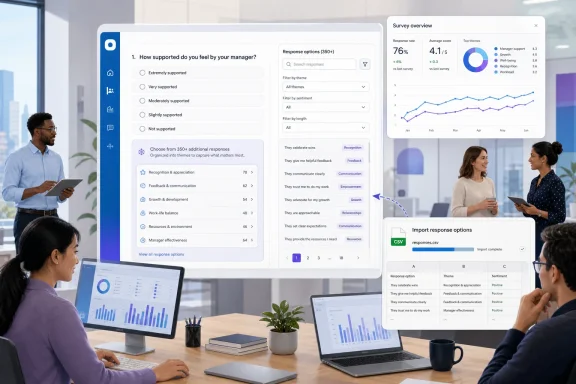 CSV upload addresses the administrative bottleneck
The roadmap’s most useful detail is the option import mechanism. A 500-choice ceiling would be of limited value if every label still had to be keyed into the Glint question editor individually; a CSV upload makes long, controlled answer lists plausible to deploy and maintain.
This is relevant to HRIS and Microsoft 365 administrators who build surveys around organizational data that changes frequently. A company could use a long list of office sites, business units, product lines, customer segments, internal communities, or professional certifications as a selectable response set, then update the list from a spreadsheet rather than repeatedly editing the question UI.
Microsoft has not published the CSV schema, required columns, encoding rules, language support, error reporting, or whether an upload will replace an entire option set or append to it. Those details will determine whether the feature is a controlled bulk-management tool or merely a faster way to seed a new question.
Administrators should also be careful with imports once the feature arrives. Microsoft’s existing Glint guidance warns against overwriting an existing response option with a different label because it can create reporting trend problems and confusion in raw-data exports. Bulk upload will make large updates easier, but it will not remove the data-governance problem of changing what an answer option means halfway through a recurring survey program.
Search begins only after 50 choices
Microsoft says respondents will be able to search and filter options for questions with more than 50 responses. That threshold is revealing: the company is treating long choice lists as a distinct interaction problem, rather than simply raising a numerical limit in the survey editor.
A drop-down or static list with hundreds of entries is a poor survey experience, especially for employees completing questionnaires on smaller screens or under time pressure. Search can reduce scrolling and prevent respondents from abandoning a question that asks them to find one precise value among dozens of similar labels. It may also reduce incorrect selections caused by adjacent options, inconsistent naming, or a respondent settling for the nearest familiar category.
The roadmap does not explain whether the search will match partial text, whether it will tolerate spelling variants, whether filters are grouped by metadata, or whether the experience will work identically for single-select and multi-select questions. Those are operational details worth testing before an organization uses a 500-option question in a live engagement or lifecycle survey.
The new threshold also creates a design boundary for admins. A question with 49 choices may still be technically unwieldy but would not, according to the roadmap description, receive the new search-and-filter experience. Teams designing choice lists should therefore avoid treating 50 as a recommended survey-design target; it appears to be the point at which Microsoft enables navigation assistance.
Reporting support is the part administrators need to verify
Viva Glint already includes a Multiple Choice Question Report that presents response options in tables and breaks them down by percentages across selected hierarchy attributes. Microsoft Learn documents that report as a way to inspect patterns in multiple-choice and multi-select questions, with filters and editable report sections available to authorized roles.
Supporting 500 options means Glint’s reporting layer must cope with a much larger result set than a conventional employee-survey question. The key question is not whether the product can technically store hundreds of labels, but whether managers and HR analysts can identify meaningful patterns without turning a report into a long, low-signal catalog of tiny percentages.
Microsoft has not said whether the upcoming reporting changes will include search within results, pagination, suppression behavior for sparse options, improved exports, ranking controls, or a way to focus on selected responses. No independent outlet had separately reported those implementation details as of August 20, 2026. Organizations considering high-cardinality questions should plan for the possibility that the survey-taking experience improves first while analysis remains dependent on existing report filters and exports.
There is also a confidentiality consideration. Microsoft’s current Glint documentation says the default minimum response threshold for rating and multiple-choice items is five, though organizations can configure thresholds for a survey program before it launches. A long list can split responses among many narrowly defined options, so administrators should test whether their survey design yields enough responses per option and demographic slice to produce usable aggregates without encouraging unsafe interpretation of thin results.
The change expands Glint beyond standard engagement questions
Most employee-engagement surveys use compact answer scales: agreement ratings, yes-or-no questions, or a limited set of focus areas. A 500-option multiple-choice capability pushes Viva Glint toward a broader class of structured feedback collection where the answer itself is a classified data point.
That could be useful for always-on surveys, onboarding feedback, manager-effectiveness programs, or operational listening exercises where leaders want employees to identify a specific location, policy, process, or resource. But a long selectable list does not automatically make Glint the right replacement for a dedicated form, service-management portal, or HR workflow.
The product’s strengths remain in confidential employee feedback, survey-program controls, hierarchy-based reporting, and follow-up analysis. Administrators should use the new capacity where the selected value must feed Glint’s reporting and action process—not simply because a spreadsheet happens to contain a long list that can now be imported.
What to prepare before September
The roadmap status remains In development, which means the September 2026 availability window is a target rather than proof that every tenant can use the feature today. Microsoft identifies the release as general availability for Viva Glint on the web in the worldwide standard multi-tenant environment; it does not list GCC, sovereign-cloud, mobile, or desktop-client availability.
Before deploying a large response list, Glint owners should prepare a controlled source file, define who approves label changes, and decide whether choices are stable enough to compare across survey cycles. They should also test a representative question with real respondents and validate how it appears in the Multiple Choice Question Report, exports, and each authorized manager role’s view.
The immediate consequence is straightforward: Viva Glint surveys will soon be able to collect far more specific structured answers without requiring administrators to hand-build enormous option lists. The harder work will be ensuring those answers remain searchable for employees, interpretable for managers, and consistent enough to compare after the CSV file changes.