
For organizations that rely on Viva Glint to turn large volumes of open-ended employee feedback into engagement actions, this is not simply another Copilot chat feature. It is a foundational change to how the platform decides what a comment is about before that feedback reaches topic clouds, filtered reports, exports, executive presentations, and action-planning discussions.
The promise is compelling: more comments should map to the topics that genuinely reflect their meaning, reducing the risk that important themes disappear into an unclassified N/A bucket or land under an overly broad label. But the rollout also reinforces an essential rule for HR, IT, and leadership teams: AI-generated topic groupings are a faster path to insight, not a substitute for reading the underlying employee feedback.
 Background: Why Topic Assignment Matters in Viva Glint
Microsoft Viva Glint is built around the premise that survey scores alone do not fully explain employee sentiment. A low score for manager effectiveness, workload, trust, or inclusion may identify where an issue exists, but the comments are often what explain why it exists and what employees believe should change.
The Viva Glint Comments report already helps managers and leaders explore employee feedback through topic areas, sentiment, keywords, and representative comments. It can also present comments by survey item or demographic group, giving organizations a way to connect quantitative results with qualitative evidence.
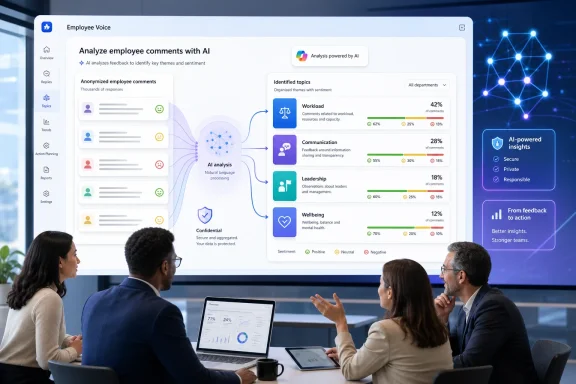
Topic assignment is central to that experience. In the Comments report, Viva Glint presents themes based on the comments it has analyzed, along with aggregate sentiment and the volume of comments connected to each topic. Leaders can select a topic to move beyond a high-level visualization and inspect the supporting feedback.
That workflow sounds straightforward, but it involves a significant interpretation problem. Employee comments are rarely clean, single-subject statements. A short response such as “My manager is supportive, but the constant reorganization and unclear priorities are exhausting” may involve management, communication, organizational change, workload, strategy, and wellbeing at the same time.
Traditional natural-language processing can provide a consistent taxonomy, but it can struggle when comments are ambiguous, context-dependent, multilingual, or written in the informal and compressed language typical of employee surveys. Copilot-enhanced topic assignment is Microsoft’s effort to improve that classification layer without forcing organizations to rebuild their existing Viva Glint reporting model.
What Microsoft Has Changed
Microsoft describes the new capability as an enhancement to the existing Viva Glint topic experience rather than a replacement for the Comments report. Organizations that enable Copilot in Viva Glint can have comments assigned to relevant Viva Glint topics through the Copilot-enhanced pipeline, while organizations without Copilot enabled remain on the existing standard topic-assignment experience.
The distinction is important. This is not primarily the same thing as asking Copilot to summarize comments in a chat pane. It is the classification stage that determines how comments are organized into topic-level reporting in the first place.
Standard assignment versus Copilot-enhanced assignment
Under the standard Viva Glint process, the service analyzes comments through its natural-language-processing pipeline and maps them to Viva Glint’s standard topic set. Microsoft says that topic assignment takes place after the survey response is submitted and the full response is analyzed, rather than while an employee is typing a comment.
The older approach also has a clear limitation: not every comment receives a topic. When a comment does not align with Viva Glint’s standard topics, the platform can display N/A as the topic value in reports and spreadsheet exports.
Copilot-enhanced topic assignment is designed to improve alignment between comment meaning and the topics that best represent it. The goal is not to make every comment look more polished or to invent a novel management narrative. The goal is to make the existing topic view a more faithful representation of the feedback employees actually submitted.
The existing reporting workflow remains intact
The upgrade is deliberately low-disruption. Microsoft says that both standard and Copilot-enhanced assignment appear through the existing Topics experience in the Comments report. Admins do not have to define a separate set of topic rules before the capability can operate.
That means familiar Viva Glint reporting practices remain relevant:
- Reviewing aggregate topic volume and sentiment.
- Opening a topic to read associated comments.
- Comparing feedback by available demographic or organizational filters.
- Exporting reports and comments for deeper review.
- Using representative and prescriptive comments to move from listening to action.
For Windows and Microsoft 365 administrators, the practical benefit is that the release should not require a separate reporting rollout, a new employee survey interface, or a wholesale retraining exercise for every manager who uses Glint results.
Availability, Enablement, and Who Will See the Change
The roadmap entry identifies the feature as launched, with general availability scheduled for July 2026 on the web for worldwide standard multi-tenant tenants.
However, “launched” should not be confused with “visible in every report for every user.” Microsoft documents several requirements that influence whether Copilot-enhanced topic assignment is available in practice.
Copilot in Viva Glint is the controlling switch
There is no standalone feature toggle specifically for Copilot-enhanced topic assignment. Microsoft says it becomes automatically available for supported Viva Glint survey programs and reports when Copilot in Viva Glint is turned on.
This is a consequential deployment model. An organization that has enabled Copilot in Viva Glint for comment summarization may also see the classification model behind its Topics experience evolve, even though users may continue to work in the same familiar Comments report.
Administrators manage Copilot access through Viva Feature Access Management (VFAM) in the Microsoft 365 admin center. Microsoft’s current documentation says Copilot in Viva Glint is enabled by default, while VFAM can be used for organization-wide or group-specific controls. Users also need the appropriate Viva Glint role permissions, including access to comments where applicable.
Supported programs and reports still matter
Copilot-based comment capabilities are not universally available across every type of Viva Glint program. Microsoft documents support for recurring and ad hoc survey programs, while Always-On and Employee Lifecycle programs are excluded from the Copilot Comments Summary experience.
The precise support matrix for topic assignment may continue to evolve independently from chat-based summaries, but Microsoft explicitly notes that users can remain on standard topic assignment if the relevant survey program or report is not yet supported.
That makes testing essential. Organizations with multiple Glint program types should validate their high-value reports rather than assume that a Copilot-enabled tenant produces identical behavior across engagement surveys, pulse surveys, lifecycle feedback, and specialized one-off programs.
Why Better Classification Can Improve Employee Listening
The strongest case for Copilot-enhanced topic assignment is not that it adds another AI label to a dashboard. It is that better classification can improve the quality of management attention.
Employee listening programs frequently produce more comments than HR teams and managers can read in full. Microsoft’s own Glint documentation says that, across Glint survey cycles completed in 2022, 57% of respondents left at least one comment. It also reported that respondents with unfavorable views were more likely to leave a comment than favorable respondents.
This creates a familiar operational problem: large organizations may have thousands of comments, while local managers have limited time to interpret patterns responsibly. Topic grouping is a necessary tool for narrowing the field, but it is only valuable if the groupings are meaningful.
A more context-aware reading of survey comments
Microsoft says Copilot-enhanced topic assignment uses comments and related survey context already available within Viva Glint, including the originating survey question.
That context matters. Consider the same phrase, “I do not get enough support.” In one survey question it may describe an employee’s relationship with a manager. In another, it may refer to IT tools, staffing levels, training, HR processes, or executive communication.
A classification system that considers the question behind the comment has a better chance of distinguishing between those meanings. This could reduce the number of comments assigned to vague, catch-all themes and make topic-level analysis more useful during follow-up meetings.
Fewer missed themes in unclassified feedback
The N/A problem is an understated but important part of this update. If comments fail to map to the standard taxonomy, they can remain unclassified in reports and exports.
Unclassified feedback is not necessarily irrelevant feedback. It may represent emerging concerns, unusual phrasing, rapidly changing workplace issues, or comments that do not fit neatly into a predefined engagement model. An improved assignment pipeline could help prevent meaningful feedback from becoming less visible simply because it is expressed in unexpected language.
The release therefore has potential value for organizations that are managing change-heavy environments. Hybrid work policies, AI adoption, reorganizations, data-use concerns, return-to-office friction, and changing expectations of leaders all produce feedback that may be harder to interpret through static categories alone.
Greater consistency for reporting and action planning
When leaders compare teams, locations, or survey cycles, they need a stable basis for discussing recurring themes. The standard topic structure remains important because it gives reporting a common language across an organization.
Microsoft’s approach appears to preserve that consistency while improving classification accuracy. Rather than replacing Glint’s topic experience with entirely free-form AI-generated themes, the capability is designed to align feedback more accurately to Viva Glint topics.
That design has a practical advantage: organizations can improve the quality of categorization without losing the ability to compare patterns across business units or time periods.
Privacy, Confidentiality, and Data Boundaries
Employee survey analysis is one of the most sensitive AI use cases in enterprise software. A feature can be technically impressive and still fail operationally if employees believe it makes their feedback easier to trace back to them.
Microsoft’s documentation outlines several safeguards around Copilot-enhanced topic assignment. It says the capability operates within Viva Glint service boundaries, uses comments and survey context already available in Glint, does not introduce external data sources, and does not use raw survey responses or user attributes to train foundation models.
Microsoft also says that one organization’s comments, topics, and topic patterns are not shared with another organization.
Confidentiality thresholds remain in force
The feature does not eliminate Viva Glint’s existing comment-suppression model. Microsoft states that Copilot-enhanced topic assignment respects confidentiality thresholds and suppression rules.
In Viva Glint, comment suppression is designed to prevent feedback from being exposed when the configured confidentiality threshold has not been met. Microsoft notes that the typical threshold is 10 unique respondents, though organizations can configure their survey programs differently.
Topics themselves are subject to those protections. Microsoft explains that, when a topic does not meet the threshold, related open-ended feedback can be suppressed even if a keyword view might still show frequently used words or phrases.
This distinction matters because better AI classification must not become a privacy loophole. A highly accurate topic label applied to a small subgroup could be sensitive if leaders were able to drill through to comments that identify a person indirectly. Microsoft’s continued reliance on suppression rules is therefore a necessary part of the release, not an administrative footnote.
Permissions still define what Copilot can see
Microsoft says Copilot comment capabilities process only the data that the signed-in user already has permission to view. The system does not access data beyond the user’s Viva Glint dashboards and reports.
For IT and HR administrators, that reinforces the importance of role design. Copilot does not replace access control; it amplifies the usefulness of whatever content the role model already exposes.
Organizations should review:
- Who has View Comments permission.
- Which demographic and HRIS attributes are available as report filters.
- Whether executive, HR business partner, and manager roles have appropriately differentiated access.
- Whether existing confidentiality thresholds still fit the organization’s size and operating model.
- How exported comment data is governed once it leaves the Viva Glint interface.
The Risks: More Accurate Does Not Mean Infallible
Microsoft explicitly cautions that AI-generated topic assignments can occasionally be inaccurate and advises users to review related comments before using topics in leadership communications or action planning.
That warning should be treated as a core operating principle rather than standard AI disclaimer language.
Misclassification can influence management decisions
Topic assignment is not a neutral formatting choice. If a cluster of comments is incorrectly classified as “Communication” instead of “Workload,” leaders may focus on messaging when employees are actually signaling understaffing, burnout, or unclear operational ownership.
Likewise, if comments expressing concerns about fairness are bundled with general management feedback, an organization could understate a more serious inclusion or employee-relations issue. Improved classification reduces that risk, but it cannot remove it entirely.
The danger is greatest when leaders treat a topic cloud as a conclusion rather than a starting point. A topic label is an index into employee feedback, not proof of a root cause.
Comment bias remains a structural issue
Even a highly accurate classifier cannot correct for who chooses to comment. Microsoft’s guidance warns that survey comments tend to be more negative than positive, while its response-rate documentation shows that unfavorable respondents are more likely to leave comments than favorable respondents.
This does not mean negative feedback is less valuable. Often it is the most actionable feedback available. But it does mean organizations should avoid treating topic volume as a direct measure of the entire workforce’s priorities without checking response rates, survey scores, segmentation, and the underlying comments.
A topic with many negative comments may reflect a widespread organizational issue. It may also reflect a smaller group of highly motivated respondents. The difference can only be understood through disciplined analysis.
AI summaries and classifications have scale limits
Microsoft’s Copilot documentation says that comment summarization can process up to 8,000 relevant comments and groups findings into up to 10 themes.
Those limits apply to comment summarization rather than necessarily to the new topic-assignment pipeline itself, but they illustrate a broader point: Copilot experiences in Viva Glint are designed to make large data sets manageable through selection, sampling, aggregation, and theme reduction.
That is useful, but it also means organizations should maintain a route back to the raw feedback. Rare but serious concerns may not dominate a theme summary, while an emerging topic could be operationally significant despite low volume.
What Administrators Should Do Now
The launch calls for a measured governance response, not a panic-driven one. Because the capability is integrated into the existing Comments report and controlled through the Copilot-in-Viva-Glint setting, many organizations can evaluate it within their normal survey-analysis process.
Validate reports before comparing trends
Organizations that run recurring engagement or pulse surveys should establish a baseline before drawing strong conclusions from changes in topic volume. If the classification pipeline improves, a rise in a topic may partly reflect better assignment rather than a sudden worsening of employee sentiment.
A sensible review process includes:
- Comparing Copilot-enhanced topic patterns with the underlying comments.
- Checking whether comments that were formerly categorized as N/A now map to meaningful topics.
- Reviewing a representative set of comments for high-volume or high-risk themes.
- Documenting when the organization enabled Copilot in Viva Glint.
- Adding context to trend reports where a methodology change may affect comparability.
Keep humans in the review loop
Microsoft’s own guidance is unambiguous: related comments should be reviewed to confirm meaning before topics inform leadership communications or action plans.
The most effective model is likely a layered one:
- Copilot-enhanced topic assignment identifies and organizes potential themes.
- HR analysts and leaders validate what the themes mean in context.
- Managers discuss the relevant patterns with teams without exposing confidential feedback.
- Action owners address operational issues with measurable follow-through.
- Future surveys test whether those actions affected sentiment and comment themes.
This approach preserves the speed benefit of AI without turning employee listening into an automated dashboard ritual.
Revisit communications with employees
The new capability is also an opportunity to refresh employee messaging about confidentiality. Employees should understand that survey comments are analyzed in aggregate, that access is governed by permissions and thresholds, and that the organization is using the feedback to drive action rather than identify individuals.
Clear communication becomes even more important when Copilot is involved. Employees do not need a technical lecture on language models, but they do deserve a credible explanation of how their feedback is handled and how their privacy is protected.
A More Useful Copilot Role for Employee Feedback
Copilot-enhanced topic assignment represents a more mature use of AI in the employee experience stack than a generic chatbot bolted onto survey data. It applies Copilot to a difficult but highly practical task: making unstructured comments easier to classify, search, compare, and act upon within an established reporting model.
Its success will depend less on whether leaders see more polished topic clouds and more on whether organizations use the improved signals responsibly. Accurate categorization can help teams spot recurring concerns sooner, find relevant comments faster, and direct action planning toward the issues employees are actually raising.
The feature’s strongest safeguards are also its most important limitations: existing confidentiality rules remain in place, permissions still constrain access, the system does not use raw responses to train foundation models, and Microsoft advises human review because topic assignments can be wrong.
For Microsoft Viva customers, that combination makes the July 2026 launch meaningful. Copilot-enhanced topic assignment can make employee feedback more navigable and potentially more actionable, but the responsibility for interpreting that feedback—and responding to it with credibility—remains firmly with people.
