
Neowin first reported the four changes on August 19, describing 1.134 as Microsoft’s latest weekly VS Code release. Microsoft’s public VS Code documentation and its active source repository independently show the underlying agent-session work, including multi-chat sessions, persisted chat layouts, and a newly developed prompt-timeline interface. However, Microsoft had not yet surfaced a public 1.134 release-notes page in the indexed release archive at publication time, and no second outlet had independently reported the build’s distribution channel or rollout timing.
That gap matters for administrators and developers: treat 1.134 as a weekly/pre-release feature drop, rather than assuming that every change is already in the broadly deployed Stable channel. VS Code’s feature work increasingly arrives first through Insiders-style iteration, particularly around the fast-moving Agents window and agent-host architecture.
 Chat grids turn agent sessions into a review surface
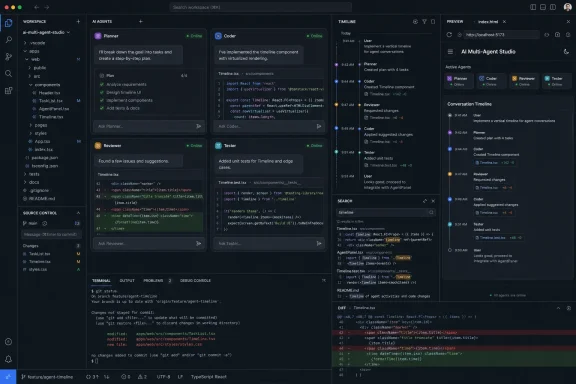
The headline feature is the ability to arrange chats and subagent chats in horizontal or vertical groups. Rather than switching among conversations one at a time, a developer can keep a parent task open next to a delegated subtask, compare competing implementation approaches, or watch an active agent while reviewing another agent’s output.
Microsoft has already been moving VS Code in this direction. Earlier 2026 releases added multiple chats per agent session, side chats for follow-up questions, and a dedicated Agents window designed to expose parallel work. The 1.134 grid is a more consequential refinement than the phrase “side-by-side chats” suggests: it changes the interface from a tabbed conversation viewer into a workspace for supervising several AI-driven tasks at once.
The layouts are also supposed to survive a reload or return to the session. That is important for longer-running coding tasks, where an agent may work for minutes or hours and the human reviewer may need to leave the editor, switch branches, or reopen VS Code before checking the result.
There is a constraint hidden behind the productivity pitch. In agent-host sessions, sibling chats can share the same workspace and worktree. Parallel chats therefore do not automatically mean isolated work. If two agents are asked to change overlapping files, the result can still be competing edits, merge friction, or a confusing review surface where the combined change count masks which agent introduced a regression.
For that reason, side-by-side chat layouts are most useful when tasks have deliberate boundaries:
- Use one chat for implementation and another for tests, documentation, or code review rather than asking both to edit the same module.
- Put exploratory or explanatory prompts in a side chat when they do not need to modify files.
- Use separate branches or worktrees when two agents must pursue genuinely competing implementations of the same component.
The visual grid makes concurrency easier to observe. It does not supply concurrency control.
The prompt timeline makes agent work more auditable
The prompt timeline is the most practical addition for anyone using long agent sessions. According to Neowin’s account of Microsoft’s announcement, dots in the transcript gutter represent user prompts, with the active dot indicating the current point in the session. Prompts that changed files also expose added and removed line counts and a route into the relevant changes.
Microsoft’s active VS Code source tree corroborates that a prompt-timeline component is under development, including navigation behavior tied to prompt positions in the transcript and a persistent header identifying the prompt currently in view. The implementation detail matters because it confirms this is not merely another chat-history shortcut: the feature is being built around transcript position and change review.
VS Code already offered keyboard navigation between prompts in a chat session. A visual rail improves on that for a different reason: it makes the shape of the conversation visible. An agent session with 30 prompts is difficult to scan when each response can contain tool calls, summaries, diffs, and collapsed sections. A timeline can identify the handful of points where the user changed direction, requested a fix, or caused the agent to touch the repository.
For code review, the line-change badge should be treated as triage, not evidence of correctness. A small diff may represent a critical configuration or authentication change; a large diff may be mechanical formatting. But mapping a prompt directly to its code changes helps answer a question that conventional chat transcripts handle poorly: Which instruction caused this edit?
That improves accountability in collaborative repositories. A reviewer can distinguish the implementation requested in the original task from a later “try a different approach” prompt, then inspect the resulting diff before accepting or committing it.
Ctrl+F finally applies to the whole chat transcript
VS Code 1.134 also brings Find to Chat view, chat editors, and the Agents window. The feature is more substantial than binding familiar browser behavior to a new pane: search is meant to cover the entire conversation, including content that is not currently rendered on screen, and to expand a collapsed work summary when it contains a match.
That solves a common failure mode in agent-assisted development. Chat sessions are often used as temporary project memory: they contain rationale for an architecture choice, an error message that was fixed three prompts ago, an agent’s list of files it modified, or a command that needs to be rerun. Without transcript search, users either scroll through a virtualized interface or repeat the question and spend more model time recreating context.
Case-sensitive, whole-word, and regular-expression search make the feature useful beyond ordinary prose lookup. Developers can search for an error code, a particular API symbol, a file path, a commit-like identifier, or a repeated tool failure. Administrators validating an agent-assisted change can search for commands such as package installs, permission changes, git operations, or deployment steps.
The limitation is equally clear: search makes a transcript easier to retrieve, but it does not establish that an agent’s claim was accurate or that a command actually completed successfully. The source of record for a production change remains the repository, CI output, deployment log, and audit trail—not an AI chat summary.
HTML preview becomes a default-editor option
The fourth highlighted change lets users associate HTML files with VS Code’s integrated browser, using workbench.editorAssociations or the editor header, so a file can open as a rendered page rather than source code. VS Code already has an integrated browser and earlier releases added controls for where browser tabs open. The new value in 1.134 is making that browser a default file-opening behavior for HTML.
For front-end work, that is useful for static mockups, generated reports, email templates, and small documentation pages where the first task is visual inspection. It can reduce the back-and-forth between the text editor and an external browser window while keeping the preview associated with the source file.
It is not a replacement for testing in supported browsers. An editor-integrated browser preview cannot settle browser-engine differences, extension interference, enterprise policy behavior, device scaling problems, or production Content Security Policy issues. Teams should regard it as a quick local rendering check, then continue to test in the actual browser and deployment environment they support.
The setting also deserves care in shared workspaces. A personal editor association may be convenient; a workspace-level configuration can surprise contributors who expect .html files to open in the standard text editor. Teams that want to standardize preview behavior should document the choice and preserve an obvious path back to source editing.
A useful release, but only with review discipline
VS Code’s agent features are steadily becoming a session-management layer rather than a single chat panel. Side-by-side layouts, prompt timelines, transcript search, and integrated preview all reduce friction around the surrounding work: supervising agents, locating prior instructions, reviewing changed files, and checking generated HTML.
The practical consequence is straightforward. Developers using VS Code agents should update their workflow now: divide parallel tasks by file ownership, use the prompt timeline to trace edits to instructions, search the transcript before repeating context, and review the actual diff before accepting an agent’s work. The new interface makes that discipline faster, but it also makes it easier to run more simultaneous work against the same repository—exactly where disciplined review still matters most.
