
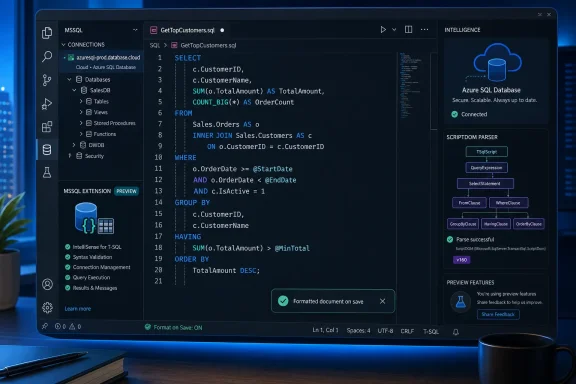
The practical change is larger than a new right-click command. Formatting can now be part of the normal editor workflow: developers can run VS Code’s Format Document or Format Selection commands, use the standard keyboard shortcut, and enable formatting on save. For teams that keep stored procedures, migrations, and database-project scripts in source control, that creates a realistic route to enforcing a shared T-SQL layout without telling every contributor to install and configure a separate extension.
Microsoft’s GitHub release notes confirm version 1.45.0 shipped on August 19, while Visual Studio Magazine first highlighted the formatter’s preview debut and its unusually broad set of layout settings. The release also arrives with a caveat worth making explicit: the formatter is a preview feature despite being switched on by default, so organizations should test its output on representative scripts before allowing automatic save-time rewrites across a repository.
 The formatter is a replacement effort, not T-SQL formatting’s first appearance
Microsoft is presenting the feature as a new SQL formatter, but the MSSQL extension has had some T-SQL formatting support before. Its own historical changelog records basic parser-based formatting in version 0.3.0, released in March 2017, including Format Document, Format Selection, and several mssql.format settings.
That history changes how version 1.45 should be read. The important news is not that VS Code users can, for the first time, capitalize SELECT or break a query across lines. It is that Microsoft has introduced a more configurable formatter and made it the default path in a mature extension whose earlier formatting capability had long been limited and inconsistent enough that many SQL developers relied on third-party tools or manual conventions.
The new preview formatter is controlled through mssql.format.enablePreviewFormatter. Microsoft says it offers more options and greater control over T-SQL style and layout. Visual Studio Magazine reports that those controls cover keyword casing, alignment, indentation, spacing, line breaks, multiline lists, SELECT lists, INSERT statements, SET items, and WHERE predicates.
That breadth matters because database teams rarely argue over whether code should be formatted; they argue over whose formatting rules get applied. A formatter that only imposes one vendor-defined layout can turn every save into a noisy diff. A formatter that can model the project’s existing convention has a better chance of reducing review churn rather than creating it.
ScriptDOM puts syntax before cosmetics
Microsoft’s SQL Server Management Studio documentation describes its SQL formatting implementation as being built on ScriptDOM, the open-source .NET library that parses T-SQL and generates scripts from abstract syntax trees. The MSSQL formatter is likewise based on ScriptDOM, according to Visual Studio Magazine.
That is significant because a parser-based formatter has a different job from a text cleanup utility. It can recognize the syntactic role of a clause, expression, or statement and apply rules to the parsed SQL structure instead of blindly changing whitespace around words. In principle, that makes it better suited to complex procedures, nested queries, batch separators, and database-project files than regular-expression-driven formatting tools.
It does not make every format operation risk-free. T-SQL code often contains dynamic SQL inside string literals, vendor-specific constructs, partially written statements, generated scripts, or intentionally arranged comments. Microsoft’s documentation reportedly allows users to choose the T-SQL version and database engine type used for parsing and script generation, and can flag cases that could not be completely parsed. Those are useful controls, but they also mean teams should identify the dialect settings that match their production estate before turning on editor.formatOnSave.
A measured rollout would begin with a branch containing a sample of the organization’s actual SQL: deployment scripts, stored procedures, views, database-project source, agent-job scripts, and any code with dynamic SQL. Run the formatter once, inspect the diff, and agree on the settings before adding save-time formatting to shared workspace settings. The point is to make formatting deterministic, not to let a preview feature rewrite hundreds of files differently on each developer’s machine.
Format on save can clean pull requests—or flood them
VS Code already provides the editor.formatOnSave setting, and the MSSQL preview formatter can participate in that standard mechanism. That makes the feature more useful than a manually invoked cleanup command: a SQL file can be normalized at the moment it is saved, before an inconsistent layout becomes part of a commit.
For database repositories, this can produce immediate gains. Stable line wrapping and clause placement make code review diffs more legible, reduce accidental formatting-only changes mixed with logic changes, and let reviewers focus on query semantics. It also aligns VS Code more closely with the formatter workflow Microsoft is rolling out in SQL Server Management Studio, where format-on-save and project-level configuration are intended to keep SQL files consistent through review.
But enabling a preview formatter by default is an aggressive choice. The extension update can change behavior for developers who already use VS Code’s generic format shortcut or who have another SQL formatter configured. The release notes identify the opt-out setting, but they do not say how the MSSQL formatter resolves conflicts with third-party formatters, workspace language settings, or multi-root projects. Administrators and lead developers should verify the active default formatter for SQL documents after deploying version 1.45.0 rather than assuming an existing setup will remain untouched.
There is another operational issue: formatter configuration needs to live with the code if the goal is reproducible output. Per-user VS Code settings make a developer’s local experience cleaner, but they do not establish a team standard. A repository-level VS Code configuration, accompanied by a documented SQL dialect target and a one-time formatting commit, is the more defensible approach when a team wants clean diffs over time.
Azure provisioning is GA, but the Azure portal still owns advanced choices
The same MSSQL 1.45.0 update promotes Azure SQL Database provisioning to general availability. Microsoft describes the feature as a way to create new free-tier Azure SQL databases from the extension, then perform post-deployment actions including copying connection strings and migration commands and downloading ARM, Bicep, or Terraform deployment templates.
The workflow is useful for developers building a proof of concept or creating a disposable development database without leaving VS Code. Visual Studio Magazine reports that the deployment view walks users through selecting a subscription and resource group, creating or choosing a logical server, naming the database, and setting up connectivity. It can also add the provisioned database to saved connection profiles.
The boundaries are as important as the convenience. Microsoft’s release notes frame the capability around the Azure SQL free tier, while Visual Studio Magazine says advanced compute, storage, and pricing choices remain in the Azure portal. This is therefore a quicker on-ramp to an Azure SQL database, not a full replacement for Azure resource design and governance.
Teams with subscription policies, private networking requirements, customer-managed identities, tagging rules, or cost controls should retain their infrastructure-as-code and portal or pipeline approval processes. The template export is a helpful bridge: use the VS Code experience to prototype, then inspect and formalize the generated ARM, Bicep, or Terraform definition before treating the deployment as repeatable infrastructure.
Shortcut configuration graduates after a short preview
Shortcuts Configuration also reaches general availability in version 1.45.0, one release after Microsoft introduced it as a preview feature in version 1.44.0 on July 15. It centralizes reusable Quick Queries and keybindings for query-editor and results-grid actions.
The specific improvement is support for repeatable SQL tasks that do not deserve a full snippet file or a trip through the Command Palette. Users can associate a query with a shortcut, either run it immediately or open it in the editor, and use an {arg} placeholder to accept selected text. If the placeholder is absent, selected editor text is appended to the query.
For DBAs and developers, this is valuable for tightly scoped tasks such as examining an object definition, checking session information, or wrapping selected identifiers in a standardized diagnostic query. It should not become a way to bind destructive production commands to easy keystrokes. The extension’s convenience features are best used with least-privilege connection profiles and clearly distinguished production connections.
Microsoft also enabled its newer Query Results Grid preview by default in 1.45.0, with support for showing, hiding, and freezing columns; users can revert by disabling mssql.preview.betaResultsGrid. The project roadmap calls that grid general availability for the same milestone, but the shipped changelog still labels it a preview. Until Microsoft resolves that documentation mismatch, administrators should treat the grid as preview software and use the explicit fallback setting if it disrupts established workflows.
Microsoft’s roadmap lists the formatter’s general availability target as version 1.46, scheduled for September 29. Until then, MSSQL 1.45.0 gives SQL teams a capable native formatting path—but the responsible move is to validate its diffs and settings in a controlled branch before making automatic T-SQL rewrites part of everyday development.