
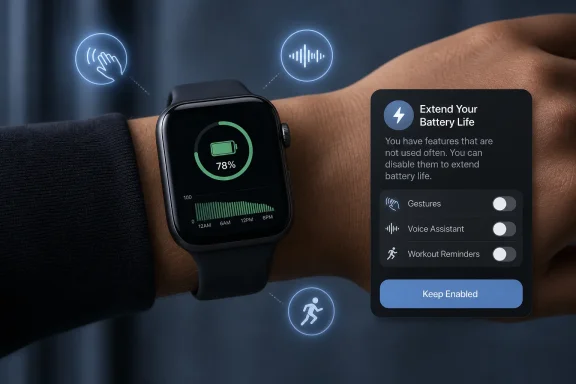
Rather than asking users to work through a long list of settings, watchOS 27 is designed to watch for patterns. If it determines that certain features are enabled but rarely or never used, the system can switch them off to reduce unnecessary background activity. A notification explains the change and gives the wearer a chance to keep the feature active.
It is a small but meaningful shift in Apple’s approach. Until now, conserving Apple Watch battery life has usually meant a manual trade-off: turn on Low Power Mode, disable background refresh, reduce cellular use, or selectively shut off health, display, and notification features. watchOS 27 instead aims to make a more surgical decision, targeting functionality that is technically available but practically irrelevant to a particular owner.
For Apple Watch users who value convenience but do not want to micromanage their wearable, that is a compelling idea. The success of the feature, however, will depend on how accurately watchOS 27 interprets “unused,” how clearly it communicates its actions, and whether Apple provides enough control to reverse a decision when a setting becomes useful again.
 Overview: A Smarter Approach to Apple Watch Battery Life
Apple Watch battery life remains one of the platform’s most persistent constraints. Newer models have improved endurance, charging speed, and efficiency, but the basic daily routine remains familiar: wear the watch, track activity, receive notifications, sleep with it when possible, and find a window to charge it before the battery runs low.
That routine is manageable for many people, especially with fast charging. Yet it becomes harder when the watch is used for outdoor workouts, long travel days, cellular connectivity, sleep tracking, music playback, navigation, or frequent app interaction. In those situations, every background process matters.
Proactive battery extension notifications appear intended to address the unnoticed drain caused by enabled features that a person has stopped using or never adopted. The concept is straightforward:
- watchOS 27 detects that a feature appears unused over time.
- The system determines that disabling it could reduce power consumption.
- Apple Watch turns off the setting or prepares to do so.
- A notification alerts the user and provides an option to retain the feature.
The initial set of examples includes:
- Gestures
- Raise to Speak for Siri
- Start Workout reminders
These are sensible candidates. Each requires some degree of monitoring, detection, or readiness in the background. The battery savings from disabling any one of them may be modest, but battery life on a compact wearable is often won through a series of small efficiencies rather than a single sweeping change.
The feature also recognizes an important reality: the best battery-saving setting is not always the one that disables the most features. It is the one that removes functionality a person does not need while leaving the rest of the Apple Watch experience intact.
What Proactive Battery Extension Notifications Are Designed to Do
The phrase proactive battery extension notifications suggests an operating system feature that takes initiative rather than waiting for the battery to become critically low. That is a different model from Low Power Mode, which is generally activated manually or when Apple Watch alerts the wearer at a low battery percentage.
Low Power Mode is deliberately broad. It reduces power use by limiting or disabling several capabilities, which can include the Always On display, background health measurements, heart-rate notifications, background connectivity behavior, and other functions. It can substantially extend runtime, but it does so by changing the overall Apple Watch experience.
watchOS 27’s new system is more selective. It is not necessarily designed to preserve battery during an emergency. Instead, it aims to remove background overhead before it becomes a problem.
A Personalization Feature, Not a Universal Battery Boost
The most important detail is that this is not a guarantee of a fixed number of additional hours. Apple has not published a specific battery-life estimate tied to proactive battery extension notifications. That makes sense because the benefit will vary substantially.
A wearer who never uses Raise to Speak, gestures, or workout prompts may gain some incremental runtime by disabling all three. Someone who uses those features daily will likely never receive recommendations for them—and should not expect a benefit from this mechanism.
Several factors will shape the result:
- Apple Watch model and battery condition
- Display settings and watch face complexity
- Cellular and Wi-Fi use
- Workout frequency and GPS use
- Health-monitoring settings
- Notification volume
- Installed apps and complications
- Frequency of Siri interactions
- Whether the watch spends time away from the paired iPhone
In practical terms, this means watchOS 27 battery optimization should be viewed as an efficiency feature, not an endurance miracle. It may help a watch finish the evening with a more comfortable reserve, but it will not turn a standard Apple Watch into an Apple Watch Ultra.
The Notification Is the Critical Design Element
The notification component matters as much as the optimization itself. Apple Watch is a personal device, and settings such as workout reminders and gesture controls can be useful precisely because they work quietly in the background.
If the system disabled a feature without warning, the first indication might be a missed workout prompt, an unsuccessful Siri request, or an absent gesture response at the wrong moment. By sending a notification and allowing the wearer to preserve the existing behavior, watchOS 27 can make the process more transparent.
That is especially important for health and fitness features. A setting may be rarely used but still valuable. A person may not need a Start Workout reminder for weeks, then rely on it during a new training routine. The system must therefore distinguish between infrequent and unwanted use carefully.
The Features Most Likely to Be Affected
The examples associated with proactive battery extension notifications offer a useful window into how Apple is thinking about background power consumption.
Gestures
Apple Watch has increasingly emphasized one-handed interaction. Gesture-based controls can make the device more accessible and more convenient when the other hand is occupied. Depending on the model and enabled controls, gestures can be used to interact with alerts, widgets, calls, and other interface elements.
The convenience comes with a cost: gesture recognition depends on the watch being prepared to identify intentional wrist and finger movements. Even efficient sensing and machine-learning processing consume resources over time.
For a user who has tried gestures once and never returned to them, keeping that detection capability enabled may offer no practical value. Disabling it is a logical battery-saving recommendation.
However, this is also where Apple must be cautious. Gesture controls can be particularly meaningful for:
- Users with mobility limitations
- Parents carrying a child or holding equipment
- Commuters carrying bags
- Runners and cyclists
- Workers wearing gloves or operating tools
- Anyone who relies on one-handed Apple Watch control
A person may use a gesture only occasionally, but those occasional moments may be exactly why the capability remains enabled. The option to override a battery extension notification is therefore essential rather than cosmetic.
Raise to Speak for Siri
Raise to Speak lets a user activate Siri by raising the Apple Watch and speaking naturally, without pressing a button or saying a wake phrase first. It can be convenient for setting timers, logging reminders, sending a message, controlling smart-home devices, or beginning a workout-related action.
The feature requires the watch to recognize a motion pattern associated with bringing the wrist toward the face. That kind of detection is a reasonable candidate for optimization if the wearer consistently uses other Siri methods—or does not use Siri on the watch at all.
Many Apple Watch owners activate Siri with:
- The Digital Crown
- A Siri watch face complication
- A wake phrase
- Their paired iPhone
- AirPods
- A HomePod or another Apple device
If Raise to Speak is unused, disabling it could reduce unnecessary monitoring. If it is merely an overlooked feature, the notification may also serve as a helpful reminder that the control exists.
Start Workout Reminders
Start Workout reminders can identify likely exercise activity and suggest beginning the appropriate workout type. For casual users, the reminders can be helpful when a walk, run, cycling session, or other movement becomes more substantial than expected.
For more deliberate athletes, though, workout detection may be redundant. Many runners and gym-goers start sessions manually. Others use a third-party training platform, a connected bike computer, or a specific shortcut. Some may find reminders more distracting than useful.
The potential battery saving stems from the need to monitor motion and activity patterns closely enough to identify likely exercise. Apple Watch already performs extensive health and movement tracking, so the incremental drain may not be enormous. Still, if the feature is not being used, it is sensible for watchOS 27 to ask whether it should remain active.
The risk is obvious: automatic workout reminders can catch sessions that a wearer forgot to start. Turning them off may result in incomplete activity records, missed workout credit, or less accurate fitness history.
How This Differs From Existing Apple Watch Battery Tools
watchOS 27 does not replace the battery-management tools already available on Apple Watch. Instead, it adds another layer between everyday use and the more aggressive compromises required by Low Power Mode.
Low Power Mode Remains the Emergency Lever
Low Power Mode is still the right choice when battery life must be extended immediately. It is especially useful during travel, long outdoor activities, overnight wear, or days when charging access is uncertain.
The trade-off is that Low Power Mode can affect core Apple Watch behavior. Depending on the model and configuration, it may reduce display, health, network, and background activity. That makes it a powerful option, but not necessarily the preferred everyday setting for people who want all features available.
Proactive battery extension notifications should be less disruptive. The operating system is not trying to suppress the Apple Watch experience wholesale. It is attempting to remove individual pieces of functionality that have become unnecessary for a particular wearer.
Background App Refresh Still Matters
Background App Refresh remains another important factor. Apple Watch apps may update information in the background, which can consume battery power even when the apps are not actively open. Users can disable refresh globally or limit it on an app-by-app basis.
This setting requires more manual judgment than the new watchOS 27 feature. A person must decide which apps deserve background access, understand how complications behave, and periodically revisit the list as apps change.
Apple’s new approach is more narrowly focused on system features rather than third-party app behavior. That makes it easier to understand, but it also means it will not solve every Apple Watch battery drain problem.
Optimized Charging Protects Battery Health, Not Daily Runtime
Apple Watch also includes Optimized Battery Charging and, on supported models, Optimized Charge Limit. These tools learn charging patterns and can reduce the time a battery spends at a full charge, helping to slow long-term chemical aging.
That is fundamentally different from proactive battery extension notifications.
- Optimized charging seeks to preserve battery health over months and years.
- Proactive battery extension seeks to improve usable runtime during a day by reducing unnecessary power use.
Both are forms of intelligent battery management, but they solve different problems. A watch can have good long-term battery health and still run down quickly because of heavy cellular, GPS, display, workout, or app usage. Conversely, a watch with an aging battery may still benefit from more efficient settings, but software cannot restore lost physical battery capacity.
Why This Could Be One of watchOS 27’s More Practical Additions
New versions of watchOS often arrive with visible changes: refreshed design elements, updated health capabilities, new apps, workout features, interaction methods, and smarter suggestions. Those additions matter, but battery-life improvements tend to have broader everyday value.
A feature that helps the watch last longer without requiring a new habit may be more meaningful than it first appears.
Less Settings Maintenance
Most people do not regularly audit their Apple Watch settings. Once the watch is configured, many options stay enabled indefinitely. That is understandable: the settings interface is not where people want to spend their time, and it can be difficult to predict the effect of changing a particular control.
watchOS 27 could reduce that burden. Rather than presenting a generic list of battery tips, it can identify settings that have become candidates for removal based on real use.
That is a stronger approach than an impersonal prompt such as “Disable features to save power.” The system can make a concrete recommendation tied to a specific capability and provide a reason for it.
Better Than a One-Size-Fits-All Recommendation
Apple Watch users have radically different habits. One person may use Siri constantly but never track workouts. Another may depend on workout detection but ignore voice features. A third may have gestures enabled for accessibility or convenience but rarely touch music, cellular data, or third-party apps.
A blanket battery-saving preset cannot account for that variation. Personalization can.
If watchOS 27 handles the analysis responsibly, it could preserve the features that matter while eliminating those that do not. That is arguably the best form of battery optimization: not a reduction in capability, but a reduction in waste.
A Useful Signal for Older Devices
Although the feature’s availability will depend on Apple’s watchOS 27 compatibility rules and the hardware required for its intelligence features, the concept may be especially helpful for users whose Apple Watch battery capacity has declined over time.
As lithium-ion batteries age, their maximum capacity falls. The watch can still operate normally, but the margin between a comfortable day and a low-battery warning shrinks. Small software efficiencies become more valuable in that situation.
Users should not mistake the feature for a cure for battery degradation. If an Apple Watch has severely reduced maximum capacity or unusual drain, battery service, software troubleshooting, or a review of connectivity and app behavior may be more appropriate. But cutting unneeded background activity can still help stretch the remaining capacity.
The Limitations and Risks Apple Watch Owners Should Understand
The promise of automated battery management is attractive, but it also introduces questions about control, transparency, and accuracy.
“Unused” Does Not Always Mean “Unimportant”
The clearest limitation is behavioral interpretation. A feature may be used rarely because it is needed only in specific contexts.
For example, a person may use Raise to Speak only while driving, cooking, hiking, or running. A watchOS algorithm that sees little routine use might classify it as unnecessary even though it has high value in those less frequent moments.
Similarly, a person might ignore Start Workout reminders for months and then begin a new fitness program. Disabling the reminders could cause missed workout detection just when the user begins to need it.
Apple should make restoration simple. Ideally, a notification should not merely offer an immediate “keep enabled” choice; it should also make clear where the setting can be reactivated later.
Battery Gains May Be Difficult to Notice
Apple has not attached a numerical estimate to the feature, and that is appropriate. The power saved by a few background settings will likely depend heavily on the user and the hardware.
For many people, the difference may be subtle. A watch ending the day at 32% instead of 27% may be technically better, but it may not change charging behavior. The feature becomes more valuable when it creates a meaningful buffer—enough to track sleep, survive a delayed trip home, or avoid Low Power Mode.
This should temper expectations. Proactive battery extension notifications are an optimization tool, not a promised multi-day battery upgrade.
New Software Can Introduce Its Own Battery Variables
Major operating-system updates can temporarily produce unexpected battery behavior. After an update, devices may perform indexing, synchronization, app refresh, background processing, or data reorganization. Beta software can introduce additional variability.
That does not mean watchOS 27 will worsen battery life. It simply means users should avoid judging the final release based solely on the first few hours after installation or on early beta behavior.
The smarter way to assess watchOS 27 battery life is to compare several days of normal usage after the update has settled, while considering charging habits, workouts, network conditions, and any changed settings.
Practical Apple Watch Battery Settings to Review Alongside watchOS 27
The new notifications can make routine battery management easier, but they will work best as part of a broader approach. Apple Watch owners who need more endurance should still review the settings that have the largest effect on power consumption.
Prioritize the Biggest Drains First
For substantial battery gains, focus on features that involve the display, cellular radio, GPS, streaming, and continuous sensors.
Useful areas to review include:
- Low Power Mode for travel or long days
- Always On display preferences
- Cellular use when the iPhone is not nearby
- Workout settings, especially GPS-heavy outdoor sessions
- Streaming music or podcasts directly from the watch
- Background App Refresh
- Notification volume from nonessential apps
- Watch face complications that refresh frequently
- Excessive Siri, app, or voice-control use
- Battery Health information and maximum capacity
None of these settings should be changed blindly. Apple Watch is valuable because it provides quick access to notifications, safety features, health data, and activity tracking. The aim is not to make the device less capable; it is to remove the features that do not contribute meaningfully to the owner’s day.
Treat Low Power Mode as a Deliberate Trade-Off
Low Power Mode remains the most direct way to extend Apple Watch battery life. It is particularly useful when a full charge is not available and the priority is making the watch last.
But it should be activated with an understanding of what may be limited. Health readings, display behavior, background updates, connectivity, and notifications can be affected. That makes it ideal for specific circumstances, not necessarily a substitute for a properly configured watch.
Watch for Battery Health, Not Just Daily Percentage
Daily battery percentage can fluctuate with usage, but Battery Health is the more important long-term indicator. If a watch loses an unusually large amount of charge during light use, or if it can no longer last through a normal day despite conservative settings, the physical battery may be a factor.
Software optimization is valuable, but it cannot overcome a battery that has significantly deteriorated. Keeping optimized charging enabled where supported, avoiding prolonged exposure to extreme temperatures, and reviewing battery health periodically will remain important even after watchOS 27 arrives.
What watchOS 27 Gets Right
The strongest part of the new feature is its philosophy. Apple is applying personalization to a problem that users frequently encounter but rarely want to manage manually.
Instead of forcing everyone into a lower-power experience, the operating system can potentially identify the capabilities that add no value to a specific person. That is more respectful of the device’s role as a health tracker, fitness companion, communication tool, and safety device.
The approach also has a practical advantage over battery tips that appear only after the charge becomes low. A recommendation delivered before the watch reaches a critical state can improve the baseline experience, reducing the chance that a user needs to make harsher compromises later.
If the controls are transparent and easy to reverse, proactive battery extension notifications could become one of the better examples of Apple Watch software working quietly in the background for the owner’s benefit.
The Bottom Line
watchOS 27’s proactive battery extension notifications will not transform every Apple Watch into a multi-day wearable, and users should be wary of expecting a dramatic, measurable jump in runtime from a handful of disabled settings. Apple has not promised a fixed battery-life improvement, and actual results will depend on which features are unused, the watch model, battery health, network conditions, workouts, and daily habits.
Still, the feature addresses Apple Watch battery life in a thoughtful way. By identifying gestures, Raise to Speak, Start Workout reminders, and potentially similar capabilities that a wearer does not actually use, watchOS 27 can reduce hidden background work without requiring a broad shutdown of the watch’s best features.
That balance is what makes the addition notable. Rather than asking users to sacrifice functionality in exchange for battery life, watchOS 27 aims to remove only the functionality they have already chosen not to use. If Apple gets the detection and notification experience right, the result could be a more efficient Apple Watch that feels exactly the same—except it is more likely to still be running when the day is not quite over.
