
That does not make Windows Terminal obsolete. Microsoft’s terminal remains a polished, highly capable host for PowerShell, Command Prompt, WSL distributions, Azure Cloud Shell, and virtually any other command-line application. It supports tabs, split panes, GPU-accelerated text rendering, custom themes, background images, and remappable actions. Microsoft’s overview makes clear that Windows Terminal has become far more than a replacement for the legacy console host.
But a Windows-first terminal and a consistent cross-platform terminal environment are different things. For developers who routinely switch between a Windows desktop, Linux workstation, macOS laptop, remote server, and WSL instance, WezTerm’s design solves a particular kind of friction: it treats the terminal configuration as code rather than as a platform-specific collection of preferences.
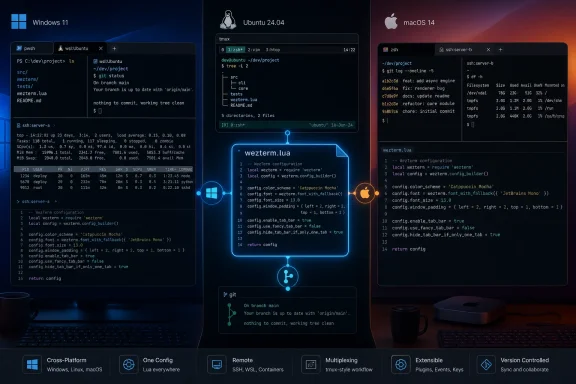 Overview: Why WezTerm Can Replace Windows Terminal
The central argument for replacing Windows Terminal with WezTerm is not that Microsoft’s terminal is missing basic capabilities. It plainly is not. Windows Terminal supports profiles, pane splitting, GPU rendering, custom keyboard actions, tab tear-out, Unicode, backgrounds, and command-line automation. Microsoft documents split-pane workflows and custom actions in considerable detail.
The case for WezTerm on Windows is instead about unification. WezTerm is available as a prebuilt application for Windows, macOS, Linux, FreeBSD, and NetBSD, giving one terminal emulator a much broader footprint than Windows Terminal can provide. WezTerm’s installation documentation lists support across those platforms, while its Windows documentation specifies support for 64-bit Windows 10 build 17763 and later because it depends on the Windows Pseudo Console infrastructure. WezTerm’s Windows installation guide also offers installer, ZIP, winget, Scoop, and Chocolatey routes.
That platform coverage matters less to someone who uses Windows exclusively. It matters enormously to anyone who wants the same pane behavior, keyboard shortcuts, fonts, color palette, SSH experience, tab logic, and startup routines across several operating systems.
A developer can keep a single .wezterm.lua file under version control, synchronize it to a new machine, and obtain a substantially familiar working environment without rebuilding the terminal experience from scratch. The terminal can then become part of the dotfiles strategy rather than a separate category of per-device GUI customization.
The Cross-Platform Advantage Is More Than a Checkbox
Cross-platform support sounds like an ordinary compatibility claim, but it has practical consequences. A terminal application sits in the center of developer workflows: source-control tasks, container management, shell scripting, build output, log inspection, remote deployment, serial sessions, and work inside WSL or SSH.
When the terminal differs across operating systems, muscle memory becomes fragmented. A split-pane key combination on a Windows desktop may not exist on a MacBook. A theme may need to be imported separately. A remote workflow may behave differently because one terminal shells out to the system SSH client while another manages its own connections.
WezTerm’s appeal is that it aims to make those differences less visible. Its documentation describes the terminal as configurable through Lua 5.4, with a wezterm module exposing configuration and control functions to the user’s config file. The official Lua reference shows the basic pattern: import the module, construct a configuration table, and return it.
That sounds simple, but it is a meaningful distinction from a static settings file.
JSON Settings Versus a Configuration Language
Windows Terminal uses settings.json for advanced customization, though it also provides a friendly graphical settings interface. Microsoft explicitly supports changing or adding profiles in the settings UI and through the JSON file. Its FAQ identifies the location of settings.json for stable, Preview, Canary, and unpackaged builds.
JSON is excellent for expressing data:
- A font face
- A color scheme
- A profile name
- A keybinding
- A startup action
- A background image path
What JSON is not designed to express elegantly is logic. It does not naturally answer questions such as:
- Is this computer a laptop with a smaller display?
- Is the session running under WSL?
- Is the operating system using dark mode?
- Should this shortcut change when a particular workspace is active?
- Should the terminal use a different font size when it detects a high-DPI display?
Lua can.
That does not automatically mean Lua is better for every person. It means WezTerm is more appropriate for users who view their terminal preferences as a programmable system. A single configuration can include conditional behavior, reusable functions, event handlers, generated key tables, and dynamic decisions based on the environment.
For example, a user can build a practical rule that uses a compact font on a laptop while choosing a larger one on a desktop. WezTerm can also detect the desktop appearance and reload a configuration based on light or dark mode changes. Its appearance API documentation shows that WezTerm can identify light, dark, and high-contrast states, then re-evaluate the configuration when that appearance changes.
This is the difference between customization and programmability. Windows Terminal is highly customizable. WezTerm is designed to make customization programmable.
Lua Makes the Terminal a Portable Development Asset
The most persuasive feature in the WezTerm versus Windows Terminal comparison is the ability to store nearly every meaningful preference in one readable Lua file. That file can live in Git, be backed up with dotfiles, and evolve in the same pull-request-and-diff workflow used for code.
A Practical Starting Configuration
A concise Windows-friendly setup can begin with a few settings:
local wezterm = require 'wezterm'
local config = {}

config.font = wezterm.font 'JetBrains Mono'
config.font_size = 13.0
config.color_scheme = 'Builtin Solarized Dark'
config.window_background_opacity = 0.90

config.keys = {
 {
 key = 't',
 mods = 'ALT',
 action = wezterm.action.SpawnTab 'CurrentPaneDomain',
 },
 {
 key = 'w',
 mods = 'ALT',
 action = wezterm.action.CloseCurrentTab { confirm = true },
 },
}

return config
The value of this approach is not the handful of lines themselves. It is that the exact same file can serve as the basis for a Windows, Linux, and macOS setup, with conditional adjustments added only where the hardware or operating system truly requires one.
WezTerm’s configuration is also designed to reload automatically by default when it detects a changed configuration file. The automatically_reload_config documentation confirms that file watching is enabled unless explicitly disabled. That makes iterative tuning far less disruptive than restarting a terminal application after every minor change.
A Better Fit for Version Control
A terminal config is often more important than it appears. It holds small workflow decisions that accumulate over years:
- Preferred fonts and fallbacks
- Font sizes and line spacing
- Color schemes
- Default shells
- Pane-navigation behavior
- Tab-management shortcuts
- Launch commands
- Domain-specific SSH routines
- Workspace naming conventions
- Rules for status bars and tab titles
Windows Terminal can also be version-controlled because settings.json is a file. But WezTerm’s Lua-based configuration is easier to scale once the user needs shared variables, functions, or conditional rules.
That flexibility carries risk. A malformed JSON setting is usually easy to locate. A Lua configuration can fail because of syntax mistakes, an incorrect module call, flawed control flow, or an unintended interaction between functions. The same power that makes a configuration elegant can make it harder to troubleshoot.
For users who want checkboxes, dropdowns, and an approachable visual settings experience, Windows Terminal remains the more forgiving option. Its settings UI can create new profiles, while the underlying JSON remains available for users who want direct control. Microsoft’s documentation explicitly supports both approaches.
Native Multiplexing Is the Feature That Changes the Workflow
The second major reason to choose WezTerm is its integrated multiplexing model. Many developers have historically combined a terminal emulator with tmux or GNU Screen to create persistent sessions, pane layouts, and remote workflows.
That combination is powerful, but it introduces layers:
- The terminal emulator has its own configuration.
- tmux has a separate configuration language and keybinding system.
- Remote machines may have different tmux versions or setups.
- Clipboard behavior, mouse support, scrolling, and color handling can vary across layers.
WezTerm attempts to reduce that stack by incorporating multiplexing into the terminal itself.
According to WezTerm’s multiplexing documentation, a domain represents a distinct set of windows and tabs. The default local domain manages normal local terminal windows, while additional local, SSH, Unix, and TLS-oriented domains can extend that model. Once connected, the terminal can attach the domain’s tabs and windows to the native UI, including mouse, clipboard, and scrollback behavior.
Why This Feels Different From “Just Split Panes”
Windows Terminal already has very good panes. Users can split vertically, horizontally, or automatically, and the application can open specific profiles in those panes. Microsoft’s panes documentation covers both keyboard-driven and UI-driven workflows.
But a split-pane feature is not necessarily a multiplexer.
WezTerm’s multiplexing architecture matters when a user wants tabs, panes, domains, and remote connections treated as related parts of one persistent terminal model. It can deliver a more unified experience for developers who otherwise use tmux primarily to avoid losing session layout and navigation consistency.
There are practical benefits:
- One set of keybindings for terminal and multiplexer behavior
- Native mouse and clipboard handling rather than terminal-to-tmux translation
- Per-pane scrollback integrated into the terminal application
- Workspaces and domains that can organize distinct projects or environments
- Less need to maintain a separate
.tmux.conf
This does not mean tmux has been displaced. tmux remains ubiquitous on servers, well understood by administrators, and extremely useful when a session must persist independently of the local terminal GUI. WezTerm’s own documentation describes its multiplexing functionality as a feature that is still evolving, an important caution for users considering it as a total tmux replacement. The official multiplexing page labels the capability “young” and notes that it continues to develop.
That warning deserves attention. A developer who needs a battle-tested remote session manager across minimal Linux installations may reasonably keep tmux. A developer who wants a unified local terminal experience with optional remote multiplexer domains may find WezTerm’s approach cleaner.
SSH Domains Are Powerful, but They Need Careful Expectations
WezTerm’s remote features are easy to oversimplify. There are two related but different ideas:
- Integrated ad-hoc SSH
- SSH domains for remote WezTerm multiplexing
For an ordinary remote shell, WezTerm includes an embedded SSH client. The wezterm ssh user@host command can establish a connection, prompt for authentication if necessary, and open the remote shell. Additional panes or tabs can use new channels in the existing session, avoiding repeated authentication in that workflow. WezTerm’s SSH documentation explains these behaviors and the available configuration options.
However, ordinary integrated SSH is not necessarily persistent. The same documentation warns that these sessions are non-persistent and associated tabs end if the network connection drops. That is an important operational limitation for anyone who equates “built-in SSH” with the durable reconnect behavior traditionally associated with tmux.
The More Advanced SSH Domain Model
An SSH domain is different. It connects to a compatible remote WezTerm multiplexer over SSH. For that model, WezTerm must be installed on the remote host, and the remote version must be compatible with the local setup. WezTerm’s multiplexing guide explicitly states that requirement.
The payoff is substantial for users who control both endpoints. Remote tabs and panes can be surfaced in the local native UI, letting the user work with remote sessions in a way that feels less like a basic SSH window and more like a continuation of the local workspace.
WezTerm can also auto-populate SSH domains from ~/.ssh/config, using SSH: and SSHMUX: prefixes for standard and multiplexed options. The documentation describes how hosts defined in the SSH configuration become available as plain SSH or multiplexing domains.
That is a meaningful quality-of-life improvement over manually creating a distinct terminal profile for every server. Windows Terminal can launch an SSH command inside a profile, and its command-line argument system can open profiles and pane layouts programmatically. Microsoft’s command-line documentation demonstrates this flexibility. But WezTerm’s domain model is more closely integrated into the terminal’s own navigation and workspace concepts.
The trade-off is complexity. The easier WezTerm makes remote terminal organization, the more important it becomes to understand whether a particular connection is an ordinary SSH session or a WezTerm multiplexer session. Those have different persistence, installation, and recovery characteristics.
Appearance Customization Goes Deep Without Becoming Cosmetic
WezTerm can look conventional, retro, transparent, minimal, or heavily customized. That visual flexibility is not its core advantage, but it helps explain why it can become a full-time replacement rather than a niche tool.
The terminal ships with more than 700 color schemes sourced from several terminal-theme collections, according to WezTerm’s appearance documentation. It also supports custom colors, custom schemes, external scheme directories, tab-bar styling, configurable fonts, window backgrounds, gradients, and pane dimming.
Transparency, Fonts, and Tab Bars
A small amount of transparency can make a terminal feel better integrated with a desktop environment, though readability must always come first. WezTerm’s window_background_opacity accepts values from 0.0 to 1.0; the documentation notes that non-default transparency may affect render performance. WezTerm’s appearance guide also confirms that Windows, macOS, and Wayland environments support compositing without extra setup.
Font configuration is equally flexible. WezTerm bundles JetBrains Mono, Nerd Font Symbols, and Noto Color Emoji, and supports custom font choices and ordered fallback lists. The font documentation explains how fallback selection works when a glyph is unavailable in the primary face.
The tab bar can use a native “fancy” style or a more traditional terminal-style presentation. It can have its own font, size, colors, placement, and visibility behavior. WezTerm’s appearance guide documents separate tab-bar font controls and the ability to hide it when only one tab exists.
For a developer with a carefully coordinated desktop theme, this is attractive. For a user who wants the terminal to get out of the way, it can be overkill. The best WezTerm configuration is usually not the most visually elaborate one; it is the one that preserves contrast, makes the active pane obvious, and makes project contexts recognizable at a glance.
Inline Images Are Useful, but Not a Reason to Switch Alone
WezTerm supports inline images through the iTerm2 image protocol, including the wezterm imgcat command. Its imgcat documentation shows the expected syntax for rendering an image directly in the terminal.
That can be useful for:
- Viewing generated screenshots in a terminal-centric workflow
- Inspecting image assets over SSH
- Using CLI tools that emit graphical previews
- Working with documentation or test artifacts without switching windows
It also illustrates the broader point that terminals no longer have to be restricted to text-only, fixed-function interfaces.
Still, this is not an unqualified advantage. The same documentation warns that image protocol support is not fully handled by multiplexer sessions. WezTerm’s image documentation therefore makes clear that graphical terminal features may behave differently in the very multiplexed workflows that draw users to WezTerm.
That is a useful reminder: terminal graphics protocols are not universal standards in the way users may expect. A workflow built around images should be tested on the exact terminal, remote host, multiplexer mode, and application combination that will be used day to day.
Terminal Compatibility: Avoid Creating a TERM Problem
One reported concern with advanced terminal emulators is compatibility with older remote systems that lack the required terminfo entry. When TERM advertises capabilities that a server does not understand, text-based applications can misbehave: colors may be wrong, key sequences may fail, screen-clearing may act strangely, or programs such as nano may render incorrectly.
The crucial detail is that current WezTerm documentation says its default terminal type is already xterm-256color, specifically because it provides broad functionality without requiring additional terminfo data on the remote host. WezTerm’s term configuration reference recommends that default as a compatibility-friendly choice.
Users can instead install WezTerm’s own terminfo definition on systems they control and set term = "wezterm" to advertise newer features such as styled underlines, italics, and true color. But that option should be approached deliberately: remote compatibility improves only when the corresponding terminfo entry is installed and discoverable.
The sensible strategy is straightforward:
- Use
xterm-256colorwhen connecting to varied, older, or externally managed systems. - Use
weztermonly on hosts where the WezTerm terminfo definition has been installed. - Test full-screen tools such as
vim,nano,htop,less, andtmuxafter changing terminal type behavior. - Treat remote
TERMsettings as infrastructure, not as a cosmetic tweak.
This is one of the few areas where a terminal’s power can become a portability risk. Advanced capabilities are valuable only when the other end of the connection can interpret them correctly.
Where Windows Terminal Still Makes More Sense
A serious comparison should not reduce Windows Terminal to a legacy fallback. Microsoft’s terminal remains an excellent recommendation for most Windows users, particularly those who work primarily in PowerShell, Command Prompt, WSL, and Windows-native developer tools.
Windows Terminal’s strengths include:
- A polished graphical settings interface
- Built-in discovery of common Windows and WSL profiles
- Strong integration with Windows workflows
- Easy profile management
- GPU-accelerated text rendering
- Mature panes, tabs, shortcuts, and command palette features
- A direct, approachable upgrade from the classic Windows console environment
Microsoft also supports advanced configuration for users who outgrow the UI. Its settings structure includes global startup options, custom profile definitions, keyboard actions, and startup pane layouts. The Windows Terminal startup documentation describes settings for default profiles, persisted layouts, startup actions, and related behavior.
For a user who does not want to learn Lua, manage dotfiles, or think about terminal domains, Windows Terminal is probably the better Windows terminal. It offers a powerful experience with less up-front investment.
WezTerm becomes more persuasive when the requirements are more specialized:
- One terminal setup across Windows, Linux, and macOS
- Configuration that can contain actual logic
- A desire to replace or reduce tmux usage locally
- Deep keyboard and mouse customization
- Domain-oriented remote workflows
- A preference for treating terminal settings as code
The Real Upgrade Is Consistency
The appeal of WezTerm is not simply that it has more options than Windows Terminal. In several areas, Windows Terminal already meets or exceeds what many users need. The real distinction is that WezTerm combines terminal emulation, scripting, cross-platform portability, and multiplexing into a single model.
That model will feel excessive to someone who opens PowerShell a few times a week. It can feel transformative to someone who lives in terminals across several operating systems and spends enough time refining workflows that each repeated action matters.
Windows Terminal remains one of the best default choices on Windows because it is capable, modern, accessible, and well integrated with the operating system. But for users whose terminal environment must travel intact between desktops, laptops, servers, and operating systems, WezTerm offers a more coherent long-term home.
The switch is not about rejecting Windows Terminal. It is about choosing a terminal that can become part of a portable development environment—one Lua file, one interaction model, and one set of habits that survive the move from Windows to Linux, macOS, WSL, and back again.
