
MakeUseOf is right to call that residual share unusually large. It is wrong, or at least needlessly imprecise, to frame it as Windows 11 still being unable to “beat” its predecessor. Windows 11 has won the version-share contest by a margin of 39.1 percentage points. The more consequential finding is that almost three in 10 measured Windows desktop web visits still originate on Windows 10 even after Microsoft formally ended normal support and began steering customers toward Windows 11 hardware.
That is a deployment problem, not a popularity poll. And Microsoft’s own actions now acknowledge that an October 2025 cutoff did not produce a clean migration.
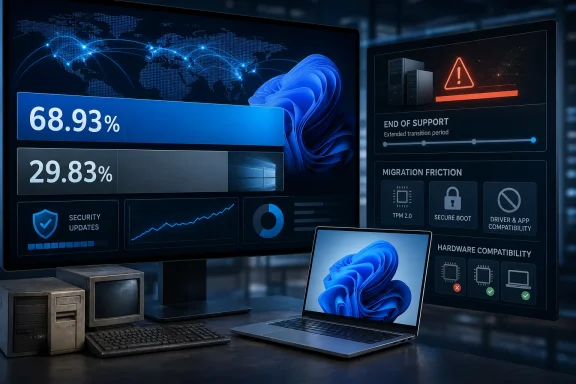 StatCounter Measures Web Traffic, Not the Windows Installed Base
StatCounter’s July table is specific: it measures desktop Windows version market share worldwide across the sites that use its analytics code. It is useful as a directional indicator, but it is not a census of PCs, active enterprise endpoints, or Microsoft’s own Windows install base.
The distinction changes how the 29.83% figure should be read. It captures machines that browsed the web through sites in StatCounter’s measurement network; it does not count Windows 10 devices that are switched off, isolated from the internet, restricted to line-of-business software, running behind specialized kiosks, or operating in managed environments that never touch participating sites. It also cannot distinguish between an aging home notebook, a corporate desktop under a paid ESU agreement, a medical workstation, or an unsupported machine receiving no patches at all.
Still, the number is difficult to dismiss as a statistical blip. Windows 10, Windows 11, Windows 7, Windows 8.1, Windows XP, and Windows 8 account for virtually the entire chart. Windows 10’s share is therefore not being diluted by an oversized “other Windows” bucket. It is a substantial portion of the web-visible Windows estate.
The correct conclusion is narrower and more useful than the headline: Windows 11 is the dominant Windows version, but Windows 10 remains a major operational platform. For IT teams, that means Windows 10 risk has not disappeared merely because the successor OS became the numerical leader.
Microsoft’s Security Extension Undercuts the Idea of a Finished Transition
Microsoft ended normal support for Windows 10 version 22H2 on October 14, 2025. That decision ended routine free security updates, feature work, bug fixes, and standard technical support for Home, Pro, Enterprise, and Education editions on the General Availability Channel. It did not stop the operating system from booting, running applications, or remaining in use.
More importantly, Microsoft is still shipping Windows 10 security updates to machines enrolled in Extended Security Updates. Microsoft’s Windows 10 release-health record lists the July 14, 2026 update as KB5099539, raising version 22H2 to build 19045.7548. The monthly patching pipeline remains alive for ESU-covered systems.
Microsoft also extended the consumer Windows 10 ESU program through October 12, 2027, adding a second year beyond the initial October 2026 end date. The change was first noticed in Microsoft documentation rather than announced with a major migration campaign; Tom’s Hardware, Windows Central, TechRadar, and other outlets subsequently reported the extension. Microsoft’s lifecycle documentation separately lists commercial Windows 10 ESU coverage through October 10, 2028, with year-by-year dates that reflect the enterprise program’s three-year design.
Those dates need to be kept separate:
- Consumer Windows 10 ESU coverage for enrolled personal devices now runs through October 12, 2027.
- Commercial Windows 10 ESU is structured as a paid, three-year bridge and can run through October 10, 2028.
- Windows 10 LTSC and IoT editions follow different lifecycle rules, so a Windows 10 machine is not automatically unsupported merely because it runs the Windows 10 brand.
The extension does not restore Windows 10 to normal support. Microsoft says ESU supplies critical and important security updates when available; it does not include new features, ordinary non-security fixes, design changes, or standard support services. A PC receiving ESU patches is safer than an unpatched Windows 10 PC, but it remains on a deliberately shrinking servicing path.
That makes the extension a practical concession, not a reversal of Microsoft’s Windows 11 strategy. The company has bought users more time while retaining the incentive to move: ESU keeps the lights on but does not modernize the building.
Compatibility Rules Turned an Upgrade Decision Into a Hardware Decision
The most durable explanation for Windows 10’s staying power is not that every holdout prefers its Start menu. It is that Windows 11’s official eligibility rules exclude machines that remain entirely usable for ordinary work.
Microsoft requires Windows 11 systems to have UEFI firmware with Secure Boot capability, TPM 2.0, at least 4 GB of RAM, 64 GB of storage, and a processor from Microsoft’s supported CPU lists. The TPM requirement supports security capabilities including measured boot, credential protections, BitLocker-related scenarios, and Windows Hello. Microsoft’s security rationale is real.
But those requirements create a gap between functional and supported. A device with an Intel Core processor from the late 2010s can still handle Microsoft 365, web applications, remote desktop, video conferencing, printers, scanners, and line-of-business software without difficulty while failing the supported-processor check. In many fleets, the obstacle is not performance degradation. It is a procurement and deployment event triggered by a compatibility policy.
Unsupported Windows 11 installations do not solve that policy problem for organizations. Workarounds can bypass setup checks, but they leave IT departments responsible for hardware outside Microsoft’s supported baseline and potentially complicate compliance, warranty, servicing, and future feature-update planning. Home users can make that choice; managed environments usually cannot treat it as a migration strategy.
Linux is a real option for machines that cannot move to supported Windows 11, particularly where the workload is browser-based or uses open-source and cross-platform tools. It is not a drop-in answer for organizations dependent on Active Directory workflows, proprietary Windows software, specialty peripherals, or Microsoft Office macros. The important point is less about Linux adoption than about the hardware: a PC deemed ineligible for Windows 11 may remain technically capable of useful, secure computing under another supported operating system.
Windows 11’s Friction Is Still Part of the Migration Cost
MakeUseOf also points to interface familiarity, and that argument has more weight than it is often given in upgrade planning. Windows 10 users do not merely recognize an old visual style; they know how to find settings, arrange their taskbar, manage windows, and work around the oddities accumulated in a specific configuration.
Windows 11 removed or changed several of those expectations. Its simplified taskbar initially eliminated the ability to place it at the top or sides of the display, a feature used disproportionately by multi-monitor and ultrawide users. Microsoft began testing alternative taskbar positions again in its Experimental Insider channel on May 15, 2026, according to the Windows Insider release notes and reporting from Windows Central.
That is a preview, not a commitment to broad release. Microsoft explicitly says Experimental features are subject to controlled rollout, may change, and may never ship beyond the Insider program. The taskbar reversal is therefore evidence that Microsoft recognizes a customization gap, but it is not yet a feature that IT administrators can put into a Windows 11 standard operating environment.
Windows 11 Home and Windows 11 Pro when configured for personal use also require internet connectivity and a Microsoft account during initial setup, according to Microsoft’s current specifications. Domain-joined, enterprise-managed, and other business deployment scenarios are different, but the consumer rule adds another point of friction for people replacing or reinstalling a PC that had been running Windows 10 locally for years.
None of those decisions individually explains nearly 30% share. Together with hardware eligibility, application validation, deployment cost, device replacement cycles, and the simple risk of changing a system that works, they explain why a free Windows 11 upgrade did not translate into an immediate Windows 10 exit.
The Operational Issue Is Patch Status, Not Which Interface Won
For Windows enthusiasts, the StatCounter result is an interesting measure of the long handoff from one familiar release to another. For administrators, it should trigger a much less sentimental inventory question: which Windows 10 devices are covered by ESU, which run LTSC under a valid lifecycle, and which are simply operating after end of support with no patch entitlement?
Those categories demand different action. A Windows 10 22H2 PC on build 19045.7548 with confirmed ESU enrollment has a documented security-update path through October 12, 2027 for consumers or longer under the appropriate commercial program. A similarly configured device without ESU is not made safe by the fact that it still appears in StatCounter’s traffic sample.
Windows 11 has replaced Windows 10 as the most-used version in StatCounter’s worldwide Windows desktop data. Microsoft has not replaced Windows 10 in the field at anything like the same speed. By extending ESU into 2027 while its July 2026 telemetry proxy still shows Windows 10 near 30%, the company has effectively made the transition period two years longer than its original consumer plan.