
DevPro Journal correctly identifies the exposure: this is a separate retirement from the mainstream Windows 10 cutoff on October 14, 2025. Microsoft’s release-health documentation still lists the 2016 LTSB release—Windows 10 version 1607, build family 14393—as supported today, with its August 2026 cumulative update bringing it to build 14393.9418. But the runway is short, and the systems involved are precisely the ones conventional endpoint-management inventories often miss.
Microsoft confirmed the deadline in its Windows IT Pro Blog earlier this year, alongside the January 2027 retirement of Windows Server 2016. The company’s IoT documentation is more direct about the kind of machines at stake: Windows IoT Enterprise exists for fixed-purpose devices in retail, healthcare, hospitality, manufacturing and banking. That makes this an application-vendor problem as much as an OS-administration problem.
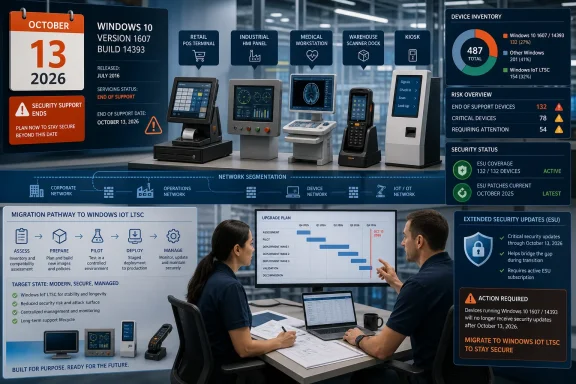 The 2016 LTSB population is easy to misidentify
The naming alone creates trouble. In current Microsoft documentation, the same generation appears variously as Windows 10 Enterprise 2016 LTSB, Windows 10 Enterprise LTSC 2016, and Windows 10 IoT Enterprise LTSB 2016. The relevant technical marker is more reliable: version 1607 on the 14393 build branch.
A device reporting Windows 10 does not, by itself, establish that it is affected. Most Windows 10 Enterprise and IoT Enterprise devices on the General Availability Channel reached end of support in October 2025. A Windows 10 Enterprise LTSC 2019 installation, based on version 1809 and build 17763, remains supported until January 9, 2029. Windows 10 IoT Enterprise LTSC 2021, build 19044, remains supported until January 13, 2032.
That distinction should change the first task for ISVs and managed service providers. Do not send a generic “Windows 10 is unsupported” notice to every customer; that will generate false positives and obscure the systems that actually need work. Ask customers for the exact edition, version, OS build, device model, application release, owner and network location. On an affected unit, winver should identify version 1607, while system inventory should show a 14393-series build.
The deadline is especially awkward because these systems were built to be left alone. Long-Term Servicing Branch was Microsoft’s old name for the servicing model now called LTSC: a controlled release intended for specialized equipment where frequent feature changes can create more risk than benefit. The LTSB decision may have been entirely sensible in 2016. The error now would be treating an old stable image as a perpetually supportable one.
A POS lane, a badge-printing station, a warehouse scanner dock, or a production-floor HMI can run reliably for years while remaining nearly invisible to the team that manages employee PCs. It may sit in a separate VLAN, be enrolled in a legacy remote-management tool, or be maintained by a facilities, operations or application group rather than central IT. The vendor whose software starts automatically after boot is often the first party with a usable record of where those boxes are.
End of support is a security and support boundary
Microsoft says both Enterprise LTSB 2016 and IoT Enterprise LTSB 2016 will receive their final regular monthly update on October 13. Without additional coverage, the operating system will no longer receive security updates, non-security fixes or normal Microsoft support.
That does not mean every machine becomes immediately unusable at midnight. It does mean the risk calculation changes permanently. A vulnerability discovered after the cutoff may continue to have a working exploit path on the device, with no vendor patch arriving for the underlying Windows component. A fixed-function deployment that has no browser, no email client and strong network segmentation has a smaller exposed surface than a general-purpose PC, but it is not automatically insulated from Windows vulnerabilities, credential theft or lateral movement.
The practical exposure also does not stop at the operating system. ISVs should identify whether their application depends on a supported browser runtime, database driver, remote-support agent, VPN client, antivirus product, payment middleware or hardware driver on 1607. The application can still launch while one of those dependencies loses support, rejects the old OS, or requires an update that has never been validated against the customer’s locked-down image.
This is where a routine lifecycle date turns into a contractual issue. Customers may have written security obligations, payment-card requirements, insurance conditions, or regulated-device validation procedures that demand supported software or documented compensating controls. An ISV does not become responsible for Windows merely because its program runs on the device. But it will be difficult to argue that the operating-system retirement was unforeseeable if the vendor knew its supported deployment base included 2016 LTSB machines and had no migration guidance.
The useful message to customers is specific: their application may continue to run, but its published support position needs to say whether it will continue to be supported on an OS that has passed its normal Microsoft support date, and under what controls.
ESU buys patch coverage, not a modern platform
Microsoft has made Extended Security Updates available for both affected 2016 LTSB editions for as long as three additional years. The important correction to the usual “final patch and then nothing” framing is that eligible devices enrolled in ESU can receive critical and important security updates after October 13, 2026.
ESU is a paid subscription, and it does not supply feature updates, general product enhancements or a migration path. Microsoft describes the program as security coverage for devices that need more time, not as continued full servicing. That distinction matters for a device that needs a new driver, a compatibility fix, or vendor assistance for an issue that does not qualify as a critical or important security vulnerability.
For Windows 10 Enterprise 2016 LTSB, Microsoft’s published structure is deliberately punitive to delayed planning. Windows Central reported that the first year costs $61 per device, with a first-year $45 price for devices managed through Microsoft Intune or Windows Autopatch. Microsoft says pricing doubles in each consecutive year, and that ESU enrollment is cumulative: a customer starting in year two must also pay for year one.
For a device that stays in the program for all three years, the standard list-price sequence works out to $61, $122 and $244 per device, or $427 in total. The managed-device discount makes only the first year cheaper; it is not a substitute for an inventory or migration plan. A 500-device estate at the undiscounted rate would face $213,500 in ESU license costs across those three years, before labor, testing, hardware replacement, application remediation and support are counted.
Windows 10 IoT Enterprise LTSB 2016 follows a different purchasing route. Microsoft’s ESU activation guidance instructs customers to contact their OEM partner for IoT Enterprise MAK keys rather than retrieve them through the ordinary commercial licensing workflow. DevPro Journal’s warning about opaque IoT pricing is therefore well founded: Microsoft has documented the OEM channel, but has not published a universal IoT per-device price on its public guidance.
That OEM dependency is more than paperwork. If the original device maker has changed distributors, stopped selling the platform, ended a support agreement or disappeared, obtaining the ESU entitlement can become a project in its own right. ISVs should find that out now, before the October deadline turns every customer request into an urgent escalation.
An application inventory is more valuable than a warning email
The immediate job is to divide affected customers into three groups: those that can migrate before October 13, those that need a short ESU bridge, and those whose device hardware or validation process makes replacement a longer program. That assessment must be done per device family, rather than by assuming a single customer-wide answer.
Microsoft’s current supported options make the destination clearer than the route. Windows 10 Enterprise LTSC 2019 remains supported until January 2029, though its remaining life is already limited. Windows 10 IoT Enterprise LTSC 2021 has support through January 2032. Microsoft’s newest fixed-function release, Windows 11 IoT Enterprise LTSC 2024, has a support date through October 10, 2034.
The newest release is not automatically the correct answer. A migration from 1607 needs application testing against the newer Windows build, device-driver verification, review of peripherals such as receipt printers and payment readers, and confirmation that lockdown features, startup behavior and recovery procedures still work. Medical and industrial deployments may also have formal validation or certification constraints. Those are reasons to start now, not reasons to let the date pass.
ISVs should give customers a supportable path in writing:
- Identify Windows 10 Enterprise LTSB 2016 and Windows 10 IoT Enterprise LTSB 2016 by version 1607 and build 14393, rather than relying on a broad Windows 10 inventory.
- Confirm the OEM, the device’s Windows license channel, the hardware’s Windows 11 readiness, and whether an ESU purchase route is available.
- Test the application, drivers, peripherals, remote-management agent and recovery image on the intended LTSC or Windows 11 IoT replacement before production rollout.
- Treat ESU as a documented, time-limited control with an exit date, because it covers only security updates and becomes more expensive when customers delay enrollment.
The real deadline is October 13, 2026, but the business consequence arrives earlier. Any vendor that waits until the October security release to discover which customers depend on build 14393 will be choosing between an unsupported production device and a rushed, untested migration.
