
Windows 11’s August 2026 servicing cycle is broadening Windows Hello Enhanced Sign-in Security, or ESS, to compatible external fingerprint readers—a meaningful change for desktop users and laptop owners whose devices lack an ESS-capable sensor. As Windows Central first reported, the practical decision remains simpler than Microsoft’s terminology suggests: Windows Hello is the passwordless sign-in system; ESS is the higher-assurance way supported biometric hardware connects to it.
That distinction matters because ESS can look like a replacement feature in Settings, particularly when Windows asks for a PIN update or removes prior fingerprint enrollment. It is not. Standard Windows Hello remains a strong, TPM-backed sign-in method for the overwhelming majority of Windows 11 users. ESS builds on that foundation by placing more of the biometric path behind hardware-backed isolation designed to resist tampering, replay, and injected biometric samples.
Microsoft’s current Windows support documentation confirms that compatible third-party fingerprint readers can operate with ESS on Windows 11 version 24H2 and later, while external camera modules still cannot. The company also says the availability of the feature is rolling out in phases, so even otherwise compatible PCs may not expose the setting immediately.
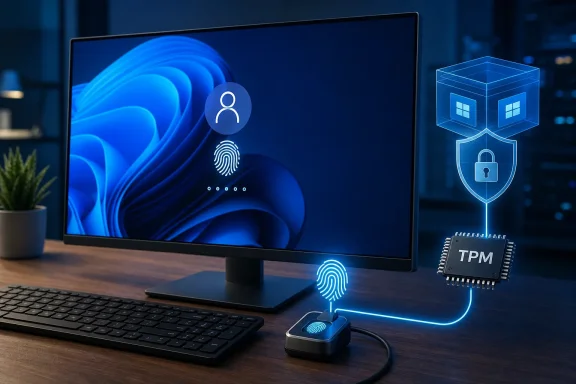
The baseline Windows Hello model is considerably more secure than the password it commonly replaces. Rather than holding a reusable account password locally and sending it to services for verification, Windows Hello uses cryptographic keys tied to the individual device. A PIN, fingerprint, or face scan locally unlocks the key material, with the Trusted Platform Module protecting the credentials.
That difference is why Windows Hello can help limit damage from password reuse, credential phishing, and database breaches. A user’s fingerprint template is not a password that gets transmitted to Microsoft, a website, or an organization’s identity provider. It remains local to the PC, and the biometric is used to authorize the device-bound credential.
Microsoft’s Windows security documentation also makes an important point that is often lost in consumer-facing explanations: biometrics are not the account credential itself. They are the convenient local gesture that allows Windows to use the credential. If the fingerprint sensor fails, Windows falls back to the Windows Hello PIN, which is also tied to that device rather than functioning like a portable password.
For a home PC with an ordinary Windows Hello fingerprint reader or infrared camera, that is already a substantial security upgrade. There is no general reason to disable Windows Hello, abandon an existing sensor, or buy a new laptop simply because its biometric hardware does not support ESS.
In standard Windows Hello operation, Windows receives data from a trusted biometric device and performs the relevant authentication work before allowing use of the TPM-protected credential. With ESS, sensitive parts of that flow are constrained to protected environments. Microsoft describes the goal as protecting the biometric data and the communication channel that carries the authentication result.
This is aimed at a more demanding threat model than a stolen password. ESS is designed to raise resistance to attacks such as biometric sample injection, replay, and tampering by malware that has obtained unusually deep access to the operating system. That is why the feature has been associated most closely with Secured-core PCs and certain modern business-focused systems, even though it is not exclusive to organizations or Copilot+ PCs.
The mechanism varies by modality. For ESS-capable face authentication, Microsoft requires particular hardware, firmware, and platform configuration, including support for the Secure Devices ACPI table and appropriate IR camera components. For fingerprint authentication, Microsoft’s documentation requires match-on-chip behavior: matching happens inside the fingerprint sensor instead of sending biometric material to Windows for comparison.
That is the core reason a reader may see Windows Hello and ESS as separate choices when they are really layers of the same sign-in stack. Windows Hello answers, “Can this person unlock their device-bound credential?” ESS adds, “Can the system establish that answer through an isolated and verified biometric path?”
An ESS-ready peripheral fingerprint reader needs more than a suitable driver. Microsoft says the hardware must carry a Microsoft-issued certificate placed in the device during manufacturing, and it must support the Secure Device Connection Protocol. That protocol uses key negotiation and an encrypted connection to protect the authentication exchange between the reader and Windows.
The effect is deliberately narrow. Windows should receive an authenticated result from a trusted peripheral rather than raw fingerprint data that could create additional opportunities for interception or manipulation. The reader becomes part of the secured sign-in boundary rather than simply a USB accessory feeding the operating system.
Microsoft’s hardware documentation explicitly states that peripheral ESS fingerprint scanners are supported on capable hardware and supported Windows builds. Independent reporting from WindowsReport and All Things How has also identified wider plug-in reader support in recent Windows 11 Release Preview builds, though Microsoft’s phased rollout language means individual availability can still differ by system configuration and update channel.
The limitation on cameras remains. Microsoft’s support page says ESS is not supported for external camera modules. Users can still use an external webcam for applications such as Teams while ESS is enabled, but not as an ESS Windows Hello face-authentication device. That is a significant practical distinction for desktop setups where an external Windows Hello camera was once the preferred convenience upgrade.
Microsoft has not publicly offered a detailed consumer explanation for why the fingerprint path can expand to certified USB peripherals while ESS face sign-in remains restricted to tightly integrated camera hardware. Its technical requirements, however, show why the two cases are not equivalent: the ESS camera model depends on certified camera, chipset, firmware, and protected-memory conditions that are more difficult to assure across generic external webcams.
With a supported peripheral attached, Windows may report “Pending set up.” Some users instead see “Update PIN,” an indication that Windows needs to refresh the local sign-in setup before moving to the ESS configuration. Once the prerequisites are met, enrolling a fingerprint through the supported reader completes the transition.
There is an important side effect: moving from a non-ESS configuration to ESS removes existing non-ESS biometric enrollments and associated credentials, including passkeys. Microsoft documents this as an intentional cleanup step to establish a secure configuration. Users should expect to refresh their PIN, enroll their fingerprints again, and re-provision any affected passkeys.
Administrators should pay particular attention on shared machines. ESS is a system-level security posture, not a per-user preference. Microsoft’s technical guidance says that the lowest Windows Hello security posture on a multi-user system applies. An admin can move the PC to ESS, but all users will need to re-enroll when they next sign in.
The reverse is also true: once ESS is enabled, Windows will not enumerate non-ESS biometric sensors for Windows Hello. That can catch users who attach an older “Windows Hello compatible” USB reader and expect it to work automatically. On 24H2 and newer, turning ESS off permits those non-ESS peripherals, but it trades away the enhanced protected path.
Enable ESS if the PC and sensor support it—especially on a work device, a system holding sensitive data, or a desktop where a newly purchased external fingerprint reader explicitly supports ESS. There is little reason to turn down the stronger configuration when all components are compatible, and the new peripheral support gives desktop Windows users a path that was previously much more constrained.
But ESS is not a universal upgrade button. A user with a reliable non-ESS fingerprint reader should not assume it is defective because Windows blocks it while ESS is on. Nor should they replace working hardware solely to satisfy a feature whose benefits are most relevant against sophisticated local compromise.
The immediate consequence of Microsoft’s expansion is choice: compatible fingerprint peripherals no longer have to force a Windows 11 PC down to the standard Windows Hello posture. The unresolved issue is whether Microsoft can broaden the same assurance model to external Windows Hello cameras without weakening the tightly controlled biometric chain that ESS was built to protect.
Microsoft’s current Windows support documentation confirms that compatible third-party fingerprint readers can operate with ESS on Windows 11 version 24H2 and later, while external camera modules still cannot. The company also says the availability of the feature is rolling out in phases, so even otherwise compatible PCs may not expose the setting immediately.
 Windows Hello Already Replaced the Weakest Link
The baseline Windows Hello model is considerably more secure than the password it commonly replaces. Rather than holding a reusable account password locally and sending it to services for verification, Windows Hello uses cryptographic keys tied to the individual device. A PIN, fingerprint, or face scan locally unlocks the key material, with the Trusted Platform Module protecting the credentials.That difference is why Windows Hello can help limit damage from password reuse, credential phishing, and database breaches. A user’s fingerprint template is not a password that gets transmitted to Microsoft, a website, or an organization’s identity provider. It remains local to the PC, and the biometric is used to authorize the device-bound credential.
Microsoft’s Windows security documentation also makes an important point that is often lost in consumer-facing explanations: biometrics are not the account credential itself. They are the convenient local gesture that allows Windows to use the credential. If the fingerprint sensor fails, Windows falls back to the Windows Hello PIN, which is also tied to that device rather than functioning like a portable password.
For a home PC with an ordinary Windows Hello fingerprint reader or infrared camera, that is already a substantial security upgrade. There is no general reason to disable Windows Hello, abandon an existing sensor, or buy a new laptop simply because its biometric hardware does not support ESS.
ESS Secures the Biometric Route, Not the Familiar Sign-In Screen
The visible experience does not change when ESS is enabled. Users still touch a fingerprint reader, look at an IR camera, or enter a PIN at the lock screen. The change is architectural: ESS uses Virtualization-Based Security, TPM 2.0, specialized sensor support, and isolated processes to make the path from biometric capture to authentication harder to interfere with.In standard Windows Hello operation, Windows receives data from a trusted biometric device and performs the relevant authentication work before allowing use of the TPM-protected credential. With ESS, sensitive parts of that flow are constrained to protected environments. Microsoft describes the goal as protecting the biometric data and the communication channel that carries the authentication result.
This is aimed at a more demanding threat model than a stolen password. ESS is designed to raise resistance to attacks such as biometric sample injection, replay, and tampering by malware that has obtained unusually deep access to the operating system. That is why the feature has been associated most closely with Secured-core PCs and certain modern business-focused systems, even though it is not exclusive to organizations or Copilot+ PCs.
The mechanism varies by modality. For ESS-capable face authentication, Microsoft requires particular hardware, firmware, and platform configuration, including support for the Secure Devices ACPI table and appropriate IR camera components. For fingerprint authentication, Microsoft’s documentation requires match-on-chip behavior: matching happens inside the fingerprint sensor instead of sending biometric material to Windows for comparison.
That is the core reason a reader may see Windows Hello and ESS as separate choices when they are really layers of the same sign-in stack. Windows Hello answers, “Can this person unlock their device-bound credential?” ESS adds, “Can the system establish that answer through an isolated and verified biometric path?”
External Fingerprints Are the New Compatibility Test
The August expansion matters because external fingerprint readers have long been a weak spot in the ESS story. Plenty of USB devices carry “Windows Hello compatible” branding, but that only means they can work with the normal Windows Hello framework. It does not guarantee ESS compatibility.An ESS-ready peripheral fingerprint reader needs more than a suitable driver. Microsoft says the hardware must carry a Microsoft-issued certificate placed in the device during manufacturing, and it must support the Secure Device Connection Protocol. That protocol uses key negotiation and an encrypted connection to protect the authentication exchange between the reader and Windows.
The effect is deliberately narrow. Windows should receive an authenticated result from a trusted peripheral rather than raw fingerprint data that could create additional opportunities for interception or manipulation. The reader becomes part of the secured sign-in boundary rather than simply a USB accessory feeding the operating system.
Microsoft’s hardware documentation explicitly states that peripheral ESS fingerprint scanners are supported on capable hardware and supported Windows builds. Independent reporting from WindowsReport and All Things How has also identified wider plug-in reader support in recent Windows 11 Release Preview builds, though Microsoft’s phased rollout language means individual availability can still differ by system configuration and update channel.
The limitation on cameras remains. Microsoft’s support page says ESS is not supported for external camera modules. Users can still use an external webcam for applications such as Teams while ESS is enabled, but not as an ESS Windows Hello face-authentication device. That is a significant practical distinction for desktop setups where an external Windows Hello camera was once the preferred convenience upgrade.
Microsoft has not publicly offered a detailed consumer explanation for why the fingerprint path can expand to certified USB peripherals while ESS face sign-in remains restricted to tightly integrated camera hardware. Its technical requirements, however, show why the two cases are not equivalent: the ESS camera model depends on certified camera, chipset, firmware, and protected-memory conditions that are more difficult to assure across generic external webcams.
Turning ESS On Can Require a Small Migration
The safest way to approach ESS is not to flip a switch blindly. First determine whether the PC and the biometric device support it. On Windows 11 version 24H2 or newer, the relevant control appears under Settings > Accounts > Sign-in options > Additional settings when Windows detects appropriate hardware. The setting is called “Enhanced sign-in security.”With a supported peripheral attached, Windows may report “Pending set up.” Some users instead see “Update PIN,” an indication that Windows needs to refresh the local sign-in setup before moving to the ESS configuration. Once the prerequisites are met, enrolling a fingerprint through the supported reader completes the transition.
There is an important side effect: moving from a non-ESS configuration to ESS removes existing non-ESS biometric enrollments and associated credentials, including passkeys. Microsoft documents this as an intentional cleanup step to establish a secure configuration. Users should expect to refresh their PIN, enroll their fingerprints again, and re-provision any affected passkeys.
Administrators should pay particular attention on shared machines. ESS is a system-level security posture, not a per-user preference. Microsoft’s technical guidance says that the lowest Windows Hello security posture on a multi-user system applies. An admin can move the PC to ESS, but all users will need to re-enroll when they next sign in.
The reverse is also true: once ESS is enabled, Windows will not enumerate non-ESS biometric sensors for Windows Hello. That can catch users who attach an older “Windows Hello compatible” USB reader and expect it to work automatically. On 24H2 and newer, turning ESS off permits those non-ESS peripherals, but it trades away the enhanced protected path.
The Right Choice Depends on Hardware You Already Own
For most individuals, the advice is straightforward. Leave standard Windows Hello enabled and use a PIN, fingerprint reader, or supported face camera. It is already passwordless, device-bound, and materially more resistant to common credential attacks than a conventional password.Enable ESS if the PC and sensor support it—especially on a work device, a system holding sensitive data, or a desktop where a newly purchased external fingerprint reader explicitly supports ESS. There is little reason to turn down the stronger configuration when all components are compatible, and the new peripheral support gives desktop Windows users a path that was previously much more constrained.
But ESS is not a universal upgrade button. A user with a reliable non-ESS fingerprint reader should not assume it is defective because Windows blocks it while ESS is on. Nor should they replace working hardware solely to satisfy a feature whose benefits are most relevant against sophisticated local compromise.
The immediate consequence of Microsoft’s expansion is choice: compatible fingerprint peripherals no longer have to force a Windows 11 PC down to the standard Windows Hello posture. The unresolved issue is whether Microsoft can broaden the same assurance model to external Windows Hello cameras without weakening the tightly controlled biometric chain that ESS was built to protect.
References
- Primary source: Windows Central
Published: 2026-08-01T14:15:00+00:00
Windows Hello vs. Enhanced Sign‑in Security: Which sign‑in method actually keeps your Windows 11 PC safer, and what's the difference? | Windows Central
Windows 11's latest security update expands Enhanced Sign-in Security to external fingerprint readers. Here's what it actually changes.www.windowscentral.com - Related coverage: support.microsoft.com
Using third-party fingerprint readers and cameras with Windows Hello | Microsoft Support
Using third-party fingerprint readers and cameras with Windows Hellosupport.microsoft.com - Related coverage: learn.microsoft.com
Windows Hello Enhanced Sign-in Security | Microsoft Learn
Windows Hello Enhanced Sign-in Security provides your organization an additional level of security using biometrics or PIN.learn.microsoft.com - Related coverage: learn.microsoft.com
Windows 11 security book - Passwordless sign-in | Microsoft Learn
Identity protection chapter - Passwordless sign-in.learn.microsoft.com - Related coverage: support.microsoft.com
Erweiterte Anmeldesicherheit in Windows | Microsoft Support
Erfahren Sie mehr über enhanced Sign in Security (ESS) und ihre Konfiguration.support.microsoft.com - Related coverage: windowsreport.com
Windows 11 Release Preview Build Improves Windows Hello and Reliability
Windows 11 Insider Release Preview Build 26100.8942/26200.8942 improves Windows Hello, power settings, accessibility, updates, and more. windowsreport.com
- Related coverage: cloudbymoe.com
Windows Hello ESS: The Toggle That Appeared on Your Windows
If you manage Windows Hello for Business in your organization, you may have recently noticed a new toggle appearing under Sign-in options on Windows 11 devices. Most admins enable it without reading the cloudbymoe.com
- Related coverage: blogs.windows.com
Update on Recall security and privacy architecture
Overview As AI becomes more integral to Windows, Microsoft is doing more with AI on the edge with the power of a 40+ TOPS Neural Processing Unit on Copilot+ PCs. This enables lower latency, better battery life for AI intense tasks, use of AIblogs.windows.com - Related coverage: bleepingcomputer.com
- Related coverage: bleepingcomputer.com
- Related coverage: blogs.windows.com
Windows security and resiliency: Protecting your business
At Microsoft, security is our top priority, and with every release, Windows becomes even more secure. At Ignite 2024, we will highlight new Windows security innovations that will provide the clarity and confidence our customers and organizations requblogs.windows.com - Related coverage: dandh.com
- Related coverage: securityinsights.net
SecurityInsights.net - Your Partner for Microsoft Security
Your partner for Microsoft Security. Expertise in Endpoint Management, Defender XDR and Data Protection. www.securityinsights.net
