
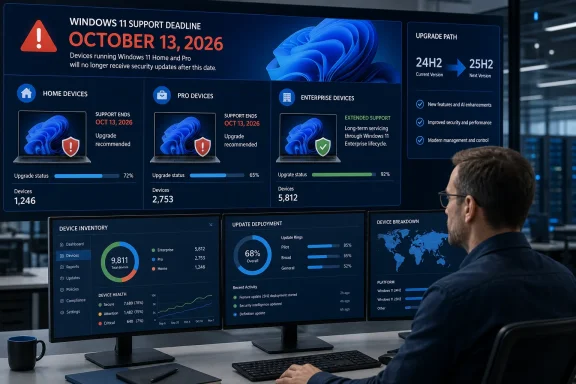
TechRepublic correctly flags the calendar deadline, but Microsoft’s lifecycle record adds a critical operational detail: “24H2” is not a sufficient inventory field. The same version has a different end date depending on its edition. Windows 11 24H2 Enterprise, Education, Enterprise multi-session, and IoT Enterprise continue receiving updates until October 12, 2027, while 24H2 Home and Pro do not.
For organizations that permit personally owned or lightly managed Pro devices alongside Enterprise desktops, that creates a clean compliance failure waiting to happen. A report showing “Windows 11 24H2” can make a fleet appear covered through 2027 when some endpoints lose monthly security servicing this October.
 October 13 Is an End of Updates Date
Microsoft lists October 13 as the final support date for Windows 11 24H2 Home and Pro under its Modern Lifecycle Policy. After that date, Microsoft says those editions will no longer receive monthly security updates, non-security preview updates, fixes for known issues, technical support, or even time-zone updates.
This is not a retirement of Windows 11 as a whole, and it does not mean a 24H2 PC will suddenly stop booting or become unusable on October 14. It means a machine can remain operational while its patch level becomes permanently stale. Each newly disclosed Windows vulnerability after the cutoff becomes a problem that Microsoft may fix for supported releases but will not remediate for 24H2 Home and Pro.
The deadline is part of the normal Windows 11 servicing model, rather than an emergency withdrawal. Microsoft released 24H2 on October 1, 2024, and Home and Pro feature releases receive 24 months of servicing. Enterprise and Education releases receive 36 months, which is why the edition distinction is more consequential than the version label.
Windows Central and TechRepublic have both reported Microsoft’s end-of-updates warning, while Microsoft’s own Windows release-health documentation supplies the authoritative edition-by-edition dates. The reporting is useful as a prompt, but the lifecycle tables should be the source of truth for deployment and audit decisions.
The Upgrade Is Small, but It Is Still a Version Change
For a fully updated Windows 11 24H2 PC, moving to 25H2 is unusually low-risk compared with a conventional annual Windows upgrade. Microsoft delivers 25H2 through an enablement package, KB5054156, because 24H2 and 25H2 share the same core operating-system files and servicing branch.
In practical terms, many of the components needed for 25H2 arrived through regular 24H2 cumulative updates but remained inactive. Installing the enablement package turns on the version’s capabilities, changes the release designation to 25H2, and requires one restart. Microsoft describes it as a small “master switch,” rather than a full operating-system replacement.
That design has an important support consequence: the move renews the lifecycle clock without asking IT teams to stage a large feature-update download for every already-current 24H2 endpoint. It does not, however, excuse organizations from normal application validation. An enablement package may be technically compact, but a version change can still expose problems in VPN clients, endpoint protection agents, disk-encryption tooling, custom drivers, line-of-business software, and update-management rules.
Microsoft’s September 2025 25H2 announcement explicitly recommended that commercial customers use targeted deployments to validate applications, devices, and infrastructure before broad rollout. That advice remains the right approach in August 2026, especially for environments that have delayed feature updates through Windows Update for Business, Microsoft Intune, Windows Autopatch, WSUS, or Configuration Manager.
Unmanaged PCs Should Move Automatically—Managed Ones May Not
Microsoft says Home and Pro devices on 24H2 that are not managed by an IT department will receive the Windows 11 25H2 update automatically. Users can schedule the restart or postpone the installation, and eligible devices can also look for it manually under Settings > Windows Update > Check for updates.
The phrase “not managed by an IT department” is doing substantial work here. It is not safe for an administrator to assume that every Pro device will self-update merely because Microsoft has begun automatic rollout. Feature-update deferrals, target-version policies, WSUS approval settings, configuration-management deployments, safeguard holds, disconnected devices, and inadequate update prerequisites can each leave a computer on 24H2.
Microsoft’s KB5054156 says the enablement package applies to 24H2 devices that receive updates through Windows Update or WSUS, assuming the feature update is available and the device meets the prerequisite baseline. Systems must be on Windows 11 24H2 and have at least the August 29, 2025 preview update KB5064081 or a later cumulative update before the package can be applied.
That makes the pre-deadline work straightforward: find the machines that are both on 24H2 and one of the editions retiring in October, then establish whether policy will permit the 25H2 offer. Do not wait until October’s security release to discover that an update ring remains pinned to 24H2.
Inventory Must Capture Edition, Version, and Management State
The basic identification step is easy on an individual machine: run winver, or open Settings > System > About, to see the installed Windows version and edition. For fleet reporting, administrators should ensure their endpoint query captures at least the product name, edition, version, build, servicing channel, ownership or management status, and the policy that controls feature updates.
The October population includes devices reporting Windows 11 24H2 with Home, Pro, Pro Education, or Pro for Workstations editions. Build 26100 alone is not enough to determine eligibility or lifecycle, because 24H2 Enterprise and Education also use that release family but are supported for another year.
A sensible remediation sequence is short:
- Identify all Windows 11 24H2 Home and Pro-family editions, then separate them from 24H2 Enterprise, Education, multi-session, and IoT Enterprise devices.
- Confirm that 24H2 devices are receiving current cumulative updates, since 25H2’s enablement package depends on the 24H2 servicing baseline.
- Review feature-update policies and WSUS or Intune assignments to confirm that 25H2 is offered rather than withheld or superseded by an outdated target-version setting.
- Pilot 25H2 on representative systems with security tooling, VPN clients, encryption, specialized drivers, and business-critical applications before expanding deployment.
- Verify successful completion by recording version 25H2 and build family 26200, rather than treating a completed download as proof of migration.
The key governance point is that edition has to be first-class inventory data. A Pro laptop enrolled in Intune is still Pro for lifecycle purposes; enrollment does not turn it into Enterprise. Conversely, an Enterprise device’s longer 24H2 runway is a scheduling advantage, not a reason to stop tracking it.
Windows 10 LTSB 2016 Is a Separate October Problem
October 13 also marks the extended-support end date for Windows 10 Enterprise LTSB 2016, version 1607, build family 14393. TechRepublic groups that deadline with the Windows 11 24H2 retirement, but the remediation options differ sharply.
Windows 10 Enterprise LTSB 2016 is a long-term servicing product used in specialized and fixed-purpose environments. Microsoft’s lifecycle record shows it reaching the end of its existing extended-support period on October 13, 2026. Microsoft has also published instructions for a paid Extended Security Updates program for Enterprise LTSB 2016 and IoT Enterprise LTSB 2016, allowing enrolled commercial devices to continue receiving critical and important security updates after that date.
That ESU route does not apply to Windows 11 24H2 Home or Pro. Those devices have no paid security-update bridge in the material Microsoft has published; they need a supported Windows feature release. Treating both October deadlines as equivalent could therefore produce the wrong remediation plan: an LTSB device may be a deliberate ESU candidate, while a 24H2 Pro workstation should be upgraded.
Windows 11 Enterprise LTSC 2024 is also a separate product line with its own lifecycle through October 2034. It is not a license or support conversion that turns an ordinary Windows 11 Pro PC into a long-term-servicing device.
25H2 Is the Practical Destination for Existing 24H2 PCs
Microsoft’s current release information also lists Windows 11 26H1, released in February 2026, with Home and Pro support through March 14, 2028. But 26H1 is scoped to new devices and is not offered as an in-place update from existing 24H2 or 25H2 installations. That makes 25H2—not 26H1—the practical supported destination for a normal 24H2 PC today.
For Home and Pro users, the necessary migration is typically a one-restart enablement update. For IT departments, the task is less about upgrade mechanics than correcting an inventory blind spot before October 13: a Windows 11 24H2 Pro machine is entering its final servicing weeks even when an adjacent 24H2 Enterprise machine remains supported for another year.