
Microsoft confirmed the split in its June 19 Windows IT Pro and Insider announcements. The company says 24H2, 25H2, and 26H2 share source code, cumulative security and quality fixes, and compatibility validation. For those systems, 26H2 is not a conventional replacement of the OS image. It is an eKB—an enablement package—that changes the active version and turns on capabilities Microsoft has staged in the common code base.
That makes the basic deployment story straightforward, but it also exposes an awkward reality in Microsoft’s 2026 Windows release plan: 26H1 is technically newer in one important respect than the 26H2 release that follows it. It runs on a separate Windows core aimed at new hardware, and Microsoft has chosen not to provide a downgrade path merely to keep the version labels in chronological order.
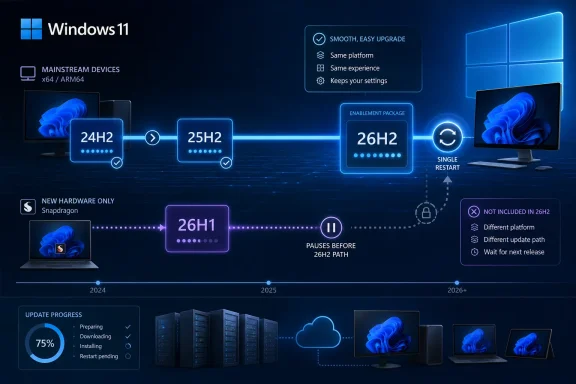 24H2 and 25H2 are already on the 26H2 track
For organizations and home users on Windows 11 24H2 or 25H2, Microsoft’s message is unusually clear. Version 26H2 belongs to the same servicing branch as both earlier releases, so the update should resemble a monthly cumulative update far more than a traditional feature upgrade.
Microsoft’s documentation describes the common branch as sharing three things: the same source code base, the same security and quality updates, and the same compatibility and regression testing. The visible difference between releases is which features Microsoft enables. In practical terms, that means much of the 26H2 code is expected to reach eligible PCs through ordinary Windows servicing before the final version label is switched on.
The model is familiar from the 24H2-to-25H2 transition. Microsoft used an enablement package for that upgrade as well, avoiding the lengthy setup phase, large download, extended downtime, and recovery risk associated with a full in-place OS replacement. The company says 26H2 should require a single restart and no reimaging or special deployment sequence for supported 24H2 and 25H2 installations.
For IT teams, that reduces the operational effort required to put the latest supported Windows version on the estate. Windows Autopatch, Microsoft Intune, Windows Server Update Services, and other established servicing routes will support 26H2, according to Microsoft. Administrators should still use pilot rings; a small update package does not eliminate the need to test line-of-business applications, security agents, drivers, VPN clients, or device-control policies.
The more important benefit is that compatibility testing is no longer being reset by an entirely different platform branch. If an organization has already validated its applications on fully patched 25H2, it is testing substantially the same Windows foundation it will have on 26H2. That should make the release easier to approve than the jump to 24H2 was.
Shared servicing lowers upgrade risk, not every risk
Microsoft’s explanation includes a point that deserves more attention than the “tiny update” headline: its shared servicing model means bugs in the common code are not neatly separated by version numbers.
In the technical material accompanying the 26H2 announcement, Microsoft says an issue affecting 26H2 will also affect 25H2, and vice versa, where the issue is in their shared source. The corresponding fix is likewise the same update. That is a useful warning for administrators who might otherwise assume that staying on 25H2 creates a reliable escape hatch from a 26H2 problem.
The version label can still matter when a bug is tied to a feature enabled only in the newer release. A new 26H2 capability can introduce a new failure mode, and a managed fleet can still encounter deployment errors, driver conflicts, or policy interactions. But rolling a PC from 26H2 back to 25H2 should not be treated as a cure for a defect embedded in the common servicing branch.
This is also why Microsoft’s claim of lower compatibility risk should be read precisely. The company is promising less platform churn, not immunity from problematic updates. The correct enterprise response is a narrower validation cycle, not the elimination of one. Test the 26H2 enablement package and the features it activates, then deploy through the existing update rings rather than scheduling a full feature-upgrade project.
There is another practical implication for Windows enthusiasts: reinstall media and version branding may make 24H2, 25H2, and 26H2 look farther apart than they are. The build families already show the relationship. Microsoft’s August 2026 release information lists 24H2 as build 26100, 25H2 as build 26200, and 26H1 as build 28000. The version number alone is no longer a dependable shorthand for the underlying Windows platform.
Windows 11 26H1 is the exception, not the next upgrade for everyone
The 26H1 label has caused understandable confusion because the name implies a routine first-half Windows release that should precede 26H2. Microsoft says that is not what it is.
Version 26H1 became generally available on February 10, 2026, but it was scoped for new devices rather than offered as an in-place upgrade to existing 24H2 or 25H2 PCs. Microsoft’s first confirmed hardware target was systems using Qualcomm Snapdragon X2 Series processors. The company characterized 26H1 as a targeted release intended to support new device innovations, not a broad annual Windows feature update.
That distinction changes the significance of the 26H2 block. A typical Intel, AMD, or earlier Snapdragon Windows PC did not update itself from 25H2 to 26H1 and will not be stranded there. The affected group is owners and administrators of newly purchased systems that arrived with 26H1 preinstalled—primarily the new hardware for which Microsoft created the separate platform release.
Those devices will continue to receive monthly security, quality, and feature updates on 26H1. They are not unsupported, abandoned, or being asked to reinstall Windows immediately. Microsoft’s lifecycle page lists support through March 14, 2028, for Home and Pro editions, and through March 13, 2029, for Enterprise and Education.
What those systems will not receive is the 26H2 version upgrade expected in the second half of 2026. Microsoft has promised a route to a future Windows release, but it has not named the version, date, delivery mechanism, or whether the eventual transition will be an enablement package, a conventional in-place upgrade, or something more hardware-specific.
Windows Central first highlighted the counterintuitive result in February: 26H1 uses a different, newer Windows core, while 26H2 stays on the established 24H2/25H2 foundation. Microsoft has now repeated the policy in both its 26H1 and 26H2 materials. The source of the confusion is real: a PC can remain on 26H1 while another PC moves to 26H2, even though the former is not necessarily behind in platform development.
Support timing gives 24H2 users a reason to plan
The enablement-package approach is convenient, but it is also a support-lifecycle reset. Windows feature updates in the annual second-half cadence receive 24 months of servicing for Home, Pro, Pro Education, and Pro for Workstations editions, and 36 months for Enterprise and Education.
That is particularly relevant to Windows 11 24H2. Microsoft’s current lifecycle table says 24H2 Home and Pro editions reach end of updates on October 13, 2026. Enterprise and Education editions remain supported until October 12, 2027. For consumer and small-business PCs still on 24H2, 26H2 should therefore be treated as the practical next destination once Microsoft makes it broadly available and the device passes normal safeguard checks.
Windows 11 25H2 remains supported longer—until October 12, 2027, for Home and Pro, and October 10, 2028, for Enterprise and Education. Organizations on 25H2 do not face an immediate lifecycle deadline, but moving to 26H2 will be comparatively cheap in deployment terms and begins a new support window.
Microsoft has not announced a final general-availability date for 26H2. As of August 24, 2026, it remains available to Windows Insiders through the Experimental channel. Microsoft has said it will provide further information when 26H2 reaches Release Preview, the channel that normally signals a build is approaching broad release quality.
The deployment advice is simpler than the versioning
The right action depends on the installed version, not on the largest number visible in winver.
- Devices on Windows 11 24H2 or 25H2 should stay current on monthly cumulative updates, test 26H2 in a pilot ring when it reaches Release Preview, and expect a small enablement-package deployment rather than a reimage.
- Devices that shipped with Windows 11 26H1 should remain on Microsoft’s monthly servicing track and should not be forced toward 26H2 through unofficial media or unsupported downgrade methods.
- Administrators buying new Snapdragon X2 systems should record 26H1 as a separate platform population in inventory and support planning, rather than assuming it joins the ordinary 24H2-to-26H2 progression.
Microsoft has made 26H2 easy for the vast majority of current Windows 11 PCs by retaining the 24H2/25H2 servicing branch. The company has made the smaller 26H1 population wait for a future convergence release, however. For everyone on 24H2 and 25H2, the 2026 update should be a routine servicing event; for the newest targeted hardware, it is a reminder that Windows version numbers no longer tell the whole platform story.
