
That timing is more than a calendar correction. The submitted report presents the change as though it is already available and pairs it with unspecified “security upgrades,” but it provides neither a KB number, Windows build number, supported Windows version, nor a Microsoft release note. Microsoft has not yet published the August 2026 Patch Tuesday documentation that would establish the final feature set, security fixes, known issues, and deployment scope.
The core claim is real, but narrower than the framing suggests: Microsoft is adding a supported way to uninstall the local Image Creation AI component on qualifying Copilot+ PCs. It is not a general-purpose switch for stripping AI out of Windows 11, and it does not mean ordinary Windows 11 PCs suddenly carry an uninstallable collection of local models.
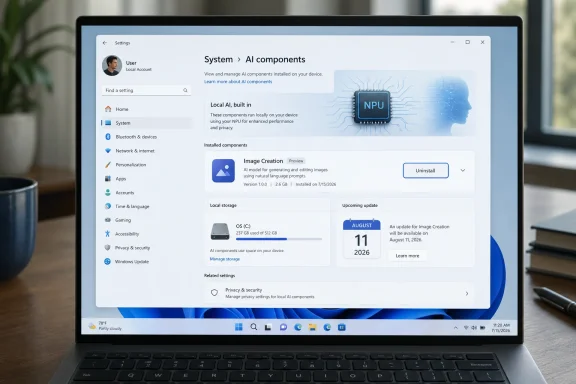 The August update is scheduled, not available
Windows Central’s preview of the August Patch Tuesday release says the package is expected to include several user-facing changes, including the Image Generation model removal control, Windows Hello Enhanced Sign-in Security support, new touchpad gestures, Voice Access voice isolation, and changes to Voice Typing. Those are prospective release details, not evidence that a production update is already on machines.
That distinction matters for administrators preparing update rings. Until Microsoft posts the August 11 release notes and Update Catalog entry, there is no authoritative KB identifier to approve in WSUS, deploy through Windows Update for Business, or test against a baseline. There is also no final list of CVEs, servicing-stack changes, enablement packages, or known regressions.
Microsoft’s monthly Windows servicing cycle usually lands on the second Tuesday of the month. August 11, 2026, is that date. The report published on August 3 is therefore describing expected content roughly eight days before the security release, not documenting an installed update.
Calling this an August “security upgrade” also overstates the evidence currently available. The model-removal control is a manageability and storage choice. Windows Hello Enhanced Sign-in Security is a genuine identity-hardening technology, but no published August advisory yet ties a particular vulnerability fix or security bulletin to the Settings control for AI components.
What the AI Components page actually manages
Microsoft’s support documentation describes Copilot+ AI components as a collection of local models, runtimes, and hardware-optimized execution layers that support features such as image processing, image transformation, image creation, and local language intelligence. They are serviced through Windows Update separately from the traditional operating-system feature cadence.
The Image Creation component is the relevant one here. Microsoft says it supplies the local model and runtime required for text-to-image generation and creative image workflows on Copilot+ hardware. Its purpose is to let Windows features and supported applications generate or alter images locally, using the machine’s neural processing unit rather than sending prompts or image data to a cloud service.
The practical significance is that Microsoft is treating at least part of that model stack as a removable Windows component. Users who do not use local image generation will no longer have to regard that payload as an untouchable part of the operating system.
But the new control should not be mistaken for a broad AI debloating tool. Microsoft’s component documentation lists separate Image Processing, Image Transform, and Phi Silica language-model components. Nothing in the available reporting establishes that the August update will expose uninstall buttons for all of them. Windows Central specifically identifies the Image Generation model, singular, as the component being made removable.
For Windows enthusiasts, that means the initial setting is likely useful but limited. Removing the Image Creation component should prevent Windows features or apps from relying on that local image-generation capability until it is restored, while leaving the rest of Windows—and other AI-backed features that use different models—intact.
Copilot+ PC owners are the audience
The feature applies to Copilot+ PCs, not to every computer running Windows 11. Microsoft’s AI component documentation is explicit that these are local workloads designed for Copilot+ systems and their dedicated neural processing hardware.
That qualification is absent from the supplied account’s practical advice. A user with a standard Windows 11 desktop, an older laptop, or a business device without Copilot+ hardware should not expect to open Settings and find a meaningful Image Creation model to remove. Previous Windows servicing notes have likewise stated that AI component updates apply only to Copilot+ PCs and are not installed on conventional Windows PCs or Windows Server.
It also means the storage argument needs restraint. Microsoft has not published the size of the removable Image Creation payload for the August release, so claims about how much disk space a user will recover cannot yet be verified. The amount may vary by model version, architecture, language resources, and whether related components remain installed.
The claim that removal will free “processing bandwidth” is even less precise. A local model can consume NPU, memory, power, and storage when an application calls it. But its mere presence on disk does not establish that it is continually occupying compute resources. The likely recurring benefit is reclaimed disk space and a reduced local software footprint, rather than an across-the-board performance increase in everyday Windows use.
For a 256GB Copilot+ laptop, any recovered space could be welcome. For a workstation with ample storage, the bigger benefit is control: a supported setting is safer and more durable than deleting packages or modifying component registrations with unsupported scripts, only to have Windows Update repair them later.
The security change has a different target
The other major security-related item associated with the expected August package is Windows Hello Enhanced Sign-in Security, or ESS. Microsoft’s documentation describes ESS as a set of protections for biometric authentication that uses virtualization-based security and TPM 2.0 to isolate biometric templates and the data path between a compatible camera or fingerprint reader and the Windows authentication stack.
ESS is intended to make biometric sign-in more resistant to attacks involving injected, replayed, or tampered biometric data. It depends on compatible sensors, drivers, firmware, and device configuration; it is not something a monthly update can simply add to an unsupported webcam or fingerprint reader.
Microsoft had already been expanding ESS support in earlier Windows 11 preview servicing. In January, the Windows Insider team announced support for compatible external fingerprint readers, allowing eligible desktops and laptops to use a supported ESS peripheral through Settings > Accounts > Sign-in options. The August rollout appears to continue availability of that work rather than introduce an entirely new Windows Hello architecture.
There is an operational consequence for IT departments: enabling or moving a device into an ESS-backed biometric configuration may require users to re-enroll biometric credentials and, in some cases, passkeys. Microsoft documents that existing non-ESS enrollments and associated credentials can be removed during the migration to preserve the protected configuration.
That is the part worth planning for. The AI component setting is a user-choice feature; ESS changes may affect sign-in enrollment and peripheral compatibility. Those belong in different test plans.
What to verify after August 11
When the August 2026 security update arrives, the first check should be Microsoft’s Windows 11 release notes—not screenshots of a Settings page. Administrators should confirm the applicable Windows 11 versions, OS builds, known issues, and whether the feature is immediately enabled or controlled through gradual rollout.
For Copilot+ PC users, the expected path is straightforward:
- Open Settings > System > AI components and confirm whether the Image Creation or Image Generation component is listed with an uninstall option.
- Record the component name and installed version before removal if the device is part of a managed fleet or a reproducible test environment.
- Test any local image-generation or AI-assisted editing workflows after removal, because those features may no longer function until the component is reinstalled.
- Do not expect the setting to remove Copilot, Recall, Click to Do, Phi Silica, or every other on-device AI function unless Microsoft’s final release notes explicitly say those components are separately removable.
For Windows Hello ESS, test supported cameras and fingerprint readers before changing policy or asking users to re-enroll. An organization that relies on external biometric hardware should verify that its exact peripheral is ESS-capable, because a generic Windows Hello-compatible device is not necessarily eligible.
The concrete change in August is modest but meaningful: Microsoft is beginning to give Copilot+ PC owners a supported way to remove a local AI model they may not use. The published report gets the direction right, but its release timing and security framing do not hold up. The feature becomes actionable only after the August 11 Windows update arrives with a real KB number, final build scope, and Microsoft’s security documentation.
