
Windows 11 Insider Preview Builds 26220.9022 and 28020.2623 finally let Beta-channel testers place the taskbar at the top, left, or right edge of the display, restoring a major customization option that Windows 11 removed at launch. The builds also add a smaller taskbar mode, while Build 26220.9022 fixes an installation rollback tied to error 0xc1900101.
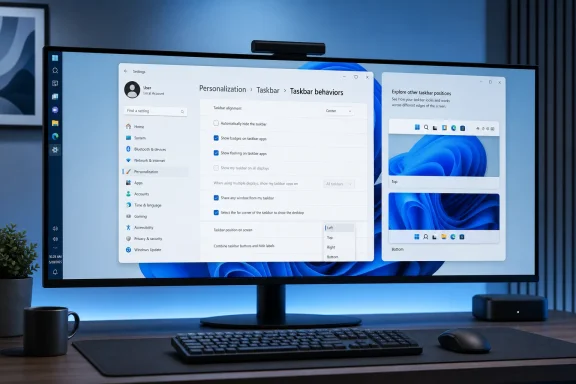
As reported by Neowin and Windows Report, the changes are available in the standard Windows 11 Beta channel through Build 26220.9022 and in the Beta (26H1) branch through Build 28020.2623. The setting lives in Settings > Personalization > Taskbar > Taskbar behaviors.
For users with ultrawide monitors, portrait displays, or screen-space-sensitive workflows, the return of vertical taskbars is the practical headline. Microsoft says existing options such as never combining taskbar buttons continue to work in alternate positions, including the labeled-button view that can make a vertically docked taskbar more useful for tracking multiple windows.
The new Taskbar position selector supports bottom, top, left, and right placement. The smaller taskbar setting reduces taskbar height and icon size, with Start, Search, and the system tray scaling to match.
Not every taskbar feature is ready for every layout. Microsoft says support for touch gestures, the Search box, and Ask Copilot in alternate positions remains in development. Auto-hide and touch-optimized taskbars are not yet supported outside the traditional bottom position, and the smaller taskbar currently works only when docked at the top or bottom.
That limitation matters for tablet and hybrid-device users: the most requested desktop customization is returning, but the newer touch-oriented taskbar behavior has not caught up with it.
There are two further fixes of interest to managed Windows environments:
The 26H1 build also begins Microsoft’s unified-update approach, coordinating driver, .NET, and firmware updates with the monthly quality update to reduce restart prompts. For IT teams, that is potentially more consequential than the taskbar changes—but it is beginning as an Insider rollout, not a production servicing guarantee.
For now, the immediate payoff is simpler: Beta testers can put the Windows 11 taskbar where their workflow needs it, while Microsoft works through the remaining touch and auto-hide gaps.
For users with ultrawide monitors, portrait displays, or screen-space-sensitive workflows, the return of vertical taskbars is the practical headline. Microsoft says existing options such as never combining taskbar buttons continue to work in alternate positions, including the labeled-button view that can make a vertically docked taskbar more useful for tracking multiple windows.
 The New Controls Still Have Some Edges
The new Taskbar position selector supports bottom, top, left, and right placement. The smaller taskbar setting reduces taskbar height and icon size, with Start, Search, and the system tray scaling to match.Not every taskbar feature is ready for every layout. Microsoft says support for touch gestures, the Search box, and Ask Copilot in alternate positions remains in development. Auto-hide and touch-optimized taskbars are not yet supported outside the traditional bottom position, and the smaller taskbar currently works only when docked at the top or bottom.
That limitation matters for tablet and hybrid-device users: the most requested desktop customization is returning, but the newer touch-oriented taskbar behavior has not caught up with it.
Build 26220.9022 Also Targets a Familiar Update Failure
The standard Beta build addresses an update rollback that could end in error 0xc1900101. That code is commonly associated with driver-related upgrade failures, although Microsoft’s release notes describe this as a specific Beta-channel issue rather than a blanket fix for all instances of the error.There are two further fixes of interest to managed Windows environments:
- File History backups to SMB network shares should no longer fail with a misleading invalid-credentials message.
- Files on DFS mapped drives should no longer be incorrectly treated as internet-originated after a device starts offline and later reconnects, avoiding unexpected Mark of the Web tagging and Preview pane warnings.
26H1 Adds Touchpad and Update Work
Build 28020.2623 adds precision-touchpad controls for scroll and zoom speed, accelerated scrolling, and related gesture behavior. Microsoft notes that some complete gesture support in WinUI 3 applications depends on newer Windows App SDK releases.The 26H1 build also begins Microsoft’s unified-update approach, coordinating driver, .NET, and firmware updates with the monthly quality update to reduce restart prompts. For IT teams, that is potentially more consequential than the taskbar changes—but it is beginning as an Insider rollout, not a production servicing guarantee.
For now, the immediate payoff is simpler: Beta testers can put the Windows 11 taskbar where their workflow needs it, while Microsoft works through the remaining touch and auto-hide gaps.
References
- Primary source: Neowin
Published: 2026-07-31T18:04:01+00:00
New Windows 11 Insider Beta builds bring finally bring taskbar customization - Neowin
Check out what's included in the new builds 26220.9022 and 28020.2623 (26H1) for the Beta channel of the Windows 11 Insider Program. www.neowin.net
- Independent coverage: Windows Report
Published: 2026-07-31T17:59:07+00:00
New Windows 11 Beta Build Finally Adds Taskbar Customization & Fixes Update Error 0xc1900101
Windows 11 Beta Build 26220.9022 adds movable and smaller taskbars, fixes File Explorer bugs, and renews Insider flight certificates. windowsreport.com
- Related coverage: blogs.windows.com
Windows quality update: May
Hey Windows Insiders, One of the best parts of the work is hearing directly from the people using Windows every day. I was recently in Hyderabad and Taipei meeting with local Windows Insiders, and those conversations gave me a lot of energy headingblogs.windows.com