
As MakeUseOf recently highlighted, right-clicking the desktop and trying to rename “New folder” to CON produces an invalid-device-name error. The same applies to PRN, AUX, NUL, COM1 through COM9, and LPT1 through LPT9. Windows documentation still lists all of them as reserved names, and the restriction applies to files as well as folders.
This is not merely a list of awkward strings that Microsoft forgot to remove. Each was designed as an address for a device. In the DOS world, a program could open a name such as PRN and send output to a printer rather than to disk. That basic assumption became embedded deeply enough in Windows compatibility behavior that the old names are still treated specially today.
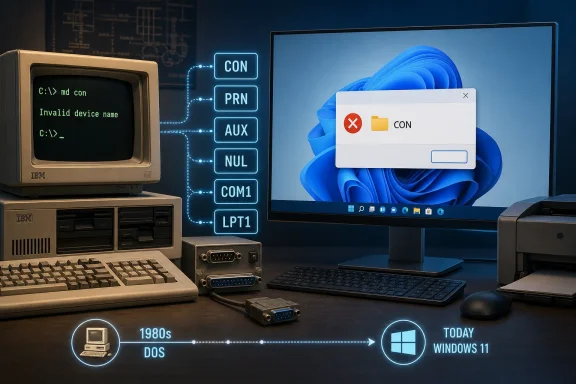 The device aliases that outlived their hardware
The famous one is CON, short for console. It represents the system console: traditionally keyboard input and screen output. PRN refers to the default printer, AUX to an auxiliary communications device, and NUL is the null device—the Windows equivalent of a digital discard bin. Send output to NUL, and Windows accepts it but throws it away.
The COM and LPT series are just as old-fashioned. COM1 through COM9 refer to serial communications ports; LPT1 through LPT9 refer to parallel printer ports. Neither is likely to describe physical hardware on a typical Windows 11 desktop, but both remain valid abstractions for legacy software, scripts, drivers, and command-line workflows.
Microsoft’s current Win32 file-naming documentation names 22 standard reserved device aliases:
CON,PRN,AUX, andNULare reserved.COM1throughCOM9are reserved.LPT1throughLPT9are reserved.
There are six more edge cases that make the list stranger: Windows recognizes superscript digits one, two, and three as digits in these device names. That means COM¹, COM², COM³, LPT¹, LPT², and LPT³ are reserved too.
The practical rule is simple: do not use these names in software-generated filenames, archive contents, source trees, or shared repositories intended to work on Windows.
DOS treated devices much like files
The behavior dates back to the earliest IBM PC software stack. PC DOS 1.0 shipped with the original IBM PC in August 1981, at a time when disks had a single flat directory rather than a folder tree. Applications needed a uniform way to read from keyboards, write to screens, send text to printers, and communicate through serial hardware.
DOS answered that problem by exposing device names through ordinary file-style operations. A program did not need separate routines for every output destination. It could write bytes to PRN, for example, and DOS directed those bytes to the configured printer. Reading from CON accepted keyboard input; writing to it placed output on the console.
That approach is still visible in batch files. The redirection operator in a command such as command > NUL remains useful because the underlying device alias remains available. The shell is not creating a file named NUL; it is passing output to the null device.
The idea resembles Unix device files, but with one consequential difference. Unix systems conventionally keep device nodes under /dev. DOS made its device aliases globally recognizable wherever a filename could occur. That choice made device access convenient for small, early PC programs—but it permanently created a collision between ordinary filenames and device identifiers.
DOS 2.0 carried the collision into every folder
PC DOS 2.0 arrived alongside the IBM PC/XT on March 8, 1983, adding hierarchical directories, hard-drive support, redirection, and a more capable handle-based I/O model. Microsoft’s DOS 2.0 programming reference described the new tree-structured directory support while retaining compatibility with disks and programs designed for the flat-directory era.
Directories solved the organizational limits of DOS 1.x, but they could not cleanly separate old device aliases from the new filesystem hierarchy. Programs were already written with the expectation that PRN, CON, and other aliases would resolve without needing a special device directory.
So the names became special in every directory.
A path that appears to point to an ordinary object—such as C:\Users\Alice\Documents\PRN—is not interpreted by normal Win32 path handling as a request for a document named PRN. The reserved component is recognized as a DOS device name instead. Microsoft’s documentation is explicit that the names are reserved “in every directory.”
This is why the behavior feels disproportionate in 2026. A user is not attempting to access a serial port or a parallel printer. They are trying to name a folder with three ordinary letters. But Windows is preserving a namespace rule whose original purpose predates the folder tree itself.
Adding an extension changes nothing
One common assumption is that CON.txt or NUL.mp3 ought to be legal because the complete filename is no longer identical to the device name. Windows does not see it that way.
The Win32 naming rules examine the relevant base name before treating the suffix as a normal extension. Microsoft specifically warns that NUL.txt and NUL.tar.gz are both equivalent to NUL for this purpose. The same principle applies to names such as CON.log, AUX.c, and LPT1.csv.
For administrators and developers, this matters more often than the desktop-folder experiment suggests. A build process, package manager, extraction tool, or cross-platform Git repository can contain a filename that is perfectly acceptable on Linux or macOS but cannot be materialized in an ordinary Windows working directory.
A project may include aux.c as an innocuous source file, for example. Linux and macOS can store it normally because their device namespace is isolated. On Windows, a checkout can fail when the filesystem-facing API encounters the component. The portable fix is to rename the file in the repository rather than expecting Git, Explorer, or a different archive tool to override the operating system’s reserved-name behavior.
This is one reason filename validation belongs at the application boundary. Software that imports files, generates reports, extracts archives, or synchronizes content across platforms should reject or rewrite Windows-reserved components before attempting the final write operation.
The filesystem is not always the layer saying no
The weirdest part of the CON story is that the restriction is primarily a conventional Windows path-processing rule, not necessarily a statement that every underlying filesystem is physically incapable of storing the name.
Microsoft’s namespace documentation distinguishes normal Win32 paths from extended-length paths using the \\?\ prefix. The extended form tells Windows to pass the supplied path with less normalization, which is essential in specialized cases involving long paths, trailing characters, and names that ordinary shell interfaces do not handle well.
That distinction has led to long-running demonstrations in which a reserved-looking directory can be created through lower-level or extended path handling on NTFS, then becomes difficult or impossible to manage through File Explorer. Explorer and many everyday applications still use normal Win32 parsing, so they encounter the same legacy device-name rule when trying to open, rename, or delete the object.
The lesson is not that users should create such directories. It is that filesystem capability and the Win32 namespace are separate layers. An object that exists on disk may still be inaccessible through common Windows tools if its name collides with a reserved DOS alias.
That is particularly relevant for IT teams handling external drives, backups, archives, forensic images, or files created by non-Windows systems. A name that is legal on the originating platform can become an operational nuisance after it reaches a Windows endpoint.
An old compatibility rule once became a crash bug
The device-name machinery has also produced genuine security failures. On March 16, 2000, Microsoft released Security Bulletin MS00-017 for Windows 95, Windows 98, and Windows 98 Second Edition. The vulnerability involved paths containing multiple DOS device names.
According to Microsoft’s bulletin, those Windows versions correctly rejected a path involving one reserved DOS device name, but did not properly handle paths containing multiple device-name components. Attempting to interpret the malformed reference could trigger an illegal resource access and usually crash the system.
That made sequences such as nested CON or AUX path components more than a historical oddity. A malicious webpage or HTML email could potentially cause an affected machine to access one of those malformed local references, locking up or crashing the PC. Microsoft’s patch corrected the missing validation for multiple DOS device names; it did not remove the names themselves.
The distinction matters. The 2000 fix addressed a parsing flaw in Windows 9x. The current restriction on creating CON remains deliberate compatibility behavior in supported Windows versions.
A tiny restriction with a large compatibility footprint
Microsoft could theoretically free these names for ordinary folders, but doing so would mean changing behavior that command scripts and older programs have relied on for decades. NUL remains useful in batch automation. CON still has meaning to console-oriented software. COM and LPT aliases remain part of Windows’ long compatibility contract even as USB, Bluetooth, network printing, and virtual serial devices replaced the physical ports that inspired them.
The cost of keeping the blocklist is tiny: a few dozen unavailable names among effectively unlimited filename choices. The cost of retiring it would be harder to quantify, because it would appear in edge-case scripts, installers, old line-of-business applications, device integrations, and recovery tools that have quietly assumed the aliases will always work.
So the next time Windows refuses to accept CON as a folder name, it is not defending a modern Windows 11 feature. It is honoring a decision baked into DOS-era path handling: hardware names must work everywhere, which means those names can belong to users nowhere.
