
PCMag’s 2026 budget-desktop guide reaches the right practical conclusion for Windows buyers: 8GB of RAM is a floor, not a target, and a $500-class tower can still be a credible replacement for an aging home PC. But the more important reading is what sits behind that advice. Cheap desktops are no longer defined mainly by slow processors; they are defined by fixed memory, cramped storage, proprietary power supplies, and whether the box can remain useful after its first workload changes.
The guide, published by PCMag, correctly points out that modern mini PCs can handle web browsing, streaming, office documents, digital signage, and other light-duty roles. That is a meaningful shift from the low-cost desktops of a decade ago. A small Windows 11 system with a current low-power Intel or AMD chip, an NVMe SSD, and sufficient RAM can be quiet, fast to boot, and unobtrusive enough to mount behind a monitor or television.
For Windows users replacing a Windows 10 machine, however, this is a purchase that has to last. Microsoft ended ordinary Windows 10 support on October 14, 2025, and its consumer Extended Security Updates route runs only through October 2026. The next cheap desktop should therefore be selected as a supported Windows 11 endpoint for several years, not as the least expensive device that happens to open a browser today.
Microsoft’s published Windows 11 hardware minimum remains just 4GB of RAM and 64GB of storage, alongside a supported 64-bit processor, UEFI with Secure Boot capability, and TPM 2.0. Those requirements determine whether Windows can be installed; they do not describe a satisfying desktop PC in 2026.
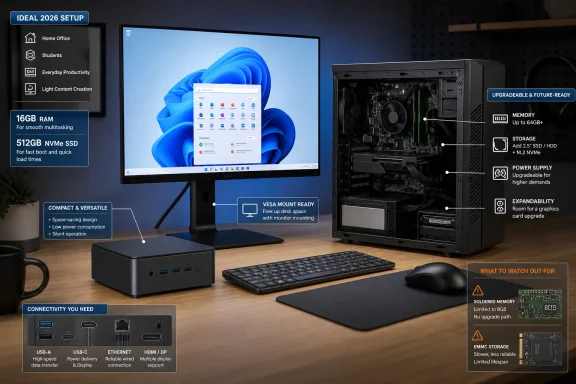
A 4GB Windows 11 mini PC can technically meet the specification and still become frustrating under ordinary use. Windows itself, a few browser tabs, a video call, background sync clients, and an Office document can force paging to the SSD. On systems built around soldered-down memory or eMMC storage, there is no inexpensive correction later. The practical result is a device that qualifies as a Windows 11 PC but behaves like an appliance with a short usable life.
PCMag’s 8GB recommendation is thus sensible for one-purpose deployments: a reception display, streaming client, web kiosk, lightweight point-of-sale terminal, or a child’s homework station. For a general household Windows computer, 16GB should be the preferred configuration if the extra cost is tolerable. It is the point at which a desktop remains responsive when the use case inevitably expands from “email and documents” to dozens of tabs, Teams or Zoom, photo imports, printer software, cloud backup, and occasional remote-support sessions.
Storage needs the same distinction between minimum compliance and ownership reality. A 256GB SSD can work for a tightly managed machine, but Windows updates, restore points, cloud-sync caches, application installers, and a modest photo library consume it quickly. A 512GB SSD is the sensible baseline for a primary family PC; 1TB is worth pursuing for a budget gaming tower or a machine expected to retain local media and large applications. Buyers should also confirm that the advertised capacity is an actual M.2 SSD rather than soldered eMMC flash, which is common in the lowest-priced compact systems and sharply limits both performance and repairability.
The limitation is serviceability. In many mini PCs, the processor is a laptop-class chip permanently attached to the motherboard. Memory may be removable SO-DIMM RAM, soldered LPDDR memory, or a mix of both depending on the exact model. Storage may be upgradeable through one M.2 slot, but that does not mean a second drive fits, nor does it mean a future GPU, capture card, or higher-wattage networking card can be added.
That is why the product page’s exact configuration matters more than the product family name. A model sold with 16GB of soldered memory and a replaceable 512GB SSD may be a perfectly solid kiosk or living-room system. The visually identical version with 8GB soldered RAM and 256GB storage may be a false economy. Buyers should look for a clear statement of whether RAM is socketed, how many M.2 slots are present, whether a 2.5-inch drive bay exists, and whether the vendor publishes BIOS and driver updates for the precise model.
The NUC naming deserves some care as well. Intel exited direct NUC production in 2023, but ASUS took over support for transitioned Intel NUC products and received a non-exclusive license to build future NUC designs. MSI’s similarly named Cubi NUC machines are real compact PCs, but “NUC” is no longer a shorthand for one standardized Intel-designed product with one support path. For a business purchase, support ownership, firmware cadence, warranty terms, and driver availability should be checked against the actual vendor—not inferred from the label on the front of the box.
The buying mistake is assuming every newer name signals a better desktop. Intel’s Core Ultra 200S family, based on Arrow Lake-S, was launched for desktop systems, but it has not displaced conventional Core processors across bargain prebuilt towers. Its integrated AI hardware has limited value to a basic office PC unless the software in use can access it locally. Paying a premium for an NPU on a desktop that will spend its life in Edge, Microsoft 365, and a remote desktop client is rarely money well spent.
There is also an emerging naming problem in the guide’s mobile-chip discussion. Intel’s Wildcat Lake platform is no longer merely a coming budget processor family; Intel now identifies the shipped parts as Core Processor Series 3, with products introduced in the second quarter of 2026. Panther Lake is likewise identified by Intel as Core Ultra Series 3. A buyer comparing mini PCs will see all three kinds of language—code names, “Series 3,” and Core/Core Ultra tiers—in retailer listings and vendor specification sheets.
The practical response is simple: ignore the marketing chronology and compare the listed CPU model, installed RAM, storage, ports, and upgrade path. A well-configured mini PC using a slightly older Core i5 or Ryzen 5 will usually serve light productivity better than a newer chip paired with 8GB of non-upgradeable memory.
Yet PCMag’s warning about graphics upgrades needs to be treated as a hard constraint, not a footnote. A PCI Express x16 slot is not evidence that a budget tower is graphics-upgrade ready. Many entry-level systems ship with sub-200-watt power supplies, proprietary connectors, shallow cases, or only enough physical clearance for a short, low-profile card. A later GPU upgrade can fail on any one of those points.
Anyone buying a tower with even a remote plan to add graphics should verify four facts before checkout:
That makes the Mac mini more expensive at the door, though its 16GB memory and 512GB storage configuration makes it a useful comparison point for Windows vendors. A Windows mini PC sold near that price with 8GB of soldered memory, 256GB storage, or a one-year warranty is not automatically a bargain simply because it runs Windows. The Mac mini’s price movement also illustrates a broader market issue: component pressure is moving through the low-cost segment, where vendors have fewer ways to preserve margins except by reducing memory, storage, support, or expandability.
The cheap desktop worth buying in 2026 is therefore not necessarily the smallest box or the lowest listed price. It is the system with enough memory for its intended life, an SSD that can hold Windows and real files, a documented Windows 11 support path, and—where flexibility matters—a standard tower design that does not turn a future upgrade into a replacement purchase.
For Windows users replacing a Windows 10 machine, however, this is a purchase that has to last. Microsoft ended ordinary Windows 10 support on October 14, 2025, and its consumer Extended Security Updates route runs only through October 2026. The next cheap desktop should therefore be selected as a supported Windows 11 endpoint for several years, not as the least expensive device that happens to open a browser today.
 Windows 11’s official minimum is dangerously low as a buying guide
Microsoft’s published Windows 11 hardware minimum remains just 4GB of RAM and 64GB of storage, alongside a supported 64-bit processor, UEFI with Secure Boot capability, and TPM 2.0. Those requirements determine whether Windows can be installed; they do not describe a satisfying desktop PC in 2026.A 4GB Windows 11 mini PC can technically meet the specification and still become frustrating under ordinary use. Windows itself, a few browser tabs, a video call, background sync clients, and an Office document can force paging to the SSD. On systems built around soldered-down memory or eMMC storage, there is no inexpensive correction later. The practical result is a device that qualifies as a Windows 11 PC but behaves like an appliance with a short usable life.
PCMag’s 8GB recommendation is thus sensible for one-purpose deployments: a reception display, streaming client, web kiosk, lightweight point-of-sale terminal, or a child’s homework station. For a general household Windows computer, 16GB should be the preferred configuration if the extra cost is tolerable. It is the point at which a desktop remains responsive when the use case inevitably expands from “email and documents” to dozens of tabs, Teams or Zoom, photo imports, printer software, cloud backup, and occasional remote-support sessions.
Storage needs the same distinction between minimum compliance and ownership reality. A 256GB SSD can work for a tightly managed machine, but Windows updates, restore points, cloud-sync caches, application installers, and a modest photo library consume it quickly. A 512GB SSD is the sensible baseline for a primary family PC; 1TB is worth pursuing for a budget gaming tower or a machine expected to retain local media and large applications. Buyers should also confirm that the advertised capacity is an actual M.2 SSD rather than soldered eMMC flash, which is common in the lowest-priced compact systems and sharply limits both performance and repairability.
Mini PCs are excellent deployments, not universal upgrades
The guide is strongest when it treats mini PCs as purpose-built systems rather than tiny equivalents of a tower. ASUS’s NUC line, MSI’s Cubi NUC systems, Lenovo’s compact desktops, and models from Geekom and ECS can provide multiple display outputs, wired Ethernet, USB ports, Wi-Fi, and an SSD in a box that can disappear behind a screen. For IT administrators, that makes them useful for conference-room displays, digital signage, thin-client-style workloads, lab benches, and home-theater PCs.The limitation is serviceability. In many mini PCs, the processor is a laptop-class chip permanently attached to the motherboard. Memory may be removable SO-DIMM RAM, soldered LPDDR memory, or a mix of both depending on the exact model. Storage may be upgradeable through one M.2 slot, but that does not mean a second drive fits, nor does it mean a future GPU, capture card, or higher-wattage networking card can be added.
That is why the product page’s exact configuration matters more than the product family name. A model sold with 16GB of soldered memory and a replaceable 512GB SSD may be a perfectly solid kiosk or living-room system. The visually identical version with 8GB soldered RAM and 256GB storage may be a false economy. Buyers should look for a clear statement of whether RAM is socketed, how many M.2 slots are present, whether a 2.5-inch drive bay exists, and whether the vendor publishes BIOS and driver updates for the precise model.
The NUC naming deserves some care as well. Intel exited direct NUC production in 2023, but ASUS took over support for transitioned Intel NUC products and received a non-exclusive license to build future NUC designs. MSI’s similarly named Cubi NUC machines are real compact PCs, but “NUC” is no longer a shorthand for one standardized Intel-designed product with one support path. For a business purchase, support ownership, firmware cadence, warranty terms, and driver availability should be checked against the actual vendor—not inferred from the label on the front of the box.
Processor branding is less useful than the platform around it
PCMag notes that budget desktops continue to use older Intel Core i3, Core i5, Ryzen 3, and Ryzen 5 processors while newer Core Ultra parts have appeared more gradually. That assessment captures the market accurately: a 14th Gen Intel Core chip or a Ryzen 7000- or 8000-series processor can still be entirely appropriate in a low-cost desktop, especially where the alternative is a newer platform paired with too little memory or storage.The buying mistake is assuming every newer name signals a better desktop. Intel’s Core Ultra 200S family, based on Arrow Lake-S, was launched for desktop systems, but it has not displaced conventional Core processors across bargain prebuilt towers. Its integrated AI hardware has limited value to a basic office PC unless the software in use can access it locally. Paying a premium for an NPU on a desktop that will spend its life in Edge, Microsoft 365, and a remote desktop client is rarely money well spent.
There is also an emerging naming problem in the guide’s mobile-chip discussion. Intel’s Wildcat Lake platform is no longer merely a coming budget processor family; Intel now identifies the shipped parts as Core Processor Series 3, with products introduced in the second quarter of 2026. Panther Lake is likewise identified by Intel as Core Ultra Series 3. A buyer comparing mini PCs will see all three kinds of language—code names, “Series 3,” and Core/Core Ultra tiers—in retailer listings and vendor specification sheets.
The practical response is simple: ignore the marketing chronology and compare the listed CPU model, installed RAM, storage, ports, and upgrade path. A well-configured mini PC using a slightly older Core i5 or Ryzen 5 will usually serve light productivity better than a newer chip paired with 8GB of non-upgradeable memory.
Towers preserve options—but only if the power supply does
A standard small or midsize tower remains the safer choice for a buyer who cannot fully predict future needs. It is more likely to accept an additional SSD, a memory upgrade, a replacement power supply, a larger CPU cooler, or a graphics card. It also generally offers more USB ports and easier access when a drive or fan fails.Yet PCMag’s warning about graphics upgrades needs to be treated as a hard constraint, not a footnote. A PCI Express x16 slot is not evidence that a budget tower is graphics-upgrade ready. Many entry-level systems ship with sub-200-watt power supplies, proprietary connectors, shallow cases, or only enough physical clearance for a short, low-profile card. A later GPU upgrade can fail on any one of those points.
Anyone buying a tower with even a remote plan to add graphics should verify four facts before checkout:
- The power-supply wattage and its available PCIe power connectors are published.
- The case documentation states the maximum graphics-card length and height.
- The PCIe x16 slot is physically accessible and not blocked by the power supply or drive cage.
- The motherboard and power supply use standard, replaceable connectors rather than a vendor-specific design.
Apple’s Mac mini is a budget benchmark, not a Windows substitute
PCMag includes Apple’s Mac mini at the high end of the budget range and notes the new $799 entry price with 512GB of storage. Independent reporting by Bloomberg, Macworld, and MacRumors confirms Apple removed the prior $599 256GB configuration in May 2026, leaving the 512GB M4 model as the entry point.That makes the Mac mini more expensive at the door, though its 16GB memory and 512GB storage configuration makes it a useful comparison point for Windows vendors. A Windows mini PC sold near that price with 8GB of soldered memory, 256GB storage, or a one-year warranty is not automatically a bargain simply because it runs Windows. The Mac mini’s price movement also illustrates a broader market issue: component pressure is moving through the low-cost segment, where vendors have fewer ways to preserve margins except by reducing memory, storage, support, or expandability.
The cheap desktop worth buying in 2026 is therefore not necessarily the smallest box or the lowest listed price. It is the system with enough memory for its intended life, an SSD that can hold Windows and real files, a documented Windows 11 support path, and—where flexibility matters—a standard tower design that does not turn a future upgrade into a replacement purchase.
References
- Primary source: PCMag UK
Published: 2026-08-02T20:00:00+00:00
Loading…
uk.pcmag.com - Related coverage: gamesradar.com
Loading…
www.gamesradar.com - Related coverage: tomsguide.com
Loading…
www.tomsguide.com - Related coverage: learn.microsoft.com
Windows processor requirements Windows 11 supported Intel processors | Microsoft Learn
This specification details the Intel processors that can be used with Windows 11 customer systems that include Windows products, including custom images.learn.microsoft.com - Related coverage: learn.microsoft.com
Windows 11 requirements | Microsoft Learn
Hardware requirements to deploy Windows 11.learn.microsoft.com - Related coverage: support.microsoft.com
Windows 11 System Requirements | Microsoft Support
Learn about Windows 11 minimum system requirements and how to assess your upgrade eligibility.support.microsoft.com - Related coverage: tomshardware.com
Intel's upcoming Nova Lake desktop SKU to require 65W of separate power delivery for its iGPU, leaker claims — beefy integrated graphics could require two VCCGT phases for 12 Xe3P cores | Tom's Hardware
One VCCGT phase can usually sustain up to 30W safely.www.tomshardware.com - Related coverage: community.intel.com
Loading…
community.intel.com - Related coverage: intel.com
- Related coverage: techcommunity.microsoft.com
Preparing for key End of Support milestones coming in 2025
Microsoft Buildtechcommunity.microsoft.com