
bypassnro.cmd helper from Windows 11 Insider Preview Build 26200.5516, released to the Dev Channel on March 28, 2025, making the familiar local-account setup shortcut unavailable in that preview build. But the more consequential detail omitted by NeoTeo’s headline is that Microsoft removed a script, not the underlying setup behavior, and the change initially applied to an Insider branch—not immediately to every retail Windows 11 installation.
Microsoft documented the removal in the release notes for KB5054687, saying it was intended to improve “security and user experience” and ensure users complete the Out-of-Box Experience, or OOBE, with both an internet connection and a Microsoft account. BleepingComputer, Ars Technica, Windows Central, and other outlets independently confirmed that the file being removed was BypassNRO.cmd, a small batch script long used during setup to re-enable an offline path and create a local account.
The distinction was important then and remains important now. The NeoTeo report was published on March 29, 2025, although its page was modified on August 14, 2026. It describes a real change, but readers encountering it as if it were fresh news should not mistake Build 26200.5516 for a blanket removal across all Windows 11 media at the time.
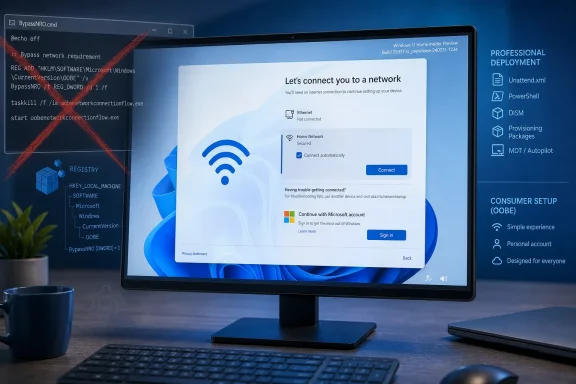 Build 26200.5516 removed the convenience layer
For years, Windows enthusiasts and repair technicians used OOBE\BYPASSNRO at the network screen during Windows setup. The command launched Microsoft’s own BypassNRO.cmd file, restarted the PC, and exposed an option to continue without connecting to a network. That route also avoided the Microsoft-account prompt that Windows 11 Home and many consumer Windows 11 Pro setup paths increasingly placed in front of new installations.
Microsoft’s Dev Channel release notes did not describe a vulnerability, exploitation risk, or configuration error caused by the script. The company’s stated rationale was broad: security and a better setup experience. Its practical effect was far clearer than its explanation: people who relied on a one-line, memorable setup command now had to know more about Windows internals or use a deployment workflow.
BleepingComputer reported at the time that the script itself did little more than add a BypassNRO Registry value under the OOBE configuration branch and immediately restart Windows. The Registry behavior remained in the build after the batch file disappeared, which meant the removal raised the effort required without yet removing the underlying capability.
That is why calling this a total end to offline installation was premature. It was the first move in a broader tightening campaign, and it changed the accessibility of the workaround more than it changed the architecture of setup on day one.
Microsoft’s stated security case lacked technical detail
Microsoft was entitled to change its consumer setup experience, but its March 2025 release notes offered no technical account of why a local-account route represented a security problem. No CVE, advisory, exploit chain, or attack scenario accompanied the decision. The company’s language linked the removal to security while also explicitly tying it to completion of OOBE with internet access and a Microsoft account.
Those are separate propositions.
A Microsoft account can provide concrete benefits for consumers: device settings can synchronize, OneDrive integration is easier to enable, and recovery information such as BitLocker recovery keys can be associated with the account. Those are useful services for many home users, especially when a device is lost, reset, or replaced.
But an offline local account is not inherently an insecure Windows account. Security still depends on patching, disk encryption, credential hygiene, administrative privileges, endpoint protection, and the network environment. For a machine intentionally kept off the public internet, requiring online identity during setup can be operational friction rather than a security improvement.
Microsoft’s later explanation made the company’s actual concern more explicit. In October 2025, the Windows Insider team announced Build 26220.6772 and said it was removing other known local-account creation mechanisms because those methods could skip “critical setup screens” and leave a device not fully configured. That is a more coherent product-support argument than the original March statement—but it also confirms that the removal of BypassNRO.cmd was part of a continuing effort to close multiple OOBE escape paths.
The March change was not an enterprise deployment decision
The consumer OOBE screen is not how most managed Windows fleets should be provisioned. Organizations using Windows Autopilot, Microsoft Intune, Configuration Manager, Windows Deployment Services, or other established imaging processes generally have supported ways to create and manage device identities without instructing technicians to press Shift+F10 during first-run setup.
Microsoft’s deployment documentation still supports unattended installation configuration, including the creation of local accounts through the UserAccounts component in an answer file. That matters for administrators: an unattended XML file is a deployment mechanism, not an accidental loophole hidden in a retail setup wizard.
The important limit is that an answer file does not turn a consumer edition into an enterprise-managed operating system. Admins should treat local-account creation, device naming, driver staging, BitLocker escrow, domain or Entra ID enrollment, and update policy as parts of one controlled build process. A shortcut that gets past an account screen may be useful for a lab or repair bench, but it is not a substitute for documented provisioning.
The same warning applies to third-party USB creation tools. Rufus and similar utilities have long offered installation-media options intended to streamline local deployment and reduce OOBE prompts. They can be practical for one-off rebuilding, but IT departments need to validate them against licensing, security baselines, recovery procedures, and internal change controls rather than assuming a popular workaround will keep surviving new Windows builds.
Windows 11 IoT Enterprise LTSC is not a consumer escape hatch
NeoTeo points to Windows 11 IoT Enterprise LTSC as a cleaner answer for people who want fewer consumer-oriented prompts and more flexible hardware rules. The edition does have characteristics that make it attractive for specialized deployments: Microsoft documents more flexible optional hardware requirements for Windows IoT Enterprise, including scenarios where TPM 2.0 and Secure Boot are optional. Windows 11 IoT Enterprise LTSC 2024 is based on the Windows 11 24H2 generation and has a support lifecycle through October 2034.
However, Microsoft is equally clear that IoT Enterprise LTSC is for fixed-function, specialized devices. It is sold through OEM and volume-licensing channels for use cases such as kiosks, industrial terminals, point-of-sale systems, and dedicated appliances. It is not a retail replacement for Windows 11 Home or Pro on a general-purpose personal PC.
That licensing distinction matters. Flexible hardware criteria do not amount to a universal permission slip to deploy IoT Enterprise LTSC on ordinary desktops merely to avoid Microsoft-account setup, feature churn, or consumer Windows requirements. Administrators considering it need a defensible specialized-device role, appropriate licensing, and a servicing plan.
The better lesson from the March 2025 change is simpler: choose the Windows edition and deployment path that matches the device’s job before setup begins. Trying to turn a consumer OOBE into a long-term offline provisioning tool was always vulnerable to a vendor change.
Microsoft turned a shortcut into a moving target
Build 26200.5516 did not, by itself, eliminate every route to a local account. It removed the best-known wrapper around one route, and reporting at the time showed that the associated Registry setting still existed. Microsoft’s October 2025 Dev Channel announcement then showed that the company intended to go further by disabling additional local-only commands.
For Windows enthusiasts, the practical consequence is that setup tricks should be treated as build-specific and temporary. For repair shops and sysadmins, the consequence is more concrete: document a supported deployment method, maintain tested installation media, and do not base a repeatable workflow on an undocumented command Microsoft has already demonstrated it is willing to remove.