
Endstate is a new open-source Windows utility aimed at the tedious final stage of a clean install: restoring not only an application list, but supported apps’ preferences and configuration files. As reported by Windows Central, the tool can reinstall software through WinGet and Chocolatey, then selectively restore saved settings from a portable ZIP-based profile.
That distinction matters. WinGet’s built-in export capability can preserve a list of installed packages, but a fresh install still leaves tools such as Visual Studio Code, Windows Terminal, OBS Studio, and PowerToys at their defaults. Endstate adds an app-specific settings layer intended to bring back the customizations that normally have to be rebuilt by hand.
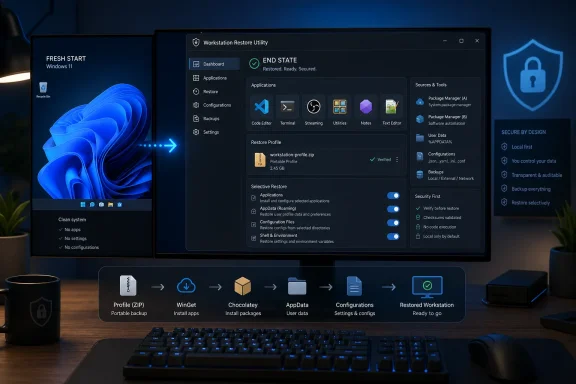
Endstate currently advertises settings modules for 357 applications. Its supported list includes MSI Afterburner, Adobe Lightroom Classic, VS Code, Git, Obsidian, OBS Studio, Notepad++, ShareX, Windows Terminal, and PowerToys.
An application does not need a settings module to be reinstalled: if it is available through WinGet or Chocolatey, Endstate can still include it in an app restore. The settings component is separately chosen on a per-application basis, a useful safeguard when moving between machines with different hardware, paths, plug-ins, or security requirements.
The developer says the program operates locally, needs no account, and can work offline. Its engine is written in Go, while the desktop interface uses Tauri and React.
Administrators should treat it as a convenience tool rather than a replacement for enterprise configuration management. Intune, Configuration Manager, Group Policy, PowerShell Desired State Configuration, and application-specific backup processes remain better suited to controlled deployments, compliance reporting, secrets handling, and repeatable organization-wide baselines.
There is also an immediate trust consideration: the developer has said Endstate is not code-signed, meaning Windows SmartScreen may warn during installation. Anyone testing it should obtain releases only from the project’s official GitHub repository, inspect what a settings restore contains before importing it, and avoid transferring profiles that could include credentials, tokens, machine-specific paths, or licensed plug-in data.
Endstate’s value will depend on how quickly its settings-module coverage grows and how reliably it handles application updates. But for users who have long regarded a fresh Windows install as easy and the following weekend of reconfiguration as inevitable, it offers a more focused alternative to starting from scratch.
That distinction matters. WinGet’s built-in export capability can preserve a list of installed packages, but a fresh install still leaves tools such as Visual Studio Code, Windows Terminal, OBS Studio, and PowerToys at their defaults. Endstate adds an app-specific settings layer intended to bring back the customizations that normally have to be rebuilt by hand.
A package list is not a workstation profile
Endstate currently advertises settings modules for 357 applications. Its supported list includes MSI Afterburner, Adobe Lightroom Classic, VS Code, Git, Obsidian, OBS Studio, Notepad++, ShareX, Windows Terminal, and PowerToys.An application does not need a settings module to be reinstalled: if it is available through WinGet or Chocolatey, Endstate can still include it in an app restore. The settings component is separately chosen on a per-application basis, a useful safeguard when moving between machines with different hardware, paths, plug-ins, or security requirements.
The developer says the program operates locally, needs no account, and can work offline. Its engine is written in Go, while the desktop interface uses Tauri and React.
Useful for enthusiasts; test first for managed fleets
For a home lab, PC builder, or power user who regularly resets Windows 11, Endstate addresses a practical gap between simple package deployment and a fully scripted workstation build. It could be particularly useful for preserving editor settings, capture-tool profiles, terminal preferences, and other user-level configuration that is often scattered through AppData, Documents, and registry locations.Administrators should treat it as a convenience tool rather than a replacement for enterprise configuration management. Intune, Configuration Manager, Group Policy, PowerShell Desired State Configuration, and application-specific backup processes remain better suited to controlled deployments, compliance reporting, secrets handling, and repeatable organization-wide baselines.
There is also an immediate trust consideration: the developer has said Endstate is not code-signed, meaning Windows SmartScreen may warn during installation. Anyone testing it should obtain releases only from the project’s official GitHub repository, inspect what a settings restore contains before importing it, and avoid transferring profiles that could include credentials, tokens, machine-specific paths, or licensed plug-in data.
Endstate’s value will depend on how quickly its settings-module coverage grows and how reliably it handles application updates. But for users who have long regarded a fresh Windows install as easy and the following weekend of reconfiguration as inevitable, it offers a more focused alternative to starting from scratch.
References
- Primary source: Windows Central
Published: 2026-07-29T15:52:42+00:00
I spoke with the developer behind Endstate, a new app that fixes one of the worst parts of setting up a fresh Windows PC | Windows Central
WinGet or Chocolatey can reinstall your software in minutes, but this new open-source app brings back your custom settings and preferences too.www.windowscentral.com