
Windows Latest revived the issue after an online complaint about repeated Ctrl+C presses, pointing to a May 2025 explanation by Microsoft engineer Raymond Chen. Chen did confirm that Clipboard History can miss intermediate entries when an application changes the clipboard faster than the history service can ingest them. But his sample was a program deliberately writing three different strings in a tight loop to preload them into history—not a user copying text once in Notepad, Excel, a browser, or File Explorer.
For Windows users, the practical takeaway is simpler than the headline suggests: if Ctrl+V pastes the correct, most recently copied item, then Ctrl+C worked. If Win+V does not show every item from a rapid sequence of copies, that is the designed limitation Chen described. If Ctrl+V itself fails, pastes stale data, or the shortcut intermittently does nothing, that is a different problem and should not be explained away as Clipboard History behavior.
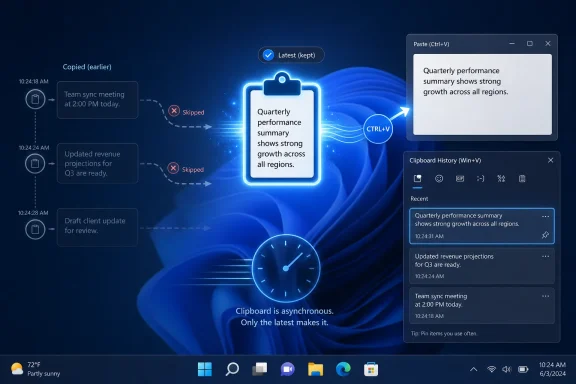 Clipboard contents and Clipboard History are separate paths
The active Windows clipboard holds the current item available to paste. Clipboard History is an optional service, introduced with Windows 10 version 1809 and carried into Windows 11, that observes clipboard changes and retains eligible items for later selection through Win+V.
That separation explains the apparent contradiction in Microsoft’s position. A program can update the active clipboard several times in quick succession, and the final value remains available for an ordinary Ctrl+V paste. Yet the history service may record only that last value because it did not get enough time to process the preceding changes.
Chen’s example used three strings: a bug identifier, a commit hash, and a comment. The program placed all three onto the clipboard one after another, intending to create a ready-made set of Win+V entries. In practice, only the final comment consistently arrived in Clipboard History.
Microsoft’s explanation is that Clipboard History registers for WM_CLIPBOARDUPDATE through the AddClipboardFormatListener API. Windows posts that notification after the clipboard changes, so the listener processes it asynchronously. By the time the history service wakes up to examine the first update, a second or third update may already have replaced it.
That is a race condition in the history-ingestion path. It is not evidence that Windows discarded a single normal Ctrl+C operation before the copied item reached the clipboard.
Microsoft chose responsiveness over complete history capture
Chen called the loss of brief intermediate values “sort of a feature,” an answer likely to frustrate people who depend on clipboard managers or automated data-entry workflows. But there is a technical tradeoff behind it.
The older clipboard viewer model delivered notifications synchronously. Each listener had to process the update before the clipboard change could fully move on through the chain. That ensured observers had a chance to see every state, but it also created a system-wide reliability hazard: one slow or hung clipboard viewer could delay other listeners and, in the worst cases, bog down clipboard use for everybody.
Microsoft has long advised developers to move away from that older viewer-chain design. Chen wrote in 2011 that a broken app in the chain could prevent downstream applications from receiving notifications, while a loop could create an infinite notification cycle. Clipboard format listeners removed the fragile application-maintained chain and made Windows responsible for distribution.
The cost is that a posted notification is not a transaction log. It tells an app that the clipboard changed; it does not preserve a snapshot of every value that existed before the listener got CPU time. Clipboard History therefore reflects what a person can ordinarily use—the current clipboard contents—rather than serving as a guaranteed audit trail of every transient update.
That rationale is defensible for everyday copy and paste. A value that survives for only a few milliseconds is usually not something a human could select and paste before the next update overwrites it. It becomes much less satisfying for tools that use the clipboard as a queue.
The actual affected users are automation and clipboard-tool developers
The reporting around repeated Ctrl+C presses blurs a key boundary. Manually pressing Ctrl+C several times on the same selected text does not create several useful clipboard states; each press replaces the clipboard with materially identical content. Pressing the shortcut repeatedly may be a familiar muscle-memory ritual, but it is not the workload Microsoft used to explain the history limitation.
The scenario that genuinely breaks is a tool that cycles through distinct values and expects each to land in Win+V. That can include custom data-entry aids, test automation, macro utilities, accessibility tools, integration scripts, and internal line-of-business software that stages identifiers, addresses, case notes, or form fields for an employee to paste one by one.
For those developers, “add a delay” is an unreliable workaround. A fixed wait may succeed on one PC and fail under load, after a Windows update, or on hardware with different scheduling behavior. Microsoft’s follow-up post offered a more disciplined approach: write one clipboard item, wait for the Clipboard.HistoryChanged event, then write the next item.
The event fires when Clipboard History changes and is available through the Windows Runtime clipboard API. Microsoft’s documentation says it occurs when a new item is added to clipboard history. Chen’s sample uses it as an acknowledgement that the history service has processed the application’s prior change before allowing the next write.
There is an important implementation caveat. HistoryChanged does not exclusively mean that the application’s own item was captured; it can also reflect a user clearing history, deleting an entry, or another relevant history change. Chen explicitly described his code as a sketch. Production software should verify that its expected entry is present, handle timeouts, detect when clipboard history is disabled, and avoid hanging if the user changes history settings while the task is running.
Windows Latest’s “Ctrl+C fails” framing goes further than the evidence
Windows Latest is correct that Microsoft has documented dropped intermediate history entries and that the asynchronous architecture is intentional. Neowin independently reported Chen’s explanation in 2025, likewise describing it as a Clipboard History behavior designed to avoid slowing or hanging clipboard operations.
The stronger claim—that a single Ctrl+C often fails because of this design—does not follow from Chen’s posts. His explanation says the last clipboard value is what matters to ordinary users because it is the value they can paste. That is the opposite of a documented failure to make a single copied item available through Ctrl+V.
Users experiencing a genuine copy shortcut failure should isolate it before blaming Clipboard History:
- Test whether the problem occurs in more than one application, such as Notepad and a web browser.
- Check whether right-click Copy works when Ctrl+C does not, which can point to a keyboard, remapping, hotkey, or application-level issue.
- Use Ctrl+V immediately after copying before judging Win+V, because the two tests measure different parts of the system.
- Disable or temporarily exit third-party clipboard managers, macro tools, keyboard utilities, and remote-session software that may intercept or replace clipboard contents.
- Check whether Clipboard History is enabled only if the missing item is a Win+V problem; it is not required for ordinary Ctrl+C and Ctrl+V use.
Microsoft has not announced a Windows 11 fix for Clipboard History’s intentional asynchronous capture behavior, and none is implied by Chen’s year-old developer guidance. The company already provides an acknowledgement mechanism for software that needs reliable staged entries.
The conclusion is less dramatic but more useful: Win+V is not a guaranteed record of every rapid clipboard change, while Ctrl+V is still governed by the latest value that actually reached the clipboard. Treating those as the same failure will send users toward the wrong fix—and lets a real shortcut, input, or application problem go undiagnosed.