
Windows 11 is getting a right-click menu editor that will let users hide, reorder, and disable File Explorer actions, but the planned feature does not resolve the reason File Explorer still presents two incompatible menus. Windows Central first reported the forthcoming customization control after seeing it at a Windows Insider Meetup in London; PCMag’s August 5 report correctly identifies it as overdue, while also pointing to the larger problem Microsoft has yet to address.
The new control is reportedly intended to sit at the bottom of the modern context menu as “Customize,” letting users decide which applications and commands appear. Microsoft is also said to be developing a more compact menu that opens faster by prioritizing common actions instead of loading every third-party extension when a user right-clicks a file, folder, or the desktop.
For anyone managing Windows fleets, the practical headline is narrower than it first appears: there is no announced Insider build, release channel, Windows version, rollout date, or compatibility policy for the feature. It has been shown, not shipped. Administrators should not assume an incoming Windows 11 update will eliminate the “Show more options” step that employees still use for compression tools, document-management clients, source-control utilities, encryption products, and other legacy shell integrations.
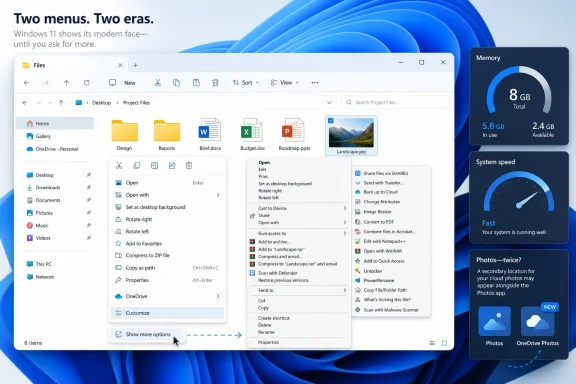
Windows 11’s modern context menu was designed to reduce the sprawling lists familiar from Windows 10 and earlier. Its most visible consequence was also its biggest compatibility compromise: many commands registered through the older Windows shell-extension model were pushed behind “Show more options,” which opens the classic menu. Holding Shift while right-clicking can reach that older interface as well.
Microsoft’s own developer documentation makes the divide explicit. To appear in the modern Windows 11 menu, an application must implement the newer
Older software has a different technical path. Traditional context-menu handlers are typically COM shell extensions registered through registry locations such as
That is the material limitation of the proposed customizer. It may make the modern menu much more tolerable for users whose menus are bloated by current, compliant applications. It cannot make an old
Microsoft can choose to make the classic menu less prominent. It cannot retire it without either breaking commands many organizations still rely on or providing a more comprehensive compatibility bridge than the one it has described. Windows Central’s report says the compact design is expected to avoid loading third-party actions initially, which could improve responsiveness, but that approach reinforces the split: a fast primary menu and a compatibility menu reached through another click.
For Windows power users, the coming editor should be useful. For IT teams, it does not yet change the deployment reality: inventory the shell extensions your organization needs, and identify vendors that have moved their commands to the modern model. A user hiding a modern menu item will not solve a legacy command that is already absent from the first menu.
But the reporting also exposes what Microsoft has not committed to. There is no public statement on whether customization will apply across File Explorer, the desktop, and other native Windows surfaces equally. There is no indication of how a user’s configuration will roam, whether it can be controlled through Group Policy or CSP policy, or how administrators will restore a known configuration after a user has removed a required command.
Those omissions matter because context menus are one of the places where Windows application behavior becomes operational behavior. If a company uses an endpoint-protection product whose “Scan with” command is visible only in the legacy menu, a new per-user customization feature does nothing to surface it. If a modern application exposes several commands, an employee may hide one that a help desk workflow assumes is present. Microsoft has not described an administrative control plane for either scenario.
The apparent performance goal is sensible. File Explorer should not pause for a second or two before a basic right-click because every installed application wants to participate. Yet the remedy Microsoft has shown is an interface cleanup and deferred loading strategy, not a published migration plan for third-party developers. Until that plan exists, calling the work a complete File Explorer fix would be premature.
The promise is directionally right, but it is still a promise without an engineering yardstick. Microsoft has not published a Windows 11 build target, a memory-footprint baseline, a before-and-after measurement, a set of representative workloads, or a date by which an 8GB PC should deliver a different experience. “8GB and above” also defines a broad hardware range without telling users how much memory Windows itself aims to reclaim.
That distinction is important. A system can show adequate free memory while still feeling poor because of paging, startup workloads, browser tabs, sync clients, security software, Teams, Electron-based applications, and the actual task the user is trying to complete. OS-level reductions can improve headroom and responsiveness, but they cannot make an 8GB machine perform like a 16GB or 32GB device under heavier work.
Windows Central’s own testing commentary reaches a similar practical conclusion: everyday work remains possible with 8GB, but Microsoft acknowledges Windows 11 needs to behave better on constrained systems. The immediate value of the pledge is that Windows engineering is now naming low-memory performance as a target. The missing value is a testable standard.
There is a connection to the File Explorer work. Context-menu performance and memory pressure are separate problems, but both expose the cost of an operating system that loads more components, integrations, and application hooks into routine interactions. Making the right-click menu defer third-party work can improve the first click. Reducing Windows’ memory use can give every foreground application more breathing room. Neither change will be credible until it arrives in builds that can be measured.
Windows Latest independently reported that OneDrive Photos runs from the existing OneDrive installation directory through
Microsoft’s own OneDrive Sync release notes illustrate the visibility problem. The current Windows Deferred Ring entry for version 26.078.0426.0002, targeted for August 3, 2026, documents a File Explorer command that moves folders directly to OneDrive. It does not describe OneDrive Photos. The notes list other feature rollouts in considerable detail, so the absence is conspicuous even if it does not prove the app was delivered in that specific version.
For administrators, silent component changes are harder to evaluate than an announced Windows feature. A new app can introduce support questions, duplicate existing functionality, affect start-menu baselines, and complicate application inventory. Windows Latest’s observations about the executable and WebView2 architecture are one outlet’s testing, but PCMag’s account and user reports establish that the app is appearing on Windows 11 systems without the sort of public rollout documentation administrators expect.
Microsoft’s File Explorer editor and 8GB optimization pledge both aim at complaints users can feel immediately: clutter and sluggishness. Shipping a second photo experience through the OneDrive channel without a clear explanation works against that message. The next meaningful Windows update will be the one that provides the context-menu feature in an identifiable build, states what happens to legacy extensions, and documents every new component it installs.
For anyone managing Windows fleets, the practical headline is narrower than it first appears: there is no announced Insider build, release channel, Windows version, rollout date, or compatibility policy for the feature. It has been shown, not shipped. Administrators should not assume an incoming Windows 11 update will eliminate the “Show more options” step that employees still use for compression tools, document-management clients, source-control utilities, encryption products, and other legacy shell integrations.
 File Explorer Still Has Two Context-Menu Systems
Windows 11’s modern context menu was designed to reduce the sprawling lists familiar from Windows 10 and earlier. Its most visible consequence was also its biggest compatibility compromise: many commands registered through the older Windows shell-extension model were pushed behind “Show more options,” which opens the classic menu. Holding Shift while right-clicking can reach that older interface as well.Microsoft’s own developer documentation makes the divide explicit. To appear in the modern Windows 11 menu, an application must implement the newer
IExplorerCommand interface and register an app-identity-backed windows.fileExplorerContextMenus extension. Even unpackaged Win32 applications need a sparse package to participate in that model. Microsoft’s guidance tells developers to use “Show more options” to inspect legacy context-menu extensions.Older software has a different technical path. Traditional context-menu handlers are typically COM shell extensions registered through registry locations such as
ContextMenuHandlers; Microsoft still documents support for those classic handlers, including for packaged apps. The compatibility layer is deliberate, not an accidental duplicate Microsoft can remove by changing a setting.That is the material limitation of the proposed customizer. It may make the modern menu much more tolerable for users whose menus are bloated by current, compliant applications. It cannot make an old
IContextMenu extension become a modern IExplorerCommand extension. That requires work by the application vendor, packaging changes in some cases, and testing against the Windows 11 shell.Microsoft can choose to make the classic menu less prominent. It cannot retire it without either breaking commands many organizations still rely on or providing a more comprehensive compatibility bridge than the one it has described. Windows Central’s report says the compact design is expected to avoid loading third-party actions initially, which could improve responsiveness, but that approach reinforces the split: a fast primary menu and a compatibility menu reached through another click.
For Windows power users, the coming editor should be useful. For IT teams, it does not yet change the deployment reality: inventory the shell extensions your organization needs, and identify vendors that have moved their commands to the modern model. A user hiding a modern menu item will not solve a legacy command that is already absent from the first menu.
Microsoft Has Shown the Interface, Not Its Exit Strategy
The timing matters. Microsoft publicly indicated in June that it was working to make context menus faster, simpler by default, and configurable. Windows Central’s later reporting added the specifics: a customization surface, a compact layout, and performance work aimed at the delay that can occur when File Explorer gathers commands from installed software.But the reporting also exposes what Microsoft has not committed to. There is no public statement on whether customization will apply across File Explorer, the desktop, and other native Windows surfaces equally. There is no indication of how a user’s configuration will roam, whether it can be controlled through Group Policy or CSP policy, or how administrators will restore a known configuration after a user has removed a required command.
Those omissions matter because context menus are one of the places where Windows application behavior becomes operational behavior. If a company uses an endpoint-protection product whose “Scan with” command is visible only in the legacy menu, a new per-user customization feature does nothing to surface it. If a modern application exposes several commands, an employee may hide one that a help desk workflow assumes is present. Microsoft has not described an administrative control plane for either scenario.
The apparent performance goal is sensible. File Explorer should not pause for a second or two before a basic right-click because every installed application wants to participate. Yet the remedy Microsoft has shown is an interface cleanup and deferred loading strategy, not a published migration plan for third-party developers. Until that plan exists, calling the work a complete File Explorer fix would be premature.
The 8GB Memory Pledge Has No Measurable Target Yet
PCMag also highlighted Microsoft’s stated focus on “memory optimization for 8GB and above,” a commitment that Windows Central and TechRadar have independently reported. It is a notable admission from a company that continues to support a substantial installed base of low-memory Windows 11 laptops and has recently marketed systems with 8GB configurations.The promise is directionally right, but it is still a promise without an engineering yardstick. Microsoft has not published a Windows 11 build target, a memory-footprint baseline, a before-and-after measurement, a set of representative workloads, or a date by which an 8GB PC should deliver a different experience. “8GB and above” also defines a broad hardware range without telling users how much memory Windows itself aims to reclaim.
That distinction is important. A system can show adequate free memory while still feeling poor because of paging, startup workloads, browser tabs, sync clients, security software, Teams, Electron-based applications, and the actual task the user is trying to complete. OS-level reductions can improve headroom and responsiveness, but they cannot make an 8GB machine perform like a 16GB or 32GB device under heavier work.
Windows Central’s own testing commentary reaches a similar practical conclusion: everyday work remains possible with 8GB, but Microsoft acknowledges Windows 11 needs to behave better on constrained systems. The immediate value of the pledge is that Windows engineering is now naming low-memory performance as a target. The missing value is a testable standard.
There is a connection to the File Explorer work. Context-menu performance and memory pressure are separate problems, but both expose the cost of an operating system that loads more components, integrations, and application hooks into routine interactions. Making the right-click menu defer third-party work can improve the first click. Reducing Windows’ memory use can give every foreground application more breathing room. Neither change will be credible until it arrives in builds that can be measured.
OneDrive Photos Shows the Product-Ownership Problem
The new OneDrive Photos app is the clearest example of why Windows users are skeptical that individual quality efforts will produce a more coherent operating system. PCMag reported that the app has begun appearing alongside the existing Microsoft Photos app, even though Photos already supports viewing OneDrive content. Microsoft had previously promoted Photos as a unified gallery for local images and cloud libraries, including OneDrive.Windows Latest independently reported that OneDrive Photos runs from the existing OneDrive installation directory through
OneDrive.App.exe and is built on WebView2. That report is significant for one reason beyond the app itself: it suggests the new viewer is being delivered as part of OneDrive rather than as a separately documented Microsoft Store or Windows component.Microsoft’s own OneDrive Sync release notes illustrate the visibility problem. The current Windows Deferred Ring entry for version 26.078.0426.0002, targeted for August 3, 2026, documents a File Explorer command that moves folders directly to OneDrive. It does not describe OneDrive Photos. The notes list other feature rollouts in considerable detail, so the absence is conspicuous even if it does not prove the app was delivered in that specific version.
For administrators, silent component changes are harder to evaluate than an announced Windows feature. A new app can introduce support questions, duplicate existing functionality, affect start-menu baselines, and complicate application inventory. Windows Latest’s observations about the executable and WebView2 architecture are one outlet’s testing, but PCMag’s account and user reports establish that the app is appearing on Windows 11 systems without the sort of public rollout documentation administrators expect.
Microsoft’s File Explorer editor and 8GB optimization pledge both aim at complaints users can feel immediately: clutter and sluggishness. Shipping a second photo experience through the OneDrive channel without a clear explanation works against that message. The next meaningful Windows update will be the one that provides the context-menu feature in an identifiable build, states what happens to legacy extensions, and documents every new component it installs.
References
- Primary source: PCMag
Published: 2026-08-05T14:01:22+00:00
Loading…
www.pcmag.com - Related coverage: windowscentral.com
Loading…
www.windowscentral.com - Related coverage: windowscentral.com
Windows 11's cluttered and controversial context menus are going away | Windows Central
Simpler, configurable context menus are on the way to Windows 11.www.windowscentral.com - Related coverage: support.microsoft.com
Loading…
support.microsoft.com - Related coverage: support.microsoft.com
Loading…
support.microsoft.com - Related coverage: learn.microsoft.com
Loading…
learn.microsoft.com - Related coverage: learn.microsoft.com
Windows 11 Insider Experimental Preview Build 26300.8758 - Windows Insider Program | Microsoft Learn
Release notes for Windows 11 Insider Experimental Preview Build 26300.8758learn.microsoft.com - Related coverage: blogs.windows.com
Loading…
blogs.windows.com - Related coverage: microsoft.com
Loading…
www.microsoft.com - Related coverage: blogs.windows.com
Loading…
blogs.windows.com - Related coverage: news.microsoft.com
- Related coverage: aimg8.dlssyht.cn
Loading…
aimg8.dlssyht.cn - Related coverage: techradar.com
Microsoft deploys yet another emergency patch for Windows 11 — but at least the fix for the broken March update arrived quickly | TechRadar
Break things then move fastwww.techradar.com - Related coverage: tomsguide.com
Microsoft is reportedly developing a dedicated OneDrive app for Windows 11 — here's what it looks like | Tom's Guide
A native OneDrive app for Windows 11 has been discovered in Microsoft Servers with several new features.www.tomsguide.com - Related coverage: techradar.com
In a shock move from nowhere, it seems Microsoft is finally giving Windows 11 users the ability to configure the right-click menu | TechRadar
Right-click the right waywww.techradar.com - Related coverage: techcommunity.microsoft.com
Loading…
techcommunity.microsoft.com - Related coverage: microsoft.com
Loading…
www.microsoft.com - Related coverage: download.microsoft.com
Loading…
download.microsoft.com - Related coverage: cdn-dynmedia-1.microsoft.com
Slide 1: Microsoft 365, Office 365, Enterprise Mobility + Security, and Windows 11 Subscriptions
PDF documentcdn-dynmedia-1.microsoft.com
- Related coverage: techcommunity.microsoft.com
- Related coverage: news.microsoft.com
- Related coverage: news.bloomberglaw.com
Loading…
news.bloomberglaw.com - Related coverage: computersweden.se
Loading…
computersweden.se - Related coverage: inc.com
Loading…
www.inc.com - Related coverage: mstechpages.com
Loading…
www.mstechpages.com - Related coverage: pcworld.com
No Windows 12 at Build, but Microsoft has something else up its sleeve | PCWorld
Microsoft's Pavan Davuluri confirmed Windows 12 won't appear at Build 2026, but the new Surface Laptop Ultra with Nvidia N1X might steal the show.www.pcworld.com