

That distinction matters for anyone buying Windows hardware, standardizing laptops, or trying to document a supportable keyboard configuration. The key was sold as a long-term change to the PC keyboard in January 2024. Two years later, Microsoft is still changing the software destination, the configuration rules, and even the visual branding associated with the button.
Windows Latest is right to point out the awkward result: a physical key gives a software brand a permanence that Microsoft’s fast-moving Copilot strategy does not have. But its framing conflates several separate changes — a Microsoft 365 Copilot app redesign, a previous Microsoft 365 rebrand, and the consumer Copilot application — into a merger Microsoft has not publicly described.
Microsoft’s own documentation still treats the apps as separate
Microsoft Support’s current product documentation distinguishes the Microsoft 365 Copilot app from the standalone Microsoft Copilot app rather than presenting them as a single application. The Microsoft 365 Copilot app is positioned as a work-and-content hub: it handles files, Microsoft 365 apps, agents, and Copilot Chat for users with eligible work, school, or consumer subscription accounts. The standalone Microsoft Copilot app remains the conversational consumer experience tied to a personal Microsoft account.
That separation is more than a naming technicality. Microsoft’s Windows management documentation says the consumer Microsoft Copilot app does not support Microsoft Entra authentication. If an employee attempts to sign into that app using an Entra work account, Windows directs the person to Microsoft 365 Copilot Chat in a browser instead. A true app merger would require Microsoft to explain what happens to that account boundary, the different data controls, and the enterprise licensing model. No such explanation appears in the public materials reviewed for this report.
There has been genuine branding churn. Microsoft renamed its old Microsoft 365, formerly Office, app to “Microsoft 365 Copilot” and began rolling out its then-new icon on January 15, 2025. Microsoft also began rolling out a redesigned, chat-centered Microsoft 365 Copilot experience worldwide in June 2026, with broader deployment scheduled through August. Those are meaningful interface and product-positioning changes, but they do not establish that the consumer Copilot app and Microsoft 365 Copilot have become one program.
The new icon cited by Windows Latest may be part of that ongoing Microsoft 365 Copilot design work. Microsoft’s own support page says the Microsoft 365 Copilot icon and name were already being rolled out in early 2025, while its May 2026 design announcement describes a broader redesign across Microsoft 365 apps. The submitted report does not identify a new Microsoft announcement, build number, Store version, or rollout notice that establishes the claimed August 13 merger or a new keyboard-marking standard.
For readers, the practical takeaway is simple: do not make deployment decisions on the assumption that uninstalling one Copilot application removes every Copilot experience from a Windows device. In a managed environment, the consumer app, Microsoft 365 Copilot app, Windows-integrated entry points, and Microsoft 365 app experiences can be separately present and governed by different policies.
The Copilot key was built for a product definition that keeps moving
Microsoft announced the dedicated Copilot key on January 4, 2024, calling it the first significant change to the Windows PC keyboard in nearly three decades. The company’s original premise was straightforward: new Windows 11 PCs would gain one-button access to Copilot.
The problem is that “Copilot” has never stayed a single, stable destination. It has variously referred to Windows Copilot, Bing Chat, a consumer assistant, a Microsoft 365 work assistant, Copilot Chat, paid Microsoft 365 Copilot features, OEM-specific implementations, and now a growing lineup of agents and app-specific experiences. Microsoft’s software can accommodate those changes with an update. A laptop keycap cannot.
The physical key itself is not necessarily tied to the exact icon shown on it. Windows receives a hardware scan code or a firmware-defined action; it does not inspect the printed symbol before deciding what to launch. A PC bought in 2024 can continue opening whatever Windows maps as the Copilot experience even if Microsoft changes the logo in the app, taskbar, or Store.
But physical labels shape user expectations. A Copilot key with an older logo tells the buyer that the key launches a recognizable product that still exists in the same form. When that product is renamed, split between personal and work experiences, rerouted depending on identity, or redesigned around a different icon, the promise of a dedicated key becomes less clear.
That is the part Microsoft should treat as a product-design lesson, not merely a branding inconvenience. A dedicated key works best for a durable system function: volume, microphone mute, screen brightness, Print Screen, or a broadly understood modifier such as Ctrl. It works less well for a branded cloud service whose identity, access model, and capabilities change on a yearly — sometimes monthly — cadence.
Microsoft has already had to alter the key’s behavior. Its Windows documentation says that, as of the May 2025 optional non-security preview release, the Copilot hardware key had a more streamlined model for consumer and commercial users. Employees using Microsoft Entra accounts can choose the Microsoft 365 Copilot app as the destination through Windows settings, provided the device and configuration support it. Developers can also register qualifying applications as Copilot hardware-key providers.
That flexibility helps, but it reinforces the original weakness. The button is not a fixed Copilot button in any useful operational sense. It is increasingly a configurable special key with a Copilot logo.
Microsoft has acknowledged the lost-keyboard-function problem
The strongest part of the underlying report is not the icon complaint; it is the accessibility and workflow issue Microsoft has formally acknowledged. Microsoft Support says that some Windows 11 devices released from 2024 onward replaced either the Right Ctrl key or the Context Menu key with a dedicated Copilot key. It also says customers who depended on those keys for keyboard shortcuts or assistive technologies, including screen readers, encountered workflow challenges.
That is an unusually direct admission for a hardware-layout decision. Microsoft has not called the Copilot key a mistake, but its planned remedy concedes that some affected layouts took away a functional input users needed.
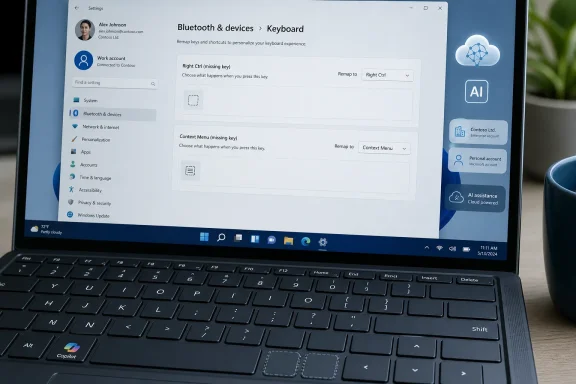
Microsoft says a Windows 11 update due later in 2026 will add a Settings option to map the Copilot key to Right Ctrl or the Context Menu key. The company identifies the intended location as Settings > Bluetooth & devices > Keyboard. Microsoft also warns that remapping the key to Right Ctrl can cause some combinations involving the physical Left Shift and Right Ctrl keys to behave inconsistently on certain keyboards; using the physical Right Shift key is the stated workaround.
Independent reporting by Windows Central confirmed the planned restoration of Right Ctrl and Context Menu behavior, while TechRadar reported that preview code also points to a “do nothing” option for the key. The latter has not been announced in Microsoft’s public support documentation, so administrators should not write it into user guidance as a released Windows 11 feature.
The key limitation is timing. Microsoft’s support page promises a Windows 11 update “later this year,” but does not name a KB number, Windows 11 version, Insider channel, release-preview build, or exact general-availability date. The setting is therefore a commitment, not a present-day remediation for every affected PC.
That leaves IT teams with an immediate documentation problem. A laptop may carry a Copilot-labelled key, but the key’s destination can differ by Windows release, user identity, OEM firmware, device policy, installed app, and future Windows update. Help-desk instructions that simply tell users to “press the Copilot key” will become unreliable unless they state which environment they mean.
Buyers and administrators should treat the key as configurable, not essential
For consumers choosing a new Windows 11 laptop, the Copilot key should not be a deciding feature. Check the keyboard layout before purchase, particularly on compact laptops where Right Ctrl and Context Menu keys are most likely to be displaced. If those keys are part of a daily workflow, verify whether the OEM supplies its own remapping utility and whether the device can receive the upcoming Windows setting.
For enterprise buyers, keyboard layout belongs in the evaluation checklist alongside ports, webcam controls, Wi-Fi hardware, docking behavior, BIOS settings, and Windows edition. The question is no longer merely whether a device has a Copilot key. It is which standard key was removed, what the current firmware exposes, how Windows maps the key for Entra users, and whether the future Right Ctrl or Context Menu remap meets the organization’s accessibility requirements.
Microsoft’s own Windows management guidance offers one additional warning: when an OEM provides key-management software, users should not configure the same key in both the OEM utility and Windows. Competing mappings can create unpredictable results and turn a seemingly simple keyboard request into a support ticket.
The logo issue will eventually sort itself out. OEMs can revise keycaps in later production runs, and older machines will remain physically unchanged. The operational problem is more immediate: Microsoft put a product name on a key before it had finished deciding what that product would mean across consumer Windows, commercial Microsoft 365, and managed PCs.
The forthcoming Windows 11 remap option is the necessary corrective step. Until Microsoft publishes a specific release date and supported build list, though, organizations should plan around the keys they physically have — not around the Copilot experience Microsoft may decide to put behind them next.