

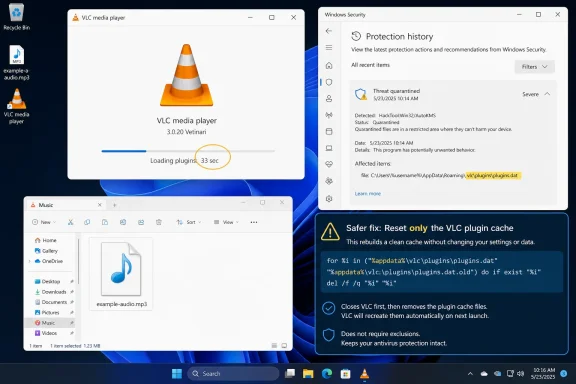
The practical takeaway is narrower, and more useful, than the social-media argument. A damaged or missing VLC plugin cache can produce dramatic startup delays, but VideoLAN’s assertion that Defender is the trigger has not yet been backed by a Microsoft advisory, a Windows KB number, a Defender detection name, or an affected engine and security-intelligence version. Microsoft had not publicly addressed the report as of August 13.
That makes this a plausible, actionable diagnosis for affected PCs—not proof that every slow VLC launch on Windows 11 is a Defender false positive.
VideoLAN’s explanation matches a known VLC failure mode
VLC relies on a cache of information about its installed modules and plugins so it does not have to fully enumerate them at every launch. When that cache is absent, stale, or unusable, VLC can spend a long time rebuilding or scanning plugin information before it reaches audio playback.
VideoLAN told users in its response on X that a Windows 11/Microsoft Defender update had quarantined that cache “as if by magic,” and suggested either reinstalling VLC or regenerating the cache. The company’s position is important: this is not a newly announced VLC 3.0.23 regression in the usual sense, but an interaction involving the Windows security stack and a generated VLC file.
There is independent evidence that the symptom is real, even if the precise Defender mechanism is not yet documented. A Windows 11 user on Super User reported that VLC 3.0.23 began taking five to 20 seconds to open media after upgrading in February 2026; subsequent commenters described 30-to-40-second VLC startup times that disappeared after rebuilding plugins.dat. A separate April 2025 discussion in the Mp3tag community described first-play delays of up to 15 seconds after restarting Windows, with one user attributing the delay to Defender’s scanning behavior.
Those reports should not be treated as forensic proof of a single bug. They do establish that an invalid or regenerated plugin cache has been a recurring source of severe startup latency on Windows systems, including on modern SSD-equipped machines.
The reset shortcut is broader than the cache fix
Korben correctly points out that the official Windows installation includes a Start menu entry named “VLC media player - reset preferences and cache files.” It is convenient, but it is not a surgical repair.
That shortcut launches VLC with both the configuration-reset and plugin-cache-reset switches, then exits. In plain terms, it rebuilds the cache but also deletes user settings: customized hotkeys, subtitle choices, audio-output selection, interface behavior, and other preferences can be lost. For a lightly configured home PC, that may be harmless. For users who have tuned VLC for passthrough audio, a specific renderer, accessibility settings, or operational playback shortcuts, it is an unnecessary side effect.
VLC’s own developer documentation distinguishes the plugin-cache reset from configuration reset. The smaller intervention is to rebuild the plugin cache alone, using VLC’s --reset-plugins-cache option, then launch VLC again and let it recreate the cache. That directly tests VideoLAN’s explanation while preserving normal VLC preferences.
Reinstalling VLC may also rebuild the cache, but it should be the fallback rather than the first response. A reinstall changes more variables at once and makes it harder to learn whether the cache was the actual cause.
Check Defender’s record before changing VLC
If Defender truly quarantined a VLC-generated cache file, Windows should leave evidence. Before resetting anything, affected users should open Windows Security, go to Virus & threat protection, and review Protection history for quarantined items connected to VLC.
The useful details to record are the file path, detection name, action taken, and the Defender security-intelligence, engine, and platform versions shown with the event. That information separates this incident from other startup problems—such as a broken VLC update, a network drive referenced by recent-file history, a slow external disk, or ordinary first-launch plugin enumeration.
Users should not restore or allow an item solely because it has a VLC-related filename. The file should be associated with a verified official VLC installation, and the Windows Security event should match the suspected cache issue. If the detection appears to be a false positive, Microsoft provides a file-submission route for home users, enterprises, and software developers to submit a suspected incorrectly classified file for analysis.
This is also the information VideoLAN and Microsoft would need to turn a viral complaint into a fixable defect. At present, neither company has published the key identifiers that administrators need to scope the incident across a fleet.
Excluding vlc.exe is a poor permanent workaround
The most problematic recommendation circulating with this story is to add vlc.exe to Microsoft Defender’s exclusions. It may reduce or remove a delay in some cases, but it trades away substantially more protection than the suggestion implies.
Microsoft’s own Defender documentation says an exclusion is a protection gap. A process exclusion does not merely spare the VLC executable from scanning; it can cause Defender to skip files opened by that process during real-time protection. Since VLC opens local media, network streams, subtitle files, playlists, and potentially removable-drive content, that is a broad exception for an application regularly pointed at untrusted files.
Microsoft also warns that process exclusions can affect security features built on the antivirus engine, including network protection and attack-surface-reduction enforcement. A folder exclusion for the entire C:\Program Files\VideoLAN\VLC directory is similarly excessive, and is worse advice for managed devices.
For an individual troubleshooting a repeatable delay, the safer order is:
- Review Protection history and verify whether Defender actually quarantined a VLC-related file.
- Reset only VLC’s plugin cache, preserving configuration where possible.
- Update VLC from the official installer and test a new launch after restarting Windows.
- If a verified VLC file is repeatedly detected, submit it to Microsoft as a suspected false positive rather than permanently excluding VLC from scanning.
Enterprise administrators should avoid deploying a Defender exclusion through Intune, Group Policy, or Configuration Manager until they have detection telemetry demonstrating that it is required. A fleet-wide exception for a media player is not a reasonable response to an undocumented issue affecting an unknown subset of systems.
The missing Microsoft details are the real story
VideoLAN’s response answers why one user may see a 33-second wait, but it does not yet identify the Windows update, Defender signature, antimalware platform release, or cache filename involved. Nor is there a documented rollback, Defender intelligence update, or release note showing the problem has been corrected.
That omission matters because the same outward behavior can have different causes. A manually extracted VLC archive without a generated plugin cache can start slowly. A corrupt cache after a VLC update can do the same. So can a separate VLC 3.0.23 startup issue reported by Windows users earlier this year. Defender quarantine is one credible explanation, not a universal diagnosis.
For now, the defensible conclusion is that VLC’s plugin cache is the component to inspect first, and that the “exclude VLC from Defender forever” advice should be rejected. If Windows Security shows a real quarantine event on a legitimate VLC-generated cache, preserving that record and submitting it as a false positive offers a route to a vendor-side correction. Resetting a cache may restore instant playback today; identifying the exact Defender detection is what prevents the problem from returning after the next scan or update.