
Windows Central’s new how-to describes the features as part of a coming September update. Microsoft’s own record tells a narrower story: the changes are being tested through Windows Insider channels, with different pieces appearing on different schedules and through controlled rollouts. The distinction is important for anyone managing Windows PCs or deciding whether to wait for a built-in option rather than deploying a third-party shell modification.
As of August 23, Microsoft’s latest Release Preview flight for Windows 11 24H2 and 25H2 is build 26100.9267 and 26200.9267. Microsoft’s August 14 announcement listed those builds without announcing the Taskbar, Start, or Search controls as a general-release feature set. The newer August 21 Beta and Experimental flights likewise highlighted AutoPlay and an accessibility setting, not a September delivery date for these desktop customizations.
The capabilities are real. The schedule presented in the how-to is the part readers should treat as provisional.
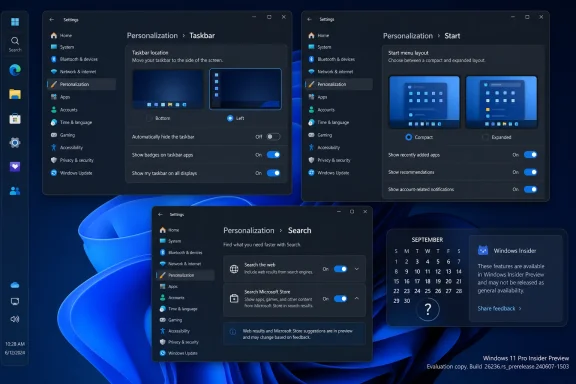 The Taskbar move is real, but it is still unfinished
Microsoft began testing alternate Taskbar positions in May through its Experimental channel, restoring an option Windows 11 removed at launch: placing the Taskbar at the top, left, right, or bottom edge of the display. By late July, the company said the feature had also reached Beta and Beta 26H1 testers in builds including 26220.9022 and 28020.2623.
The practical appeal is obvious. Developers working on short laptop screens can reclaim vertical space with a side-mounted Taskbar. Users accustomed to Windows 10’s top or vertical layouts can recover a workflow Windows 11 had forced them to abandon. The smaller Taskbar option also reduces icon and bar height, which is useful on compact displays where Windows 11’s default touch-friendly dimensions consume too much screen real estate.
But this is not a full restoration of the Windows 10-era Taskbar. Microsoft says touch gestures, the Search box, and Ask Copilot are still in progress for alternate Taskbar locations. Auto-hide and the touch-optimized Taskbar are not supported when the Taskbar is moved, and the smaller Taskbar is currently limited to the top and bottom positions.
That makes the feature most ready for keyboard-and-mouse desktop users who want a top-mounted Taskbar, or a conventional bottom Taskbar with less height. A vertical layout can work, particularly with “Never combine” enabled and labels shown, but it remains a preview feature with known omissions rather than a drop-in replacement for every Windows 10 configuration.
Windows Central also noted that moving the Taskbar to the left relocates Notification Center with it. That behavior follows the Taskbar’s new placement, but users who want the Taskbar vertical while keeping notifications on the far-right edge will not get that split arrangement from the current implementation.
Start menu controls solve a long-running limitation
Microsoft’s May Insider announcement set out a more useful set of Start menu changes than a simple resize control. The company is adding independent switches for the Pinned, Recent, and All sections; a separate control for file recommendations; Small and Large Start menu sizes; and an option to hide the account name and profile image.
The fine print here matters. Windows Central correctly identifies that the new file-recommendation control is separate from File Explorer history. In the current Windows 11 design, turning off recommendations can affect recent items in other places, including Jump Lists and File Explorer. Microsoft says the new setting separates Start’s file suggestions from those broader recent-file experiences.
For shared PCs, presentation machines, and work devices used in meetings, the profile-hiding switch is the most practical part of the update. It removes an easy source of accidental disclosure when a user opens Start during screen sharing. It is a small privacy control, but it addresses a real behavior that many organizations currently handle through user training or more restrictive desktop policies.
The size setting deserves more restrained expectations. Microsoft is offering preset Small and Large choices, not freeform resizing. Users still will not be able to drag Start’s edges into arbitrary dimensions or restore the full-screen Start menu behavior associated with Windows 10. That limitation is not cosmetic: users trying to create a dense, app-first launch surface will still need to work within Microsoft’s chosen layouts.
Microsoft’s own wording is also more cautious than the how-to’s “once you install the update” framing. In May, the company said these Start changes would roll out to Experimental-channel Insiders “over the coming weeks,” with several features arriving later than the initial Taskbar test. Microsoft has not yet published a public support article or a stable-channel release note that names a September rollout for the full collection.
Search finally gets an off switch, with regional limits
The Search change is the most consequential of the three because it replaces a combination of policy settings, Registry changes, and region-specific behavior with an expected Settings control. Microsoft announced on July 13 that Experimental-channel Insiders would receive a new option under Settings > Privacy & security > Search to choose whether web and Microsoft Store suggestions appear alongside local results.
With both switches disabled, Windows Search should focus on installed apps, settings, and indexed local or connected files rather than directing an ordinary local query toward Bing or a Store recommendation. Windows Latest reported seeing the controls in Experimental build 26300.8697 before Microsoft publicly detailed the broader Search update. Microsoft later confirmed the feature itself, though it warned that Search experiences vary by region.
That regional caveat is not boilerplate. European Economic Area users have had more Search choice because of Microsoft’s Digital Markets Act compliance work, including search-provider and web-search controls unavailable in the same form elsewhere. Microsoft has not yet laid out whether the new web and Store suggestion toggles will ship identically across every Windows market, account type, and managed configuration.
The July Insider announcement also describes improvements beyond the two switches: a simplified Search home page, clearer labels identifying apps, files, settings, web results, and Store suggestions, and ranking changes meant to put a strong local match ahead of online material. Microsoft says it has added better tolerance for spelling errors and partial app names, support for two-character file searches, and reliability work aimed at fewer crashes and loading problems.
Those changes should be judged independently of the off switch. Turning off web suggestions does not expand Windows indexing, repair a folder excluded from indexing, or guarantee that every document is instantly discoverable. On managed PCs, IT staff will still need to consider Windows Search service health, indexing scope, OneDrive and connected-file behavior, and existing Group Policy settings before treating the new consumer-facing toggle as a complete Search strategy.
Do not confuse Insider availability with a September release
Microsoft’s recent Windows Insider cadence confirms the central point: these features are in flight, but they are not one finished package awaiting a named September patch. The company has distributed alternate Taskbar positions to Beta after first testing them in Experimental, while the Search changes began as a Controlled Feature Rollout in Experimental. Microsoft explicitly says not every Insider will see the Search features immediately, even after installing the eligible build.
That rollout model creates a common trap. A PC can be on a newer build and still lack a feature because Microsoft has not enabled it for that device. Conversely, an enthusiast can expose a dormant component with feature flags or unsupported tools before Microsoft declares it ready. Neither state should be used as evidence that a stable Windows 11 deployment has received the capability.
For administrators, the sensible move is to avoid standardizing on these controls until Microsoft identifies their supported Windows 11 versions, policy behavior, and stable release documentation. Moving a Taskbar is a per-user preference; disabling web Search results can intersect with an organization’s privacy, support, and browser policies. Those are different deployment questions, and Microsoft has not published the enterprise implementation details necessary to answer them all.
The three tweaks are worth watching because they return choices Windows 11 removed or buried: where the Taskbar lives, how much Start exposes, and whether Search mixes local work with Microsoft services. But on August 23, the dependable advice is simple: look for them in supported Insider builds first, and wait for Microsoft to name a stable release before treating September as a delivery promise.