
That matters when the two addresses represent different services. As MakeUseOf highlighted this week, a malware-blocking resolver such as Quad9 may deliberately return NXDOMAIN for a malicious domain—the same basic response a client sees when a domain genuinely does not exist. Windows treats that as an answer, not as a reason to ask the alternate resolver.
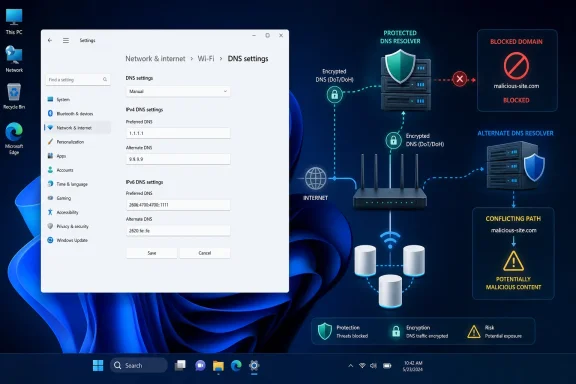 A DNS “backup” does not validate the first answer
For a Windows 11 PC configured with Quad9 as preferred DNS and an unfiltered public resolver as alternate DNS, Quad9’s block normally remains effective while Quad9 responds. The alternate address is not a second opinion on blocked sites, false positives, or DNSSEC failures; it is principally resilience when the configured server or route fails to answer.
Microsoft documents that Windows does not consult every listed resolver for every query, and that a Name Error response stops the retry process. Quad9 likewise says its protected service returns NXDOMAIN for blocked domains, though its response metadata can distinguish a policy block from a genuinely nonexistent name when administrators inspect it directly.
The practical consequence is straightforward: do not mix resolver policies unless inconsistent results are intentional. A second resolver with different filtering, privacy, logging, or DNSSEC behavior can make troubleshooting harder whenever the system, router, or browser shifts traffic to it.
Routers can make “preferred” even less meaningful
The warning becomes more important when a Windows device sends DNS traffic to a home router, mesh unit, firewall, or local resolver rather than directly to public DNS addresses. Those devices may forward requests according to their own policy, independent of the labels exposed in the management interface.
MakeUseOf cited dnsmasq, a widely used DNS forwarder in consumer networking gear. Its current documentation is more nuanced than a simple “query everything at once” model: by default, dnsmasq chooses one available upstream server and favors servers it considers healthy. Administrators can enable --strict-order to enforce configured order, or --all-servers to send every query to every available upstream resolver and use the first reply.
Either way, a router’s two DNS fields should not be treated as a contractual primary-and-standby arrangement. Vendor firmware, DNS forwarder settings, DHCP-delivered DNS, IPv6 resolver advertisements, and encrypted DNS settings can all change where the lookup ultimately goes.
Windows and Edge add another DNS layer
Windows 11 supports DNS over HTTPS, while Microsoft Edge can also be managed with its own DNS-over-HTTPS policy. In managed environments, Edge’s automatic mode can attempt encrypted DNS first and fall back to conventional DNS on error.
That means the DNS server configured on a router is not necessarily the resolver used by every browser session. IT teams relying on DNS filtering should verify endpoint DNS-over-HTTPS policy, browser configuration, and local resolver logs rather than infer protection from a pair of addresses in a router UI.
Keep both addresses in the same service family
The safer configuration is to use the published primary and secondary addresses for one resolver service. Cloudflare’s standard pair is 1.1.1.1 and 1.0.0.1; Quad9’s protected pair is 9.9.9.9 and 149.112.112.112.
That preserves redundancy without silently changing the security and privacy policy behind a lookup. For Windows administrators, the real task is not choosing which DNS address looks “primary”—it is ensuring every resolver a client might reach enforces the policy the network expects.
