
Windows Central first reported the removal, but Microsoft’s own release notes make the scope clearer: this is not a one-channel rollback or a temporary pause in an isolated test branch. The same removal notice appears in the current 25H2 Beta flight and in the newer 26H1 Beta and Experimental flights. Microsoft says it is “continuing to explore improvements” and expects to share a replacement experience in a later update, but it has not provided a timetable, design, or rollout target.
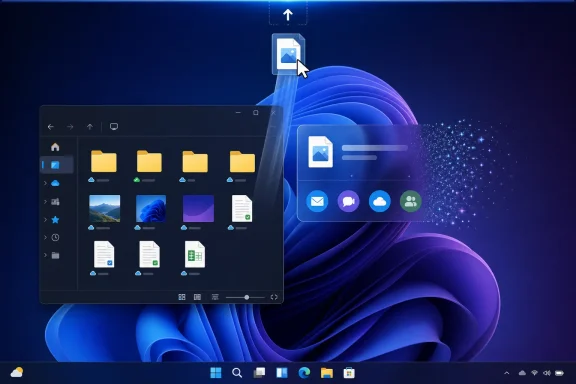
For users, the immediate result is simple: updating to one of those Insider builds removes the overlay that appears when dragging a local file toward the top edge of the display. For everyone else, the important point is less certain. Microsoft has not announced removal from released Windows 11 builds, nor said whether the currently shipping implementation—renamed Drop Tray earlier this year—will be retired in a future servicing update.
 Three branches lose the same feature
Microsoft’s simultaneous removal in builds 26220.9202, 28020.2731, and 28120.2738 is the strongest indication that the company has stopped pursuing the existing implementation rather than merely turning off a staged rollout.
Build 26220.9202 remains tied to Windows 11 version 25H2 through an enablement package, while build 28020.2731 is in the Beta channel for 26H1 and build 28120.2738 is an Experimental 26H1 release. Those branches occupy different points in Microsoft’s development pipeline. Removing the overlay from all of them prevents it from riding forward simply because it was already present in an older code line.
The wording in Microsoft Learn’s notes is also unusually direct for an Insider feature adjustment. Microsoft thanks testers for feedback, says the experience is being removed “in this build,” then promises only that it is investigating a future replacement. There is no claim that the current interaction will return after fixes, and no preview screenshot or feature name for its successor.
That leaves a real gap between Microsoft’s internal preview direction and its public Windows 11 footprint. Current non-Insider users should not assume the feature has disappeared from their PCs just because the announcement says Drag Tray is gone. The removal is presently documented for Insider builds, not a public Windows Update.
The top-edge trigger was the design problem Microsoft tried to solve
Drag Tray entered public testing in February 2025 as a shortcut for sharing local files. When a user began dragging a file from File Explorer or the desktop, Windows displayed a tray at the top of the screen with suggested apps and a More option that opened the normal Windows Share window.
The intended benefit was speed: instead of releasing a file, right-clicking it, choosing Share, and selecting a destination, a user could keep the drag action going and drop directly into an offered app. Later changes expanded it to multiple files, more relevant app suggestions, and moving files into a chosen folder.
But the interaction depended on a highly sensitive area of the screen. The top edge already matters in Windows for title-bar actions, window movement, File Explorer tabs, maximized-app controls, and Snap-related behavior. A share overlay that appears while a user is simply moving a file upward can become an interruption rather than an accelerator.
Microsoft itself had been trying to reduce that friction for months before scrapping the experience. In March, it said feedback had led it to make the tray’s peek view smaller, explicitly to reduce accidental invocations and make it easier to dismiss when working near the top of the display. April preview-release notes repeated that rationale.
The removal is therefore not the first sign that the original interaction was misfiring. It is the endpoint of a design correction Microsoft had already begun: first shrink the overlay, then rename it and relocate its settings, and now pull it from active preview branches.
Drag Tray and Drop Tray are the same feature
Microsoft’s current release notes call the removed feature “Drag Tray,” even though the company renamed it Drop Tray in March 2026. That naming inconsistency is more than cosmetic for administrators and help-desk staff trying to identify what a user is describing.
The feature originally appeared as Drag Tray under Windows Share. Microsoft later moved its settings from Settings > System > Nearby sharing to Settings > System > Multitasking, while changing the public name to Drop Tray. The move made sense from a product-taxonomy perspective: the overlay activates during a drag operation across the desktop rather than during a conventional Nearby Sharing transfer.
However, Microsoft’s August removal notes revert to the earlier name. Users searching Settings may see Drop Tray, while Insider documentation and older support articles refer to Drag Tray. They should be treated as the same top-of-screen file drag-and-drop experience, not as separate features with different removal status.
For the moment, this is the practical distinction:
- Windows 11 Insiders who install build 26220.9202, 28020.2731, or 28120.2738 should expect the tray to be removed by the update.
- Users on released Windows 11 builds may still encounter the feature as Drop Tray, depending on their installed update and feature rollout state.
- There is no announced replacement, no policy migration guidance, and no declared schedule for changing released builds.
Microsoft had previously exposed an on/off control for the tray, first under Nearby sharing and later under Multitasking. That control reduced the need for users who disliked the overlay to seek unsupported registry workarounds or wait for a removal. But it did not resolve the product question: a feature enabled by default or surfaced unexpectedly still has to earn its place in a common file-management workflow.
Existing share workflows remain intact
The removal does not eliminate Windows file sharing. It removes one entry point into it.
Windows Share remains available through File Explorer and desktop context menus, where users can select a local file, choose Share, and send it through compatible apps or other Windows sharing destinations. Traditional drag-and-drop into an open compatible application also remains separate from the top-edge tray concept.
That distinction matters in managed environments. The Drag Tray removal does not signal a change to OneDrive, Nearby Sharing, Windows Share, application-level share targets, or File Explorer’s ordinary file operations. It is a UI rollback, not a file-transfer protocol change and not a security advisory.
For IT teams testing the new Insider builds, there is little remediation work beyond updating internal documentation and screenshots that mention the Drop Tray switch. Any onboarding material that tells users to share a file by dragging it to the top of the screen is now inaccurate on the affected preview versions. Training should point users back to the Share command or to app-specific drag-and-drop destinations.
Microsoft’s promised replacement is still undefined
The more useful reading of this rollback is that Microsoft has accepted the need for a faster sharing path without committing to the original gesture. Its announcement does not say that quick sharing was a mistake; it says the experience is being removed and another approach is under exploration.
A replacement could preserve app suggestions, multi-file sharing, or fast handoff to a destination folder without placing an interruptive target at the top of every display. But that is inference, not an announced plan. Microsoft has not said whether it will build on Windows Share, File Explorer, the context menu, or a different drag target altogether.
Until the company ships and documents that replacement, the result is a rollback of the top-edge overlay across active Windows 11 preview channels. The current Drop Tray in released Windows builds remains a separate deployment question—and Microsoft has not yet answered it.
Update: Drag Tray removal reaches Windows 11’s Future Platforms channel (August 18, 2026)
The rollback now extends to Windows 11 Experimental Build 29648.1000 in the Future Platforms channel, according to Windows Report. That adds a fourth documented Insider branch where Microsoft is removing Drag Tray following tester feedback.
The new build suggests the decision is applying beyond the 25H2 and 26H1 preview paths already covered, including a more forward-looking experimental development branch. For Insider testing and IT documentation, the top-edge drag-to-share overlay should therefore be treated as discontinued across an even wider set of active pre-release builds.
Microsoft’s stated position remains unchanged: it is exploring improvements before introducing a possible replacement. Build 29648.1000 does not identify that replacement or provide a timeline, and it does not establish that Drop Tray has been removed from released Windows 11 versions.
