
The release is split across Windows 11 version 25H2, 26H1, 26H2, and an Experimental Future Platforms track. Microsoft’s Windows Insider Blog announced the package on August 17, and the individual Microsoft Learn release notes supply the changes omitted from the overview post. The important distinction is that the headline features—File Explorer’s menu redesign and new emoji—are limited to Experimental Build 26340.9212. The removal of the wmic command-line utility is far broader.
There is also an immediate documentation discrepancy. Microsoft’s Insider Blog identifies the standard Beta release as Build 26220.9209, but the linked Microsoft Learn release notes are titled Build 26220.9202 and state that they are based on Build 26220.9202. Microsoft had not explained the seven-point mismatch when the pages were published. Insiders should therefore verify the installed build number in Settings or winver, rather than relying on the blog’s build label when filing feedback or comparing deployment results.
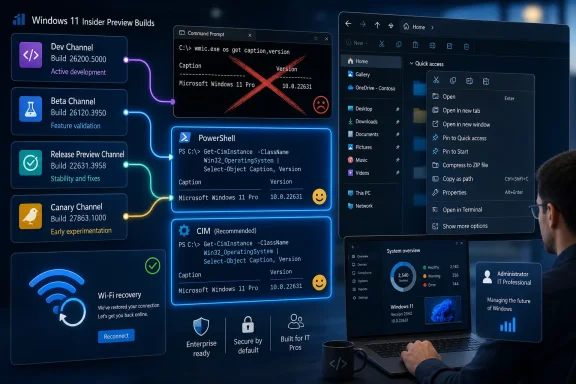 Five builds, several Windows development branches
The August 17 flight consists of five releases:
- Windows 11 Beta Build 26220.9202 targets the 25H2 servicing line, despite the Insider Blog’s reference to Build 26220.9209.
- Windows 11 Experimental Build 26340.9212 is based on version 26H2 and carries the major visible changes.
- Windows 11 Beta (26H1) Build 28020.2731 contains a smaller set of removal and reliability changes.
- Windows 11 Experimental (26H1) Build 28120.2738 mirrors much of that smaller feature set but has a game-specific compatibility safeguard.
- Windows 11 Experimental (Future Platforms) Build 29648.1000 carries early platform work, minor Windows Security interface changes, and two known update or cursor problems.
That spread matters because “Experimental” is no longer a single comparable track. Microsoft is using it for at least three substantially different development paths: the 26H2 line represented by 26340, a 26H1 path represented by 28120, and a forward-looking platform branch represented by 29648. A setting, regression, or feature seen in one should not be assumed to exist in the others.
Microsoft also says the new features in the Experimental channels are delivered through Controlled Feature Rollout. Installing Build 26340.9212 is therefore not a guarantee that the redesigned context menu or every other announced change will immediately appear on a particular PC.
WMIC’s removal is the real compatibility deadline
Every build in this flight removes Windows Management Instrumentation Command-line, better known as WMIC. Microsoft has been warning about the utility’s deprecation since Windows 10 version 21H1, but the preview releases turn a long-running notice into an actual compatibility test: scripts, installers, diagnostics, and inventory jobs that invoke wmic.exe will fail where the command is no longer present.
This does not mean WMI itself is gone. Microsoft’s own WMIC documentation is explicit that the retirement applies to the legacy command-line utility, not to Windows Management Instrumentation as a platform. Existing software that talks to WMI through supported APIs, management tooling, or PowerShell is not automatically affected.
The practical concern is old automation. A surprising amount of Windows scripting still calls aliases such as wmic bios, wmic cpu, wmic diskdrive, or wmic product. The last category has long been especially troublesome, because querying installed MSI products through WMI can trigger consistency checks and repairs. But even harmless-looking asset-inventory, warranty, startup, and hardware-discovery scripts can carry an undeclared wmic dependency.
Microsoft’s long-standing replacement direction is PowerShell, and current PowerShell guidance goes a step further: for new automation, use CIM cmdlets such as Get-CimInstance rather than the older WMI cmdlets such as Get-WmiObject. CIM cmdlets are built around current management standards and work better with modern remoting patterns. The migration is not always a mechanical command-for-command substitution, particularly where legacy WMIC aliases, formatting, or remote credentials were baked into a batch file.
IT teams using these previews should treat the removal as a deployment-readiness exercise:
- Search login scripts, packaging scripts, endpoint-remediation content, task sequences, and internal tools for
wmic,wmic.exe, and shell-outs that construct those commands dynamically. - Test the intended PowerShell or CIM replacement on the same networks and privilege boundaries used in production, especially if the script reaches remote devices.
- Do not mistake a missing
wmicexecutable for a broken WMI repository or management service; those are separate components. - Escalate dependencies owned by third-party software now, because Microsoft’s preview notes describe removal, not a temporary disablement that an administrator can simply reverse.
Microsoft has not published a per-release production schedule for this exact removal in the August 17 notes. That leaves preview users with a clear warning but no safe date to postpone remediation to. The sensible assumption is that an organization that discovers a WMIC dependency in these builds should remove it before moving to later Windows feature updates.
File Explorer’s context menu is arriving gradually—and with unanswered details
Experimental Build 26340.9212 begins rolling out a redesigned File Explorer context menu. Microsoft describes the change as reducing top-level clutter, retaining commonly used actions, and adding a Settings experience for tailoring what appears in the menu. The company says its goals are faster, more predictable, and more personal right-click behavior.
This is a meaningful target. Windows 11’s context-menu redesign has been contentious because it condensed the visible menu and pushed many classic shell-extension commands behind the “Show more options” path. Microsoft’s announcement signals another attempt to reconcile a streamlined default interface with people who depend on a broader menu while working with archives, developer tools, security products, source-control clients, and enterprise file-management software.
But the official release notes do not yet document the mechanics that determine whether the redesign will solve those complaints. Microsoft has not specified which commands can be surfaced or hidden in the new settings area, whether an administrator can manage those choices, whether classic third-party extensions are treated differently, or whether the legacy expanded menu will remain available. Those details will matter more than the stated visual cleanup.
The build also fixes a prior preview bug that placed an unexpected thick band across File Explorer image previews. Beta Build 26220.9202 contains the same preview correction, alongside a faster File Explorer Home page and touch scrolling in Home’s Recommended carousel. Those are modest improvements, but they show that Explorer changes are being developed across branches rather than exclusively inside the new 26H2 context-menu test.
Experimental Build 26340.9212 additionally adds setup entry points for Camera Roll Backup in Settings Home and Accounts. The feature steers users toward backing up phone photos and videos to OneDrive. For managed PCs, that is worth noting as a user-experience change rather than a new enterprise backup system: Microsoft’s description focuses on account-facing setup prompts, and does not announce a new management policy or storage entitlement.
Emoji 17.0 confirms cross-platform character support
Build 26340.9212 adds Emoji 17.0, which Microsoft says can be accessed through the Windows emoji panel with Windows key + Period. The Unicode Consortium’s published Emoji 17.0 data independently confirms the new character names Microsoft highlighted: distorted face, fight cloud, and hairy creature. The release also includes other additions such as an orca, landslide, trombone, treasure chest, apple core, and expanded people-related emoji sequences.
The change is more than cosmetic for anyone exchanging text across current platforms. Emoji support has two parts: an application must understand the Unicode character sequence, and a platform needs a glyph to display it. Adding native support lets Windows render and insert the newly standardized characters rather than showing an empty box or a generic fallback when the receiving app supports them.
Microsoft is also revising the artwork for existing saluting face, face with peeking eye, goose, lotus, and kissing cat emoji. The company characterizes those adjustments as consistency work. Users should expect visual changes even in conversations that contain no new Emoji 17.0 characters; organizations with documentation, training, or moderation workflows built around screenshot matching may notice the altered glyphs first.
WinRE Wi-Fi, flight certificates, and the problems to watch
The standard 25H2 Beta build contains the most useful operational feature in the release: Windows Recovery Environment networking can now reuse eligible Wi-Fi profiles saved in the main Windows installation, including supported certificate-based Wi-Fi networks. Previously, Microsoft says WinRE could automatically use unauthenticated wired Ethernet or Wi-Fi networks configured separately for recovery; users often had to manually connect to ordinary WPA2 or WPA3 networks during recovery.
If it works as described, that reduces a common failure point for cloud-based recovery and Quick Machine Recovery scenarios: a laptop reaches WinRE, but cannot get online without credentials, network configuration, or hands-on assistance. Microsoft says the capability is enabled by default and can be disabled by IT administrators. Enterprises should test it deliberately, particularly in environments that use certificate authentication, network access controls, or separate recovery-network assumptions.
Microsoft also renewed the Windows Insider flight certificates included with the new builds. The previous certificates expired on August 11, 2026. Microsoft warns that Insider devices left on builds with expired certificates may see compatibility problems with software including anti-cheat applications and may not remain able to receive future preview updates. For a dedicated Insider machine, installing a current build is therefore a supportability requirement, not merely an opportunity to try the new menu.
There are known rough edges. The Feature Flags settings page is currently blank for Experimental-channel users; Microsoft says it expects a fix in the next Experimental build. Experimental 26H1 Build 28120.2738 is safeguarded against launching PUBG: BATTLEGROUNDS because Microsoft cites an unresolved stability problem with the game developer. And the Future Platforms Build 29648.1000 has outstanding reports of a repeatedly blinking mouse cursor and update failures returning error 0x80070005.
For most testers, the first priority in this flight is not the menu redesign or the emoji panel. It is determining whether any local automation still assumes wmic.exe exists—and resolving the discrepancy between Microsoft’s Beta build number before that testing data is reported back.
