
As first reported by Thurrott.com, the releases span Beta, Experimental, 26H1 development, and the experimental Future Platforms branch. Microsoft says every new build carries the renewed certificate required for enrolled devices to remain eligible for future preview flights.
The five builds are Windows 11 Beta Build 26220.9022, Experimental Build 26300.9032, Beta (26H1) Build 28020.2623, Experimental (26H1) Build 28120.2630, and Experimental (Future Platforms) Build 29639.1000.
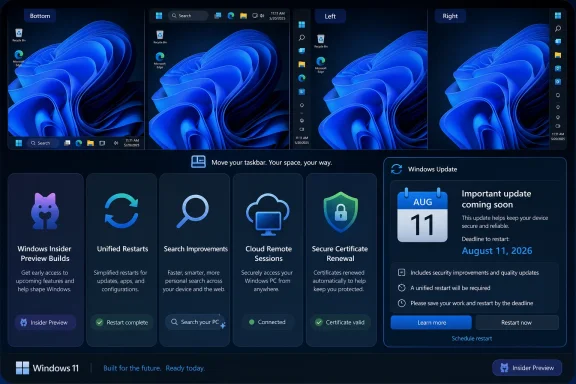 The Taskbar Finally Moves Again
The most visible change arrives in the two Beta builds. Microsoft is testing native taskbar placement controls that let users position the Windows 11 taskbar at the top, left, right, or bottom of the display through Settings > Personalization > Taskbar > Taskbar behaviors.
That is a notable reversal for Windows 11, whose redesigned taskbar long lacked the positioning flexibility familiar to Windows 10 users. The implementation is incomplete: touch gestures, the Search box, Ask Copilot, auto-hide, and touch-optimized taskbars do not yet fully support every alternate position.
Microsoft is also adding a smaller taskbar setting in Build 26220.9022 and Build 28020.2623. It reduces icon and bar height, a practical option for compact notebooks and users trying to recover a little vertical screen space. The smaller mode currently works only with top and bottom taskbar positions.
Windows Update Tests Fewer Restarts—and Longer Pauses
Builds 28020.2623 and 28120.2630 introduce Microsoft’s new unified update experience, which aims to coordinate driver, firmware, .NET, and monthly quality updates around one restart rather than several separate interruptions. The Future Platforms build also adds the ability to extend Windows Update pauses repeatedly, without the existing hard limit.
For administrators, the significant caveat is that these are Insider experiments, not a committed servicing policy for production Windows 11 deployments. Still, fewer competing reboot cycles would be a meaningful change for shared PCs and lightly managed endpoints if it reaches retail releases.
Experimental Builds Put Search and Remote Access in Focus
Experimental Build 26300.9032 expands Windows Search indexing automatically based on signals such as recent files and frequently used locations. It also adds Phone Link previews in the Start menu’s Recent section, letting users hover over a recent mobile notification or message without opening it. That feature requires Phone Link version 1.26021.3.0 or later and is rolling out gradually.
The same build improves Settings search, preserves File Explorer Home section states, and addresses a File History failure affecting SMB network shares. Microsoft also fixed a DFS mapped-drive problem that could incorrectly apply Mark of the Web treatment to internal files after a device reconnects to the network.
Build 29639.1000, meanwhile, adds an enterprise-oriented smart-card-removal policy for Azure Virtual Desktop and Windows 365 sessions using Microsoft Entra ID authentication. Administrators can configure those sessions to disconnect automatically when a redirected smart card is removed, extending an established physical-presence control into cloud-hosted Windows environments.
Build 28120.2630 carries similar SMB, DFS, touchpad, and adaptive hibernation improvements, but Microsoft lists a known compatibility safeguard: PUBG: BATTLEGROUNDS may not launch after installation.
The broadest message from this flight is not a single consumer feature. It is that Insider machines need to take the offered update before August 11, while taskbar positioning and the new reboot model remain features to watch—not capabilities IT teams should yet plan around.
