
There is an important qualification to the report’s framing. Microsoft has not issued a new corporate statement “debunking” God Mode. Windows Latest traced the explanation back to a January 4, 2010 post by Brandon Paddock, then a Windows developer, whose explanation holds up. But Paddock’s own blog explicitly says his views are personal and not indicative of Microsoft or its employees. This is an engineer’s contemporaneous technical explanation, not a current Microsoft support position.
That distinction does not make the explanation less convincing. It makes the story more useful: the familiar folder name is an unsupported path into an old Windows Shell view, and it should be treated as a personal convenience, not as a feature IT teams should deploy or document as a durable management tool.
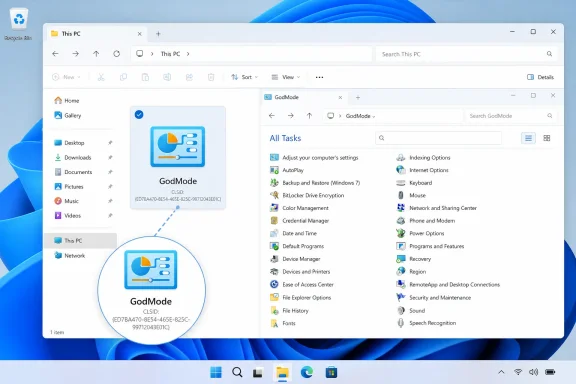 The “GodMode” Name Has Never Done Anything
The popular recipe creates a folder and renames it:
GodMode.{ED7BA470-8E54-465E-825C-99712043E01C}
Explorer then replaces the ordinary folder icon with a Control Panel-style icon and opens a long, searchable list of configuration links. The dramatic label is pure decoration. Paddock demonstrated this in 2010 by substituting a whimsical name before the period; the outcome was identical. The visible name is simply a display label.
The operative portion is the value in braces: {ED7BA470-8E54-465E-825C-99712043E01C}. It is a CLSID, short for class identifier, a 128-bit identifier Windows uses to locate registered COM classes and Shell objects. Microsoft’s own developer documentation still describes CLSIDs as registry-backed identifiers for COM class objects, and current Windows developer guidance still uses CLSID registration for File Explorer namespace extensions.
In practical terms, the folder-naming convention tells Explorer not to treat the folder as a conventional filesystem directory. Instead, Explorer resolves the CLSID and opens the Shell namespace object associated with it. The GodMode portion is not a password, an activation code, or a command to change Windows behavior.
The trick can therefore appear to work under any label that precedes the dot. That is the simplest test of the claim that it exposes a hidden “mode”: if changing its supposed activation word changes nothing, the word was never the mechanism.
All Tasks Is a Flat Control Panel View
The CLSID points to All Tasks, a Shell folder that exposes Control Panel task links in a single Explorer view. It is a catalog, not a privileged control surface.
Paddock wrote in 2010 that the ordinary Control Panel already contained the same items, arranged in a custom view intended to be easier to navigate. The All Tasks view dispenses with that presentation and displays links in Explorer’s standard list format. Ed Bott reached the same conclusion in reporting published a day earlier: the list did not contain one newly unlocked tweak, although it could expose alternate task links and keywords that were less obvious in Control Panel’s category layout.
That is why the view can still have limited value to a power user. A technician who remembers that a particular legacy applet exists but cannot recall whether it lives under System, Hardware and Sound, or Network and Internet may prefer a single searchable collection. The view can also make it easier to inspect which Control Panel links a particular Windows installation exposes.
But the list does not override Windows security boundaries. A setting that requires administrator approval still requires it. A page restricted by policy remains restricted. A component absent from the machine does not materialize because it appears in a broad task list.
Digital Citizen, which updated its Windows 11 God Mode guide in January 2026, likewise notes that the feature is an unofficial nickname and that it exposes settings already available to the signed-in user rather than conferring extra permissions. Its continued presence is evidence of compatibility, not a guarantee that Microsoft supports the naming trick as an interface contract.
Why Calling It a Secret Feature Misleads Users
“God Mode” became a durable piece of Windows folklore because the effect looks theatrical: a folder icon transforms and a long list of system controls appears. The visible result encourages the wrong inference—that Microsoft buried a master console which provides exceptional control over the PC.
It does neither. The mechanism reaches a documented category of Windows Shell functionality, and the destination is an internally named Control Panel collection. Microsoft’s current developer material continues to document the broader concepts involved: Shell namespace extensions use CLSIDs, and Control Panel items have canonical names designed for programmatic launching.
The word documented needs care here. The existence of CLSIDs and namespace extensions is documented for developers. That does not mean this particular All Tasks folder name is a supported automation target for customers or administrators. Paddock’s 2010 post is unusually direct on that point: he described the All Tasks folder and its CLSID as implementation details, then clarified that developers should not build applications around them because they could break in the future.
That warning has aged better than the mythology. Windows has retained the route through multiple generations of the operating system, but Windows 11’s administrative interface is increasingly divided between classic Control Panel components, the Settings app, management consoles, policy engines, and cloud administration portals. A catch-all legacy task list cannot resolve that fragmentation. It merely provides another way to reach a subset of the local interfaces.
A Handy Personal Shortcut Is Different From a Management Standard
For an individual Windows 11 user, creating the folder is low drama. It does not install a program, edit the Registry, bypass User Account Control, or expose controls beyond the user’s existing rights. If it proves cluttered or unhelpful, it can be removed like the shortcut-like Shell object it is.
For enterprise IT, however, the advice should be more conservative. Do not package the {ED7BA470-8E54-465E-825C-99712043E01C} naming convention into login scripts, desktop baselines, endpoint-management workflows, or internal documentation that promises a stable interface. Its behavior depends on a Shell implementation detail that Microsoft has never committed to preserve for administrators.
When a help-desk procedure or deployment tool needs to reach a specific configuration page, use a supported, named entry point instead. Microsoft documents ms-settings: URIs for launching specific Settings pages, while its Control Panel guidance identifies canonical names as the preferred command-line mechanism for individual Control Panel items. Those choices are more readable, more targeted, and less likely to leave a user staring at hundreds of links.
The difference is operationally significant. An All Tasks shortcut asks the user to hunt through a large list. A direct Settings URI or a documented Control Panel canonical name expresses the intended action—open Bluetooth settings, launch Programs and Features, or reach a particular legacy applet—and lets the procedure fail or change in a way that is easier to diagnose.
Windows 11 Keeps the Trick, but It Does Not Endorse It
Windows Latest is right on the central observation: the same folder trick continues to function on Windows 11, despite having acquired the “God Mode” nickname during the Windows 7 era. Independent current guides also demonstrate that the CLSID route remains available, with the exact inventory varying by Windows version, installed hardware, and optional components.
What the report does not establish is a newly discovered Microsoft debunking or a fresh policy change. Paddock’s post was published in January 2010, and its disclaimer explicitly separates his writing from an official Microsoft statement. No current Microsoft support article surfaced in the available record to name this folder “God Mode,” endorse it for customers, or announce that it remains supported.
The lasting lesson is less exciting than the viral trick: Windows Shell identifiers can make ordinary functionality look mysterious. Use All Tasks if you personally find the flattened Control Panel list convenient. Do not mistake it for a master key—and do not build an administrative process around a 16-year-old folder-name hack that Microsoft’s own Windows engineer warned developers not to depend on.
