
Neowin first reported the advisory, and Microsoft’s public hotpatch documentation supports the underlying explanation: hotpatch can apply monthly security fixes without restarting Windows, but baseline-style servicing is still required when an update reaches components that hotpatch cannot safely replace while the OS is running. The immediate operational consequence is straightforward: organizations that designed their September maintenance plans around a non-disruptive hotpatch window need to put restart handling back into the plan.
Microsoft says the exception affects devices enrolled through Windows Autopatch, Windows 11 hotpatch, and Windows Server hotpatch. It also says affected devices remain enrolled after restarting; administrators do not need to reconfigure the policy or re-enroll endpoints to resume hotpatching later.
The important correction to the headline language is that a restart will be required to complete installation, but Microsoft has not announced a new always-immediate reboot mechanism. Existing Windows Update for Business and Autopatch controls—including installation deadlines, active hours, and restart policies—still govern when managed PCs are prompted or forced to restart. Administrators should nevertheless treat September as a restart month, because deferring the reboot also defers completion of the security update.
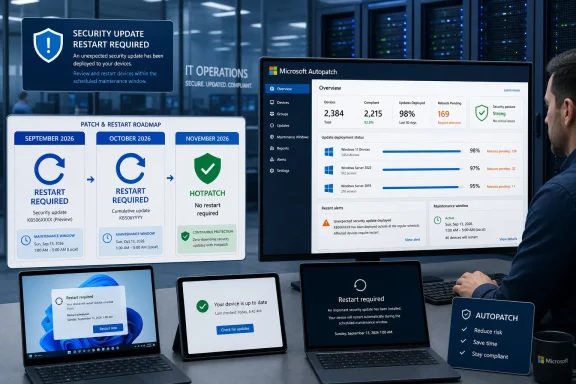 September Breaks the Published Hotpatch Calendar
Microsoft’s published 2026 calendar for Windows 11 Enterprise version 25H2 still lists September as a hotpatch month and October as the normal quarterly baseline month. Under the ordinary schedule, January, April, July, and October are cumulative baseline releases requiring a reboot; the two following months receive hotpatch security updates without one.
That public calendar is now out of step with the Message Center notice. September 2026 was expected to close the July-to-September cycle without a restart. Instead, it becomes an additional baseline-like servicing event immediately before October’s already scheduled baseline update.
Microsoft’s own hotpatch guidance explicitly anticipates this kind of exception. It says an out-of-cycle baseline update can be necessary for security reasons and does not alter the regular cadence. In practical terms, September’s restart requirement does not move October’s baseline to November. IT teams should therefore plan for two consecutive monthly reboot events:
- The September 2026 security update requires a restart because its security improvements cannot be hotpatched.
- The October 2026 release remains the planned quarterly baseline and also requires a restart.
- November 2026 is expected to be the next regular no-reboot hotpatch month.
The distinction matters for change management. September is not evidence that the organization has fallen off hotpatching, missed a prerequisite, or received the ordinary cumulative update by mistake. It is a vendor-declared exception to the expected schedule.
Hotpatch Reduces Reboots; It Does Not Eliminate Them
Hotpatching is often described as “security updates without restarts,” which is accurate only within a narrower servicing model. Microsoft uses a restarted baseline cumulative update to establish the version from which subsequent security fixes can be applied in memory. Hotpatch updates then modify eligible code while Windows keeps running.
That model has useful limits. A security update involving boot-critical code, servicing components, firmware-adjacent functionality, the .NET Framework, or other non-hotpatchable areas can fall back to conventional servicing. Microsoft has now said September includes security features in that category, though the company has not publicly identified the exact component or issued the September KB article as of August 28.
That omission leaves administrators unable to assess whether the exception applies to a narrowly defined component their estate does not use or to a broader Windows security change. For planning purposes, the distinction does not change the immediate recommendation: assume that all devices targeted by the September hotpatch deployment need a maintenance window. But it does limit the technical detail available for risk reviews and change advisory boards.
The September advisory also reinforces a point that can get lost in rollout discussions: hotpatch eligibility is not the same as an unconditional exemption from reboots. Eligible Windows 11 devices must be on a current baseline, managed through Microsoft Intune with a hotpatch-enabled Windows quality update policy, and meet Microsoft’s edition, licensing, hardware, and security-configuration requirements. Devices that do not qualify receive conventional cumulative updates, which have their normal restart requirement every month.
For a typical enterprise, then, September changes the experience most sharply for the subset of Windows 11 and supported Windows Server systems that had been avoiding reboots through hotpatch. Standard-update PCs are not newly affected; they were already scheduled to restart after monthly quality updates.
Check Whether the Restart Is Actually Completing
A restart-required update introduces two separate compliance states that reporting teams need to distinguish. A device may download and install the package successfully but remain pending restart, leaving the affected security changes incomplete. Another device may miss deployment altogether because its update ring, safeguard hold, connectivity, power state, or policy deadline delayed installation.
That makes the next month’s reporting more important than a simple “update offered” count. Windows Autopatch administrators should inspect whether September devices reached the required restart state and completed it within the organization’s deadline. They should also watch for endpoints that appear compliant to an inventory agent because the update package is present but are still pending a reboot.
This is especially relevant in organizations that have built a lighter-touch operational process around hotpatch. A hotpatch month can be deployed with minimal user disruption because the protection applies without waiting for a user to close work and restart. September requires the older discipline: user communication, a maintenance window, escalation for persistently offline devices, and a plan for systems that cannot be interrupted during business hours.
Microsoft recommends that administrators notify affected users, review maintenance windows, and monitor deployment. Those are sound minimum steps, but large environments should also review the policies that decide the practical meaning of “restart required.” A short deadline may create widespread user prompts and forced restarts soon after installation. A long deadline may preserve productivity in the short term while extending the period in which the new security protections are not fully active.
A Two-Month Reboot Window Needs Different Messaging
The risk is less about a single restart than about user expectations. Employees who have become accustomed to hotpatch updates may not understand why Windows suddenly requires a reboot in September—and then does so again in October. If communications call September a routine hotpatch release, the organization will generate avoidable help-desk traffic and may encourage users to postpone the restart.
Administrators should communicate that September is a security-driven exception, while October is the regularly scheduled quarterly baseline. The message should identify the deadline or maintenance window in local time, explain whether users can choose the restart time, and state what happens to unsaved work when the policy deadline is reached.
For shared PCs, kiosks, front-line devices, and systems with long-running workloads, the operational question is whether the September restart can be coordinated with October’s. Microsoft’s schedule does not provide that option: September’s update needs a reboot to finish its security changes, while October remains a separate baseline release. Delaying September until October may reduce interruption count for a given device, but it would also knowingly delay the September security update and could violate internal patch SLAs.
Server teams should make the same distinction. The advisory includes Windows Server hotpatch, but the best maintenance strategy varies sharply between a cluster with controlled rolling failover and a standalone server supporting a business-critical application. Hotpatch minimizes the frequency of disruptive maintenance; it does not eliminate the need to test restart behavior, validate service recovery, and maintain current rollback procedures.
November Is the Expected Return to Normal
Microsoft says no configuration changes are being made to hotpatch itself. After September’s restart and October’s normal baseline, devices should remain on their existing enrollment and resume the expected hotpatch pattern with the November 2026 security update.
The near-term task is therefore mundane but necessary: revise September maintenance plans now, validate restart deadlines before Patch Tuesday, and measure completed reboots rather than package installation alone. For organizations using hotpatch to protect uptime-sensitive Windows 11 fleets, the September exception turns a normally quiet update month into the first half of a two-month restart cycle.