
Immich is a capable open-source photo and video platform, with automatic mobile uploads, facial recognition, semantic search, albums, sharing, and a Web interface designed to resemble the convenience of Google Photos. It can run on Windows through Docker Desktop and Windows Subsystem for Linux 2. The project’s own documentation, however, recommends Linux or another Unix-like host and explicitly warns that non-Linux deployments tend to produce a poorer Docker experience and receive less troubleshooting support.
That does not rule out Windows 11. It means a desktop PC is a reasonable way to try Immich, or to run a lightly used household library, but it is not a magic escape hatch from administration. Moving photos off Google’s servers changes who operates the service. It does not eliminate the work required to preserve the photos.
 Google Photos’ AI policy is more limited than the headline suggests
The XDA piece argues that Google has quietly expanded AI training on user media and implies that a Google Photos library could be swept into that training unless users locate a separate opt-out. Google’s current Google Photos privacy documentation says something materially different: personal data in a Google Photos library is not used to train generative AI models outside Google Photos.
Google does process library content to provide product features. Ask Photos and other Gemini features can analyze photos and videos, create descriptions, identify faces and locations, improve edits, and answer questions about a library. That is substantial processing, and users who do not want those features should review the Gemini controls within Google Photos. But processing photos to operate a search or editing feature is different from using the library as general-purpose training material for models beyond Google Photos.
There is a related policy change that likely created the confusion. Reporting by TechCrunch and Tom’s Guide in July described Google’s Search Services History setting, which can retain media sent to Google Search services—such as images submitted through Lens—and use it to improve AI models if users leave the relevant setting enabled. That concerns media provided to Search interactions, not a blanket policy declaring every image stored in Google Photos fair game for model training.
Google has also introduced Google Photos connections for Gemini’s Personal Intelligence features. Google says those connections are opt-in and that private Photos libraries are not directly used to train Gemini’s models. Readers can reasonably decide they do not want Google’s AI features examining their library at all. They should make that decision based on the actual controls and policy boundaries, rather than on the broader claim that Google Photos is silently training on every stored family image.
Immich offers a different privacy model: photo data, indexes, face embeddings, thumbnails, and machine-learning jobs remain on infrastructure the administrator chooses. If that machine has no externally accessible services and no third-party cloud backup, there is no Google Photos equivalent in the path. But “local” does not automatically mean private. A misconfigured reverse proxy, exposed Docker service, weak account password, unpatched Windows installation, or insecure remote-access tool can make a self-hosted library more exposed than a major cloud provider’s service.
Windows 11 works, but the database cannot simply live on C:
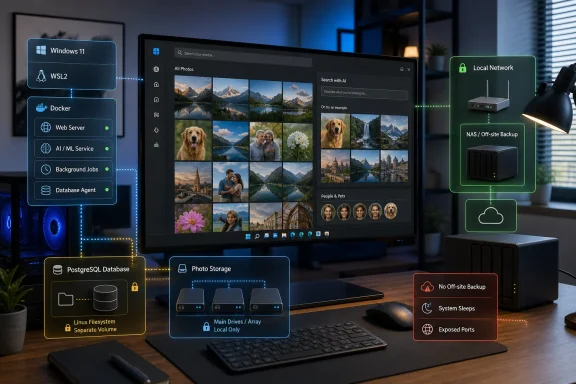
Immich’s standard deployment is a Docker Compose stack. Docker Compose reads a configuration file and starts the components together: the Immich server, PostgreSQL database, Redis cache, and machine-learning service. The XDA author is right that this makes the initial launch simpler than manually installing each service.
The Windows-specific details begin after that first command. Docker Desktop normally uses WSL 2 to run Linux containers, and Immich supports Windows through Docker Desktop or WSL 2. Yet its requirements page identifies a limitation that should be in every Windows installation guide: the PostgreSQL database cannot be stored on NTFS, exFAT, FAT32, or a WSL-mounted Windows directory such as /mnt/c.
That is not a cosmetic recommendation. PostgreSQL expects Unix-style file ownership and permissions. Put its data directory in a normal Windows-mounted path and an instance may fail to start, corrupt its permissions model, or behave unpredictably after updates. Immich’s own workaround is to use a Docker-managed volume for database data rather than binding the database to an NTFS folder.
The distinction is easy to miss because user photos and the database are not the same thing. The photo and video files can be stored where the deployment supports them, while PostgreSQL keeps the catalog: asset records, albums, user accounts, metadata, job state, search information, and other information Immich needs to make sense of the files. Lose the database and retain only the originals, and the images may still exist—but the library organization and much of the service state may not.
Windows users should also avoid treating a mapped NAS share as a universal answer. Immich’s documentation says network shares are not supported for the database. A NAS can still be part of a sound overall storage and backup strategy, but putting a latency-sensitive PostgreSQL data directory directly on a network share is a separate and risky design decision.
Smart search stays local only if the server does
Immich’s appeal is not merely that it can store JPEGs in a folder. Its machine-learning service builds the features people expect after years of Google Photos use: facial recognition and Smart Search, which can retrieve images based on natural-language concepts rather than filenames or manually entered tags.
The XDA article describes this as CLIP-based search, broadly referring to the class of vision-language model Immich uses to turn image content and search text into comparable representations. In a self-hosted deployment, those jobs run against the administrator’s own server rather than being submitted to Google Photos. That is a concrete privacy benefit for people who want powerful photo search without sending every query and asset to a hosted platform.
It also creates a local capacity problem. Immich specifies a minimum of 6GB of RAM and recommends 8GB, with at least two CPU cores and four recommended. Those are server requirements before accounting for what Windows 11, Docker Desktop, browser tabs, games, work applications, or other desktop workloads may need. The machine-learning workload can be accelerated by supported GPUs, including NVIDIA CUDA, AMD ROCm, Intel OpenVINO, and certain other back ends, but GPU acceleration is optional and can add configuration complexity.
A few thousand images on a desktop that remains powered on may be manageable. A multi-user archive containing years of 4K video, RAW files, and hundreds of thousands of photos is different. Initial indexing can be CPU-intensive; thumbnails and video transcodes consume space; and desktop sleep, restarts, Windows Updates, and a user shutting down the PC all interrupt a service phones expect to reach automatically.
Self-hosting transfers the availability problem to the owner
Google Photos operates continuously because Google runs the servers, storage replication, authentication systems, network paths, and disaster recovery. An Immich server running on a Windows 11 PC works when that PC, Docker Desktop, WSL, local network, and storage are all working.
That has practical consequences. Automatic mobile backup works reliably at home when the phone can reach the server’s private address. Reaching the same library away from home requires a deliberate remote-access plan. Opening ports on a home router is the least forgiving approach because it exposes an Internet-facing service that must be kept patched and correctly configured. A VPN or an authenticated private overlay network is usually the more cautious route for a household deployment.
The XDA author’s experience of mixing PowerShell commands with Linux shell commands is familiar to anyone new to WSL. It is also a warning that Windows is hosting multiple layers: Windows itself, WSL, Docker Desktop, the Docker Compose environment, and the Immich containers. Each has its own filesystems, update cycle, service state, logs, and failure modes.
For a personal test server, this is an acceptable learning curve. For the only copy of family photos, it is not. Immich should be treated as an application on top of a storage-and-backup plan, not as the plan itself.
The missing requirement is a real backup
Immich’s backup documentation is blunt: automatic database dumps are not a backup of the photo and video files. The software can create database backups on a schedule—by default, daily dumps with retention for the most recent 14—but those preserve metadata, not the original assets.
The project recommends a 3-2-1 strategy: at least three copies of important data, stored on two types of media, with one copy off-site. For an Immich installation, that means preserving both the uploaded asset directories and the PostgreSQL database. A database dump without the photos cannot restore the collection. A folder of photos without the database may leave the originals readable, but it does not restore the service’s metadata and structure cleanly.
Before someone replaces Google Photos, the minimum responsible checklist is short:
- Keep the original Google Photos library until the Immich upload, indexing, albums, metadata, and mobile backups have been checked.
- Store Immich’s PostgreSQL data in a Docker volume or Linux-native filesystem rather than an NTFS-mounted path.
- Back up original photos and videos separately from Immich’s database dumps.
- Test a restore of a small sample before trusting the arrangement with irreplaceable images.
- Decide how the server will remain reachable and patched when the Windows PC is asleep, rebooting, or away from home.
Immich can give Windows users meaningful control over where their images live and where machine-learning indexing runs. It cannot provide freedom from the operational duties Google Photos used to absorb. The migration is worth considering for people ready to own those duties; for everyone else, it is wiser to treat Immich as a second copy and prove the backup-and-restore process before making it the primary photo library.