
Windows Latest first flagged the omission in Microsoft’s July quality update from Windows chief Pavan Davuluri. The distinction is important because Microsoft has already demonstrated that it can make a specific OOBE promise when it intends to: in April, it explicitly said users could skip update installation during first-run setup. This time, there is no equivalent statement about local accounts, offline installation, or even a choice between a Microsoft account and a device-only account.
For anyone provisioning a personal Windows 11 PC, the practical answer is therefore straightforward: do not plan a deployment, refurbishing workflow, or clean install around a new official bypass arriving this year. Microsoft may reduce pages and wait time, but the company has not announced a change to the account gate.
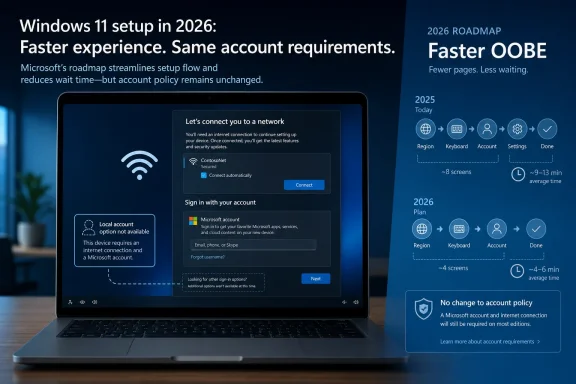 Microsoft’s new promise is broad, not an account-policy reversal
Davuluri’s July update adds onboarding and setup to four areas Microsoft says it will address before the end of 2026. The wording is spare: a faster, more efficient out-of-box experience. It supplies no target build, no list of screens being removed, no rollout channel, and no explanation of whether the changes will land first in Windows 11 25H2, 26H2, or the Experimental Insider branch.
That vagueness contrasts with Microsoft’s March quality pledge, which described new-device setup as “quieter and more streamlined,” with fewer pages and reboots. Microsoft’s April Windows Update post then turned part of that pledge into an identifiable feature: users could choose to skip updates during OOBE and reach the desktop first.
Microsoft also specified the limitation. The skip-updates option does not apply to commercially managed OOBE deployments, and it may not appear where an update is needed to make a device functional. That is the sort of scope statement missing from the new onboarding announcement.
The latest publicly documented Insider releases underscore the gap. Windows 11 Insider Beta Preview Build 26220.9022, released July 31 for the Windows 11 25H2 track, lists taskbar, search, storage, File Explorer, and update changes, but no OOBE account change. Experimental Build 26300.9032 for Windows 11 26H2 likewise contains no setup or local-account feature. Those notes do not prove that Microsoft has ruled out an account change later in 2026, but they do establish that it is not among the announced features in the newest public flight documentation.
The first OOBE concession addressed time, not identity
The update-skip control solves one real frustration. A newly purchased or freshly reinstalled PC should not necessarily need to download a cumulative update, driver package, and possibly firmware before its owner can reach the desktop. Microsoft’s April change gives the user a choice: update immediately, or complete setup and take the updates later.
That was a meaningful adjustment to the sequence of setup. It did not change the identity requirement.
For consumer Windows 11 Home and Pro installations, setup still steers users through network connectivity and Microsoft-account sign-in before they can finish in the normal supported flow. Once the account is attached, OOBE can offer Microsoft 365, OneDrive, Phone Link, Game Pass, backup, and other connected-service experiences. A shorter OOBE could remove or consolidate some of those pages, but it would not restore the ability to create a machine that has never been associated with a Microsoft account.
Windows Latest reports that its March OOBE test encountered successive Microsoft 365, Phone Link, OneDrive, browser-data, and Game Pass prompts before the desktop. That is a single outlet’s hands-on account, rather than a Microsoft specification, but it points to the larger issue: page count is only part of the annoyance. The sign-in requirement determines what data and service decisions users must make before they can operate their own PC.
Microsoft has offered no public detail on whether “efficient” means fewer promotional screens, fewer reboots, reduced download time, more deferred choices, or all of the above. Until an Insider build puts the revised flow in front of users, it would be premature to treat the company’s language as a promise to de-commercialize setup.
Microsoft previously tightened the local-account path
The absence of a local-account announcement reads more sharply because Microsoft spent 2025 removing the escape hatches that made offline setup relatively simple.
In October 2025, Microsoft’s Insider release notes for Windows 11 Build 26220.6772 said it was removing “known mechanisms” for creating a local account during OOBE. BleepingComputer and Tom’s Hardware independently reported that the change targeted popular commands including
oobe\bypassnroand
start ms-cxh:localonly. Microsoft’s stated rationale was that those methods could skip setup screens and leave a PC not fully configured for use.
That explanation describes the problem with the workarounds, not why Windows needs to prohibit a supported local-account choice. A normal, visible “Set up with a local account” path would not have to skip screens, omit security settings, or exit setup in an incomplete state. It could retain every required hardware, privacy, recovery, and update step while leaving account type to the owner.
Instead, Microsoft’s approach made the unsupported route more brittle. The company had already removed the
BypassNRO.cmdscript from newer Windows 11 previews, then went after the local-only command path. Some registry edits, answer files, edition-specific routes, and deployment tools may still work in particular builds or scenarios, but those are not a consumer-friendly policy and should not be mistaken for one.
There is an important operational difference here. A workaround that works with one ISO or one Insider build can disappear after the next feature update, while an answer-file or Autopilot process may be appropriate for managed fleets but is excessive for someone reinstalling a family laptop. Neither is equivalent to the checkbox Windows users had in earlier setup experiences.
Scott Hanselman’s March reply has not become a roadmap item
Microsoft Vice President Scott Hanselman gave local-account advocates a reason to watch this year’s quality work when he replied on March 20 that he disliked the requirement and was “working on it.” Windows Central, TechRadar, and PC Gamer all reported the exchange at the time.
That response was useful as an acknowledgement. It was not a product commitment, schedule, or release-note entry.
Nearly five months later, the difference between Hanselman’s comment and Microsoft’s official roadmap remains unresolved. The March quality announcement mentioned quieter setup. The April update listed update controls. The July follow-up identifies OOBE as a new work area. Across those publications, Microsoft has not said that a local account option is planned, what edition it would cover, whether it would require an offline machine, or whether it would return to Home as well as Pro.
The company should not be judged as though it had made that promise. But users should also not infer it from a general pledge to make setup faster. The record so far supports a narrower conclusion: Microsoft is actively improving OOBE friction while leaving its consumer account policy intact.
Consumer setup and enterprise provisioning are different problems
IT departments should avoid collapsing this debate into enterprise deployment. Windows Autopilot, Microsoft Entra ID, domain join, provisioning packages, unattend files, and OEM preinstallation workflows exist because organizations need repeatable enrollment, policy application, device naming, encryption escrow, and account control. A business often wants an identity-backed setup process; it is not evidence that every retail PC owner should be required to use the same model.
Microsoft itself distinguishes managed commercial OOBE from the consumer experience in its documentation for skipping setup updates. In managed environments, the organization can impose the timing and configuration requirements. In the consumer channel, Microsoft has made the Microsoft account part of the first-use path even for people who want a simple local administrator, an offline lab PC, a donation or resale device, a repair bench installation, or a machine with no cloud sync.
A local account is not an anti-security setting. It changes where credentials, recovery information, synchronization, backup defaults, and service entitlements are anchored. Microsoft accounts can offer benefits including easier password recovery, device backup, cross-device synchronization, and automatic escrow of certain recovery data. Those are useful options. The point at issue is whether they must be conditions of reaching the Windows desktop.
For support technicians and sysadmins who service home users, the requirement also creates an awkward handoff. The technician may need a network connection and an account at setup, yet should not attach their own personal Microsoft account to the customer’s PC. Using a temporary account and converting later introduces cleanup work and risks leaving sync, recovery, or OneDrive associations behind. A supported local-account choice would make that process cleaner.
Watch the build notes, not the marketing language
Microsoft’s stated deadline is the end of 2026, but it has not committed to a particular Windows 11 version or Insider channel. The next evidence worth watching will be a release note that explicitly names OOBE changes, followed by hands-on confirmation that the flow works on a clean consumer installation rather than only in a managed deployment.
Until then, expect the likely improvements to focus on time and presentation: fewer interruptions, deferred updates, fewer reboots, and possibly fewer service pitches. Those changes can improve the first hour with a new PC.
They will not answer the long-running local-account complaint unless Microsoft adds a plainly supported choice before the Microsoft-account screen. As of August 7, 2026, that choice is absent from Microsoft’s public plan.
References
- Related coverage: blogs.windows.com
Our commitment to Windows quality
Hello Windows Insiders, I want to speak to you directly, as an engineer who has spent his career building technology that people depend on every day. Windows touches more people's lives than almost any technology on Earth. Every day, we hear from thblogs.windows.com - Related coverage: learn.microsoft.com
Loading…
learn.microsoft.com - Related coverage: learn.microsoft.com
Loading…
learn.microsoft.com - Related coverage: windowsforum.com
Windows 11 Setup May Get Local Account Option Back After Hanselman ‘Working On It’ | Windows Forum
A long-running irritation in Windows 11 setup may finally be headed for a fix. Microsoft’s Scott Hanselman has publicly acknowledged frustration with the...windowsforum.com - Related coverage: windowscentral.com
Loading…
www.windowscentral.com - Related coverage: techradar.com
You might soon be able to sign into Windows 11 without a Microsoft account, with software engineers 'working on it' | TechRadar
We're hopefulwww.techradar.com - Related coverage: windowscentral.com
Loading…
www.windowscentral.com - Related coverage: tomshardware.com
How to Install and Log In to Windows 11 Without a Microsoft Account | Tom's Hardware
Maintain only a local account on your Windows 11 PC.www.tomshardware.com - Related coverage: pcgamer.com
Loading…
www.pcgamer.com - Related coverage: tomsguide.com
Microsoft might be cracking down on Windows 11 local account setups — here's what we know so far | Tom's Guide
Microsoft is attempting to restrict account access for local accounts.www.tomsguide.com - Related coverage: blogs.windows.com
Improving your Windows Insider experience
Hello Windows Insiders, Last month, Pavan shared our commitment to improving Windows quality, with a focus on performance, reliability and craft, iblogs.windows.com - Related coverage: techcommunity.microsoft.com
Loading…
techcommunity.microsoft.com - Related coverage: anavem.com
Loading…
www.anavem.com - Related coverage: principledtechnologies.com
Loading…
www.principledtechnologies.com - Related coverage: bleepingcomputer.com
Loading…
www.bleepingcomputer.com - Related coverage: tomshardware.com
Microsoft clamping down on Windows 11 local account setup — latest Insider build removes 'local-only commands,' skipping Microsoft account sign-in will crash setup process | Tom's Hardware
Microsoft is clamping down on the practicewww.tomshardware.com - Related coverage: support.microsoft.com
Loading…
support.microsoft.com - Related coverage: vergetech.co.uk
Loading…
vergetech.co.uk - Related coverage: support.microsoft.com
Loading…
support.microsoft.com - Related coverage: particle.news
Loading…
particle.news - Related coverage: tech-latest.com
Loading…
tech-latest.com - Related coverage: windowsforum.com
Loading…
windowsforum.com - Related coverage: download.microsoft.com
- Related coverage: techriver.com
- Related coverage: techcommunity.microsoft.com
- Related coverage: techradar.com
Microsoft is 'removing known mechanisms for creating a local account' from Windows 11 setup - get ready to use a Microsoft account | TechRadar
This isn't a popular decision...www.techradar.com - Related coverage: pcgamer.com
Microsoft is planning to make it harder than ever to install Windows without an internet connection and a Microsoft account | PC Gamer
The number of work arounds is ever shrinking...www.pcgamer.com