
For Windows 11 and Windows 10 users, online activation remains the normal route. The newly detailed offline procedure matters for air-gapped workstations, isolated lab machines, legacy equipment, and systems whose activation cannot complete through Microsoft’s online service. Microsoft documents the process across Windows 11, Windows 10, Windows 8.1, Windows 8, Windows 7, Windows Vista, and Windows XP, though the presence of an activation procedure should not be mistaken for renewed security support for the retired versions.
The important operational change is not that offline activation exists. It is that the “offline” part now applies to the target Windows PC, while the person performing the activation must use a separate connected device, complete a CAPTCHA, and sign in to Microsoft’s portal before Microsoft will return a Confirmation ID.
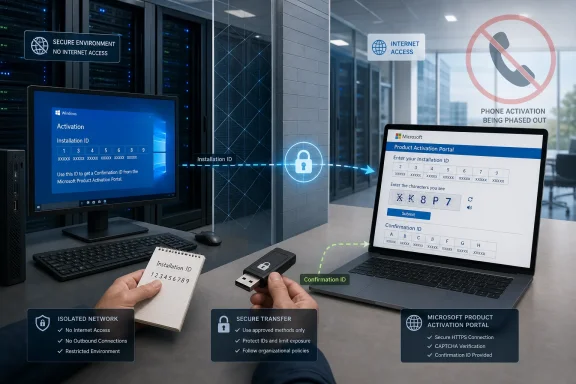 The old phone wizard is now an ID-collection screen
Windows has long used a telephone activation interface to display an Installation ID, select a country or region, and obtain a Confirmation ID. Microsoft’s current instructions retain pieces of that interface on some versions and builds, including labels such as Activate by Phone and Use the Automated Phone System.
But Microsoft’s direction is unambiguous: when that screen displays a telephone number, do not dial it. Use the Product Activation Portal with the Installation ID shown in Windows. The portal asks the operator to pass a CAPTCHA, sign in, select the appropriate Windows version, submit the Installation ID, and then take the returned Confirmation ID back to the Windows machine.
That is a material distinction for teams with formal isolation requirements. A workstation can remain disconnected from the internet, but the activation workflow no longer consists only of a telephone call placed from any available line. It now depends on a connected browser session and a person able to authenticate to Microsoft’s portal. For a small shop, that is a procedural annoyance. For a regulated network, it may require a documented handoff between the isolated-device operator and an approved internet-connected administrative workstation.
Microsoft’s support guidance does not state that the account used to access the portal becomes the owner of the Windows license. It describes the account as part of the portal workflow, while activation still turns on the Installation ID generated by Windows and the Confirmation ID issued in response. Administrators should nevertheless treat both IDs as licensing data, not as harmless diagnostic output to paste into ticket comments or public support forums.
Current Windows 11 builds have two different offline paths
Microsoft’s support page divides Windows 11 activation behavior by build number, and this is where old runbooks are most likely to fail.
On Windows 11 builds 26100.8973 and later and 26200.8973 and later, Microsoft says the recommended route is Settings > System > Activation > Automated Help. That page presents the Installation ID and later accepts the Confirmation ID returned by the portal. Microsoft’s Windows release documentation identifies the 26100 build family as Windows 11 version 24H2 and the 26200 family as version 25H2, so the cutoff is relevant to both currently serviced release lines.
For earlier Windows 11 builds, the documented settings path is System > Activation > Activate by Phone. The name is legacy; the intended result is still to expose the Installation ID, not to place a phone call.
Microsoft also marks a separate cutoff for the long-familiar slui 4 command. On Windows 11 builds 26200.7922 and later, the company says SLUI may no longer provide the expected activation experience or may not be available at all. Its prescribed alternatives are Automated Help or the slmgr command-line method.
This means slui 4 should no longer be the default advice for a modern Windows 11 activation failure. It may still work on older Windows 11 installations and remains documented for Windows 10 and earlier systems, but a script, help-desk macro, or gold-image checklist that assumes it is universally available is now outdated.
SLMGR is the durable fallback when the interface disappears
Microsoft’s more durable fallback is the Software Licensing Management Tool, invoked through an elevated Command Prompt. The company documents three commands that matter:
slmgr /dtidisplays the Installation ID on Windows 11, Windows 10, Windows 8.1, and Windows 8.slmgr /atpfollowed by the Confirmation ID applies the portal-issued code; Microsoft says to enter the Confirmation ID without angle brackets, hyphens, or spaces.slmgr /dlichecks the resulting license information after the Confirmation ID has been applied.
Windows 7 and Windows Vista use the explicit slmgr.vbs form in Microsoft’s instructions, such as slmgr.vbs /dti and slmgr.vbs /dli. Windows XP is the exception: Microsoft says SLMGR is unavailable there, leaving its older graphical activation route as the documented option.
The command-line path has a practical benefit beyond bypassing an absent button: it separates the three stages cleanly. An administrator can obtain the Installation ID, move it through the approved portal process, apply the Confirmation ID, and verify the license state without relying on a graphical wizard that may have changed between builds. It also offers a recovery route when the Activation page lacks both Automated Help and Activate by Phone.
The caution is that these commands are activation tools, not a way around licensing rules. A Confirmation ID that does not match the current licensing state, installed edition, or Installation ID will not solve an edition mismatch, an invalid product key, an exhausted retail entitlement, or an organization-managed KMS or Active Directory activation problem.
Offline activation does not replace normal enterprise activation
Microsoft’s article is directed at the Installation ID and Confirmation ID workflow for individual Windows installations. It does not present the portal as a replacement for an organization’s normal volume-activation architecture.
That distinction matters most on enterprise editions. A PC activated through Key Management Service, Active Directory-based activation, or another centrally managed volume process should be investigated as an organizational licensing issue when it loses activation. Feeding an Installation ID into the standalone portal may be appropriate for a valid offline scenario, but it does not repair a client that cannot reach its required KMS infrastructure, has the wrong volume key, or has been deployed with an edition that does not match its entitlement.
Microsoft Learn’s volume-activation planning guidance continues to describe KMS, Active Directory-based activation, and Multiple Activation Keys as distinct activation models. Administrators should identify the license channel before treating the portal as the solution. The slmgr /dli check is useful here because it exposes license information after activation work, but the authoritative answer for managed devices remains the organization’s licensing records and activation design.
For devices with a digital license or an embedded OEM key, online activation should also remain the first attempt. Connecting the machine to the internet, opening the Activation settings page, and allowing Windows to activate normally avoids the manual transfer entirely. The portal route is for a system that cannot connect or one whose online activation has failed—not a faster substitute for the standard path.
What administrators should change now
The support article gives help desks a straightforward update to make: remove instructions that tell users to call the number presented in an activation wizard. Replace them with a controlled workflow that preserves the target machine’s isolation while acknowledging the portal’s requirements.
For current Windows 11 systems, use Automated Help from Settings when it is present. If the activation interface is missing, inconsistent, or affected by the SLUI change, use an elevated Command Prompt to collect the Installation ID with slmgr /dti, apply the returned code with slmgr /atp, and validate with slmgr /dli.
For Windows 10 and older versions, the old graphical wording may still refer to phone activation, but Microsoft’s current documentation still routes the administrator to the Product Activation Portal. Do not infer from the legacy wording that a phone number is a supported completion path.
The concrete consequence is simple: an offline Windows PC can still be activated without being connected to the internet, but the operator now needs a browser-enabled device and a Microsoft portal sign-in to complete the exchange. On up-to-date Windows 11 builds, slui 4 is no longer dependable enough to be the foundation of that process.
