
Softonic’s report correctly identifies the direction of travel: Windows 11 is gaining a calendar-based pause control, normal Restart and Shut down options even when an update is pending, clearer driver labels, and a way to bypass the update check during initial setup. But Microsoft’s own release record shows a more complicated rollout than “Windows 11 updates changed in April.”
Microsoft announced the package on April 24 through the Windows Insider Blog, alongside Insider build 26300.8289. The single-restart work arrived later: Microsoft first documented it in Experimental build 26300.8687 on June 12, where it is coordinating driver, .NET, and firmware packages with the monthly quality update. TechSpot independently reported that change as an Insider-only unified update experience, not a blanket behavior already imposed on every retail Windows 11 installation.
The important correction is simple: fewer restarts and more control are real, but availability remains uneven—and pausing updates is not a safe substitute for update management.
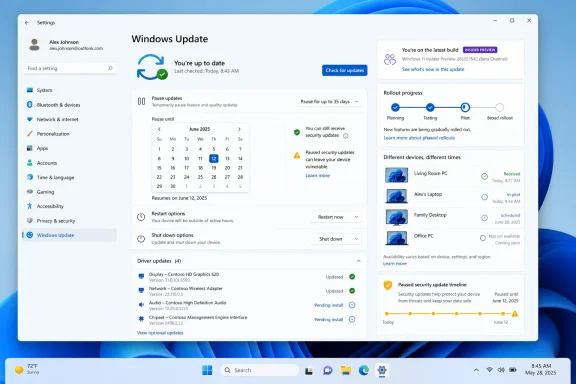 The April announcement was an Insider rollout, not a universal Windows Update change
Microsoft’s April 24 post was framed as a rollout, but it was published alongside a reorganization of the Windows Insider Program. At the time, Windows 11 build 26300.8289 was in the Experimental channel, the successor to the Dev channel. That distinction matters because Experimental features can change, be delayed, or never reach a retail release in the same form.
The April announcement named four changes:
- Users can skip update downloads during the out-of-box experience, or OOBE, and reach the desktop first.
- Users can select a pause end date up to 35 days away and repeatedly set a new date.
- The power menu can preserve ordinary Restart and Shut down actions alongside Update and restart and Update and shut down.
- Driver-update names can identify their class, such as display, audio, battery, or storage-related hardware.
Microsoft has since moved at least the new pause calendar into Release Preview for Windows 11 26H1. Its July 20 release notes for build 28000.2605 describe the feature as a gradual rollout, explicitly warning that availability varies by device. Windows 11 26H1 is also a special case: Microsoft says it is preinstalled only on select new hardware and will not be offered as a feature update to existing Windows 11 PCs.
That does not mean owners of Windows 11 24H2 or 25H2 will be permanently excluded. Microsoft says those versions will continue receiving monthly security and quality updates and new features. It does mean that the current record does not support a claim that every Windows 11 PC received the full new update experience in April, or that every consumer can enable it immediately by pressing Check for updates.
For practical purposes, users should check Settings > Windows Update rather than assume the calendar or revised power choices are missing because something has gone wrong. Feature delivery is increasingly decoupled from the cumulative-update KB number, which means two fully patched PCs on the same Windows version can expose different controls for a time.
The one-restart promise is narrower than it sounds
The most appealing part of the story is Microsoft’s plan to reduce the number of update-related reboots. The company is beginning by aligning driver, .NET, and firmware updates with the monthly Windows quality update, so that a device can complete that group of work in one monthly restart instead of applying packages on separate schedules.
That is useful, particularly for people who manually check for optional updates, install vendor firmware through Windows Update, or receive .NET servicing outside the core cumulative update. Windows has long had a reputation for turning what looks like one patching session into a chain of downloads, installs, reboot prompts, and post-restart configuration.
But this is an orchestration change, not a guarantee that Windows will reboot only once under every condition. Out-of-band security updates, emergency fixes, hardware-specific firmware requirements, feature upgrades, recovery operations, and failed installations can still require their own restart paths. Microsoft’s wording is that it is starting by coordinating several update classes; it has not promised to eliminate every additional reboot.
There is another availability problem. Microsoft’s formal documentation places the unified experience in Experimental build 26300.8687, a pre-release build based on Windows 11 25H2. The company’s own Insider notes say features in that channel use Controlled Feature Rollout, beginning with a subset of participants and expanding only after feedback and telemetry review.
So users on a stable retail build should view the one-reboot model as a credible direction and an Insider-tested improvement, not a completed servicing guarantee. The next meaningful milestone is a retail Windows 11 release note that names the unified update behavior for 24H2 or 25H2, rather than another Insider build.
Indefinite pausing gives users control over every update, including security fixes
The new calendar makes the pause feature look more flexible, and it is. Instead of selecting a fixed short period and being forced to install current updates before delaying again, Windows 11 now lets a user choose an end date up to 35 days ahead, then set another date before the current pause expires. In practice, a careful user can keep postponing updates without a hard cumulative maximum.
Microsoft’s support documentation also makes the price of that flexibility plain. While updates are paused, updates that need a restart are not downloaded or installed; automatic restarts to complete those updates do not occur; and an update already in progress is canceled. When the pause ends, Windows scans, downloads, and installs the latest available updates.
There is no consumer-facing “pause feature updates but continue receiving security fixes” switch in this new interface. A person who uses the control to avoid a troublesome cumulative update is also choosing to hold back the security content bundled into that month’s quality update. Since Windows monthly quality updates are cumulative, a PC that skips July and August does not permanently miss individual fixes; it receives the accumulated package when it resumes. But it remains exposed for the entire period it is paused.
That makes indefinite pausing reasonable as a short-term response to a documented compatibility problem, an unstable driver, a critical work deadline, or limited bandwidth. It is a poor standing policy for a primary PC. The convenience feature is best understood as a scheduling tool, not as a replacement for testing, maintenance windows, backup discipline, or a managed patch ring.
Microsoft has also retained the security-first default. Its April announcement says that, if users take no manual action, Windows downloads updates in the background and applies them alongside the next scheduled quality update. The new controls change who chooses the moment; they do not create a separate, low-risk channel that filters out bad updates while preserving all security coverage.
Businesses already have stronger controls—and stricter deadlines
For organizations, the April consumer-facing changes should not be confused with a replacement for Windows Update for Business, Group Policy, Microsoft Intune, or existing servicing processes. Commercial deployments can already defer, stage, approve, and enforce updates through administrative policy.
Microsoft explicitly says the OOBE option to skip updates does not apply where the out-of-box experience is managed commercially. It also excludes select cases in which updates are needed for the device to function. That makes sense for Autopilot, managed provisioning, and hardware deployments where the setup process must establish a supported driver or security baseline before handing a device to an employee.
Organizations can set quality-update and feature-update deadlines, along with grace periods for restarts. Microsoft’s policy documentation says that once a configured deadline is reached, Windows can force a restart regardless of active hours. These policies can also override ordinary download, installation, and reboot settings.
The operational consequence is that an employee’s new ability to choose a delayed consumer-style pause date should not be assumed to override corporate patch policy. IT departments that depend on compliance reporting should test the experience against their specific Intune update ring, deadline policy, maintenance window, and Windows version before telling staff that the new controls are available or authoritative.
Microsoft’s January 2026 maintenance-window capabilities are the more relevant tool for enterprise administrators. They can govern monthly security updates, hotpatches, .NET, Defender, driver and firmware updates, and annual feature updates inside a planned service period. That is the controlled version of the same idea Microsoft is now presenting to consumers: reduce interruptions by coordinating work, rather than by allowing updates to drift indefinitely.
Windows 10 users have a narrower, time-limited alternative
The Softonic report is right that free Windows 10 support ended on October 14, 2025. A Windows 10 PC still runs after that date, but Microsoft no longer provides free general security updates, technical assistance, or ordinary Windows Update servicing for the retired operating system.
“Move on or pay” is incomplete for consumer systems, however. Microsoft’s Windows 10 Consumer Extended Security Updates program remains available through October 13, 2026 for eligible Windows 10 22H2 Home, Pro, Pro Education, and Workstation PCs. It supplies only critical and important security updates—not features, ordinary non-security fixes, or general support.
For U.S. consumers, Microsoft offers three enrollment paths: settings synchronization through a Microsoft account at no additional charge, 1,000 Microsoft Rewards points, or a one-time $30 purchase plus applicable tax. That is a temporary bridge, not a new support lifecycle. Once October 13, 2026 passes, a Windows 10 machine that cannot move to Windows 11 will need a different operating-system plan or an organization-level support arrangement.
Microsoft’s gentler Windows 11 servicing model is a worthwhile change, especially the return of honest power-menu choices and the effort to consolidate restart-requiring packages. But the immediate action for most users is less dramatic: install current security updates, check whether the new controls have actually reached the device, and use the 35-day pause only with a specific resumption date and a reason to justify the security gap.
References
- Primary source: en.softonic.com
Published: August 8, 2026 at 4:48 PM UTC
Windows 11 updates are now gentler: there’s a new catch - Softonic
Microsoft changed the Windows 11 update experience in April 2026. The update cuts down on restarts, lets you pause updates for up to 35 days, and, onen.softonic.com - Related coverage: support.microsoft.com
Pause updates in Windows | Microsoft Support
Under Settings, you can pause the Windows Update from being downloaded and installed for a period of time. You can also select a convenient time to restart your device after the updates are downloaded and installed.support.microsoft.com - Related coverage: blogs.windows.com
Your Windows update experience just got updated
Hey Windows Insiders, Today, we’re excited to share some improvements to the Windows Update experience that are now starting to roll out. These improvements are the direct result of your feedback. We are continually reading the feedback submittedblogs.windows.com - Related coverage: learn.microsoft.com
Windows 11 - release information | Microsoft Learn
Learn release information for Windows 11 releaseslearn.microsoft.com - Related coverage: techspot.com
Microsoft is making Windows 11 updates require just one reboot instead of several | TechSpot
As part of the new update policy, Microsoft will bundle all available updates – including security patches, driver releases, bug fixes, firmware revisions, and .NET packages –...www.techspot.com - Related coverage: support.microsoft.com
Get Windows updates as soon as they're available for your device | Microsoft Support
Learn how you can get the latest available features and enhancements if you have Windows 11, version 22H2 or later.support.microsoft.com - Related coverage: learn.microsoft.com
Configure Windows Update client policies | Microsoft Learn
You can use Group Policy or your mobile device management (MDM) service to configure Windows Update client policies for your devices.learn.microsoft.com - Related coverage: techspot.com
Windows Insiders can now pause updates indefinitely, in 35-day increments | TechSpot
A new Windows update, currently rolling out to Dev Channel and Experimental Channel Insiders, overhauls how users manage system updates. Windows Update now allows indefinite postponements, the...www.techspot.com - Related coverage: pcworld.com
Windows 11 restarts several times after a recent update? Don't panic | PCWorld
Microsoft says it's normal if Windows 11 restarts two or three times after recent or upcoming updates. Here's what you should do afterwards.www.pcworld.com
- Related coverage: techcommunity.microsoft.com
- Related coverage: techriver.com
- Related coverage: windowscentral.com
We’ve tested the April 2026 Windows 11 update, and its 11 improvements genuinely make the OS feel better | Windows Central
Microsoft rolls out major Windows 11 Insider changes in April 2026, focusing on updates, recovery, gaming, and AI improvements.www.windowscentral.com - Related coverage: windowscentral.com
The 13 biggest Windows 11 changes from early May — and why these updates matter for how the OS evolves through the rest of 2026 | Windows Central
Microsoft is reshaping Windows 11 with practical fixes users have wanted for years.www.windowscentral.com - Related coverage: tomshardware.com
Microsoft will allow users to indefinitely pause updates in Windows 11 — first change in over a decade to the mandatory update policy | Tom's Hardware
No more automatic restarts during important meetings or gaming sessionswww.tomshardware.com - Related coverage: techradar.com
Fed up with constantly installing various updates for Windows 11? Microsoft is making monthly multiple reboots a thing of the past | TechRadar
Microsoft is working hard to make its default apps better, toowww.techradar.com - Related coverage: pcgamer.com
Windows 11 now lets you skip the time-consuming updates on a fresh install. Neat! | PC Gamer
One small step towards rebuilding user goodwill.www.pcgamer.com - Related coverage: tomsguide.com
Microsoft promises Windows 11 reset: new focus on performance, reliability and 'reducing unnecessary Copilot' AI | Tom's Guide
Microsoft is promising to fix Windows 11, here's how.www.tomsguide.com - Related coverage: blogs.windows.com
Announcing new builds for 12 June 2026
Hello Windows Insiders, We have a number of releases today with new builds across Beta, Experimental and Release Preview. Release notes for inbox Windows 11 apps Windows 11 inbox apps are now getting their own release notes sectioblogs.windows.com - Related coverage: techcommunity.microsoft.com