
For people who depend on voice control to operate Windows, this is potentially far more consequential than a routine audio enhancement. Voice Access is an accessibility feature intended to let users control apps, navigate the web, and author text using speech; Voice Isolation aims to make that experience less fragile in shared offices, family homes, classrooms, and other environments where a quiet room is unrealistic. Microsoft’s Insider release notes for the current Release Preview implementation
The important qualification is that Voice Isolation is not a guarantee of perfect transcription or command recognition. It is a filtering and speaker-focused recognition mode, not a replacement for a usable microphone, intelligible speech, or the broader accuracy work required in speech recognition. Yet its arrival in an early platform flight—and its prior appearance in more mainstream preview testing—suggests Microsoft sees speaker separation as an increasingly foundational capability for Windows 11 voice experiences. Windows 11 Voice Isolation coverage
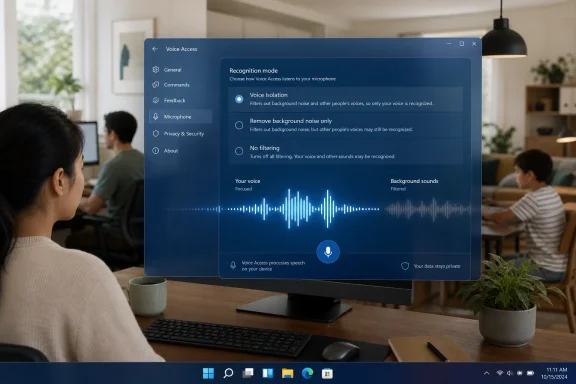 Voice Access Gets Three Distinct Recognition Modes
The new design is notable because it does not force every user into a single form of audio processing. Under Voice Access settings > Improve speech recognition, Windows 11 now presents three modes that map to distinctly different working conditions. Microsoft’s Voice Access release notes
- Voice Isolation filters both other speakers and background noise. It requires a one-time voice setup process.
- Remove background noise only targets non-speech sounds, such as typing, door slams, or environmental noise, without trying to exclude other nearby voices.
- No filtering uses the microphone input without additional processing.
That is a more thoughtful structure than treating every unwanted sound as the same problem. A keyboard clacking nearby is different from a colleague speaking during a call, and a parent talking in the next room is different again. The second option can be useful when a user wants to suppress routine disturbances without risking the aggressive speaker filtering that may be less suitable for collaborative or multi-speaker tasks.
Why Speaker Filtering Matters More Than Basic Noise Reduction
Noise reduction has long been common in conferencing applications, headset software, and driver packages. The harder task is speaker isolation: deciding whose speech should count when multiple human voices are audible at once.
For Voice Access, that distinction is critical. A system command is not merely text for a document; it can initiate an action, switch applications, select an interface element, or dictate content. If Windows interprets a nearby conversation as a command, the result is not simply a typo. It can be lost focus, an unwanted click, a broken workflow, or a user losing confidence in voice control altogether.
Microsoft describes Voice Isolation as a way for Voice Access to focus on the user’s voice when others are speaking nearby, while reducing interference from surrounding noise. Microsoft’s release notes The company’s framing is especially relevant for users who cannot easily reposition themselves, move to a quieter room, or operate conventional input devices when speech recognition fails.
The One-Time Voice Setup Is a Necessary Trade-Off
To enable Voice Isolation, a user selects the mode and follows a brief guided setup that involves reading a short passage aloud. The purpose is straightforward: Windows needs an initial sample from which to learn the user’s voice characteristics. Reporting on the feature says the setup takes roughly a minute and that the associated processing remains on the device. Voice Isolation setup details
That enrollment step introduces a little friction, but it is an appropriate trade-off. Speaker-specific processing cannot credibly promise to prioritize one voice without having some basis for distinguishing that voice from others. The alternative—an entirely generic filter—might reduce noise, but it would be much less capable of separating the user from another person who happens to be speaking at the same time.
The better question is whether the setup remains durable in real-world use. A feature like this must cope with different microphones, changes in distance from the device, variations in speech caused by fatigue or illness, and highly variable rooms. Microsoft has not published a benchmark showing its accuracy across those scenarios, so readers should treat practical performance claims cautiously until broader hands-on testing emerges.
On-Device Processing Is the Right Privacy Baseline
Microsoft says the Voice Isolation experience processes audio privately on the local device and that voice data does not leave the PC. Voice Isolation coverage of the local-processing claim That is one of the most important details surrounding the feature, particularly because a voice profile is inherently more sensitive than a normal preference such as a taskbar alignment or color theme.
Speech technologies create understandable privacy concerns. Audio can contain personal conversations, health information, workplace details, names, addresses, and other sensitive material that happens to be present near the microphone. A design that keeps the filtering and voice-learning process local reduces the need to trust a cloud service with raw or derived speech data.
Privacy Advantages for Accessibility Workflows
For users who rely on Voice Access throughout the day, local processing offers several practical advantages:
- Reduced exposure of spoken content to external services.
- Lower dependence on an internet connection for the filtering workflow.
- Potentially more predictable responsiveness, because local processing does not need a round trip to a cloud endpoint.
- Improved suitability for private environments, including home offices, healthcare settings, and organizations with restrictive data-handling policies.
Voice Access itself has been positioned as an on-device speech-recognition feature that can work without an internet connection. Voice Access feature overview Voice Isolation fits naturally within that model: Windows is attempting to make local speech recognition more resilient rather than using the cloud as a catch-all solution.
Privacy Is Not the Same as Transparency
Still, “on-device” should not end the conversation. Users and administrators will reasonably want clearer answers about how long voice-profile data persists, how it is protected at rest, whether it is tied to a Windows account, and what happens when Voice Access is reset or removed. The available release documentation establishes the local-processing promise, but it does not provide a detailed technical privacy architecture for the voice model. Microsoft’s release notes
That is not evidence of a privacy flaw. It is simply a documentation gap that matters more for a feature designed to identify a specific speaker. Before this moves into a broad Windows 11 release, Microsoft would strengthen trust by publishing a more explicit explanation of storage, reset, and deletion behavior.
A Feature With Clear Accessibility Value
Voice Access has always had a broader productivity appeal, but its central importance lies in accessibility. People with motor disabilities can use it to navigate Windows, interact with applications, browse websites, and dictate text without relying on a mouse and keyboard. Voice Access functionality overview
In that context, Voice Isolation is not a novelty. It addresses a common failure mode that can make voice-first computing exhausting: the system works well only when the environment cooperates. Real life does not consistently offer that luxury.
Shared Spaces Are the Real Test
Microsoft specifically positions Voice Isolation for locations such as open-plan offices and homes with family members nearby. Build 29634.1000 coverage The examples may sound ordinary, but they identify the environments where voice technologies often fall short.
A user may be dictating a message while someone else is on a video call. A student might be using Voice Access in a busy household. An employee may need to work from a desk near colleagues. In all of those situations, filtering only non-speech noise is insufficient because the biggest source of interference is another human voice.
The three-mode approach gives users more agency than a simple on-or-off toggle. Someone working alone with a loud fan or mechanical keyboard may prefer Remove background noise only. Someone issuing Windows commands in a busy room may benefit from Voice Isolation. And users who have found that audio processing damages their microphone’s natural sound can return to No filtering.
More Reliable Commands Can Improve Independence
The strongest potential benefit is not that commands may sound cleaner. It is that commands can become more reliable enough to reduce the number of corrections, repetitions, and interruptions needed to complete routine work.
For a user who depends on voice input, every failed command carries a disproportionate cost. Repeating “click,” “open,” or “switch to” several times can turn a quick action into a stressful sequence. If Voice Isolation can reduce unintended recognition of nearby speech, it could make Voice Access feel less like an experimental alternative and more like dependable system input.
That said, Microsoft should be careful not to market the feature as a universal answer to accessibility challenges. Acoustic conditions differ widely, some users have speech patterns that recognition models still struggle to understand, and microphone quality remains a major factor. The correct promise is better resilience, not flawless control.
The Feature’s Release Path Is More Interesting Than It First Appears
The July Future Platforms build is not the first place Voice Isolation has appeared. Microsoft had already documented the feature in Windows 11 Insider Release Preview Build 26100.8968/26200.8968, released on July 20, where it was listed among gradually rolling out Windows 11 improvements. Microsoft’s Release Preview build notes
It had also surfaced earlier in 2026 preview builds, including Experimental Build 26300.8497 and Beta Build 26220.8491. Windows 11 Insider Voice Isolation reporting
This matters because it changes the interpretation of Build 29634.1000. The new Future Platforms flight should not be read as the feature’s first public outing. Instead, it is evidence that Voice Isolation is being tested across multiple Windows development paths while Microsoft continues reshaping its Insider program.
Experimental Is Not the Same as Beta
Microsoft’s revised Insider structure places the former Dev and Canary audiences under the broader Experimental umbrella, while retaining Beta as the channel aimed at features closer to shipping. The company says Experimental is where features generally appear first and may change, be delayed, or never ship, while Beta is intended to preview work expected in the coming weeks. Microsoft’s Insider program update
Within that structure, Experimental (Future Platforms) is even earlier and more specialized. Microsoft describes it as its earliest Windows preview option, intended for highly technical users who want to test foundational platform changes that require a longer development lead time. Microsoft’s Windows Insider flighting documentation
The key implication is simple: seeing Voice Isolation in a Future Platforms build does not tie it to a named retail Windows release. It is a live test of technology and user experience, not a shipping commitment.
Why Future Platforms Is a Poor Choice for Daily PCs
The Future Platforms label should be taken literally. These builds are designed to expose platform work well before it aligns to a mainstream Windows version, which makes them valuable for developers, hardware testers, and enthusiasts—but a poor fit for machines that must remain stable.
Microsoft warns that features in Experimental builds can change, be removed, replaced, or never move beyond Windows Insiders. It also uses Controlled Feature Rollout methods, meaning a feature may reach only a subset of eligible testers initially as the company observes quality and feedback. Microsoft’s Experimental build guidance
The Clean-Install Exit Cost
There is a more serious consideration than occasional bugs. Microsoft says that because Experimental (Future Platforms) does not align with a retail Windows build, moving to another channel or leaving this specific path requires a clean installation of Windows 11. Microsoft’s Insider program update
That makes Future Platforms materially different from a casual preview opt-in. Installing it on a primary PC can create a significant recovery burden: files must be backed up, applications reinstalled, settings restored, and device configuration rebuilt before returning to a standard release path.
For that reason, Windows 11 Voice Isolation is worth testing on Future Platforms only if the tester is already comfortable with this level of platform experimentation. Users who simply want the accessibility improvement should watch the Beta and Release Preview channels, where the feature has already been documented and where the route back to production is generally less disruptive. Microsoft’s Release Preview documentation
Controlled Feature Rollout Creates Both Safety and Frustration
Microsoft’s staged deployment model is central to this release. Controlled Feature Rollout lets the company enable a feature for some eligible devices first, monitor feedback and quality data, and expand availability over time. Microsoft’s explanation of Controlled Feature Rollout
From an engineering perspective, that is sensible. Speaker isolation interacts with microphones, drivers, room acoustics, CPU loads, accessibility configurations, and languages. A feature that looks excellent in a controlled laboratory can behave very differently across millions of varied PCs.
The User Experience Problem
The drawback is predictability. An Insider can download a build after reading about Voice Isolation and still not see it immediately. Microsoft has acknowledged that this mismatch between announced features and actual availability is a major source of Insider frustration. Microsoft’s Insider program update
Microsoft’s newer Insider settings include a Feature flags page for Experimental users, intended to offer more direct control over certain visible features as the company rolls out the experience. Microsoft’s Feature flags explanation The idea is promising, although it will matter most if Microsoft clearly distinguishes between a feature that is technically present, one that is not yet enabled, and one that is unavailable because of hardware or language limitations.
For Voice Isolation, this transparency is especially important. A person who relies on Voice Access should not have to guess whether the option is missing because of a staged rollout, an unsupported configuration, or an incomplete update.
What Microsoft Still Needs to Prove
Voice Isolation has a strong premise, a sensible choice of modes, and a privacy-friendly local-processing claim. But several questions remain before it can be judged as a mature Windows 11 accessibility feature.
Accuracy Across Microphones and Environments
The feature must work across laptop microphone arrays, USB headsets, Bluetooth devices, desktop microphones, docking stations, and the inconsistent drivers that come with them. A speaker-focused algorithm that performs well only on premium hardware would not meet the broad accessibility mission implied by Voice Access.
Microsoft has not publicly supplied comparative accuracy data, latency figures, or a supported-device matrix for Voice Isolation. Until it does, reports of improved recognition should be viewed as a credible design goal rather than a quantified guarantee.
Language and Localization Coverage
Voice Access continues to broaden language support; the July Release Preview build, for example, added Korean support to Voice Access. Microsoft’s Release Preview notes But speaker isolation can introduce another layer of complexity, because robust performance must account for accents, multilingual use, vocal differences, and varying speech rhythms.
Microsoft also notes that features in active Insider development may not be fully localized initially. Microsoft’s Experimental release documentation That is normal for early testing, but it reinforces why a public release should not arrive before the feature is understandable and usable across the languages Voice Access supports.
Clear Recovery and Reset Controls
Finally, Voice Isolation should offer obvious ways to retrain, reset, or delete the locally learned voice profile. If recognition begins favoring the wrong acoustic characteristics after a user changes microphones or working environments, recovery needs to be simple. Accessibility features should minimize troubleshooting burdens, not create new ones.
Voice Isolation Points Toward a More Practical Voice-First Windows
Microsoft’s latest Experimental (Future Platforms) build is a reminder that the most useful Windows innovations are not always the flashiest. Voice Isolation does not reinvent the desktop or add another prominent AI button. Instead, it targets an everyday obstruction: the fact that people do not work in soundproof rooms.
By separating speaker filtering, background-noise reduction, and unprocessed input into three distinct Voice Access modes, Windows 11 gives users a more practical degree of control over how speech recognition behaves. The local-processing approach is also the right direction for a feature built around a user’s voice profile.
The remaining caveat is the channel itself. Build 29634.1000 belongs to a Windows Insider path deliberately reserved for early, potentially unstable platform testing, and its features remain subject to change. Microsoft’s Future Platforms guidance Still, Voice Isolation’s parallel appearance in Release Preview suggests the concept has progressed beyond a one-off experiment. If Microsoft can validate its accuracy across diverse hardware, languages, and noisy real-world settings, it could become one of the more meaningful Windows 11 accessibility improvements—not because it makes voice computing futuristic, but because it makes it usable where people actually live and work.
Update: Voice Isolation Moves Into KB5101684’s Optional Preview Release (July 29, 2026)
Microsoft has now included Voice Isolation in the optional KB5101684 preview update for Windows 11 24H2 and 25H2, delivering OS Builds 26100.8973 and 26200.8973. This moves the feature beyond the earlier Insider-focused discussion into a preview cumulative update path ahead of its expected broader Patch Tuesday rollout.
As reported by WinCentral, the update retains the three Voice Access recognition choices: speaker-focused Voice Isolation, background-noise-only filtering, and unprocessed microphone input. It also adds Korean support for Voice Access and addresses startup reliability.
For administrators and accessibility users, the release is significant because it offers a less experimental route to evaluate the feature. KB5101684 remains an optional non-security preview update, however, so production devices that are stable may be better served by waiting for the next mandatory cumulative update unless they specifically need Voice Access improvements or another included fix.
