
The practical decision has become more urgent after Windows 10 reached end of support on October 14, 2025. Enterprises with aging PCs face a three-way choice: buy Windows 11-capable hardware, extend the usable life of a lower-spec device by making it a Cloud PC access terminal, or keep the old endpoint under a supported exception plan while moving selected work into the cloud. Those are materially different choices, with different operating costs and failure modes.
Microsoft’s current Windows 365 documentation also exposes an important limitation buried beneath the phrase replace the PC: every Cloud PC still depends on a physical device, a working network path, and a supportable method of authentication. A Cloud PC can replace the workload host for many users. It does not mean an organization no longer has a device estate to secure, replace, inventory, and support.
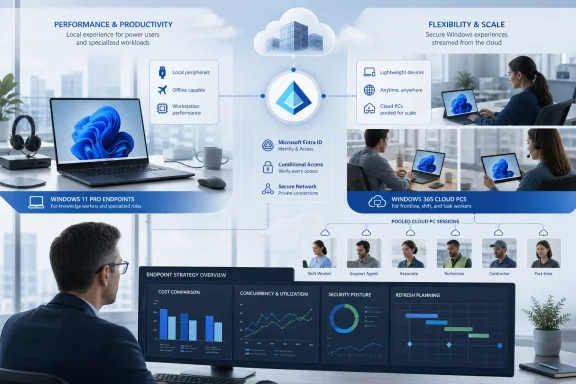 The strongest case is variable demand, not permanent replacement
TechTarget correctly identifies contractors, seasonal staff, mergers, temporary remote work, and rapidly changing headcount as the situations where Cloud PCs make the clearest operational sense. A conventional device program is built around procurement lead times, imaging, shipment, recovery, and disposal. Windows 365 Enterprise instead uses Intune provisioning policies that pair a licensed Microsoft Entra user group with a network choice and a Windows image; the service then creates the Cloud PC for eligible users.
That changes the timeline for a new employee or contractor. It does not eliminate configuration work—IT still owns the image, application assignments, identity policy, Conditional Access rules, and support process—but it can eliminate the hands-on staging and shipping cycle for a full Windows laptop. For organizations that regularly create and close short-duration accounts, that is a real operational advantage rather than a cloud slogan.
The model is particularly useful when the employee already has a capable personal device, a corporate-issued low-cost endpoint, or a shared workstation and only needs a controlled Windows environment for a defined period. Data and applications can remain inside the managed Cloud PC rather than being installed directly on an unmanaged home computer.
The caveat is straightforward: a permanent knowledge worker who needs a persistent desktop every day is not automatically a Cloud PC cost win. A per-user Cloud PC subscription continues for as long as it is assigned, while a purchased laptop is depreciated over its refresh life. The financial case must compare the entire expected term of the Cloud PC license with the purchase price, warranty, deployment labor, endpoint management, repair pool, and residual value of the physical alternative—not compare one monthly license payment with the one-time price of a laptop.
Windows 365 Flex changes the economics for shift workers
The most significant current wrinkle is that the product TechTarget calls Windows 365 Frontline has been renamed Windows 365 Flex. Microsoft says the old Frontline name may still appear in parts of the Intune admin center during the transition, a detail administrators should account for in runbooks, device filters, reporting queries, and help-desk documentation.
Flex makes more sense than a dedicated Enterprise Cloud PC where access is intermittent or shifts do not overlap heavily. Unlike the familiar model of a named, always-available desktop for each person, Flex uses pooled licensing. Microsoft’s licensing documentation says those licenses are held at the tenant level rather than assigned directly to users, and its utilization reporting is therefore central to operating the service responsibly.
That creates a useful but easily misunderstood buying model. An organization can give a population access to Cloud PCs while sizing licenses around actual concurrent sessions, rather than the total number of potential users. It is a better fit for call centers, retail managers, field personnel, training labs, and rotating shift teams than for a department in which every employee needs an individual desktop all day.
It also turns capacity planning into a service-management discipline. Buying too few pooled licenses produces access contention at peak times; buying too many recreates the idle-license waste that cloud advocates often claim to remove. Teams considering Flex should measure real concurrency for several normal and peak business cycles, including month-end, seasonal rushes, and disaster scenarios, before treating a pilot’s low usage as a production baseline.
Microsoft has also positioned Cloud Apps on Flex shared-mode Cloud PCs. That may be a more targeted answer than handing every worker a whole remote Windows desktop when the actual need is access to one or two legacy applications. It is worth separating the two use cases during planning: a full Cloud PC preserves a complete personal desktop experience, while published applications can reduce the remote environment users must navigate and IT must maintain.
The network is part of the desktop specification
A Cloud PC deployment fails its users when network design is treated as a post-purchase task. Microsoft’s Windows 365 guidance repeatedly identifies low-latency direct connectivity to its Remote Desktop infrastructure as central to performance. It specifically warns that centralized egress, proxies, secure web gateways, traffic inspection, and poorly configured VPN routes can add latency or disrupt connections.
This is where the “any device, anywhere” proposition needs careful qualification. A worker may be able to launch Windows 365 from a Windows PC, Mac, iOS device, Android device, or browser, but interactive quality still depends on the client network, the route into Microsoft’s network, and the Cloud PC’s region. Video calls, graphics-intensive applications, USB peripherals, multiple high-resolution displays, and unreliable residential broadband all need testing with actual users and actual applications.
The physical access device remains important as well. A thin client or lower-cost Windows laptop may be adequate for browser work and standard Microsoft 365 tasks, but the local machine still handles its own display, audio, camera, input devices, local network stack, and security updates. A failed access endpoint is still a failed access endpoint, even if the user’s Windows session is healthy in Azure.
For enterprises using their own Azure virtual network, the implementation burden can be greater than a simple SaaS description suggests. Microsoft requires suitable virtual-network capacity, name resolution and domain-controller connectivity for hybrid-joined deployments, plus direct access to service endpoints. Outbound traffic can also create Azure network charges in customer-managed network configurations. The predictable per-user Cloud PC price is therefore only one line in the operating model.
Reserve is continuity cover, not a general outage shield
TechTarget mentions Windows 365 Reserve as a way to prevent outages from disrupting users. That framing needs a sharper boundary. Microsoft describes Reserve as a short-term Cloud PC service for workers whose primary physical device becomes unavailable, such as after loss, theft, damage, delayed shipment, or certain incidents. Each licensed user receives up to 10 days of Cloud PC access per year.
That makes Reserve a plausible alternative to maintaining a large pool of preconfigured loaner laptops, particularly for mobile employees. It is not a full-time Cloud PC license and it is not a universal disaster-recovery answer. Microsoft’s current feature list omits custom virtual networks, hybrid Microsoft Entra join, custom images, Windows 10 gallery images, point-in-time restore, GPU configurations, and disaster-recovery add-ons for Reserve.
Those constraints matter most in organizations with line-of-business applications that require private network paths, legacy Active Directory dependencies, specialized image customization, or high-performance graphics. Reserve can restore a standard productivity workspace quickly; it should not be assumed to reproduce every configuration available on a user’s normal managed laptop.
An IT team should also decide what the user will connect from during a device failure. A Cloud PC is useful if the employee can use a personal device, an approved shared device, or a temporary endpoint that satisfies the organization’s Conditional Access policy. If security policy requires a compliant corporate device and none is available, a Reserve license alone does not solve the continuity problem.
What to measure before deferring a hardware refresh
The decision should start with user personas and observed behavior, not a blanket mandate to move everyone into Windows 365. TechTarget’s recommendation of a hybrid endpoint strategy is the defensible conclusion, because the workforce usually contains both highly standardized users and exceptions that are expensive to virtualize.
Before reducing a hardware refresh order, administrators should establish these controls:
- Measure peak concurrent use, inactive-license duration, and provisioning-to-first-login time for every Cloud PC pilot group.
- Test critical applications over the exact home, branch, VPN, and proxy paths users will have in production.
- Identify workflows that require offline operation, GPU capacity, local hardware drivers, removable media, or specialist peripherals, and retain capable physical PCs for those users.
- Define automatic deprovisioning and license-reclamation rules for contractors, leavers, and inactive accounts.
- Test a lost-laptop scenario from beginning to end, including the spare access device, authentication recovery, Conditional Access, user data availability, and the process for returning a temporary Cloud PC.
A cloud desktop strategy earns its value when it reduces the delay and overhead of delivering a secure working environment to people whose needs change faster than a traditional procurement cycle. For stable employees with demanding local workloads, it can add a permanent subscription bill while leaving the organization responsible for the physical endpoint anyway. The hardware refresh should therefore shrink selectively—not disappear on the strength of a cloud PC purchase order.
